Towinglink
Last updated: December 12, 2023
Overviewlink
Cybertruck is designed to haul payload in the bed, or tow a trailer from the rear tow hitch. There is a trailer connector on the rear tow bar to connect trailer lights and brakes to the Cybertruck trailer controller. If the Cybertruck needs to be towed, it can be winched from the front tow hooks or from the rear safety chain attachment points on the hitch tow bar.
Towing Componentslink
Front Tow Hookslink
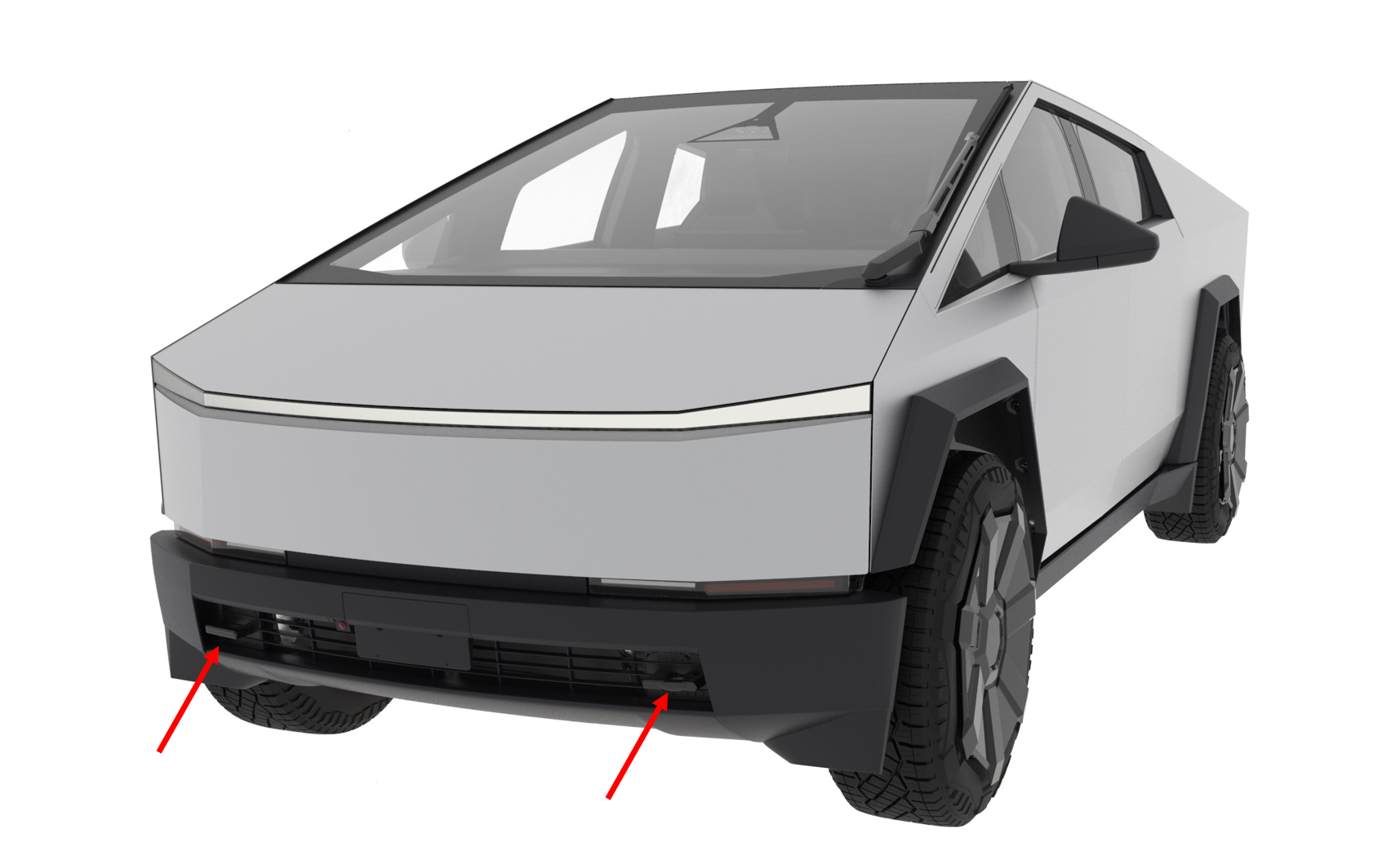
Pictured below are the Cybertruck's front towing hooks. They allow the vehicle to be towed or winched from the front, or for the Cybertruck to pull another vehicle out of the ditch using them. There are 2 square hooks provided on the dual and tri-motor variants, they are bolted onto the front subframe and are removable. On the base variant there is 1 tow hook eyelet provided, this threads into the front subframe when needed, and is normally stowed in the front trunk. For the dual square tow hook design, only 1 is needed at a time to winch the Cybertruck onto a flatbed, the same is true for the base variant with the single hook.
 |
|---|
| Front Square Tow Hooks |
Rear Tow Hooks and Hitchlink
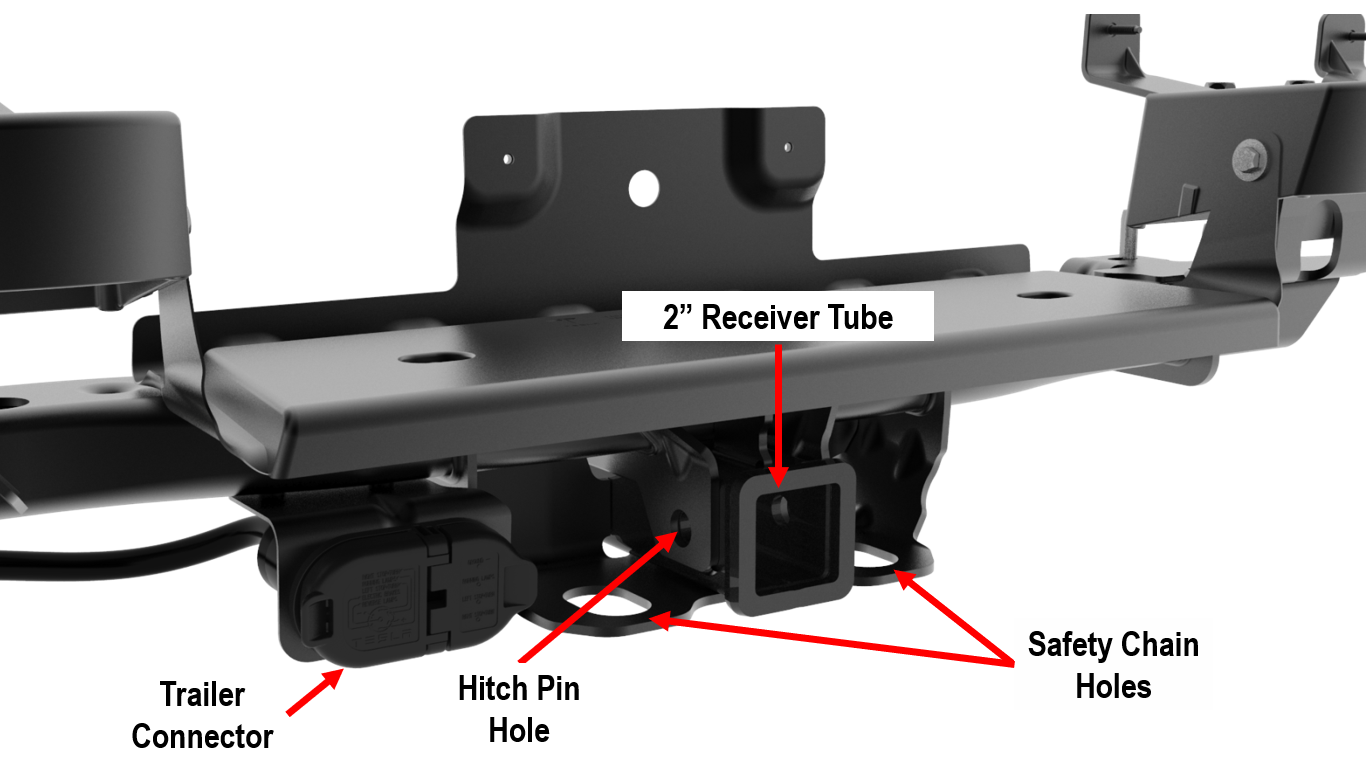
Cybertruck features a 2" rear tow hitch receiver that can be used to connect a trailer ball to tow a trailer. The receiver tube has a pinhole used to secure the receiver and tow ball. There are 2 holes used to install safety chains while towing, or they can be used to winch the vehicle from behind.
 |
|---|
| Rear End Module - Towing Features |
Trailer Lights and Brakeslink
Connectorlink
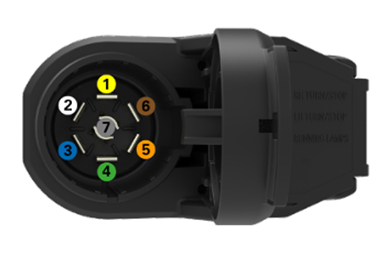
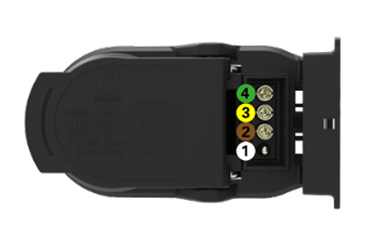
The Cybertruck features a combo socket connector for the trailer. There is a 7-pin connector and a 4-pin connector, either can be connected depending on the trailer harness connector.
 |
|---|
| 7-pin Socket (SAE J2863) |
| 1 - Left Stop + Turn Signal |
| 2 - Ground |
| 3 - Brake Control Output |
| 4 - Right Stop + Turn Signal |
| 5 - 12V Power |
| 6 - Tail / Running Lamps |
| 7 - Reverse / Backup Lamps |
 |
|---|
| 4-pin Socket (SAE J1239) |
| 1 - Ground |
| 2 - Tail / Running Lamps |
| 3 - Left Stop + Turn Signal |
| 4 - Right Stop + Turn Signal |
Trailer Controllerlink
The trailer lights and brakes are controlled by the Trailer Controller. The Trailer Controller 48V device is powered by VCREAR (Vehicle Rear Controller) and communicates with VCREAR over CAN. The Trailer Controller is mounted onto the Diffuser bracket located at the aft part of the vehicle. The Diffuser Bracket is mounted onto the rear end module that secures the hitch to the rear casting.
| Trailer Function | Power Output |
|---|---|
| Lights | Max 220 Watts total for all light outputs combined. |
| Trailer Brakes | Max 331 Watts total for the total trailer brake output load. |
| Auxilary Power | Max 270 Watts (or 375 Watts if using Electric Over Hydraulic (EOH) brakes with a max. simultaneous trailer brake output load of 12 Amps). The auxiliary output is capable of supplying up to 30 Amps when supporting an EOH trailer brake unit. |
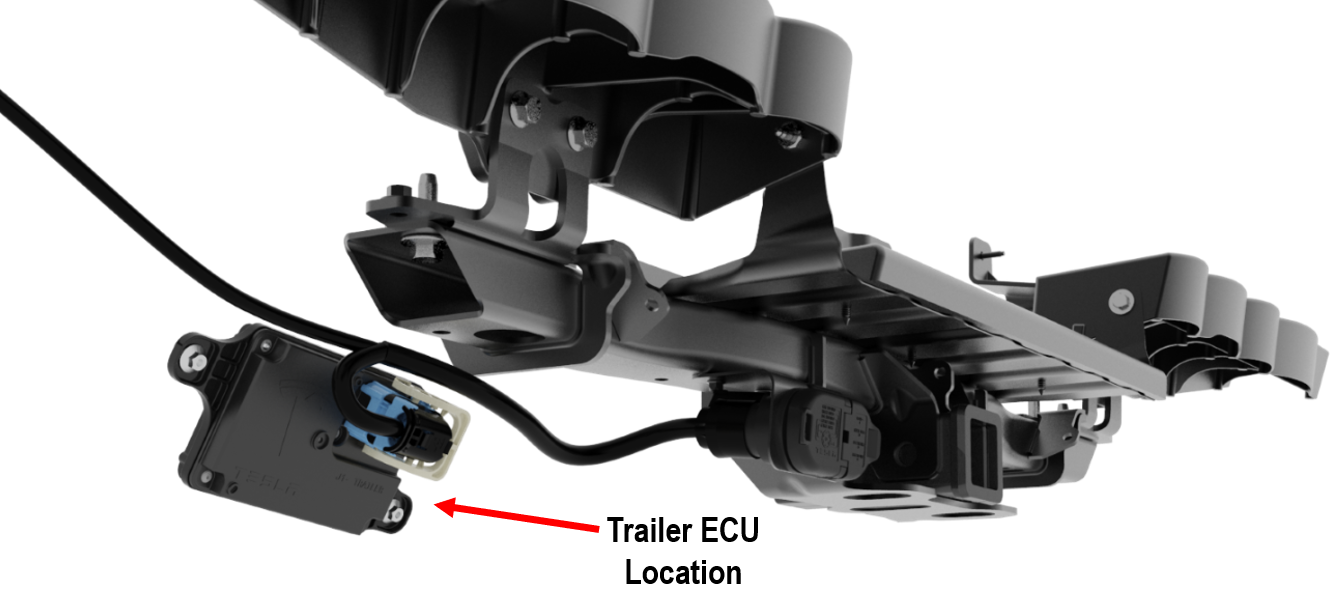 |
|---|
| Trailer ECU |
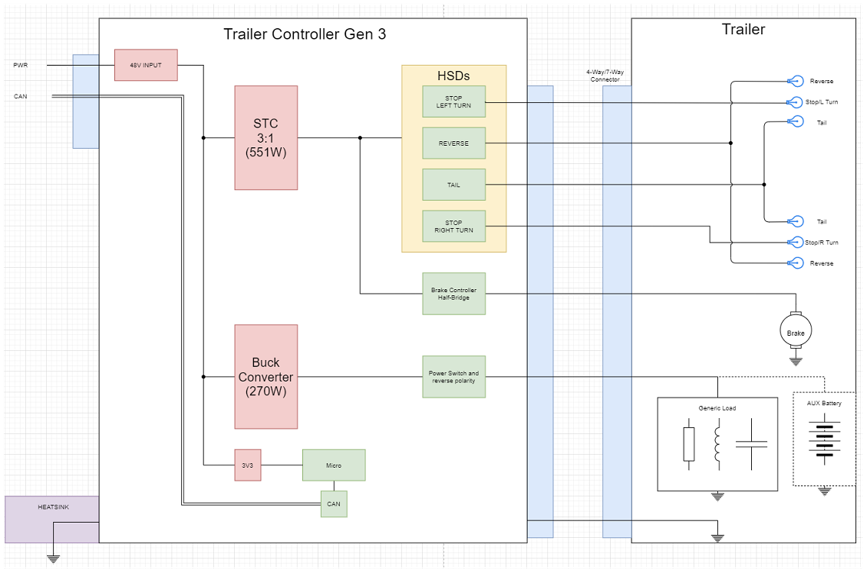 |
|---|
| Trailer ECU System Diagram |
Trailer Modelink
The vehicle uses Trailer Mode and trailer detection to adjust behaviors, operating parameters, and functions to better suit the driving experience while towing a trailer. Trailer Mode must always be active when towing a trailer. When plugging in a trailer's electrical connection, it automatically engages Trailer Mode and the blue telltale will be lit if no electrical faults are detected. As a fail-safe, Trailer mode is automatically enabled when the mass estimate of the truck reaches towing mass thresholds, in case the user forgets to connect the lights. When unplugging a trailer's electrical connection, the vehicle will display the red telltale indicating an electrical fault. This is expected as the vehicle cannot differentiate between an intentional or unintentional disconnection of the electrical connector.
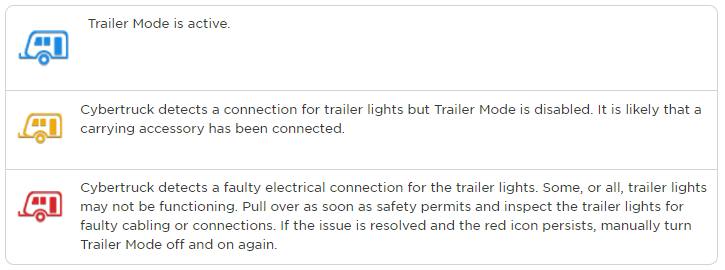
When trailer mode is active Tesla Air Suspension geofence leveling requests are not honored. The Tesla Air Suspension will correct for leveling error and raise ride height after tongue load on the hitch increases. Manual level selections are honored for only HIGH, after the vehicle reaches 25 mph the air suspension will auto lower to the default ride height (MEDIUM or LOW). If the default height is set to medium, the truck will not auto level to low based on speed thresholds, same applies if the default height is set to LOW.
There is a trailer brake light test on the 'Towing & Hauling' page that lets the driver check their running lights, brake lights, and turn signals.
Trailer Brakeslink
Trailer Mode allows the user to set the trailer brake gain, which is adjustable on a scale from 1-10. This controls the maximum trailer brakes applied from deceleration or manual application. This is helpful for the driver to tune their trailer based on varying road conditions and trailer loads to better suit their needs.
Trailer mode also allows for the brakes to be manually applied by pressing and holding a button on the UI. The left scroll wheel button can also activate manual trailer brake function. This can help mitigate trailer sway and fine-tune trailer brake gain.
The driver can also tune the trailer brake aggressiveness. This allows the trailer brakes to ramp to the desired gain from a variable set point after the brake pedal is pressed.
When Trailer Mode Adaptive Regen is enabled, regen will auto-scale based on the estimated weight of the trailer to maintain a more consistent deceleration behavior. At the start of each drive cycle, the trailer weight is automatically estimated during acceleration, and regen adjusts according to this estimate. At max towing capacity, regen can be expected to produce 0.15g of deceleration. For reference, the default regen produces 0.08g of deceleration at peak towing capacity.
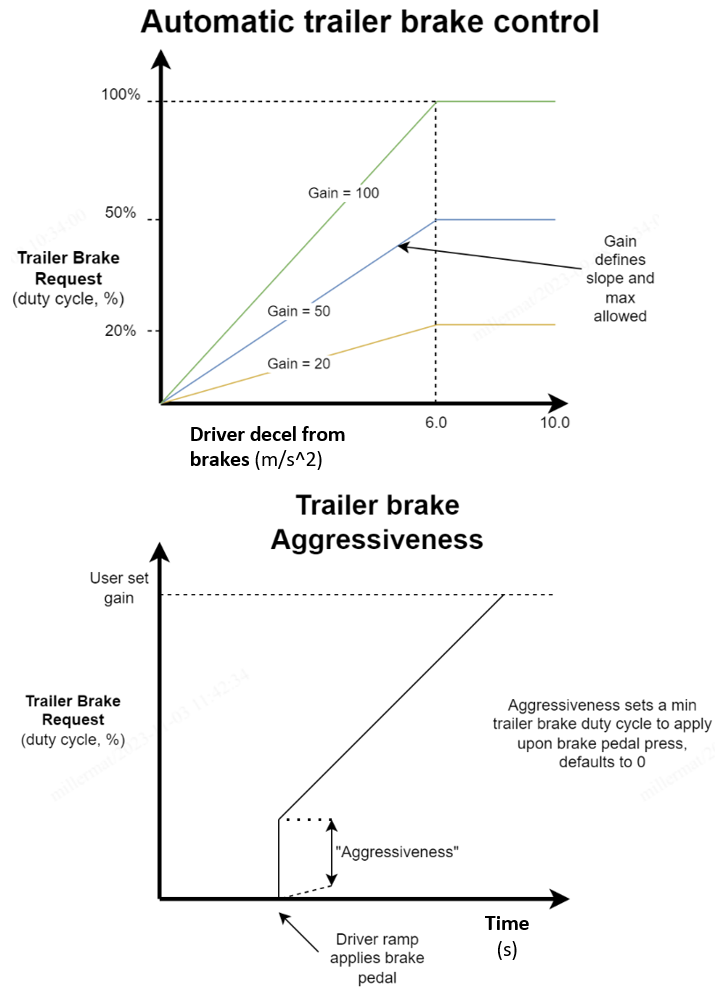 |
|---|
| Trailer Brake Gain Tune and Aggressiveness (Boost) |
Towing Capacitylink
The Cybertruck is capable of towing an 11,000 lb trailer loaded including cargo. Maximum towing capacity is calculated assuming the Gross Vehicle Weight Rating (GVWR) is not exceeded. Gross vehicle weight rating (GVWR) is the max legal limit the vehicle can be on the road, and gross axle weight rating (GAWR) is the max weight each axle can be loaded (including passengers, cargo, and trailer). The GVWR is printed on the Vehicle Certification Label on the Drivers B-Pillar. The tongue weight is the downward force that the weight of the trailer exerts on the hitch. The maximum tongue weight the trailer can transfer onto the hitch is 10% of the trailer mass = ~1100 lbs (499 kg). Carrying extra weight of equipment, passengers, or cargo in the vehicle can reduce the tongue weight it can handle, which also reduces the maximum towing capacity. Tesla recommends a separate braking system on trailers with a loaded weight of over 1000 lbs (450 kg). Refer to the Owner's manual for most up to date towing capacity information.
Winching and Transport Modelink
When Cybertruck needs to be loaded onto a flatbed, it is necessary to enable tow mode. Entering tow mode releases the electronic parking brakes and allows for the wheels to rotate freely. Use extreme caution when doing this as this can lead to a roll away event if the driver is not present to apply the brake pedal on any non-level surface.
Tow mode can be entered by navigating to the service panel, and pressing 'Towing'. A warning will pop up to confirm the user is aware the vehicle must never be towed with the wheels rolling on the ground.
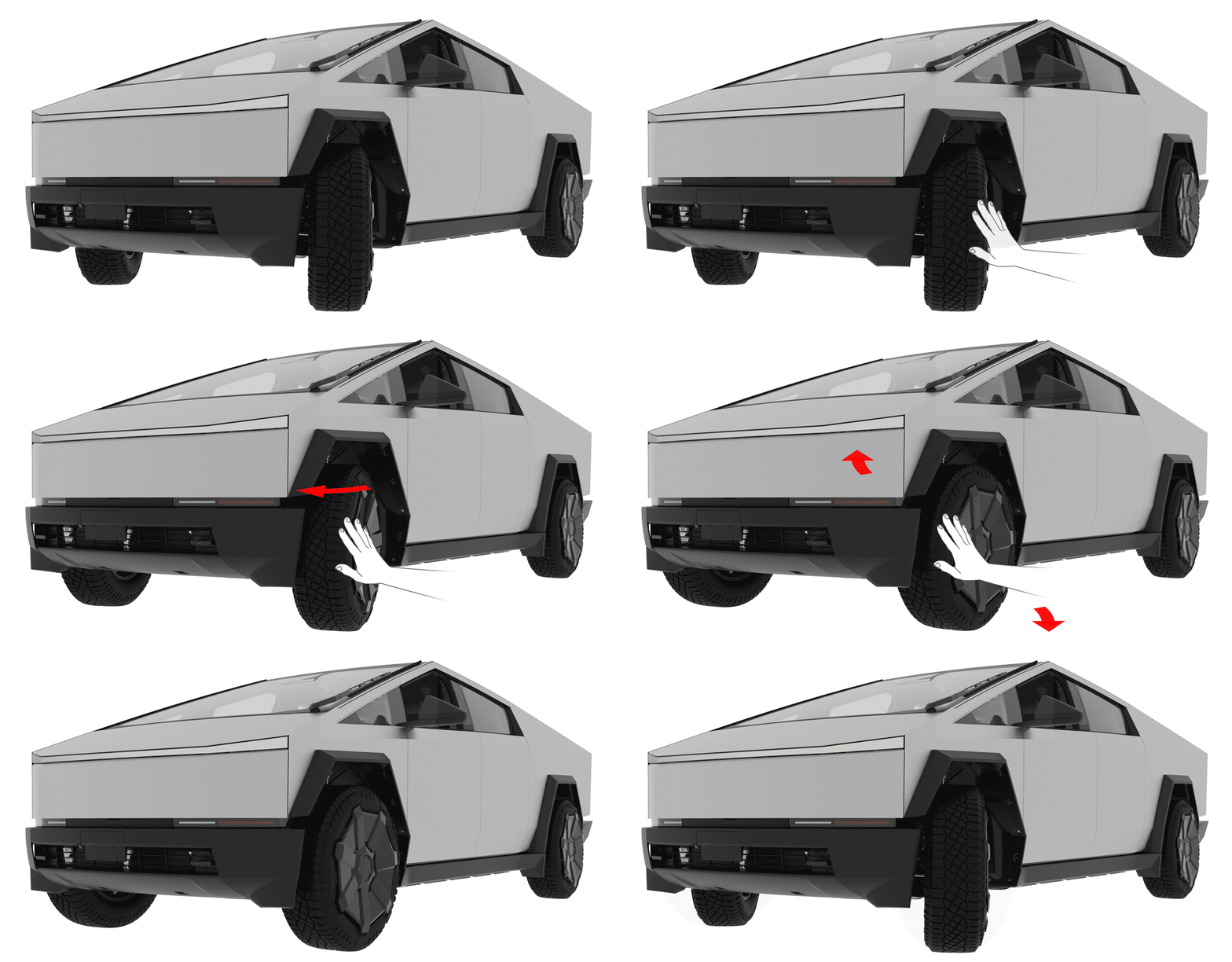
If the truck's low voltage system is unable to be supported internally or externally, and front wheels need to be straightened in order to winch onto a flatbed, the front road wheels can be manually back driven by hand.
Note: that the rear wheels cannot be back driven by hand.
 |
|---|
| Back Driving Front Wheels |