Vehicle Software Updateslink
Overviewlink
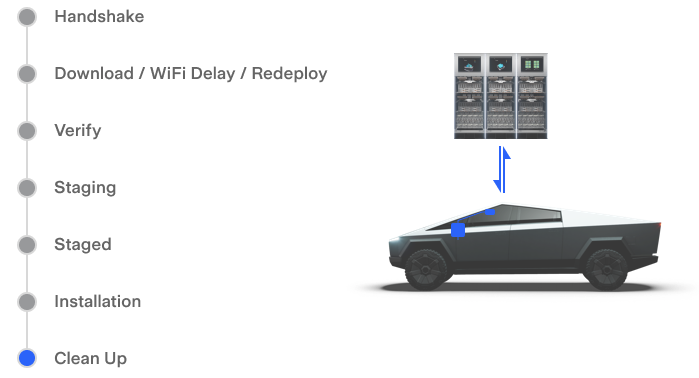
A software update improves or introduces entirely new vehicle features after the vehicle has been built. With each software update there are multiple components that are updated, including the infotainment computer, the autopilot computer, the vehicle gateway, and distributed vehicle controllers. Within a normal vehicle software update are three different update paths, depending on what is being updated. An update to the infotainment computer is known as the "primary update". A "secondary update" is used to update anything other than the infotainment computer or a Gateway-connected control module. Secondary downloads on Cybertruck are used for Autopilot and TCU. A "Gateway-based" update is used to update any of the distributed control modules across the truck. An update can range from minor bug fixes to major changes, like improvements to the user interface or more substantial updates to Autopilot control. There are three different types of updates: vehicle software, navigation maps, and games. The basic steps of an update are Handshake - Download - Verify - Staging - Staged - Installation - Clean Up.
The Updaterlink
Updates are controlled by an application on the vehicle called "the Updater". The Updater coordinates the high-level state of the update and manages the distribution of downloaded files to the vehicle components. Other than prompting the driver when there's a new update available and starting the update, the Updater remains unseen, performing all of its duties without user interaction. It is possible to interact with the Updater to get information and request actions outside of a normal update, however. There are also versions of the Updater that live on the Autopilot computer that manages the installation of Autopilot packages. The Updater will have a different "personality", depending on the infotainment platform: cid-updater, sx-updater, ic-updater, zen-updater. Additionally, the Updater is able to persist over a reboot, loss of power, or loss of connectivity by keeping status files in /var/spool/xxx-updater.
New Software Availabilitylink
Software updates become available periodically. To check to see if new software is available, each vehicle reports its unique configuration of hardware and software to the update servers. On the rare occasion, an important update will be made available outside the normal release cadence.
When there is new software available, both the Tesla mobile app and the UI will notify the user. Checking if there is a newer version available on the UI: Controls > Software. When the "Software" pane loads, the vehicle will automatically check to see if there is a newer version available. The UI will display "Checking for updates..." and then update the availability status. This is based on a data value GUI_softwareUpdateAvailable (true / false).
Software Update Preferencelink

The availability of a new software update partially depends on the software update preference. This can be found on the touchscreen in Controls > Software > Software Update Preferences. The two choices are Standard and Advanced. The selection of this toggle sets the data value GUI_updatePreference.
- Standard: Receive software updates using the normal rollout time frame.
- Advanced: Receive the latest software updates as soon as they are available.
Download Status Iconlink
| Download Status Icon | Icon Name | Description |
|---|---|---|
 |
Yellow download arrow | New software is available; Wi-Fi connection is needed to download |
 |
Green download arrow | New software is actively downloading |
 |
Yellow clock | New software has finished downloading and is ready for installation |
 |
Neutral clock | New software has finished downloading and has been scheduled to install at a future time. |
The software update process can be roughly divided into two steps: download and installation.
To send the new software to the vehicle, the software package must first be downloaded from Tesla servers using a Wi-Fi connection. This is referred to as an over-the-air (OTA) update.
Stages of a Software Update Joblink
Handshakelink
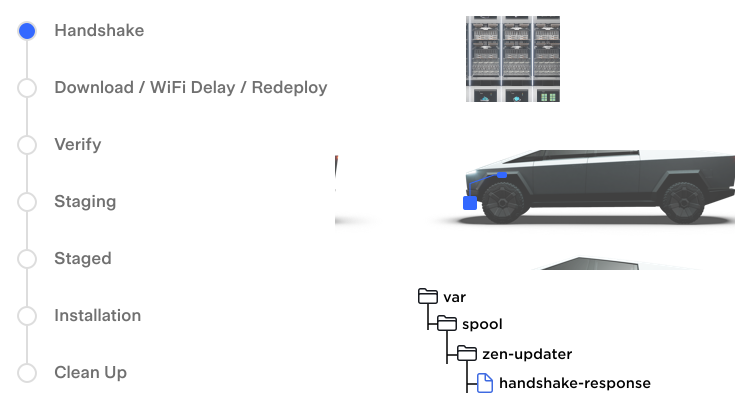
Once a new software update is available, an update job is created with a unique job id. The Updater on the vehicle sees that there is a job and initiates a handshake, an exchange of information between the vehicle and Tesla's servers.
The Updater responds to the handshake with information about what is currently installed on the vehicle.
Based on this information the server sends a handshake response file (JSON) that contains the software update plan, including
- A URL of the update job
- The download URL of the primary package http://va.teslamotors.com...
- Signature of the package
- Signature of the secondary packages
- Handshake parameters
- Type of update: Full download (the complete universal package) or diff (a generated diff between vehicle package and requested package)
Downloadlink
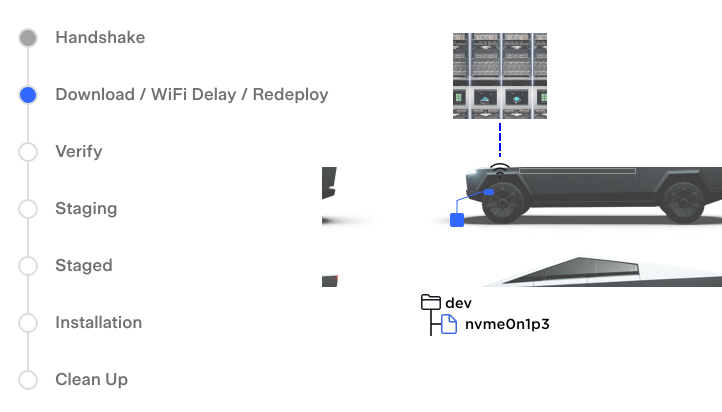
Once a plan is declared for the update job, the Updater updates the version data value: GUI_softwareUpdateVersion and checks if the update has been previously downloaded and could be redeployed instead of downloaded. If the previously downloaded packages match the target, then the download is skipped.
If a download is necessary, then the primary package download begins. The primary package is the main .ssq file which contains the kernel images, boot images, and hex files. The primary package is large, so Wi-Fi is normally required to download. The Updater checks the Wi-Fi data value to see if it is able to download the package. If on Wi-Fi, it starts downloading. If not on Wi-Fi, it enters "Wi-Fi delay".
With a good Wi-Fi connection, the primary package will begin downloading directly to the offline bank on the infotainment computer.
If the vehicle is driven during the download phase, the Updater will pause the download and then resume once Wi-Fi connectivity returns.
The package download progress is reflected in the data value GUI_softwareUpdatePackageDownloadProgress, and download throughput GUI_softwareUpdatePackageDownloadBytesPerSecond is displayed to the user. These data values are important in showing the download on the touchscreen.
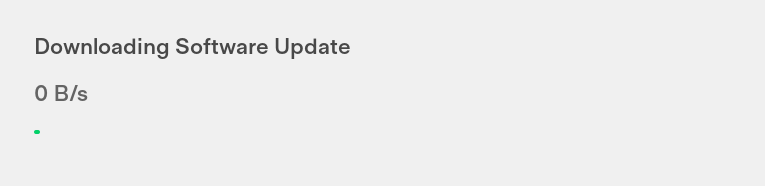
This progress bar represents the primary package download (0% - 50% of the bar) and the secondary package download (50% - 100% of the bar).
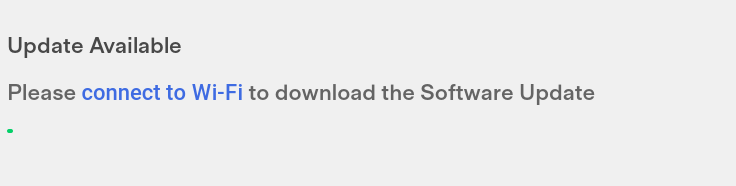
Since the software packages are large, Wi-Fi is needed to download them. When a new download is available, but the vehicle is not connected to Wi-Fi, it is referred to as "Wi-Fi wait". Wi-Fi wait or Wi-Fi delay is based on periodically checking the data value LINK_linkState and then setting GUI_softwareUpdateWifiWait depending on the value of linkState. If on Wi-Fi delay, the Controls > Software panel will show "Please connect to Wi-Fi to download the Software Update."
Verifylink
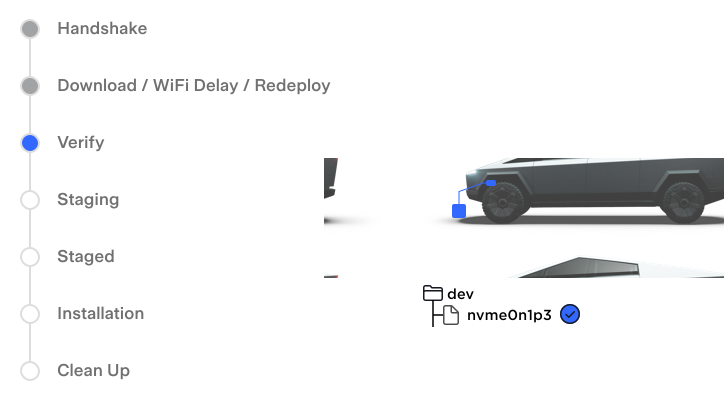
The update package is signed by Tesla. After downloading, the Updater validates the package signature to ensure that the file was downloaded successfully. If the signature check fails, the Updater will report a failure and automatically try a new download.
Staginglink
-
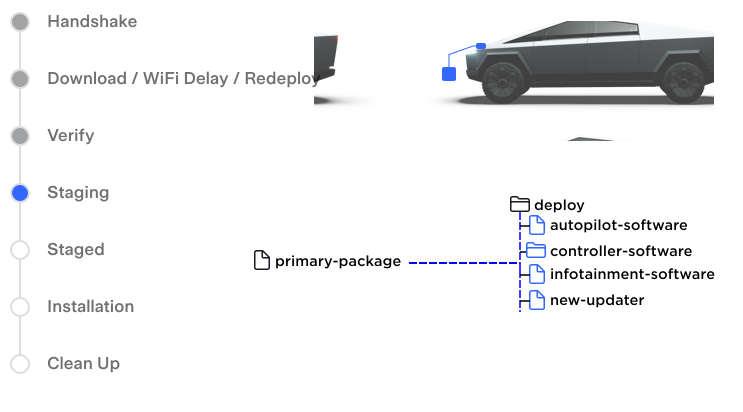
Once the primary package is verified, the Updater mounts the package to the infotainment filesystem and looks inside for some important files
- Swapped Updater: If the package contains a newer updater, then that package updater is verified and then swapped to become the new updater (referred to as the "swapped updater").
- Secondary download signatures: Inside the primary package are signature files for the secondary downloads. The Updater uses the signature files to perform a "signature resolution" with mothership and downloads all necessary secondary packages.
-
After the secondary downloads, the infotainment kernel and recovery kernel are "staged" to the offline bank.
Stagedlink
When the downloads are complete and verified, the Controls > Software panel will display "Update Available"
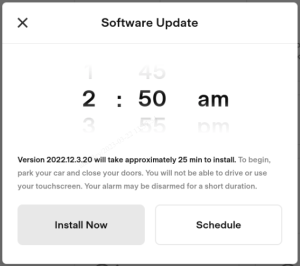
The user can then decide to start the update "Install Now" or schedule the time to start the update "Scheduled" install. Starting the vehicle update is also known as "gostaged" in Updater speak.
Installationlink
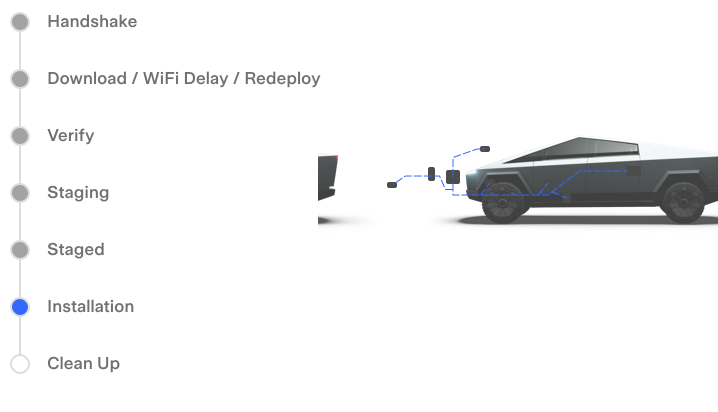
Once the software update starts, there are limits on vehicle behavior.
- No charging: If charging when the software update begins, charging stops. Charging will resume automatically once the software update completes.
- UI unavailable: A software update cannot be stopped once it has started the installation.
-
No driving: If the vehicle is being driven at the scheduled update time, the update is canceled and must be rescheduled.
-
The first step in installation is to check the package integrity again before mounting. If the signature is still valid, the primary package is then mounted again.
-
The infotainment kernel is committed.
-
The secondary components (Autopilot and TCU) are staged.
-
Gateway-based updates
- The Updater copies over a new Gateway Updater to the Gateway.
- The mid voltage battery is checked to make sure the power supply is in a good state, and then the Gateway reboots into update mode.
- After rebooting, the Gateway Updater reads the vehicle configuration
- Gateway Updater requests two files from the infotainment filesystem: cbreaker and signed_metadata_map.
- Hardware ID Acquisition: the Gateway talks to each control module over Etherloop and CAN to determine its hardware ID and currently installed software version.
- Gateway Updater locks-out the high voltage contactors to prevent high voltage.
- Gateway Updater updates the Gateway software first.
- Gateway Updater then updates all connected controllers that have newer software available.
-
Gateway reports overall result and updates datavalues.
- GUI_softwareUpdateGatewayInProgress
- GUI_softwareUpdateProgress 80
- GUI_softwareUpdateState
- After the Gateway-based update completes, the TCU, ADSP, and the Tuner are updated.
- Infotainment computer update
-
The infotainment computer reboots into the new version, verifying the kernel image signature on boot.
Clean Uplink
- Updater logs are uploaded to Tesla's servers.
- Update-related data values are reset.
- The update is finished with a "termination report", an HTTP POST marking the end of the update.
- Release notes are displayed.
Serviceabilitylink
Updatable Componentslink
| Component | Description |
|---|---|
| BLEEPCENTER |
GATEWAY
 Etherloop Etherloop
EGGLEFT
Egg Left CAN
VCSEC
Roof Auth CAN
BLEEPCENTER
|
| BLEEPCRADLE |
GATEWAY
Etherloop
EGGLEFT
Egg Left CAN
VCSEC
Center Auth CAN
BLEEPCRADLE
|
| BLEEPFRONT |
GATEWAY
Etherloop
EGGLEFT
Egg Left CAN
VCSEC
Front Auth CAN
BLEEPFRONT
|
| BLEEPFRONTLEFT |
GATEWAY
Etherloop
EGGLEFT
Egg Left CAN
VCSEC
Left Front Auth CAN
BLEEPFRONTLEFT
|
| BLEEPFRONTRIGHT |
GATEWAY
Etherloop
EGGLEFT
Egg Left CAN
VCSEC
Front Right Auth CAN
BLEEPFRONTRIGHT
|
| BLEEPLEFT |
GATEWAY
Etherloop
EGGLEFT
Egg Left CAN
VCSEC
Right Front Auth CAN
BLEEPLEFT
|
| BLEEPREAR |
GATEWAY
Etherloop
EGGLEFT
Egg Left CAN
VCSEC
Rear Auth CAN
BLEEPREAR
|
| BLEEPREARLEFT |
GATEWAY
Etherloop
EGGLEFT
Egg Left CAN
VCSEC
Rear Left Auth CAN
BLEEPREARLEFT
|
| BLEEPREARRIGHT |
GATEWAY
Etherloop
EGGLEFT
Egg Left CAN
VCSEC
Rear Right Auth CAN
BLEEPREARRIGHT
|
| BLEEPRIGHT |
GATEWAY
Etherloop
EGGLEFT
Egg Left CAN
VCSEC
Front Right Auth CAN
BLEEPREARRIGHT
|
| CMPT |
GATEWAY
Etherloop
EGGRIGHT
Thermal CAN
CMPT
|
| CP |
GATEWAY
Etherloop
HVBATT
HVS CAN
CP
|
| CPPLCFW |
GATEWAY
Etherloop
HVBATT
HVS CAN
CPPLCFW
|
| CPPLCPIB |
GATEWAY
Etherloop
HVBATT
HVS CAN
CPPLCPIB
|
| DIF |
GATEWAY
Etherloop
EGGLEFT
DI Private Front
DIF
|
| DISP |
GATEWAY
i2C (USB-C)
DISP
|
| DISPTOUCH |
GATEWAY
i2C (USB-C)
DISPTOUCH
|
| DISPOSD |
GATEWAY
i2C (USB-C)
DISPTOUCH
|
| EGGLEFT |
GATEWAY
Etherloop
EGGLEFT
|
| EGGLEFTA |
GATEWAY
Etherloop
EGGLEF
|
| EGGLEFTBL |
GATEWAY
Etherloop
EGGLEFT
|
| EGGLEFTBU |
GATEWAY
Etherloop
EGGLEFT
|
| EGGREAR |
GATEWAY
Etherloop
EGGREAR
|
| EGGREARA |
GATEWAY
Etherloop
EGGREAR
|
| EGGREARBL |
GATEWAY
Etherloop
EGGREAR
|
| EGGREARBU |
GATEWAY
Etherloop
EGGREAR
|
| EGGRIGHT |
GATEWAY
Etherloop
EGGRIGHT
|
| EGGRIGHTA |
GATEWAY
Etherloop
EGGRIGHT
|
| EGGRIGHTBL |
GATEWAY
Etherloop
EGGRIGHT
|
| EGGRIGHTBU |
GATEWAY
Etherloop
EGGRIGHT
|
| ESP |
GATEWAY
Etherloop
EGGLEFT
Left CAN
ESP
|
| ESPBL |
GATEWAY
Etherloop
EGGLEFT
Left CAN
ESP
|
| ESPBU |
GATEWAY
Etherloop
EGGLEFT
Left CAN
ESP
|
| ESPCAL |
GATEWAY
Etherloop
EGGLEFT
Left CAN
ESP
|
| ESPHSM |
GATEWAY
Etherloop
EGGLEFT
Left CAN
ESP
|
| FOHM |
GATEWAY
Etherloop
EGGRIGHT
EGGRIGHT Internal CAN
VCRIGHT
Right LIN 3
ESP
|
| GTW3 |
GATEWAY
|
| HCM3L |
GATEWAY
Etherloop
VCLEFT
Left LIN 1
HCM3L
|
| HCM3R |
GATEWAY
Etherloop
EGGRIGHT
EGGRIGHT Internal CAN
VCRIGHT
Right LIN 4
HCM3R
|
| HVBATT |
GATEWAY
Etherloop
EGGREAR
BP CAN
HVBATT
|
| HVBATTBL |
GATEWAY
Etherloop
EGGREAR
BP CAN
HVBATT
|
| HVBATTBU |
GATEWAY
Etherloop
EGGREAR
BP CAN
HVBATT
|
| IBST |
GATEWAY
Etherloop
EGGRIGHT
Right CAN
IBST
|
| IBSTBL |
GATEWAY
Etherloop
EGGRIGHT
Right CAN
IBST
|
| IBSTBU |
GATEWAY
Etherloop
EGGRIGHT
Right CAN
IBST
|
| IBSTCAL |
GATEWAY
Etherloop
EGGRIGHT
Right CAN
IBST
|
| IBSTHSM |
GATEWAY
Etherloop
EGGRIGHT
Right CAN
IBST
|
| ICR |
GATEWAY
RCM CAN
ICR
|
| ICRBL |
GATEWAY
RCM CAN
ICR
|
| ICRBU |
GATEWAY
RCM CAN
ICR
|
| LOOPSW |
GATEWAY
SPI
LOOPSW
|
| OCS |
GATEWAY
Etherloop
EGGRIGHT
EGGRIGHT PRIVATE CAN
VCLEFT
RIGHT LIN 2
OCS
|
| OHLF |
GATEWAY
Etherloop
EGGRIGHT
Right CAN
OHLF
|
| OHLRL |
GATEWAY
Etherloop
EGGLEFT
EGGLEFT Internal CAN
VCLEFT
LEFT LIN 3
OHLRL
|
| OHLRR |
GATEWAY
Etherloop
EGGRIGHT
EGGRIGHT Internal CAN
VCRIGHT
Right LIN 4
OHLRR
|
| OPCF |
GATEWAY
Etherloop
EGGLEFT
DI Private Front
DIF
Front Oil Pump LIN
OPCF
|
| PCS |
GATEWAY
Etherloop
EGGREAR
BP CAN
HVBATT
HVS CAN
PCS
|
| PEPS |
GATEWAY
Etherloop
EGGLEFT
Left CAN
PEPS
|
| PEPSM |
GATEWAY
Etherloop
EGGLEFT
Left CAN
PEPSM
|
| PMF |
GATEWAY
Etherloop
EGGLEFT
DI PRIVATE FRONT CAN
PMF
|
| PSFA |
GATEWAY
Etherloop
EGGLEFT
Left CAN
PSFA
|
| PSFAM |
GATEWAY
Etherloop
EGGLEFT
Left CAN
PSFAM
|
| RCM |
GATEWAY
RCM Private CAN
RCM
|
| RCMBM |
GATEWAY
RCM Private CAN
RCM
|
| RCMBMU |
GATEWAY
RCM Private CAN
RCM
|
| RCMBL |
GATEWAY
RCM Private CAN
RCM
|
| RCMBU |
GATEWAY
RCM Private CAN
RCM
|
| RCMCAL |
GATEWAY
RCM Private CAN
RCM
|
| RGBFLFORE |
GATEWAY
Etherloop
EGGLEFT
EGGLEFT Internal CAN
VCLEFT
Left Body CAN
VCDOORFL
Door Front Left LED LIN
RGBFLFORE
|
| RGBFLAFT |
GATEWAY
Etherloop
EGGLEFT
EGGLEFT Internal CAN
VCLEFT
Left Body CAN
VCDOORFL
Door Front Left LED LIN
RGBFLAFT
|
| RGBFRFORE |
GATEWAY
Etherloop
EGGRIGHT
EGGRIGHT Internal CAN
VCRIGHT
Right Body CAN
VCDOORFR
Door Front Right LED LIN
RGBFRFORE
|
| RGBFRAFT |
GATEWAY
Etherloop
EGGRIGHT
EGGRIGHT Internal CAN
VCRIGHT
Right Body CAN
VCDOORFR
Door Front Right LED LIN
RGBFRAFT
|
| RGBIPFL |
GATEWAY
Etherloop
EGGRIGHT
EGGRIGHT Internal CAN
VCRIGHT
IP RGB LIN
RGBIPFL
|
| RGBIPFR |
GATEWAY
Etherloop
EGGRIGHT
EGGRIGHT Internal CAN
VCRIGHT
IP RGB LIN
RGBIPFR
|
| RGBRLFORE |
GATEWAY
Etherloop
EGGLEFT
EGGLEFT Internal CAN
VCLEFT
Left Body CAN
VCDOORRL
Rear Left Door LED LIN
RGBRLFORE
|
| RGBRLAFT |
GATEWAY
Etherloop
EGGLEFT
EGGLEFT Internal CAN
VCLEFT
Left Body CAN
VCDOORRL
Rear Left Door LED LIN
RGBRLAFT
|
| RGBRRFORE |
GATEWAY
Etherloop
EGGRIGHT
Right Internal CAN
VCRIGHT
Right Body CAN
VCDOORRR
Right Rear Door LED CAN
RGBRRFORE
|
| RGBRRAFT |
GATEWAY
Etherloop
EGGRIGHT
Right Internal CAN
VCRIGHT
Right Body CAN
VCDOORRR
Right Rear Door LED CAN
RGBRRAFT
|
| RSA |
GATEWAY
Etherloop
EGGREAR
Rearsteer CAN
RSA
|
| RSAM |
GATEWAY
Etherloop
EGGREAR
Rearsteer CAN
RSA
|
| SCCM |
GATEWAY
Etherloop
EGGLEFT
Left CAN
SCCM
|
| SEPS |
GATEWAY
Etherloop
EGGRIGHT
Right CAN
SEPS
|
| SEPSM |
GATEWAY
Etherloop
EGGRIGHT
Right CAN
SEPS
|
| SSFA |
GATEWAY
Etherloop
EGGRIGHT
Right CAN
SSFA
|
| SSFAM |
GATEWAY
Etherloop
EGGRIGHT
Right CAN
SSFA
|
| SWSL |
GATEWAY
Etherloop
EGGLEFT
Left Controller Internal CAN
VCLEFT
Left LIN 2
SWSL
|
| SWSR |
GATEWAY
Etherloop
EGGLEFT
Left Controller Internal CAN
VCLEFT
Left LIN 2
SWSR
|
| THS |
GATEWAY
Etherloop
EGGRIGHT
Right Internal CAN
VCRIGHT
Right LIN 3
THS
|
| VCBLDCB |
GATEWAY
Etherloop
EGGRIGHT
Right Internal CAN
VCRIGHT
Right Internal LIN
VCBLDCB
|
| VCBLDCFL |
GATEWAY
Etherloop
EGGLEFT
Left Internal CAN
VCLEFT
Left LIN 3
VCBLDCFL
|
| VCBLDCFR |
GATEWAY
Etherloop
EGGRIGHT
Right Internal CAN
VCRIGHT
Right Internal LIN
VCBLDCFR
|
| VCBLDCPC |
GATEWAY
Etherloop
EGGRIGHT
Thermal CAN
VCSUPER
|
| VCBLDCPP |
GATEWAY
Etherloop
EGGRIGHT
Thermal CAN
VCSUPER
|
| VCDOORFL |
GATEWAY
Etherloop
EGGLEFT
Left Internal CAN
VCLEFT
Left Body CAN
VCDOORFL
|
| VCDOORFR |
GATEWAY
Etherloop
EGGRIGHT
Right Internal CAN
VCRIGHT
Right Body CAN
VCDOORFR
|
| VCDOORRL |
GATEWAY
Etherloop
EGGLEFT
Left Internal CAN
VCLEFT
Left Body CAN
VCDOORRL
|
| VCDOORRR |
GATEWAY
Etherloop
EGGRIGHT
Right Internal CAN
VCRIGHT
Right Body CAN
VCDOORRR
|
| VCLEFT |
GATEWAY
Etherloop
EGGLEFT
Left Internal CAN
VCLEFT
|
| VCREAR |
GATEWAY
Etherloop
EGGREAR
Rear Internal CAN
VCREAR
|
| VCRIGHT |
GATEWAY
Etherloop
EGGRIGHT
Right Internal CAN
VCRIGHT
|
| VCSEC |
GATEWAY
Etherloop
EGGLEFT
Left Internal CAN
VCSEC
|
| VCSUPER |
GATEWAY
Etherloop
EGGRIGHT
Thermal CAN
VCSUPER
|
| VCUSB |
GATEWAY
Etherloop
EGGRIGHT
Right Internal CAN
VCRIGHT
Right LIN 1
VCUSB
|
| WIPER |
GATEWAY
Etherloop
EGGLEFT
Left Internal CAN
VCLEFT
Left LIN 1
WIPER
|
| DFLKF |
GATEWAY
Etherloop
EGGLEFT
DI Private Front CAN
DFLKF
|
| DFLKR |
GATEWAY
Etherloop
EGGLEFT
DI Private Rear CAN
DFLKR
|
| DIR |
GATEWAY
Etherloop
EGGLEFT
DI Private Rear CAN
DIR
|
| OPCR |
GATEWAY
Etherloop
EGGLEFT
DI Private Rear CAN
PMR
|
| PMR |
GATEWAY
Etherloop
EGGLEFT
DI Private Rear CAN
PMR
|
| SDCR |
GATEWAY
Etherloop
EGGLEFT
DI Private Rear CAN
SDCR
|
| VCTRAILER |
GATEWAY
Etherloop
EGGLEFT
DI Private Rear CAN
VCTRAILER
|
| Infotainment kernel |
The infotainment computer's operating system and UI application Infotainment updater
|
| TCU |
Telematics control unit, the module that contains the cellular modem and Wi-Fi Infotainment
Ethernet
TCU
|
| Infotainment kernel |
The infotainment computer's operating system and UI application Infotainment
|
| Maps |
These are the maps used by the navigation system
Infotainment
|
| Games |
Individual games used by Tesla Arcade Infotainment
|