Gear Selectionlink
Last updated: March 04, 2024
Overviewlink
Gear selection on 2024+ Model 3 can be accomplished by:
- Using the Gear Strip
- Using Auto Shift out of Park (Beta)
- Exiting the Driver Seat
- Using the Front Overhead Module
Gear Striplink
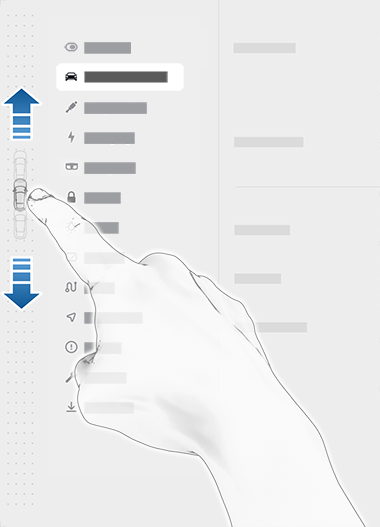
The gear strip is located on the left side of the touch screen (or right side for RHD vehicles). In Park gear, the gear strip will appear whenever the vehicle is in the drive power state and the brake is pressed. In Drive gear, the gear strip will appear when the vehicle speed is low and is not in cruise control. Swiping from the left edge to the right of the touchscreen towards the passenger can also bring up the gear strip. If the country of the vehicle is China, and the acceleration pedal is deeply applied, gear strip will also be displayed on the touchscreen. Swipe up on the gear strip for drive, or swipe down for reverse. To shift to Park, tap the Park button at the top of the gear strip while the brake is pressed, or press and hold the Park button without the brake pressed. To shift to Neutral, press and hold the Neutral button at the bottom of the gear strip.
 |
|---|
| Location of gear strip on UI |
Auto Shift out of Park (Beta)link
Auto Shift is a feature that allows the vehicle to anticipate a user’s intended direction of travel and shift out of park automatically when the brake is pressed and the vehicle is authenticated for drive. The vehicle will automatically select either Drive or Reverse gear when the brake is pressed and all of the following are true:
- Auto Shift out of Park (Beta) is enabled.
- Auto Shift is disabled by default. Tap Controls > Pedals & Steering to enable.
- All doors and trunks are closed.
- The driver seatbelt is buckled.
- The Front Overhead Module is not active.
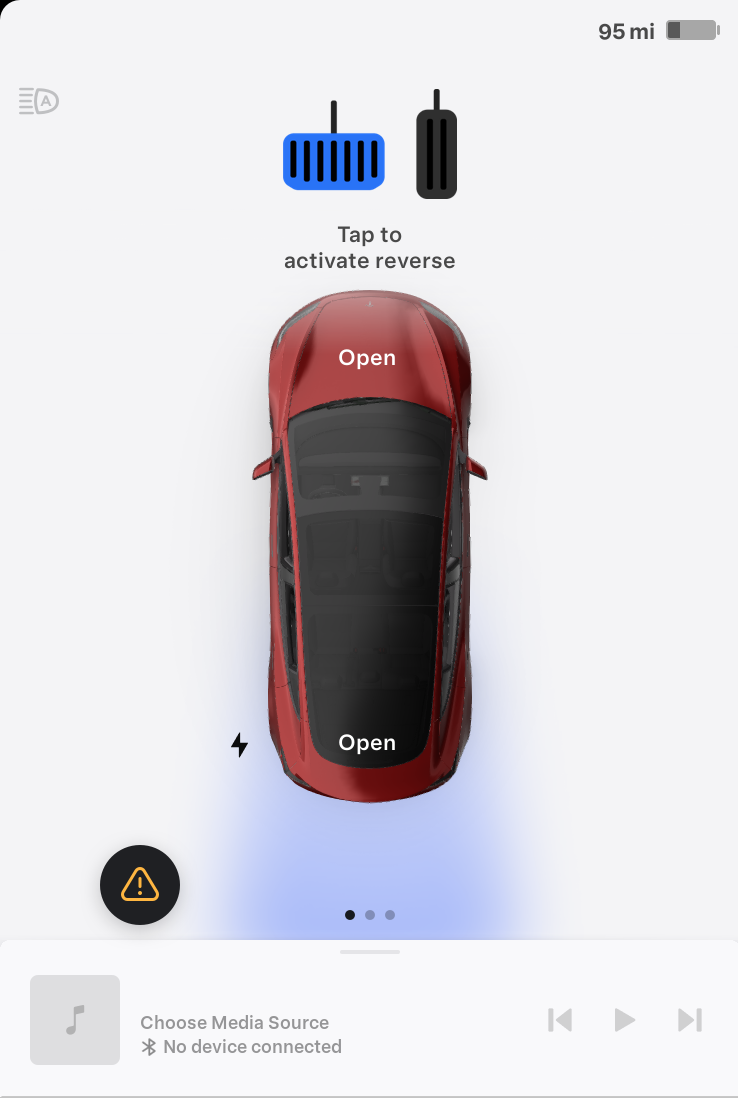
The UI shows what steps to take to prime auto shift. Once all the above conditions are met, the UI indicates which direction the vehicle will shift upon brake press.
 |
|---|
| Auto Shift UI |
Note
Auto Shift feature is availabe in most markets such as North America and Europe. But Auto Shift feature is not available in China.
How Auto Shift Selects a Gearlink
Auto Shift feature utilizes two shift states called "first shift" and "subsequent shift".
First shift occurs in three scenarios:
- After a vehicle sleeps.
- After the driver exits vehicle and vehicle is locked for 20 seconds.
- After charge cable is plugged in.
When Auto Shift determines the vehicle is in first shift state, it will check that the Driver's Assist system is awake and functional and that the vehicle is not parallel parked. The vehicle uses navigation data and GPS sensor to determine that vehicle is parallel parked.
- If the Driver's Assist system is operational, the vehicle is not parallel parked, and the cameras detect an object either in front or rear of the vehicle, Auto Shift will suggest the direction opposite of detected object.
- If the Driver's Assist system is not operational, then vehicle will auto shift into a drive mode that's opposite of last known drive mode prior to vehicle parking.
- If the Driver's Assist system is operational, but the vehicle is parallel parked, vehicle will use the ultrasonic sensors to detect whether there is object in front or rear of the vehicle, or whether there is no object.
- If there is an object detected in front of vehicle, the vehicle will auto shift into reverse.
- If there are objects detected both in front or rear of the vehicle, only in the rear of the vehicle, or no object is detected, then vehicle will auto shift into Drive.
Subsequent shift occurs after vehicle is shifted into Park. When Auto Shift determines the vehicle has entered into subsequent shift state, and the Driver's Assist system is awake and functional, the cameras will determine where an object is and Auto Shift will shift into the opposite direction.
- If the Driver's Assist system is not functional or not awake, or it's not confident, then Auto Shift will not make a shift, and instead default to the driver manually selecting a drive mode.
- If the vehicle is parallel parked, Auto Shift will always shift into Drive.
Exiting the Driver Seatlink
When not in Park gear, the vehicle will automatically shift to Park when the vehicle speed is very low and any of the following occur:
- The driver becomes unbuckled.
- The driver door opens.
Using the Front Overhead Modulelink
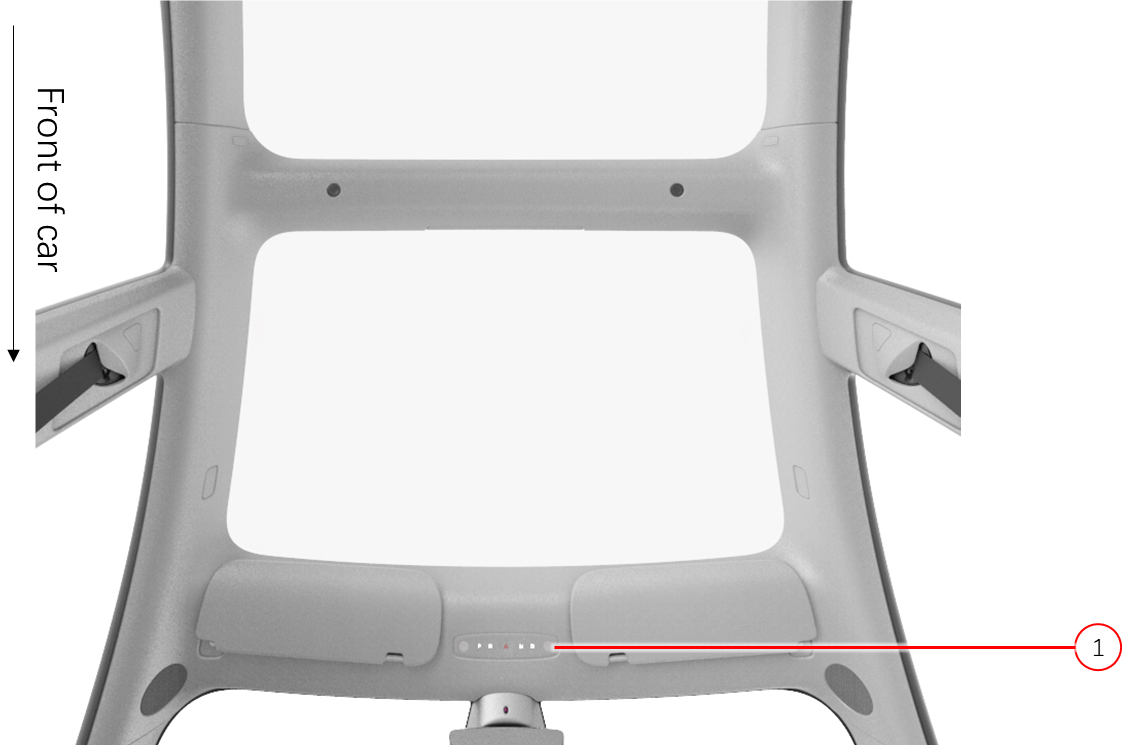
The front overhead module is redundant gear selector located on the headliner (next to the rear-view mirror) housing hazard lights, dome lights, and PRND buttons. When the front overhead module is active, PRND buttons will appear backlit white with the current selected gear in amber. While the front overhead module is active, press any of the buttons to shift gears. For gear shifting to work in Park gear, the brake pedal must be pressed. For gear shifting to work in Drive, Reverse, or Neutral gears, a brake press is not required, but the vehicle speed must be low enough. The PRND buttons use a combination of capacitive and force sensing to qualify a press.
In most situations the PRND buttons are not active unless the vehicle is in the drive power state and one of the following occurs:
- The touchscreen is unavailable.
- The PRND button is pressed.
- Both scroll wheels on the steering wheel are pressed simultaneously for 500ms.
- The vehicle is in Car Wash, Valet, or Service Modes.
The PRND backlights will turn off 90 seconds after they were last activated or when the vehicle exits power state drive.
 |
|---|
| 1. Front Overhead Module (FOHM) |
| Front Overhead Module - Location |
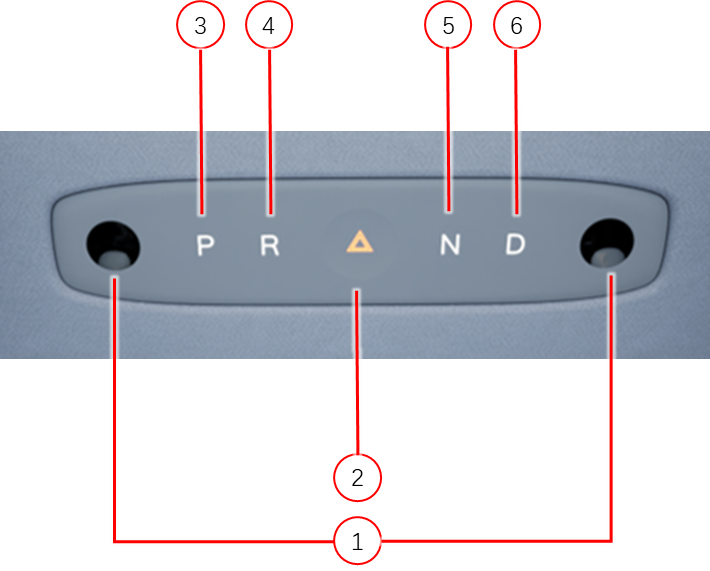
The front overhead module detects touches of Park, Reverse, Hazard, Neutral, and Drive using five capacitive touch sensors and two optical force sensors. Each selection on the module has a dedicated capacitive sensor. The two map lights are also illuminated by capacitive touch.
The optical force sensor measures the micrometer displacement via optical infrared sensing and translates into newton force readings. The left optical force sensors is located between the Park and Reverse selections. The right optical force sensor is located between the Neutral and Drive selections.
 |
|---|
| 1. Map Light (2x) 2. Hazard Light 3. Park 4. Reverse 5. Neutral 4. Drive |
| Front Overhead Module - Functions |
In order for the front overhead module to send a drive mode request, the corresponding gear selection capacitive touch button state must indicate pressed and the corresponding optical force sensor must reach a triggered force. In order for the front overhead module to request the hazard lights on, only the hazard capacitive button state shall indicate pressed.