Low Voltage Controllers and Wiringlink
Last updated: October 20, 2023
Circuit and Connector Diagramslink
Circuit diagrams show the path of all circuits in the vehicle, and the connector reference shows the location and pin outs of all connectors in the vehicle.
Note
Connector references and circuit diagrams can be found on the Service website.
Low Voltage Architecturelink
Power Distributionlink
The 2024+ Model 3 features both a low voltage system and a high voltage system. The following devices are connected to both the high voltage and low voltage systems:
- High Voltage Controller
- Power Conversion System (includes DC-DC)
- Drive Inverters (Front and Rear)
- HVAC Compressor
All other devices in the vehicle are powered solely by the low voltage system and the low voltage system features two independent sources of power:
- Power Conversion System (DC-DC)
- Low Voltage Battery (LV Battery)
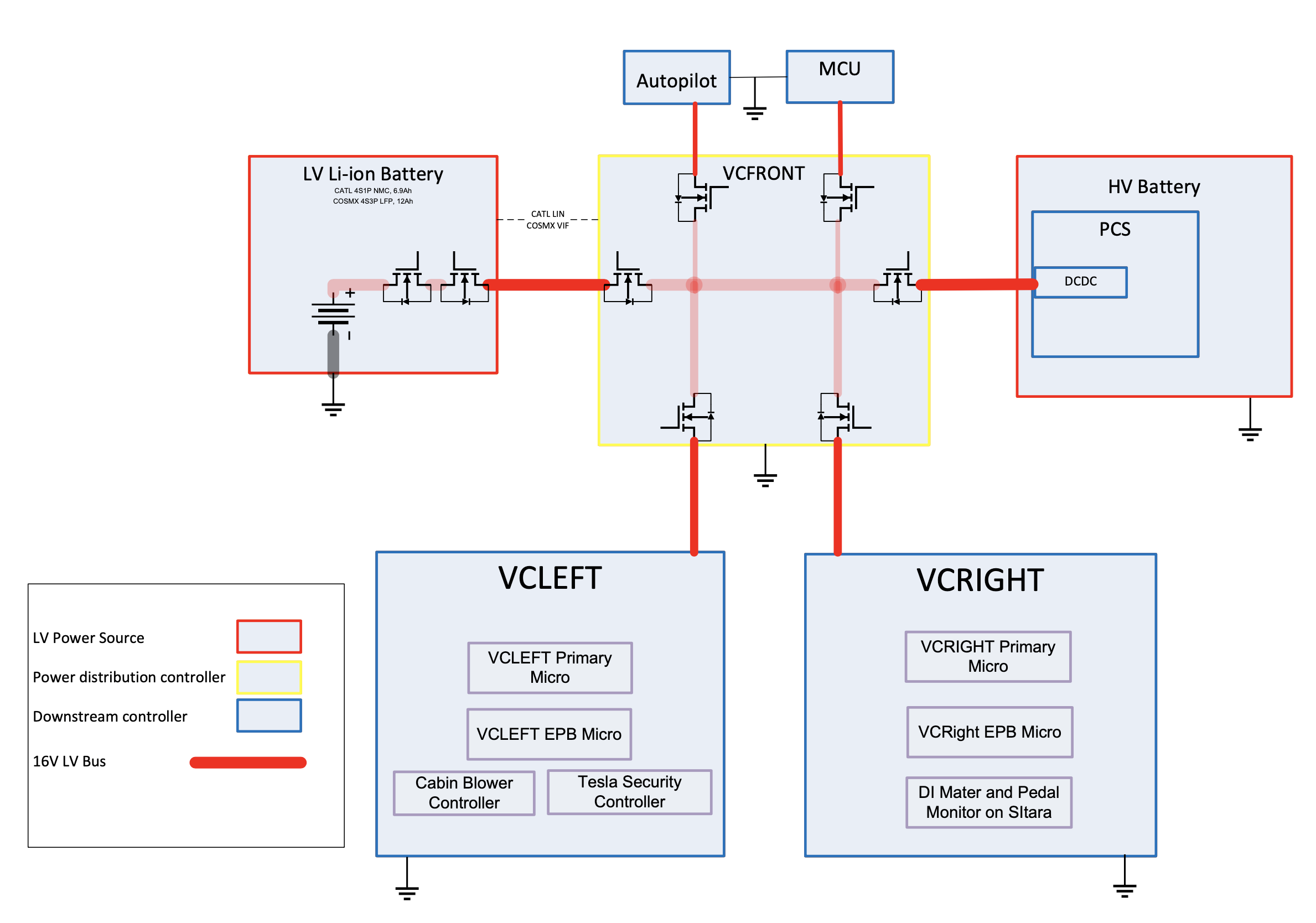
The DC-DC receives power from the High Voltage Battery pack and converts it to low voltage power. Power from the DC-DC and low voltage battery are merged together inside the Front Vehicle Controller (VCFRONT). This controller is the “heart” of the low voltage power distribution system and all low voltage current flows through the VCFRONT before being distributed throughout the rest of the vehicle.
 |
|---|
| Low Voltage Power Distribution |
While the vehicle is "awake", the DC-DC converter is the primary source of low voltage power for the vehicle and the LV Battery is only discharged in the event of a DC-DC fault, OTA (Over the Air) before High Voltage contactor is closed or during peak loads for devices such as power steering, braking, or stability control systems. When the Model 3 goes to "sleep" the sleep standby supply on HVC will turn on and connect the entire low voltage system directly to the HV Battery through the sleepbypass converter on front vehicle controller (VCFRONT) to supply a continuous 10.6V rather than relying on just the LV Battery for power (The standby supply on High Voltage Controller operates at 24V). If the LV Battery is drained during Sleep the DC-DC will still turn on and recharge it, and turn off again once recharged. E-Fuses control the flow of power to each device individually and can be "grouped" in firmware to create virtual power "rails" known as "Vehicle States".
Note
All Model 3 vehicles built in North America after January 1, 2020 use a Sleep bypass power supply.
High-level Vehicle States:
- Sleep
- Accessory
- Drive
- Conditioning
- Over the Air (OTA)
- Self-Test
Note
For more information on Vehicle States including a detailed list of the possible states, refer to the Vehicle Power States section of this document.
An E-Fuse is a transistor (MOSFET) and a current sensor. When the current through the transistor exceeds either the firmware or hardware limits, the switch opens rapidly.
Types Of E-Fuses:
- Discrete E-Fuse
- A MOSFET connected as a "high-side" switch with a pull-up resistor driven by an output pin, configured as an open-drain to deactivate downstream loads.
- Typical Applications:
- High-side driven devices which draw more than 25A.
- H-Bridge driven devices which draw more than 5A.
 |
|---|
| Discrete Style E-Fuse |
- Integrated Circuit (IC) E-Fuse
- A MOSFET connected as a "high-side" switch, but with a separate chip integrated into its package that includes special hardware (like a current sensor, temperature sensor, thermistor, etc.) to help characterize and determine when to deactivate downstream loads.
- Typical Applications:
- High-side driven devices which draw less than 25A.
- H-Bridge driven devices which draw less than 5A.
Note
For more information on E-Fuses, refer to the E-Fuses section of this document.
Powering and Controlling Connected Loadslink
Powering Loadslink
The low voltage controllers on the Model 3 use the following types of integrated circuits to control the flow of power to the various loads connected to the vehicle controllers. The integrated circuits are an H-Bridge and a High-Side Driver.
High-Side Driver:
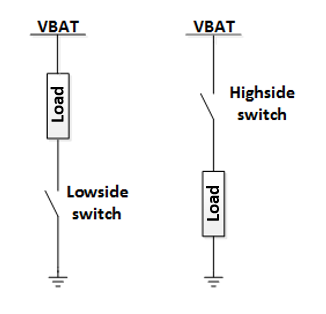
A high-side driver (shown below) is a transistor switch that can turn power on and off to a downstream load. When the switch is ON, the low voltage bus voltage is applied to the load. The current that flows depends on the load. When the high-side driver is ON it does not affect the current. Many high-side drivers feature a current sense inside the switch, and turn off automatically in the event of an over-current. A high-side driver which turns off when a specific current level is reached is called an “E-Fuse”.
For more information on E-Fuses see: E-Fuses.
 |
|---|
| High-Side Driver vs. Low Side Driver |
H-Bridge:
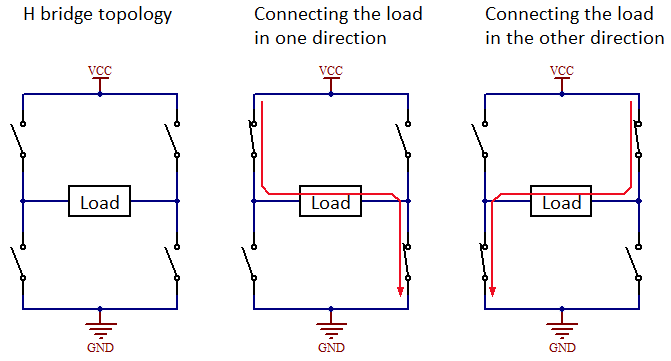
An H-bridge (shown below) is a circuit that can apply voltage across a load in two directions. It is commonly used for controlling DC brushed motors, since each direction of current flow will spin the motor in a different direction. Some examples of DC motors controlled in this way are motors in the seat, steering column, and window lift.
Note
When probing the pins for an H-bridge, make sure to measure across the two pins of the load. If only measuring from one of the H-bridge pins to ground, the readings may not match what the load is seeing.
 |
|---|
| H-Bridge |
Harnesses and Pass-throughslink
In addition to the use of traditional low voltage harnesses, the Model 3 also makes use of pass-through style connections to reduce the number of the inline connectors and wire splices required to connect the various controllers in the vehicle.
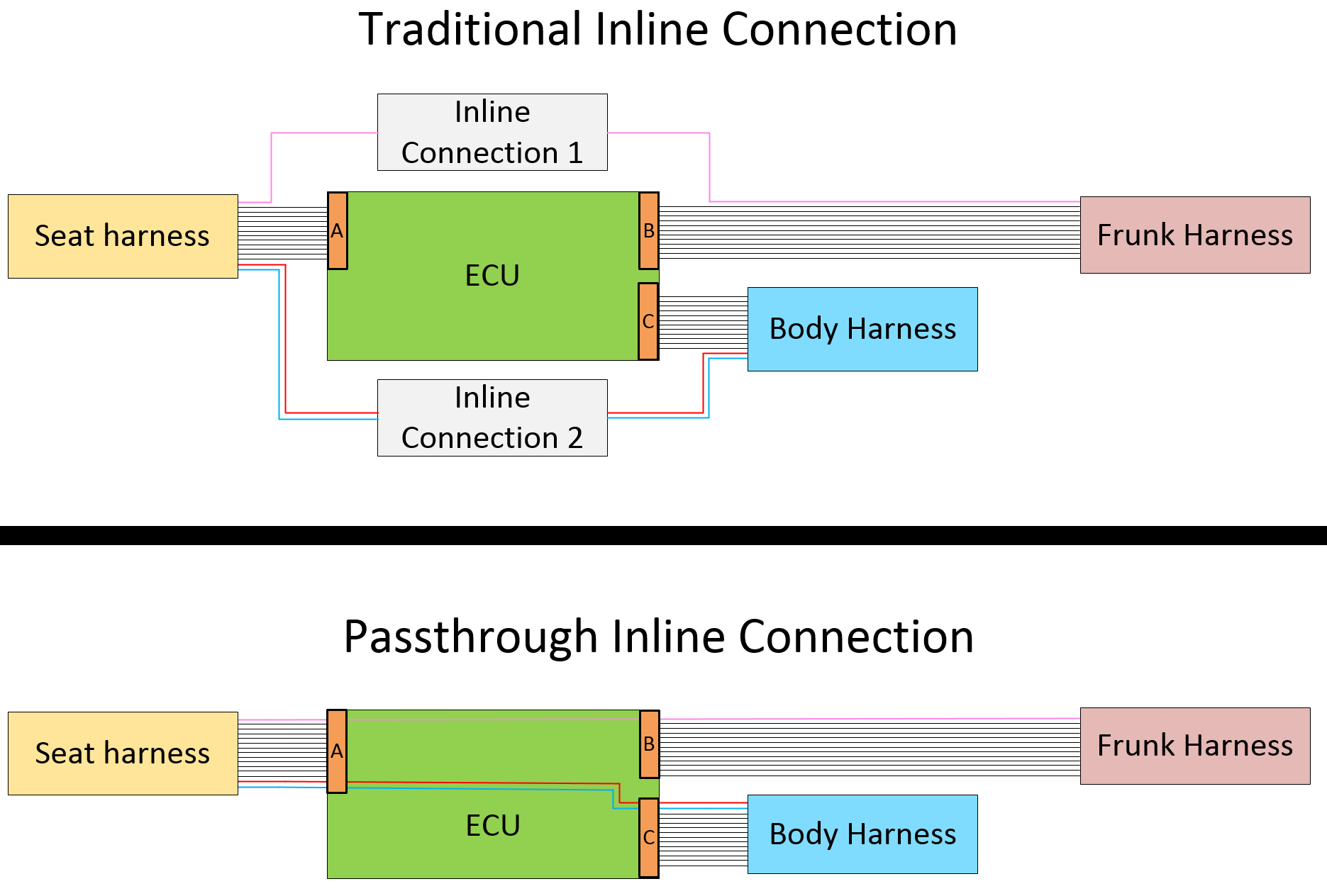
A pass-through style connection is just a metal trace on a printed circuit board (PCB) on one of the vehicle's low voltage controllers and acts like a wire harness extension. This trace does not touch any other circuitry on the PCB. It is just a "wire".
Example of a Pass-through vs. Traditional Inline Connector:
- By using traditional inline connectors the design requires connectors A, B, and C along with inline connectors 1 and 2.
- By using pass-throughs the design only requires connectors A, B, and C. Inline connectors 1 and 2 are not required.
 |
|---|
| Traditional Inline Connectors vs. Inline Connectors |
Cut-Loopslink
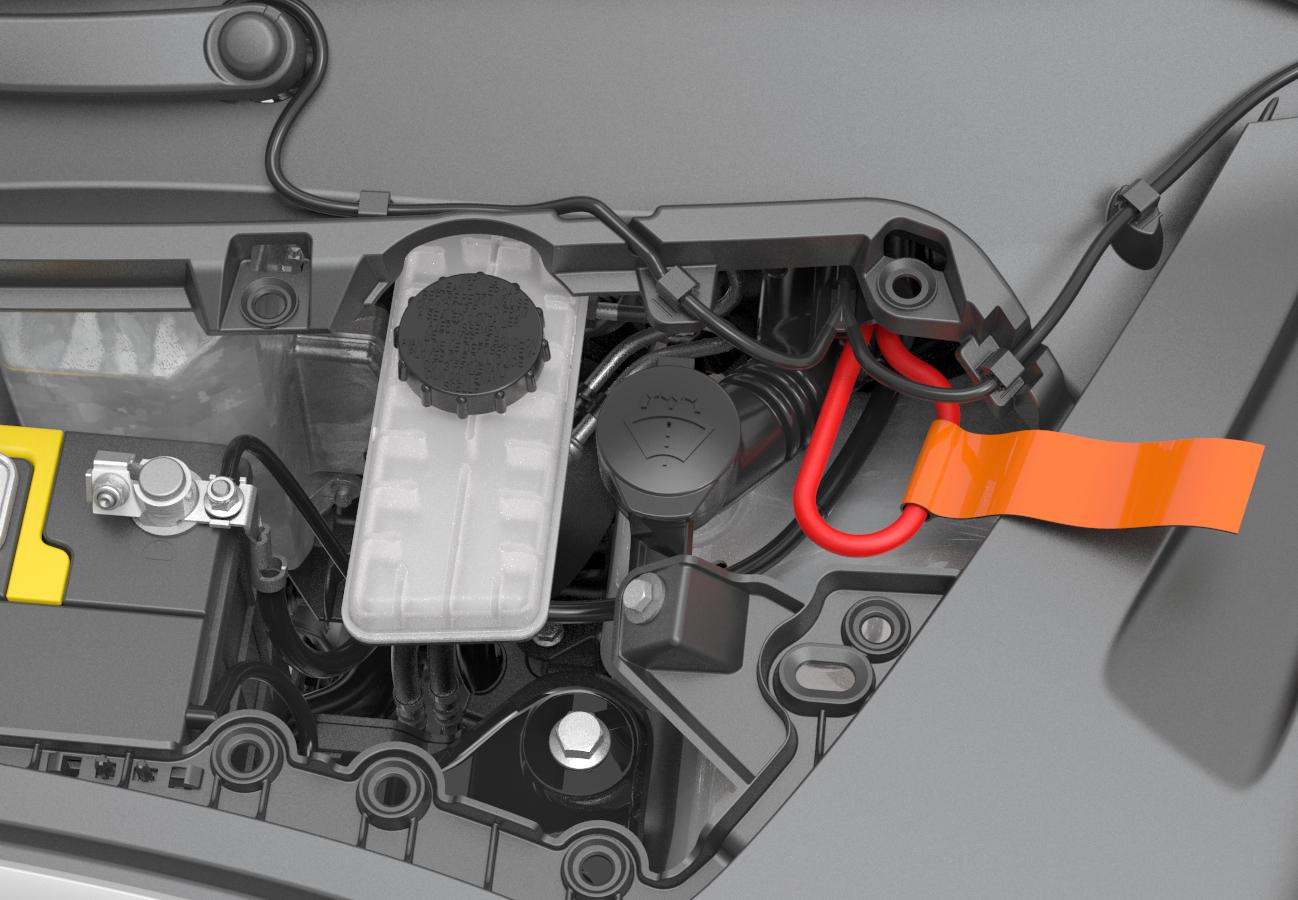
Power wires for the pack contactors and Restraint Control Module (RCM) are routed throughout the vehicle into two loops of wire. After a crash event, first responders (firefighters, EMTs, etc.) cut these wires to disconnect the HV Battery pack from the vehicle, and disable airbags. Sometimes using hydraulic rescue equipment ("jaws of life" in North America) can accidentally trigger air bag deployment, so de-energizing the airbag circuits eliminates the risk of accidental airbag deployment. First Responder Cut-Loops exist in both the front and rear of the vehicle. If one location is inaccessible (due to body deformation as a result of a crash), the other loop can be accessed instead.
 |
|---|
| First Responder Cut Loop, Front Location |
Controllerslink
Front Vehicle Controller (VCFRONT)link
 |
|---|
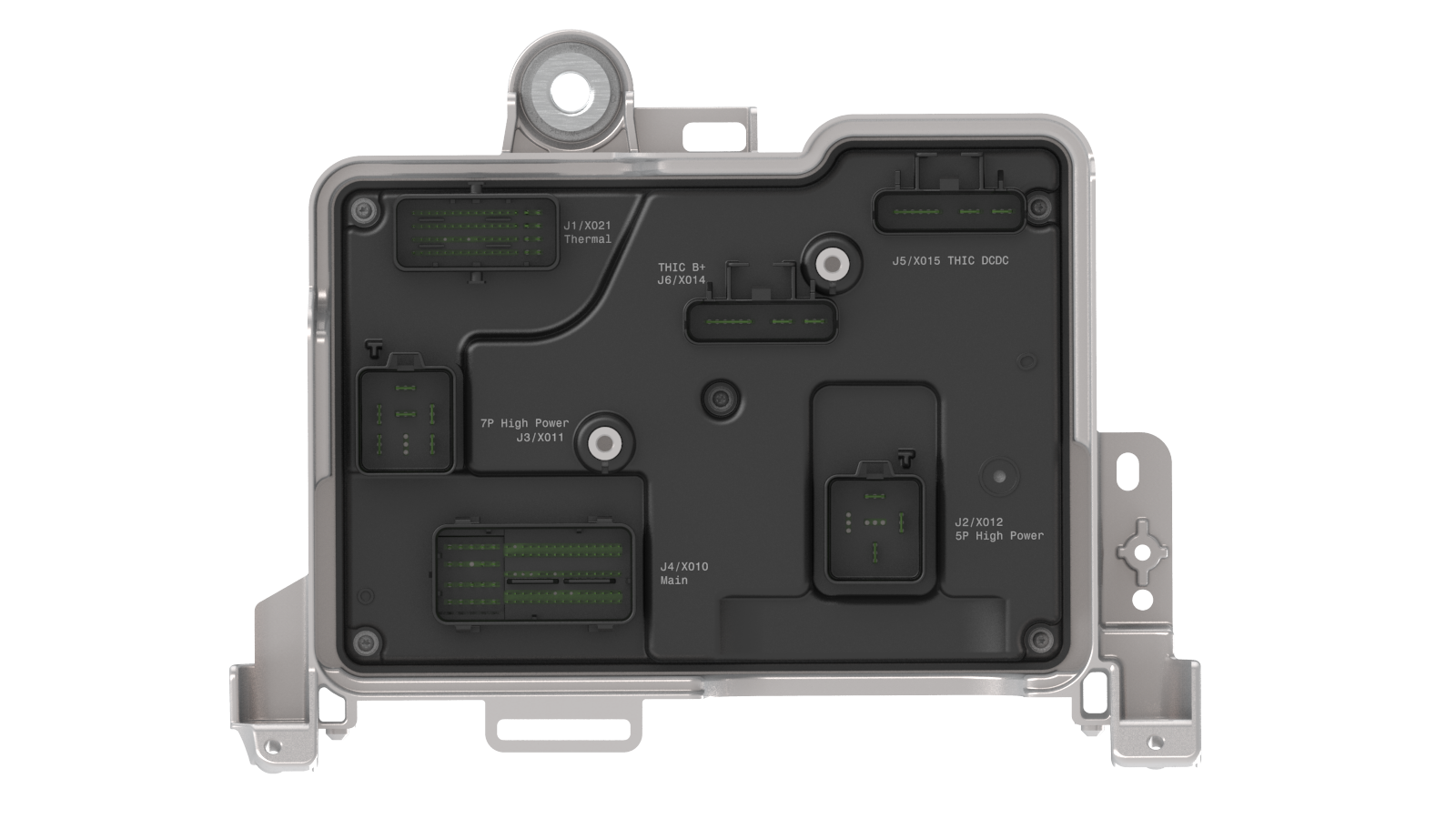
J1 Thermal X021CAN: Veh CANGround: SHUT_OFF_VALVE_1_GND, Coolant Temp BAT/PT Inlet GND, HVAC Compressor Controller GND, Coolant Valve/Level Sensor GND, Refrigerant AUX/Suction/Discharge GND, Battery/Powertrain Coolant Pump GND ShieldHalf-Bridge: Coolant Pump Battery/Powertrain Phase A/B/C, EXV ¾/⅚ Phase A/B/C/D, ½, COOLANT_VALVE_A/BHigh-Side Drive: HV Compressor LV Power, Refrigerant AUX_5V, Refrigerant Suction 5V, Shut OFF Valve 1, Refrigerant Discharge 5VSignal in: Coolant TEMP BAT/PT Inlet, Coolant Valve HALL, Coolant Level Sensor, Refrigerant AUX/Suction/Discharge Temp/Pressure |
J2 5P High Power X012High-Side_Drive: Autopilot 1, Windshield Wiper Power, iBooster |
J3 7P High Power X011Ground: Condenser Fan GroundHalf-Bridge: Condenser Fan Phase A/B/CHigh-side Drive: Autopilot 2, HCU ESP ABS Motor |
J4 Main X010CAN: Party CAN, Vehicle CANLIN: Windshield Wiper LIN, Homelink LIN, LV Battery LIN, Right Healamp LIN, Left Headlamp LINGround: Active Louver Ground, Frunk Latch Swtich Return, Emergency Frunk Release Switch ReturnHalf-Bridge: Active Louver Phase A/B/C, Frunk Latch Primary Reset/ReleaseHigh-side Drive Frunk LED, Homelink ECU, Front Drive Inverter, Front Drive Inverter Discharge, Left and Right Fog Light/Headlight , iBooster Wake, Radar, Left and Right Side Repeater/Marker, HCU ESP ABS Wake/Valve, EPAS 1 and 2 Wake, Battery Backup Siren, MCU Audio, Front Drive Unit Oil Pump, Windshield Washer Fluid Pump, Radar Heater, Windshield Wiper Park Heater, Windshield Upper Glass Heater, MCU Gaming/Logic, Horn High/Low ToneSignal in: EFUSE lockout, Frunk latch switch 1 and 2, Frunk Emergency Release Switch, Brake Fluid Level Sensor, Windshield Washer Fluid Level Switch, Trunk Exterior Switch, LV Battery Temp SensorSpecial: FRONT_TO_PCS_ENABLE, LVBMB_COMM_P/N, FRUNK_ACCESS_POST |
J5 DCDC THIC X015High-Side Drive: Right Controller, EPAS_2Special: PCS |
J6 THIC VBAT THIC X014High-Side Drive: Left Controller, EPAS_1Special: LV Battery Positive |
J7 Heatsink GroundGround: Chassis Ground |
Front Controller Overviewlink
The Front Vehicle Controller is located in the front of the vehicle, under the hood, directly behind the Low Voltage Battery. The controller is powered by the Low Voltage Battery and the PCS (Power Conversion System), depending on Vehicle State. The front vehicle controller provides power delivery to the entire low voltage system, and manages everything under the hood. Information is relayed to devices by a combination of direct I/O, CAN, LIN, ISO SPI and pass-through connections. The front vehicle controller is an always on component and it receives power during sleep, so as to monitor CAN activities and provide wake input to other controllers. It distributes power to other devices through a series of E-Fuse groupings. In the event of Low Voltage Battery power loss, the front vehicle controller responds to a 9V to 12V source on the front access post to release the primary and secondary front trunk latches. Refer to the Service Manual for information about accessing jump posts.
Communicationlink
The front vehicle controller supports both CAN and LIN communication. The controller is connected to, and communicates on, both the vehicle (VEH) and private (PTY or party) CAN busses. Commands from VCFRONT that are consumed by Electronic Control Units (ECUs) on the chassis (CH) CAN bus are forwarded by the Gateway (GTW). The Front Vehicle Controller is also the terminating ECU for Party CAN bus, and equipped with a 120 ohm terminating resistance. This has implications when measuring the bus resistance, as the controller does not terminate the bus during Sleep or when not powered. Refer to the Communication Architecture section for important information on CAN bus termination strategies.
The front vehicle controller is the master for three separate LIN communications. It communicates with the right headlight ECU and HomeLink module (optional equipment) on LIN 1, the left headlight ECU and the wiper module on LIN 2, and the Low Voltage Battery on LIN3.
The front vehicle controller also communicates with Low Voltage Battery via ISO ISP. This serves as a dual source communication with the LV battery.
Left Vehicle Controller (VCLEFT)link
 |
|---|
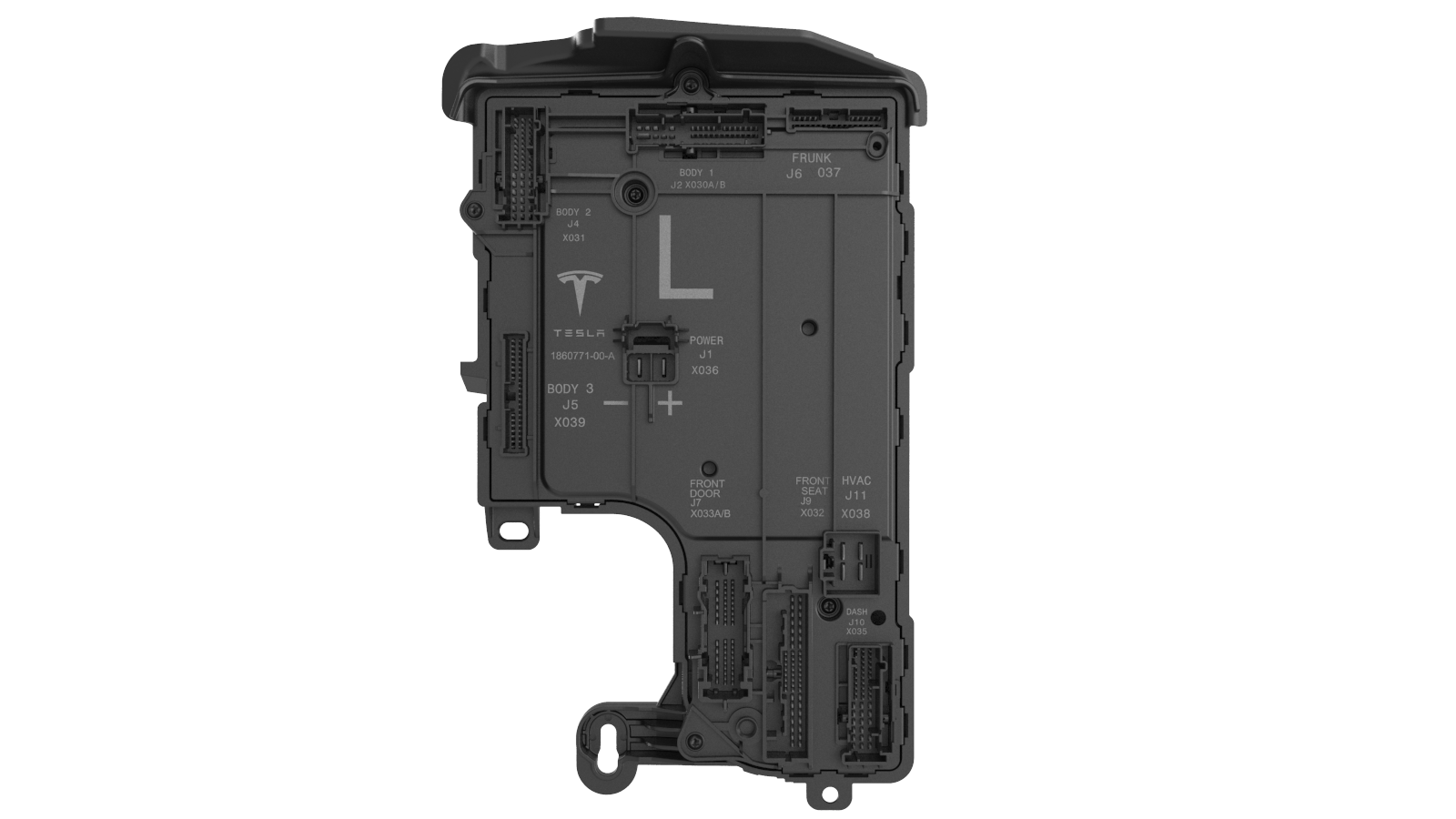
J1 Power and Ground X036Power In: PowerGround: Ground |
J2 Body 1 (1of2) X030ACAN: Vehicle CANPass-through: Chassis CAN PassthroughSignal In: 2R Right Seat Occupancy Sensor, Rear Left Door Latch Endstop Switch, Rear Left Window Switch, Rear Left Window Lift Encoder A/B, 2R Center Buckle Sensor, Trailer Brake Signal, Rear Left Door External Handle Sensor, DOOR_REAR_INTERIOR_HANDLE_SWITCH LIN: Front Overhead Module LIN, Trailer Light ECU LIN, Left Rear Door RGB LINHigh-Side Drive: Center Console Bin Front/Rear Switch LED, B Pillar/Interior/Rear Left/Rear BLE, Rear Left Door External Handle Sensor 5V, Front Overhead Module, Rear Drive Inverter, Charge Port ECU, 2R Right/Left/Center Seat Cushion Heat, 2R Left Backrest Heat |
J3 Body 1 (2of2) X030BHigh-Side Drive: Rear LV Socket, Trailer Aux, Trailer Brake ECU, Trailer ECUGround: Rear LV Socket Ground ReturnHalf-Bridge: 2R Seat Easy Entry/Recline |
J4 Body 2 X031CAN: Party CANLIN: Center Console LINHalf-Bridge: Window Lift Rear Up/Down, Parking Brake Release/Apply, Door Rear Latch Reset/Release, Liftgate Strut Close/OpenHigh-Side Drive: LV Socket Front, Door Rear Puddle/Map Pocket/Window Switch/Interior Handle Switch LED, Trunk Interior LED, Liftgate Left Turn Signal, Liftgate Left Brake Tail PWR, Rear Drive Inverter Discharge,USB Ports Pass-through: Audio Speaker Front Door Passthrough N/P, Audio 80mm Speaker Front Door Passthrough N/PSignal In: 2R Left Seat Occupancy Sensor, 2R Center Seat Occupany Sensor, Brake Switch Normally Open, 2R Left/Right/Center Seat Cushion TemperatureSignal Out: Liftgate Left Brake Tail Intensity (Type: PWM)Ground: Trunk Fold Flat Seat Switch Return, 2R Left Seat Buckle Sensor Return, 2R Occupancy Sensor Return, 12V_SOCKET_FRONT_GROUND_RETURN |
J5 Body 3 X039CAN: BLE B Pillar Left/Right UART P/N, BLE Header and BLE Rear Left, BLE Rear Center/Left UART P/N, Wireless Charger UART P/NHalf-Bridge: 2R Seat Center Release/ResetHigh-Side Drive: Door Rear RGB, Trunk Fold Flat Seat Switch LED, B Pillar Heater, Liftgate Sensor PowerSignal In: 2R Seat Center/Recline/Easy_Entry Switch, Door Rear Latch Open Switch, 2R Seat Left Buckle/Inboard Floor/Outboard Floor/Track Position Sensor, Liftgate Strut Encoder A/B, Trunk Fold Flat Seat SwitchPass-through: Audio Tweeter Front Door Passthrough P/NGround: 2R Seat Right Cushion Temperature Ground, Front Overhead Module Ground Return, 2R Seat Shared Ground Return, Liftgate Shared Ground Return |
J6 Frunk X037CAN: Vehicle CAN, OBD CANHigh-Side Drive: Accessory Feed 3, Restriant Control ModulePass-through: Chassis CAN Passthrough, Front Left/Right Satellite Impact High/Low, PedPro Right/Left Pressure Sensor Passthrough P/NGround: OBD Frunk Ground ReturnSpecial: OBD Ethernet Activation Signal |
J7 Front Door (1of2) X033ALIN: Door Front RGB LINHalf-Bridge: Window Lift Front Up/Down, Mirror Tilt Common, Mirror Unfold/Fold, Door Front Latch Release/ResetHigh-Side Drive: Door Front Puddle/Map Pocket/Window Switch/Interior Handle Switch/Blind Spot Indicator LED, Mirror Dim/Heat, Door Front RGBPass-through: Audio Tweeter Front Door passthrough P/NSignal In: Front Left Window SwitchpackGround: Front Window Lift encoder Ground Return, Shared Door Ground Return |
J8 Front Door (2of2) X033BHalf-Bridge: Mirror Tilt Up Down, Mirror Tilt Left RightHigh-Side Drive: - Mirror Tilt Postion 5V, Door Front Exterior Handle Sensor 5VPass-through: Audio Speaker Cap Front Door passthrough P/N, Audio Speaker Front Door passthrough P/N, Audio 80mm Speaker Front Door passthrough P/N, Front Door Pressure Sensor passthrough P/NSignal In: Window Switchpack FR/RL/RR, Door Front Latch Open/Endstop SWITCH, Window Lift Front Encoder A/B, Door Front Interior Handle Sensor/Switch, Mirror Tilt Position Up Down/ Left Right |
J9 Front Seat X032LIN: Lumbar ECU LIN, 1R Seat TOS LINHalf-Bridge: Front Seat Track Forward/Reverse, Front Seat Lift/Tilt/Front Seat Backrest Up/DownHigh-Side Drive: Front Seat Vent Fan Backrest/Cushion, Front Seat Heat Pad Backrest/Cushion, Occupant Classification ECU, Lumbar ECU, Accessory Feed 2 Front SeatPass-through: Lap Pretensioner Passthrough N/P, Driver Inboard Airbag Passthrough N/P, Seat Side Airbag Passthrough N/PSignal In Front Seat Lift/Backrest/Track/Tilt Encoder, Front Seat Heat Pad Cusion Temp, Front Seat Buckle/Occupancy/Track Positon Sensor, Front Seat Lumbar/Lift Tilt/Track Backrest SwitchGround: Front Seat Shared Ground Return, Occupant Classification ECU Ground Return, Front Seat Vent Fan Backrest/Cushion Ground Return, Front Seat Heat Pad Backrest/Cushion Ground Return, Front Seat Track Positon Sensor Ground |
J10 Dash X035CAN: Vehicle CAN, OBD CANLIN: Dashboard RGB LIN, Steering Wheel Controls ECU LIN, OBD LINHalf-Bridge: Steering Column In/Out/Up/DownHigh-Side Drive: Steering Wheel Controls ECU, Dashboard RGB Right/Middle/Left, Accessory Feed 1 and 2 Dash, Accessory Feed Always On, Footwell LED Front, Steering Angle and Stalk ECUPass-through: Front Left/Right Satellite Impact Low/High, Pedpro Right/Left Pressure Sensor Passthrough, Seat Side Airbag Passthrough P/N, Lap Pretensioner Passthrough P/NSignal In: Steering Column In/Out/Up/Down EncoderGround: Dashboard Harness Ground Return, Steering Column Encoder Shared Ground Return 1 and 2 |
J11 HVAC Blower X038Half-Bridge: HVAC Blower Phase A/B/CGround: HVAC Blower Motor Ground Shield |
Left Controller Overviewlink
The left vehicle controller is located of the left hand side of the vehicle, regardless of market, behind the A-Pillar trim. The VCLEFT on 2024+ Model 3 is called GEN3.5 VCLEFT. Compared to GEN3 VCLEFT (which is used on 2017-2023 Model 3 and before), it has embedded the functionality of Tesla Security Controller (VCSEC) in addition to the Left EPB controller (EPBL). The Front Vehicle Controller provides power to the left (LH) controller, depending on Vehicle State, via a dedicated high current E-Fuse or standby shared E-Fuse. The controller manages the majority of devices on the left hand side of the vehicle via multiple internal microcontrollers. Information is relayed to devices by a combination of direct I/O, CAN, LIN, and pass-through connections. The LH controller is a component that is always on, receiving power during Sleep to provide wake inputs. It distributes power to other devices through a series of E-Fuse groupings.
Communicationlink
The left vehicle controller supports CAN, LIN, and UART over CAN communication. The main microcontroller and Electronic Park Brake (EPB) microcontroller communicate on both Vehicle and Party CAN. The Tesla Security Controller communicates on Vehicle CAN. It also communicates on UART over CAN with BLE endpoints and the NFC keycard reader. The main micro controller, EPB microcontroller and security controller are distinct microcontrollers even though they are on the same PCBA. The left vehicle controller communicates with Front Overhead Module Controller (PRND), left Lumber ECU, left door RGB ambient light, dash RGB ambient light, Trailer Light ECU, steering wheel ECU via LIN. The left Vehicle Controller also passes 5V power supply to wireless charger passthrough USB HVAC controller. Items such as the switchpack and door handles are direct I/O to the controller instead.
Right Vehicle Controller (VCRIGHT)link
 |
|---|
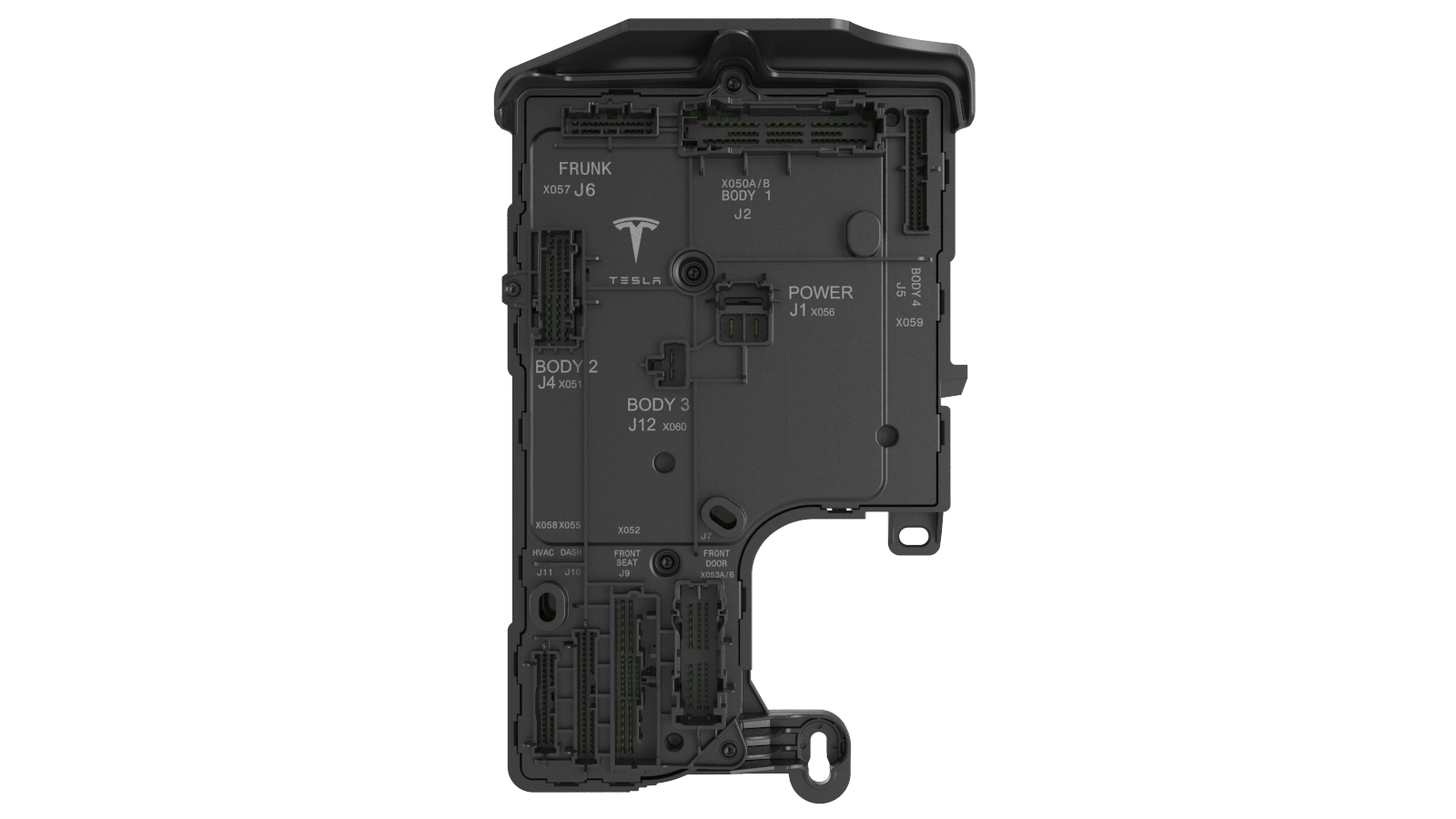
J1 Power and Ground X056Power In: PowerGround: Ground |
J2 Body 1 X050A2B: Suspension Accelerometer Rear A2B P/NCAN: Vehicle CAN, DI Rear Private CANHalf-Bridge: 2R Seat Easy Entry, 2R Seat Easy Entry Return, 2R Seat Recline, 2R Seat Recline Return, 3R Seat Right/Left Recline, Liftgate Latch A/B, Door Rear Latch Reset/Release, Liftgate Strut Open/CloseHigh-Side Drive: CHMSL Brake Light, Accelerator Pedal 5V 1 and 2, Liftgate Right Turn Signal, Liftgate Right Brake Tail Intensity/Power, HV controller, Radio Tuner, Rear Fascia Turn Signal LeftPass-through: HV Contactors Frunk Cutloop Passthrough OutSignal In: 3R Seat Right/Left Recline Switch, Window Lift Rear Encooder A/B, Accelerator Pedal Signal 1 and 2, Door Rear Interior Handle Switch, Door Rear Latch Endstop Switch, Liftgate Exterior Switch, 3R Seat Right Buckle/Occupancy sensor, Liftgate Latch Switch 1, Window Switch RearGround: Door Rear Shared Ground, Light And Humidity Sensor Ground, Mirror Rear View Ground, 2R Seat Shared Ground, Accelerator Padal Signal 1 and 2 Ground Return |
| J3 N/A spare |
J4 Body2 X051CAN: Party CANLIN: Light And Humidity Sensor LIN, Door Rear RGB LINHalf-Bridge: Window Lift Rear UP/DOWN, Parking Brake Release/ApplyHigh-Side Drive: Oil Pump Rear Drive Unit, Door Rear Map Pocket LED, Light And Humidity Sensor, Interior Radar, Rear Door Exterior Handle Sensor 5V, 2R Seat Right Heat Pad Backrest, 3R USB Ports, Rear Door Window/Interior_Handle Switch LED, Rear Fascia Turn Signal Right, Door Rear Puddle LED, Mirror Rear View Dim, License Plate Lights Rear Fascia Fog/Tail/Reverse Light Left Right, Door Rear RGB, B Pillar HeaterPass-through: ECall Passthrough, Center Dashboard Speaker Passthrough N/P, Front Door Audio Speaker Passthrough P/N, Audio 80mm Speaker Front Door Passthrough P/N, Left Dashboard Speaker Passthrough P/N, Right Dashboard Speaker Passthrough P/NSignal In: Door Rear Exterior Handle Sensor, 2R Seat Right Buckle SensorSpecial: Standby Power PCS Lockout, Ecall Standby Power |
J5 Body3 X059CAN: Vehicle CANHalf-Bridge: Damper Valve Rear Left/Right, Damper Valve Rear Left/Right ReturnHigh-Side Drive: Liftgate Strut Sensor Power, Liftgate Chime, Trunk Interior LED, Interior Camera LED Fan Liftgate Shutface Switch LEDLow-Side Drive: Liftgate Chime ReturnSignal In: Liftgate Strut Encoder A/B, Front Seat Automatic Locking Retractor Sensor, Liftgate Shutface Switch, 2R Right Seat Occupancy Sensor, 2R Seat Outboard Floor Sensor, Liftgate latch Switch ⅔, Rear Fascia Lights Left/Right Fault 2RSeat Easy Entry Switch, Rear Door Latch Open Switch, 2R Seat Recline Switch 2R Seat Track Position Sensor, 2R Seat Inboard Floor SensorGround: Front Seat Automatic Locking Retractor Sensor Ground, Liftgate Shared Ground |
J6 Frunk X057A2B: Suspension Accelerometer Front A2BCAN: Vehicle CAN, DI Front Private CANHalf-Bridge: Damper Valve Front Right/Left Return, Damper Valve Front Right/LeftHigh-Side Drive: Restraint Control Module, HV_ContactorsPass-through: Liftgate Exterior Switch Passthrough, Restraint Control Module Passthrough 1 and 2, HV Contactors Frunk Cutloop Passthrough InSignal In: Ambient Air TempSignal out: Front Efuse LockoutGround: Ambient Air Temp GroundSpecial: Standby Power PCS Lockout Switched |
J7 Front Door (1 of 2) X053AHalf-Bridge: Window Lift Front Up/Down, Door Front Latch Reset/ReleaseHigh-Side Drive: Door Front Puddle LED, Door Front Map Pocket LED, Door Front Blind Spot Indictor LED, Door Front RGB, Door Front Extterior Handle Sensor 5VPass-through: Audio Tweeter Front Door Passthrough P/NSignal In: Window Lift Front Encoder A/B, Window Switchpack FR/FL/RR/RL, Door Front Latch Open/Endstop Switch, Door Front Exterior Handle Sensor, Mirror Tilt Position Left Right/ up downSpecial: Audio Speaker Cap Front Door Passthrough N/P |
J8 Front Door (2 of 2) X053BLIN: Door Front RGB LINHalf-Bridge: Mirror Fold/Unfold, Mirror Tilt Left Right/ Up Down/ CommonHigh-Side Drive: Mirror Tilt Position 5V, Front Door Interior Handle Switch LED, Door Front Window Switch LED (x2), Mirror Dim/HeatPass-through: Audio Speaker Front Door Passthrough, Audio 80mm Speaker Front Door Passthrough, Front Door Pressure Sensor PassthroughSignal In: Door Front Interior Handle SwitchGround: Shared Door Ground, Window Lift Front Encoder Ground |
J9 Front Seat X052LIN: Occupant Classification ECU LIN, Lumbar ECU LINHalf-Bridge: Front Seat Track Reverse/Forward, Front Seat Tilt Down/Up, Front Seat Backrest/Lift Down/UpHigh-Side Drive: Front Seat Vent Fan Cushion/Backrest/Backrest Speed/Cushion Speed, Occupant Classification ECU, Lumbar ECU, Spare Footwell LED, Front Seat Heat Pad Cushion/BackrestPass-through: Driver Inboard Airbag Passthrough, Lap Pretensioner Passthrough, Seat Side Airbag PassthroughSignal In: Front Seat Track/Backrest/Lift/Tilt Encoder, Front Seat Buckle/Track Posion/Occupancy Sensor, Front Seat Heat Pad Cushion Temp, Front Seat Track Backrest/Lift Tilt/Lumbar SwitchGround: Front Seat Shared Ground, Front Seat Heat Pad Backrest Ground, Occupancy Classification ECU Ground, Spare Ground Return, Front Seat Tilt Ground Shield,Front Seat Backrest Ground Shield, Front Seat Track Position Sensor Ground, Front Seat Track Ground Shield, Front Seat Heat Pad Cushion Ground, Front Seat Vent Fan Backrest Ground Return, Front Seat Lift Ground Shield |
J10 Dash X055Half-Bridge: HVAC Left Lateral/Vertical Vane Duct Open/CloseHigh-Side Drive: HVAC Left Vertical/Lateral Vane Position 5V, Footwell LED Front, HVAC Cabin Temp Fan, Glove Box LED, Glove Box Latch ReleaseSignal In: HVAC Left Lateral/Vertical Vane Duct Position, HVAC Cabin Temp, HVAC Left/Right Upper Duct TempGround: HVAC Cabin Temp Fan Ground, HVAC Left Lateral/Vertical Vane Position Ground, HVAC Cabin Temp Signal Ground, Glove Box Latch Ground, HVAC Left/Right Upper Duct Temp GroundPass-through: Front Door Pressure Sensor Passthrough, Drive Inboard Airbag passthrough, Lap Pretensioner Passthrough, Seat Side Airbag Passthrough, Restraint Control Module Passthrough, Right/Left/Center Dashboard Speaker Passthrough, Ecall Passthrough |
J11 HVAC Case X058Half-Bridge: HVAC Right Lateral/Vertical Vane Duct Open/Close, HVAC Lower/Upper Mode CW/CCW, HVAC Intake CW/CCWSignal In: HVAC Lower Mode Duct Position, HVAC Upper/Intake Duct Position, HVAC Right Vertical/Lateral Vane Duct Position, HVAC Right/Left Lower/Upper Duct Temp, HVAC Evaporator TempGround: HVAC Shared Ground |
J12 Body 4 X060High-Side Drive: Premum Amp ECU, Rear Glass Heater |
Right Controller Overviewlink
The right vehicle controller is located on the right hand side of the vehicle, regardless of market, behind the A-Pillar trim inside the IP Cockpit. The VCRIGHT on 2024+ Model 3 is called GEN3.5 VCRIGHT. Compared to the GEN3 VCRIGHT (which is used on 2017-2023 Model 3 and before), it has embedded the functionality of External Drive Inverter in additional to Right EPB controller (EPBR). The Front Vehicle Controller provides power to the right (RH) controller, depending on Vehicle State, via a high power dedicated E-Fuse or standby shared E-Fuse. The controller manages the majority of devices on the right hand side of the vehicle via multiple internal microcontrollers. Information is relayed to devices by a combination of direct I/O, CAN, LIN, and pass-through connections. The RH controller is an always on component, receiving power during sleep to provide wake inputs. It distributes power to other devices through a series of E-Fuse groupings
Communicationlink
The right controller supports CAN, LIN and A2B communication. The main microcontroller, and EPB microcontroller communicate on both Vehicle and Private CAN. The External Drive Inverter microcontroller communicates on the Party, Vehicle and DI CAN. These microcontrollers are distinct devices even though they are on the same PCBA. The right controller communicates with the Occupancy Classification System (North America and Korea only), right Lumbar ECU, right door RGB ambient light and THS HVAC Sensor via LIN. Items such as the switchpack and door handles are direct I/O to the controller.
E-Fuselink
Overviewlink
An electronic fuse (E-Fuse) is a solid state switch, or a transistor and a current sensor. When the current through the transistor exceeds either the firmware or hardware limits, the switch opens rapidly. The E-Fuse replaces the traditional relay and fuse combination. It allows for better handling of electrical faults and protection of hardware if a fault does occur. Traditional fuses can take several seconds to trip while an E-Fuse can interrupt current flow in a matter of milliseconds, which protects the vehicle's critical systems from being damaged. In order to use E-Fuses, detailed electrical behavior for each load is required in order to differentiate between a false positive and a true fault. E-Fuses also significantly impact the concept of "power rails" because they allow for firmware-controlled virtual groupings of individual E-Fuses into "virtual" power rails which we refer to as "Vehicle States".
Note
The 2024+ Model 3 does not use traditional fuses. They only use E-Fuses.
Operationlink
An E-Fuse functions like a traditional fuse (opens circuit when too much current is flowing through it), except it reacts faster.
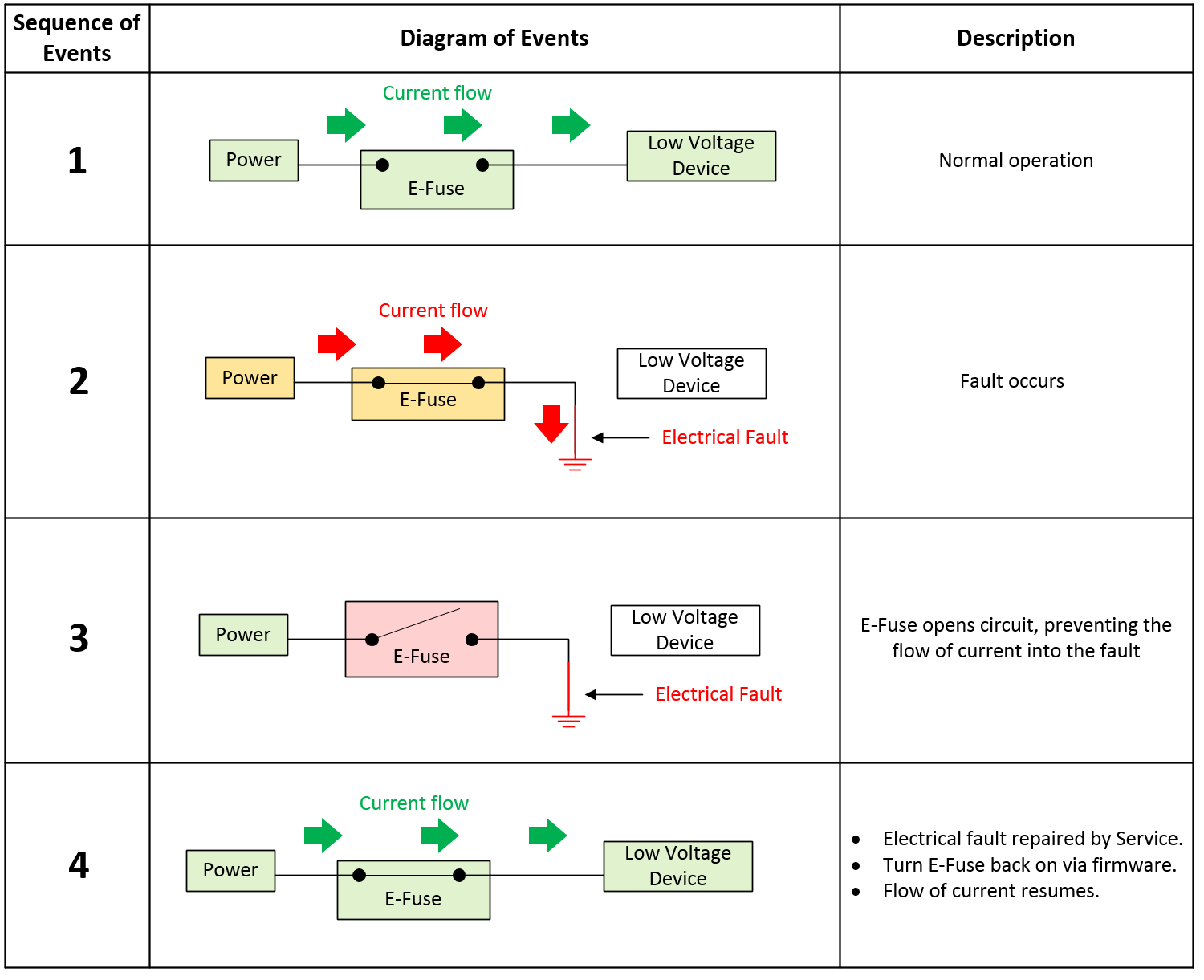 |
|---|
| E-Fuse Overview |
Trippinglink
If an E-Fuse trips, a fault signal will be read by the microcontroller. Depending on the type of load the E-Fuse is connected to, the construction of the E-Fuse, and the Vehicle State when the fault occurs, the behavior may be to enter either auto-retry or latch-off mode. Some E-Fuses may only latch-off, some always auto-retry, and some are configurable. In Tesla applications, most fall under the configurable category.
After an E-Fuse trips, Tesla firmware does not immediately try to re-enable the E-Fuse. The design intent is for the E-fuse to only trip when an electrical fault occurs, thus the E-Fuse should only be re-enabled after the electrical fault has been repaired by Service. A few exceptions to this statement exist:
- Capacitive inrush problems:
- In this scenario, firmware quickly re-enables E-Fuses to precharge downstream capacitive loads.
- User accessible ports such as the LV power socket, USB ports, and the trailer light ECU can be reset by cycling control to those outputs to recover them.
Auto-Retry Behavior:
-
The intent of the "Auto-Retry" is to have Tesla firmware intervene when a fault is detected. Using the fault signal sent to the microcontroller, firmware will immediately disable the E-Fuse until pre-defined conditions are met to re-enable the E-Fuse.
-
When an E-Fuse is capable and configured for auto-retry, it will turn off, wait a period of time, then attempt to turn back on for a period of time as determined by firmware.
Latch-Off Behavior:
- When a latch-off E-Fuse trips, it will turn off and remain off until firmware resets the E-Fuse. An E-Fuse reset is typically achieved by toggling the enable signal off-on. The enable signal will always be reset in the event of a power on reset of the microcontroller, unless the enable line is locked out.
Lock-Out Behavior:
- There are specific conditions where firmware prevents toggling of the enable line via separate protection circuitry (this is only done for E-fuses deemed drive critical, not all E-fuses). This is true in the Drive state, where it is unacceptable for firmware to actively turn off any E-Fuse. This does not mean the E-Fuse cannot trip, only that the microcontroller cannot turn off or toggle the E-Fuse enable signal. This lock-out persists on the vehicle controllers even through a reset of the main microcontroller. The only way to unlock the enable signal is to leave the Drive state.
| Master | Slave | Purpose |
|---|---|---|
| Right Controller | Front Controller | An I2C port expander exists between the front vehicle controller micro and the enable pins of drive-critical E-Fuses. When the vehicle shifts into Drive, the right controller holds the port expander in reset which "locks in" the port expander output states. This prevents the front vehicle controller micro from accidentally turning off drive-critical E-Fuses during Drive. |
| Front Controller | Power Conversion System (PCS) DC-DC | The DC-DC converter sources up to 193A into the front vehicle controller. If current flows from the DC-DC converter into the front vehicle controller prior to the front vehicle controller enabling the DC-DC E-Fuse, the body diodes of the E-Fuse FETs could experience a thermal event. Therefore, this lockout exists to prevent the DC-DC converter from being enabled until the front vehicle controller E-Fuse is fully enabled. |
| Left/Right Controller Secondary and Primary Micro | Left/Right Controller Secondary and Primary Micro | The Primary and Secondary micros must both agree to apply or release the Electronic Park Brake (EPB) before the brake can be actuated. They also must agree on power states for contactor power, and LV power to the Rear Drive Inverter. |
Types Of E-Fuseslink
External FET (Discrete):
A discrete E-Fuse uses a MOSFET connected as a "high-side" switch with a pull-up resistor driven by an output pin configured as an open-drain to deactivate downstream loads. A high-side driven switch means that the load is after the switch, with one end of the load tied to ground. Conversely, a low-side driven switch is the opposite, meaning the switch is after the load (before ground), with one end of the load tied to power.
- Typical Applications:
- High-side driven devices which draw more than 25A.
- H-Bridge driven devices which draw more than 5A.
- Discrete E-Fuses are typically comprised of multiple components, including:
- Gate drive circuit (IC or discrete)
- Charge pump (can be integrated into a gate drive IC, or be external)
- Current sense amplifier (can be integrated into a gate drive IC, or be external)
- External N-channel FET (field effect transistor)
- External low-side flyback diode or low-side FET
- External current sense resistor
- Inputs typically include:
- Enable
- Reset
- Misc settings such as gate drive current, VDS overcurrent threshold, current-chop threshold.
- Outputs typically include:
- High-accuracy current sense
- Fault
Internal FET (Integrated Circuit):
An integrated circuit E-Fuse uses a MOSFET connected as a "high-side" switch, but with a separate chip integrated into its package that includes special hardware (like a current sensor, temperature sensor, thermistor, etc.) to help characterize and determine when to deactivate downstream loads.
- Typical Applications:
- High-side driven devices which draw less than 25A.
- H-Bridge driven devices which draw less than 5A.
- This is just contains an off-the-shelf integrated circuit which typically consists of:
- An N-channel FET (field effect transistor).
- Charge pump (used to increase, or decrease voltage across a load).
- One or more temperature sensors.
- Inputs typically include:
- Enable.
- Reset.
- Outputs typically include:
- Low-accuracy current sense.
- Fault.
Types Of Fault Protectionlink
Current-Based Fault Protection:
Current-based fault protection measures a voltage drop across an external current sense resistor to determine current flow. If the current exceeds a configurable threshold, the E-Fuse opens the circuit. This type of protection is most often associated with discrete E-Fuses. An E-Fuse with current-based protection is relatively easy to match with the harness to make sure that there is adequate protection, but are more difficult to engineer to prevent false trips as extensive characterization of the downstream loads is required.
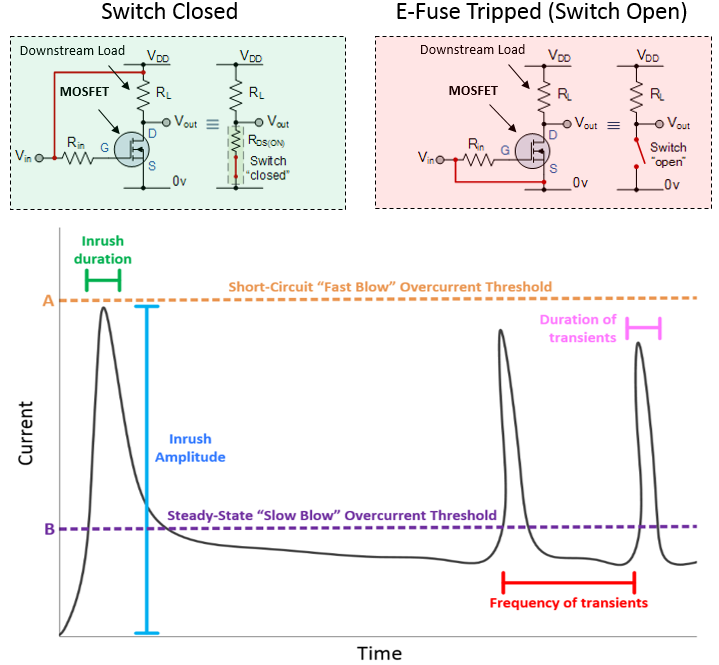 |
|---|
| Current-Based E-Fuse Fault Detection |
Discrete high-side E-Fuses typically feature two levels of overcurrent protection:
Short-Circuit Overcurrent Protection:
If current flowing through the E-Fuse exceeds the “Short-Circuit Overcurrent Threshold,” the E-Fuse will trip within 1 millisecond indicating a low-resistance "hard" short circuit has occurred.
Steady State Overcurrent Protection:
Some devices draw large bursts of current for short durations. To ensure these devices function properly, the E-Fuse allows current to exceed the “Steady-State Overcurrent Threshold” but only for a short period of time. However, the MOSFET will overheat if current of magnitude “A” flows through them for an extended period of time. Therefore, if the “Steady-State Overcurrent Threshold” is exceeded for an extended period of time, the E-Fuse will trip.
Examples of devices that use these E-Fuses include:
- The "Big 7" E-Fuses on the front vehicle controller (iBooster, ESP, PCS, VCLEFT, VCRIGHT, EPAS½).
- High-current H-Bridges (seat motors, steering column motors, parking brake motors, windows lift motors).
Temperature-Based Fault Protection:
Temperature-based fault protection is usually associated with integrated circuit style E-Fuses which feature an internal thermistor (a resistor whose resistance is dependent on temperature). If the thermistor becomes too hot, the E-Fuse opens the circuit. These devices are typically not configurable. This type of fault protection is more tolerant to loads and conditions that are not fully characterized, but are affected by ambient temperature.
On-board Diagnostics (E-Fuse Self-Checks)link
Self-check steps for E-Fuse with no upstream turn off path include:
- Measure voltage on output of E-Fuse (verify E-Fuse is off).
- Turn on E-Fuse.
- Measure voltage on output of E-Fuse (verify E-Fuse is on).
- Turn off E-Fuse via fault injection.
- Measure voltage on output of E-Fuse (verify E-Fuse is off).
- Turn on E-Fuse.
The purpose of these "self-checks" is to verify the E-Fuses can be turned off properly prior to shifting the vehicle into Drive.
Vehicle Power Stateslink
Overviewlink
The E-Fuses in the VCFRONT control the flow of low voltage power throughout the vehicle and are "grouped" together in vehicle firmware to create these virtual power "rails" known as "Vehicle States". The table below lists all the virtual power states the VCFRONT can inhabit.
| Power State | State Description |
|---|---|
| Accessory | The Accessory state is intended to support in-vehicle entertainment and HVAC features. |
| Accessory Plus | Intended for the manufacturing environment, when the VCFRONT is not in Drive. If UDS security access is granted, the VCFRONT shall enter Contactors Open (self-test), Accessory (self-test) or Accessory Plus (self-test) states for a fixed timeout based on the input parameters of the routine. |
| Conditioning | The Conditioning state is intended to support (but not limited to) vehicle preconditioning, postrun (cooling PT), maintaining pack temperature, LV support, heating to charge, charge, and Sentry mode. |
| Drive | Whenever PNRD is available on the UI the vehicle is in a drive state even if the vehicle is not in the Drive Gear. |
| HV Up Standby | HV Up Standby is an intermediate state that is used to evaluate which HV Up state VCFRONT should transition to, or if it should transition to LV Awake. |
| LV Awake | The LV Awake state is intended to only power ECUs essential for system monitoring. Upon entering LV Awake, the VCFRONT will re-enable its internal switched rails and re-initialize its brushless motor drivers (battery pump, powertrain pump, and radiator fan). |
| Sleep Shutdown | Upon entering Sleep Shutdown, the VCFRONT turns off the high current power feeds to all permanently powered devices if the current on the Sleep bypass e-Fuse is < 3A. |
| Sleep Standby | In this state, the VCFRONT executes Sleep Shutdown procedures and sends commands to put busses to sleep. |
| LV Shutdown | In this state all switched power ECUs are turned off. |
| OTA | In this state, the VCFRONT will make all E-Fuse channels available to control via UDS for use during firmware updates. |
| Battery Post Wake | In Battery Post Wake, the VCFRONT will not turn on any loads except one that allows the frunk latch to actuate and disable all reverse battery protection FETs. |
LV State Machinelink
The LV state machine could be considered the master state machine of the Model 3, since it powers the Front Vehicle Controller. Each state has implications on power distribution to vehicle components, as well as influencing the state machines of other controllers, and inhibiting or triggering certain functions or processes. Below are some of the key LV state machine states, with brief descriptions relating to power management and examples of inhibiting or triggering processes.
Note
The transition examples are not the complete list, and there are intermediate states not captured in this section due to the complexity of the state machine.
Note
To learn more about state machines in general, a good starting point for research the term "Finite-State Machine".
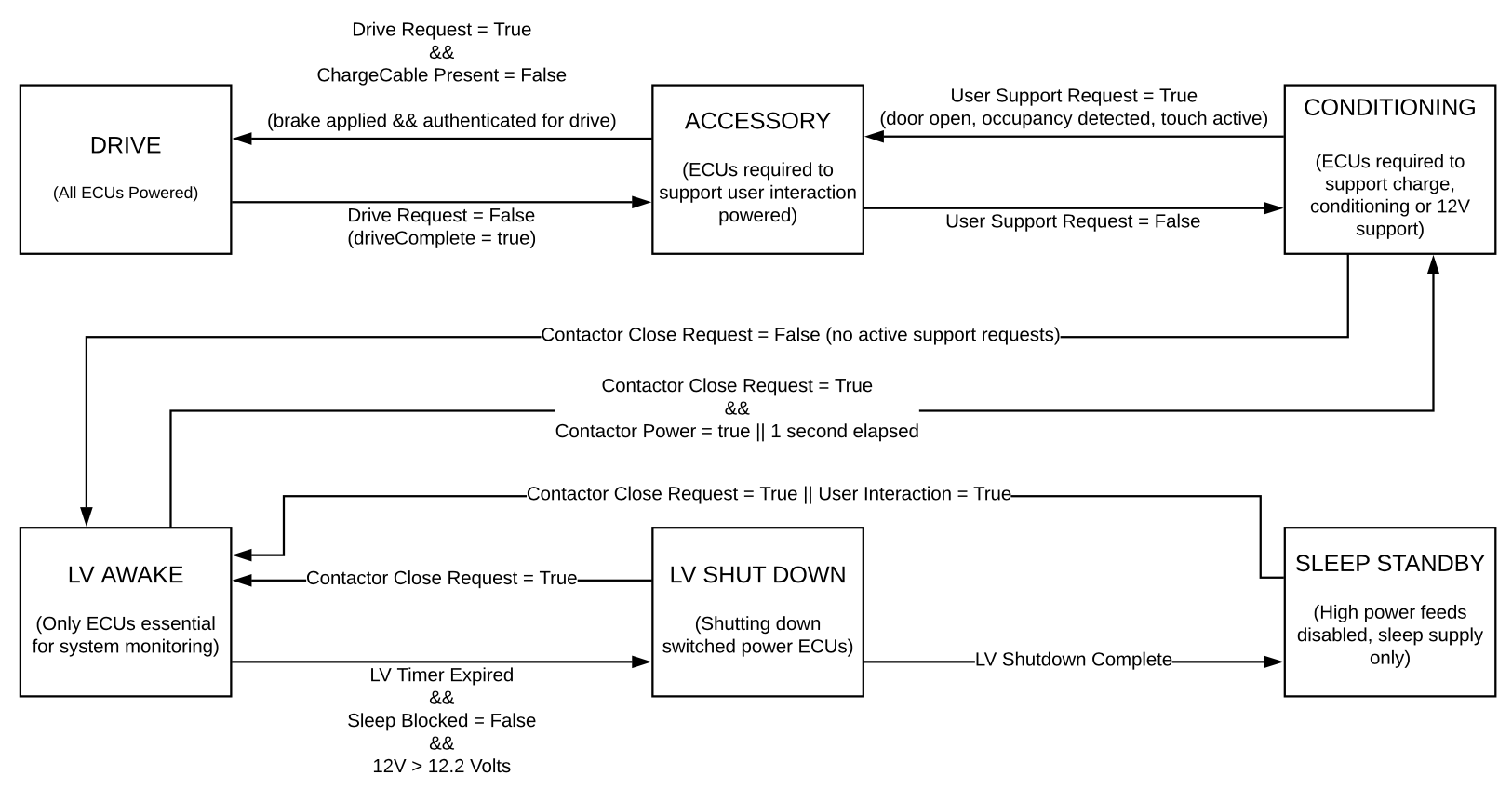 |
|---|
| LV States |
Power State Truth Tablelink
The Power State Truth Table gives record of which ECUs are powered in the core LV State Machine "Vehicle States."
- 1 = Powered
- 0 = Shut down
- Requires Warning = 1
- ECUs that have a shut down procedure require a fixed amount of time before the power feed can be safely cycled.
- C = Conditional
- Some ECUs may be on in Vehicle States when they are normally not ON, due to requiring time to shut down, or because of a keep power request. An example is the Restraint Control Module in a crash event.
| ECU | Signal | Drive | Accessory | Conditioning | LV Awake | LV Shutdown | Sleep Shutdown | Requires Warning | Warning Time |
|---|---|---|---|---|---|---|---|---|---|
| SWC | VCLEFT_swcLVState | 1 | 1 | 1 | 1 | 0 | 0 | 0 | |
| VCLEFT | VCFRONT_vcleftHiCurrentLVState | 1 | 1 | 1 | 1 | 1 | 0 | 1 | |
| VCRIGHT | VCFRONT_vcrightHiCurrentLVState | 1 | 1 | 1 | 1 | 1 | 0 | 1 | |
| Headlight ECU | 1 | 1 | 1 | 1 | 0 | 0 | 1 | ||
| OCS | VCRIGHT_ocsLVState | 1 | 1 | 0 | 0 | 0 | 0 | 0 | |
| HVAC Sensor | 1 | 1 | 0 | 0 | 0 | 0 | 0 | ||
| UI [GTW/Display] (high current) | VCFRONT_uiHiCurrentLVState | 1 | 1 | 1 | 1 | 1 | 0 | 1 | |
| UI (Audio) | VCFRONT_uiAudioLVState | 1 | 1 | 1 | 0 | 0 | 0 | 0 | |
| Tuner | VCRIGHT_tunerLVState | 1 | 1 | 1 | 0 | 0 | 0 | 0 | |
| External Amplifier | VCRIGHT_amplifierLVState | 1 | 1 | 1 | 0 | 0 | 0 | 0 | |
| Front USB | 1 | 1 | 1 | 0 | 0 | 0 | 0 | ||
| Rear USB | 1 | 1 | 1 | 0 | 0 | 0 | 0 | ||
| Homelink | 1 | 1 | 1 | 1 | 1 | 0 | 0 | ||
| Autopilot [Parker, Pascal] (high current) | VCFRONT_das1HighCurrentLVState | 1 | 1 | 1 | 1 | 1 | 0 | 1 | |
| Autopilot [Parker, Aurix] (high current) | VCFRONT_das2HighCurrentLVState | 1 | 1 | 1 | 1 | 1 | 0 | 1 | |
| Radar | VCFRONT_radcLVState | 1 | 0 | 0 | 0 | 0 | 0 | 0 | |
| Radar Backup Power | 1 | 0 | 0 | 0 | 0 | 0 | 0 | ||
| Park Assist | VCFRONT_parkLVState | 1 | 1 | 1 | 1 | 1 | 0 | 0 | |
| ESP | VCFRONT_espLVState | 1 | C | C | C | 0 | 0 | 0 | |
| EPAS 1, 2 (High Current) | VCFRONT_epasLVState | 1 | 0 | 0 | 0 | 0 | 0 | 1 | 5s |
| RCM | VCLEFT_rcmLVState/VCRIGHT_rcmLVstate | 1 | C | C | C | 0 | 0 | 0 | |
| TPMS | VCLEFT_tpmsLVState | 1 | 0 | 0 | 0 | 0 | 0 | 1 | |
| iBooster (power and wake line) | VCFRONT_iBoosterLVState | 1 | 1 | 0 | 0 | 0 | 0 | 0 | 49s |
| ESP Motor | VCFRONT_espLVState | 1 | 0 | 0 | 0 | 0 | 0 | 0 | |
| PCS | 1 | 1 | 1 | 1 | 1 | 0 | 0 | ||
| DI | VCLEFT_diLVState | C | C | C | 0 | 0 | 0 | 1 | 400ms |
| DIS | VCFRONT_disLVState | 1 | 0 | 0 | 0 | 0 | 0 | 0 | 400ms |
| Oil Pump (Rear) | VCRIGHT_rearOilPumpLVState | 1 | C | C | 0 | 0 | 0 | 1 | |
| Oil Pump (Front) | VCFRONT_oilPumpFrontLVState | 1 | 0 | 0 | 0 | 0 | 0 | 0 | |
| PTC | VCRIGHT_ptcLVState | 1 | 1 | C | 0 | 0 | 0 | 1 | |
| HVAC Compressor | VCFRONT_hvacCompLVState | 1 | 1 | C | 0 | 0 | 0 | 1 | |
| Lumbar | VCLEFT_lumbarLVState/VCRIGHT_lumbarLVState | 1 | 1 | 0 | 0 | 0 | 0 | 0 | |
| Windshield Wiper ECU | 1 | 1 | 0 | 0 | 0 | 0 | 0 | ||
| SCCM | VCLEFT_sccmLVState | 1 | 1 | 0 | 0 | 0 | 0 | 1 | 12s |
| CP (high current) | VCLEFT_cpLVState | 1 | 1 | 1 | 1 | 1 | 0 | 0 | |
| HVC (high current) | VCRIGHT_hvcLVState | 1 | 1 | 1 | 1 | 1 | 0 | 0 | |
| HV Contactors | 1 | 1 | 1 | 1 | 1 | 0 | 0 | ||
| Air Suspension | VCFRONT_tasLVState | 1 | 1 | 1 | 1 | 1 | 0 | 0 | |
| VBAT Fused Low Current | 1 | 1 | 1 | 1 | 1 | 0 | 0 | ||
| Rear Drive Inverter Discharge | 1 | 1 | 1 | 1 | 1 | 0 | 0 |
Sleep Architecturelink
During the vehicle Sleep state, many voltage devices are turned off to reduce loss of range when the vehicle is not in use. Devices capable of waking the vehicle from Sleep receive Standby power, as well as Autopilot for Telemetry and Electronic Power Assisted Steering (EPAS) to manage in-rush current. The chart below lists the ECUs that receive standby power during sleep, and which low voltage controller powers them.
Low Voltage Controller
Dependencies
Front Controller
- Gateway
- Autopilot½
- Power Steering (EPAS)
- Telemetry Control Unit (TCU), powered by Media Control Unit (MCU)
- Left Controller (VCLEFT)
- Right Controller (VCRIGHT)
Left Controller
- Security Micro (integrated into Left Controller)
- Bluetooth Low Energy (BLE) Endpoints
- Interior BLE Endpoint
- Left B-Pillar BLE Endpoint
- Rear left BLE Endpoint
- Rear Center BLE Endpoint
- Charge Port
- Front Overhead Module (FOHM)
Right Controller
- Right B-pillar BLE Endpoint
- Interior Cabin Radar (ICR)
Sleep Sequencelink
The vehicle will go to Sleep if it is not in use and there are no controllers that are setting a keep awake reason. Examples of keep awake reasons that are not related to direct user interaction (vehicle occupants, driving) are as follows: LV Support request, Charging, Preconditioning,cabin overheat protection and owner API requests.
When all the keep awake reasons are listed as NONE, the front vehicle controller and Gateway will send a "GoToSleep" message on all the CAN busses. When an ECU receives this message, it ends most processes and enters a low power state and becomes "CAN quiet". In this state, each ECU suppresses CAN transmits that are not wake up reasons, and receives or listens for CAN traffic from other ECUs in order to know when to wake up or abort Sleep. The final message to be transmitted is the command for the VEH CAN bus to go to Sleep.
In order for the vehicle to truly sleep, the LV Battery current, measured by the Intelligent Battery Sensor (IBS) that is on-board the front vehicle controller, must first fall below 3 Amps. This will trigger the front vehicle controller to deactivate the high power E-Fuses it manages. The front vehicle controller then waits until the LV Battery current drops below 500 mA before it turns off non-essential portions of itself, shutting down internal 12V and 5V rails. Finally, the microcontroller goes into a low power state.
During Sleep, there is some LV current draw through the Sleep bypass. This average current is reported after the vehicle wakes up by VCFRONT_sleepCurrent. While 500 mA is the minimum threshold to Sleep, it is high enough to drain the LV Battery to the point where it requires support relatively quickly. Ideal vehicles have an average sleep current of about 75 mA, while the majority of vehicles draw around 120-130 mA. There are many factors that affect LV current draw, the largest issues being 3rd party devices tapping into the Sleep Standby Supply (this will significantly throw off the low voltage battery charging algorithm).
Waking From Sleeplink
The Wake state inputs to the vehicle come from always-on loads that send a message to any controller connected to the CAN bus. The wake reason can be determined by inspecting vehicle CAN logs. Each controller that is capable of waking the vehicle will update its "wakeUpReason" signal when the controller wakes from Sleep and the Gateway resumes CAN logging.
The front vehicle controller will wake the vehicle if one of the following events occurs:
- The front vehicle controller detects the LV Battery needs to be charged.
- An always-on load sends a message to the front vehicle controller to wake
the vehicle, for example:
- The security controller detects a key
- A door handle is pulled
- SMS poke
- Current flowing through the battery monitoring integrated circuit exceeds a set threshold (set in firmware by the front vehicle controller micro).
Note
A nearby Phone key will not wake up the vehicle until the door handle is pulled.
Wake Inputs
| Signal | Controller | Type | Reason | |
|---|---|---|---|---|
| Interior Door Handle | VCLEFT/VCRIGHT | User-Accessible | Allows occupants to exit the vehicle | |
| Exterior Door Handle | VCLEFT/VCRIGHT | User-Accessible | Allows occupants to enter the vehicle | |
| Latch Status (Door,Frunk, and Trunk) | VCLEFT/VCRIGHT | User-Accessible | Allows the latches to wake vehicle in the event of break-in | |
| Exterior Trunk Switch/Shtuface Liftgate Switch | VCRIGHT | User-Accessible | Allows occupants to enter the vehicle | |
| Interior Frunk Switch | VCFRONT | User-Accessible | Legal requirement | |
| Hazard / SOS Button | Front OHC | User-Accessible | Legal requirement | |
| Chargeport Button / UHF | Chargeport | User-Accessible | Allows user ability to wake vehicle for charging | |
| Front Access Post | VCFRONT | User-Accessible | In the event of a dead LV Battery when the user apply LV to the Front Access Post the vehicle will wake | |
| Sleep Bypass / LV Battery Monitor | VCFRONT | User-Accessible | If a firmware or hardware condition occurs during Sleep resulting in a larger than expected amount of current being drawn, the front vehicle controller microcontroller will wake, attempt to resolve the condition, and put the vehicle back to Sleep. | |
| TMPS | VCLEFT | User-Accessible | If TPMS detect a flat tire condition, it will also wake up vehicle |
Communication Architecturelink
Overviewlink
The various controllers on the Model 3 communicate with each other via one of the following: - CAN (Controller Area Network) - Used when high bandwidth, or low latency are required by an ECU. - LIN (Local Interconnect Network) - Used when high bandwidth. or low latency are not required by an ECU. - Video (Coaxial)
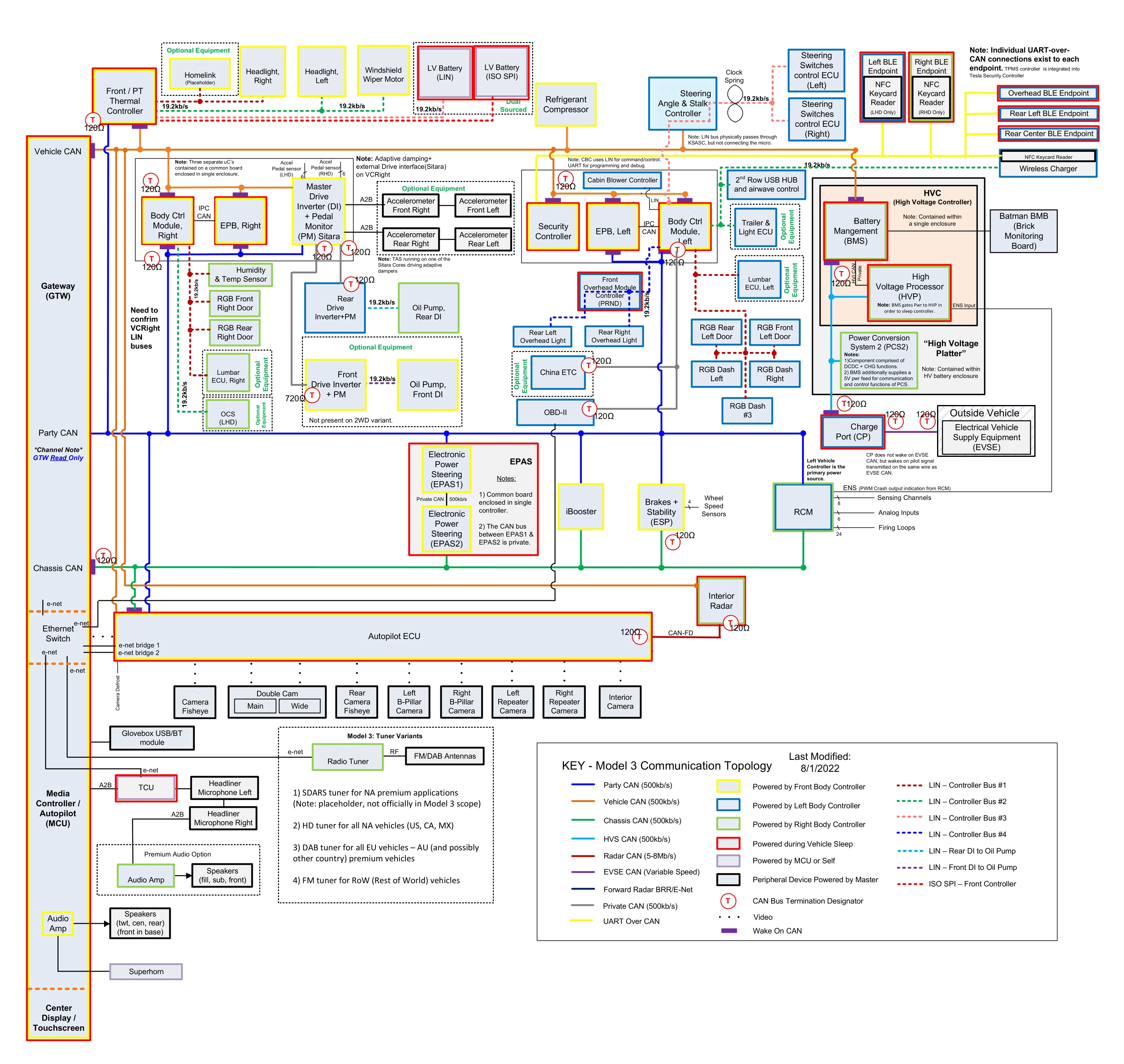 |
|---|
| Model 3 Communication Architecture |
Bus Mappinglink
The 2024+ Model 3 CAN bus networks are mapped to different ID numbers depending on where they connect to the microcontroller within the gateway.
| Bus ID | Bus Name |
|---|---|
| 2 | Party |
| 6 | Chassis |
| 7 | Vehicle |
Controller Area Networklink
Overviewlink
A Controller Area Network (CAN) is a durable low cost communication standard designed to allow any device on the network to communicate with any other device without the need for a host computer. Each Electronic Control Unit (ECU) on a CAN network is connected by 2 signal-carrying wires (CAN-HIGH, CAN-LOW) with each wire carrying a complimentary signal waveform used to signify if the signal being transmitted is a logical 1 or 0.
Transmitting and Receiving Datalink
First, a device connected to an ECU (like a sensor) detects some value. This value is then stored in the microcontroller input memory on the ECU. If this value is also required for another ECU connected to the network, it will be sent over the CAN bus. Before this value can be sent, it is first copied to the transmit memory of the ECU. From there, the information goes to the transmit mailbox of the CAN module. If a current value is located in the transmit mailbox, it is indicated by the transmit flag (flag is raised).
Once the message is sent to the CAN module, it then checks via the Receive (Rx) line whether the bus is active (i.e. whether information is in the process of being exchanged on the network). If necessary, it waits until the bus is free before sending the message over the bus. All stations connected to the bus then receive the message as it travels over the Receive (Rx) lines to the receive areas of each of the CAN modules. All connected stations receive the message sent by the sensor, and using the Cyclic Redundancy Check (CRC) checksum, they detect whether any errors have occurred in transmission. When a message is sent, a checksum is generated from all the bits and is included in the transmission, and the receivers all calculate the checksum from all the bits received using the same protocol. Once the received checksum is compared with the calculated checksum and no error are found, all the stations send an acknowledgement to the transmitter.
Finally, the correctly received message goes to the acceptance section of the associated CAN modules. From there, a decision is made whether the message is necessary for the function of the related control unit. If needed, the message is placed in the receive mailbox. Otherwise, it is discarded.
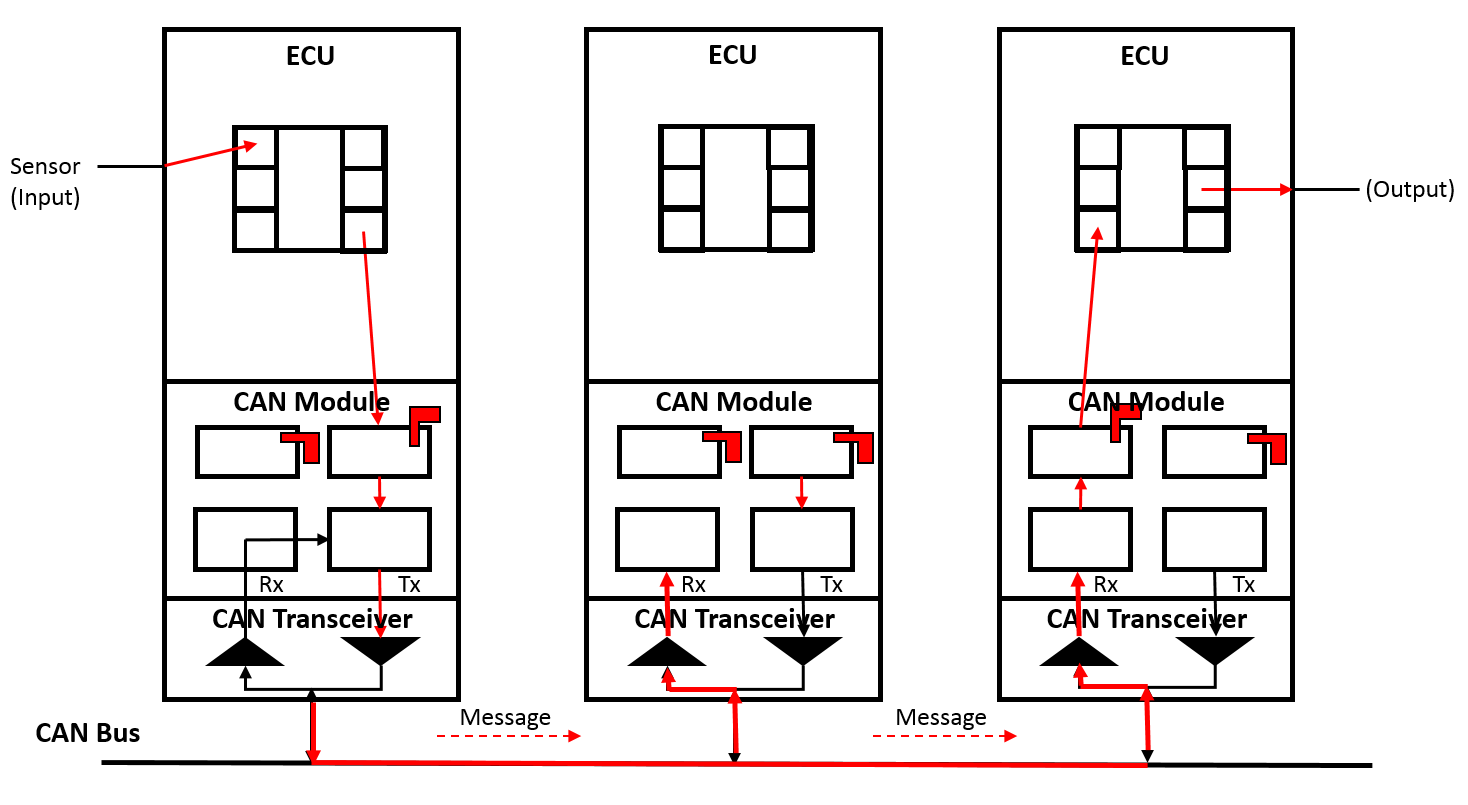 |
|---|
| CAN Bus Transmitting and Receiving Data |
- CAN Transceiver The transceiver is a transmitter and receiver amplifier which converts the serial bit stream (logic level) of the CAN module into voltage values and vice versa.
- CAN Module The CAN module is what controls the data transfer process for CAN messages and is divided into two sections, the receive section and the send section. The CAN module is connected to the control unit via a receive mailbox or the send mailbox which correspond to memory locations on the microcontroller chip.
- ECU he ECU is the device that is receiving and processing signals from things like sensors and actuators and is the top level device in the stack. For example: The ESP, iBooster, EPB, etc.
Error Managementlink
Since each message transmitted on the bus is received by each node on the bus, each node can check the validity of all the messages and post an error on the bus if a message is not valid. The tracking of these Tx (Transmit) and Rx (Receive) errors is how a CAN bus manages communication errors on the network. Using the broadcast process described in the section above, any device connected to the network that detects an error immediately notifies all other devices on the network by sending an error message called an "error frame," and the current message is then rejected by all devices on the network. This is then followed by an automatic repeat of the last transmission. If transmission continues to repeat due to continuously detected errors, an integrated error counter on each station will increase to track the error. If the preset threshold value for the error limit is exceeded (equivalent to 32 repeat transmissions), the affected ECU is informed, and the CAN bus is switched off.
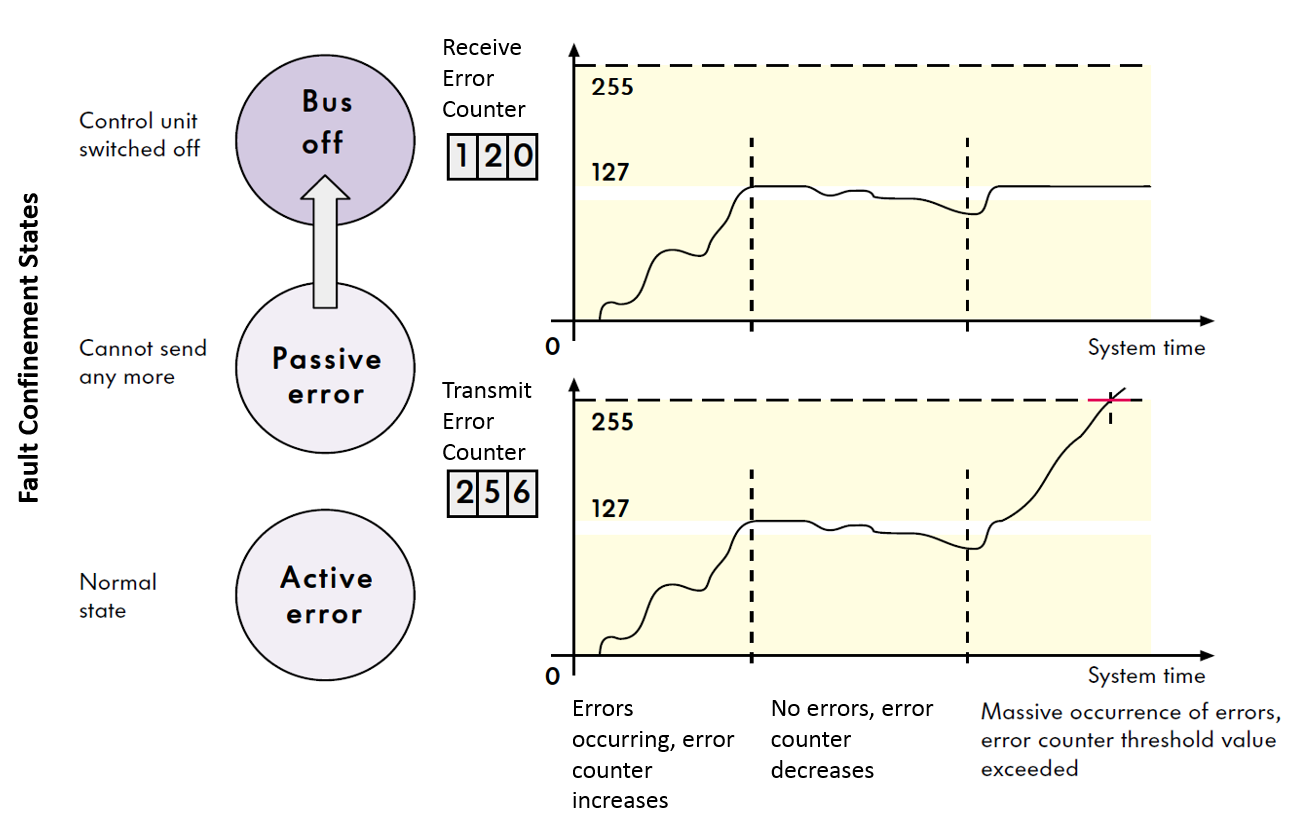 |
|---|
| CAN Bus Error Counters |
To diagnose if there is a CAN bus fault based on CAN Explorer, one can look for if there are corresponding alerts set from an ECU that identify a condition affecting the CAN bus where it is supposed to communicate on.
CAN Bus Off
Look for alerts that indicate a Bus Off event. This would indicate that a controller's error counter has exceeds its Fault Confinement threshold.
Examples:
- ESP_a093_partyBusOff: ESP module monitors Party CAN Bus cyclically, whenever there is a short circuit between CAN-H and CAN-L or a heavy bus disturbance which leads to ESP not receiving any message traffic on Party CAN Bus, and the bus off fault will be registered and populated on CAN.
- ESP_a095_chassisBusOff: ESP module monitors Chassis CAN Bus cyclically, whenever there is a short circuit between CAN-H and CAN-L or a heavy bus disturbance which leads to ESP not receiving any message traffic on Chassis CAN Bus, and the bus off fault will be registered and populated on CAN.
Missing In Action (MIA)
Look for alerts that indicate a node is MIA. This would indicate that a controller is not powered, or that it is unable to send messages to the receiving node.
Examples:
- EPAS3P_a100_diMia/EPAS3S_a100_diMia: Alert is set when the Electric Power Assist Steering (EPAS) ECU does not receive the drive inverter torque message.
- EPAS3P_a103_vcFrontMia/EPAS3S_a103_vcFrontMia: Alert is set when VCFRONT_LVPowerState message is not received by EPAS.
Troubleshooting Issueslink
Step 1: Measuring the resistance on the bus
The most common CAN bus issue is either too much or too little termination resistance. In a low speed CAN network, each device connected to the bus typically has a 120 ohm resistor. In a high speed CAN network (which is what Tesla uses), only the ends of the main loops have a 120 ohm resistor. If the bus only has 2 resistors, the measured resistance between CAN-H and CAN-L will be 60 ohms. This is because there are two 120 ohms resistors connected in parallel. Conversely, if the bus has three 120 ohm resistors in the main loop, it will measure 40 ohms. With four resistors, the measured resistance will be 30 ohms.
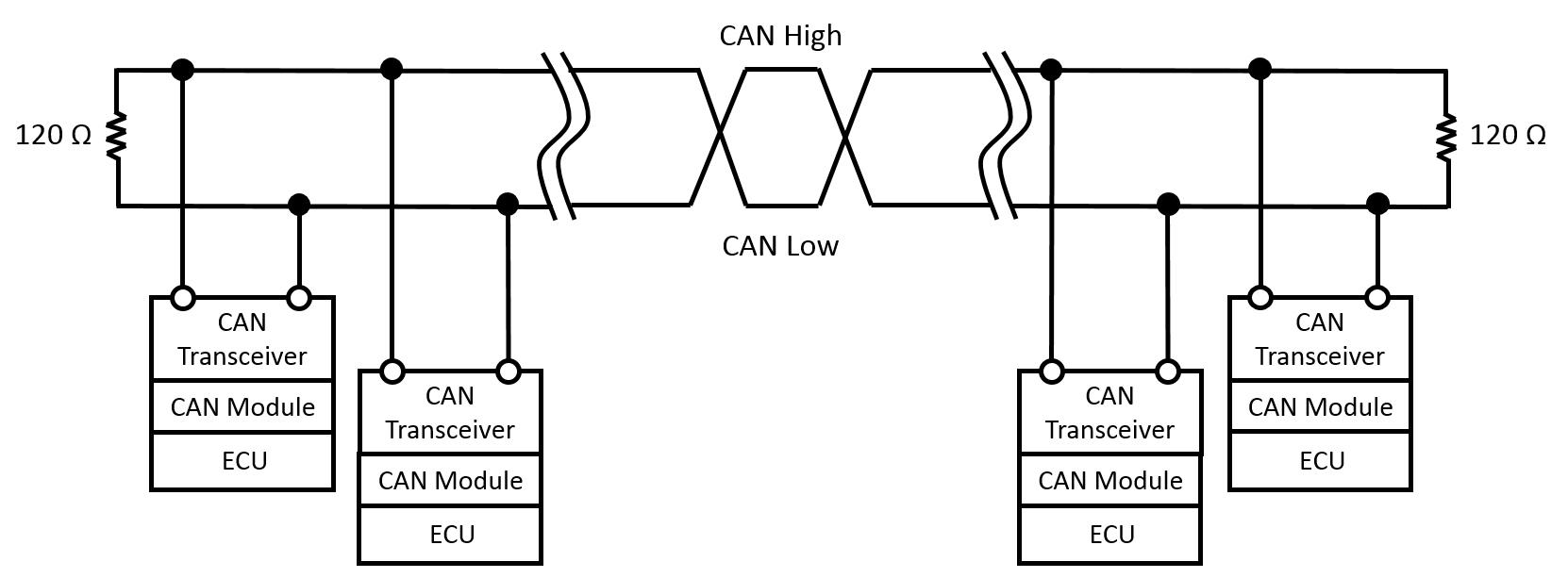 |
|---|
| CAN Bus |
Note
The CAN bus must be powered down in order to retrieve accurate resistance measurements.
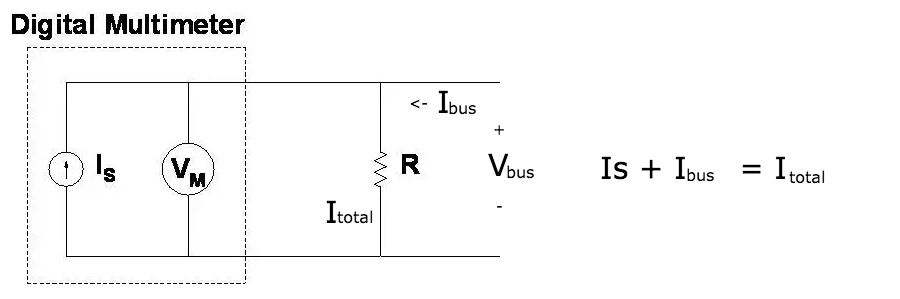
The reason why the resistance measurement requires the CAN bus to be powered down is due to the way a Digital Multi-Meter (DMM) measures resistance. A DMM uses a constant current source to drive a known and fixed amount of current through the resistor that is being measured. In parallel, the voltage drop across the resistor is measured. The resistance is then calculated using Ohm's law, V= I*R, solving for R. If there is another voltage source applied to the resistor, there will be an unknown current from the bus going through the resistor, changing the voltage drop and rendering the measurement by the DMM that is completely invalid.
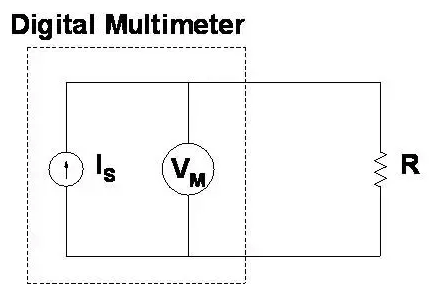 |
|---|
| Desired Operation |
 |
|---|
| Incorrect Measurement |
CAN Bus Termination
| Controller | Vehicle | Party | Chassis | Private | HVS | EVSE | Radar CAN |
|---|---|---|---|---|---|---|---|
| VCFRONT | - | 120 | - | - | - | - | - |
| VCLEFT | 120 | - | - | 120 (OBD-II CAN) | - | - | |
| VCRIGHT | 120 | 120 | - | - | - | - | - |
| External Drive Inverter (VCRIGHT) | - | - | - | 120 (only for rear drive inverter Private CAN if RWD, for both front and rear drive inverter Private CAN if AWD) | - | - | - |
| Drive Inverter Rear | - | - | - | 120 | - | - | - |
| Drive Inverter Front | - | - | - | 720 (not present on RWD variant) | - | - | - |
| Infotainment Computer | - | - | 120 | - | - | - | - |
| Electronic Stability Program | - | - | 120 | - | - | - | - |
| High Voltage Controller | - | - | - | - | 120 | - | - |
| Charge Port ECU | - | - | - | - | 120 | 120 | - |
| Electrical Vehicle Supply Equipment (EVSE) | - | - | - | - | - | 120 (Provided by EVSE) | - |
| Autopilot ECU | - | - | - | - | - | - | 120 |
| Interior Cabin Radar | - | - | - | - | - | - | 120 |
Step 2: Measuring the voltages
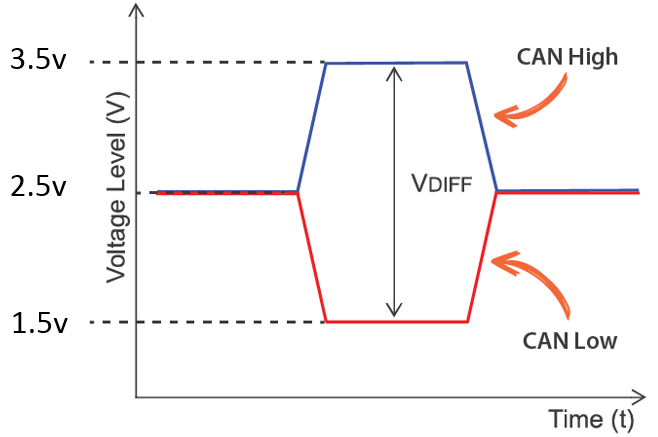
The voltage on a CAN-High wire usually fluctuates between 2.5V and 3.5V while the CAN-Low wire usually fluctuates between 2.5V and 1.5V. The easiest way to see these voltage fluctuations is by using a PC oscilloscope. If a PC oscilloscope is unavailable, it is possible to measure the average voltage directly with a multimeter. The measurement should be around 2.2V for CAN-Low and 2.7V for CAN-High.
 |
|---|
| CAN Bus Voltages |
Step 3: Checking the CAN bus load
There are no clear-cut rules for what the max bus load should be, but in general once the bus load increases beyond 70%, there is a possibility of data loss, or communication errors.
LINlink
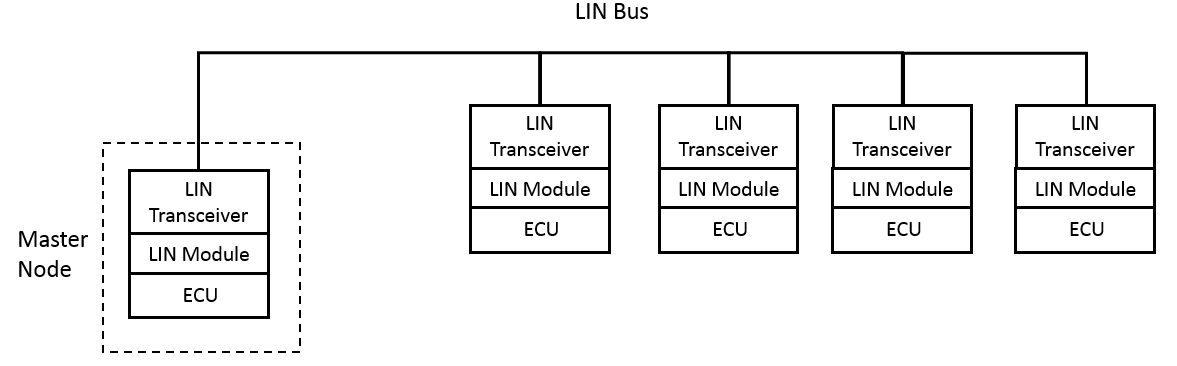
A Local Interconnect Network (LIN) is a low-cost alternative to CAN, if speed or fault tolerance are not critical. Each ECU on a LIN network is connected to primary node with a maximum number of 16 secondary nodes being connected to one primary. Unlike CAN, devices on a LIN network are connected by one signal-carrying wire instead of two and operating at LV bus voltage instead of 5V like CAN. If a LIN bus is connected to a CAN bus, it is usually connected via a primary LIN node.
 |
|---|
| LIN Network |