Vehicle Authentication and Security
Authenticationlink
System Overviewlink
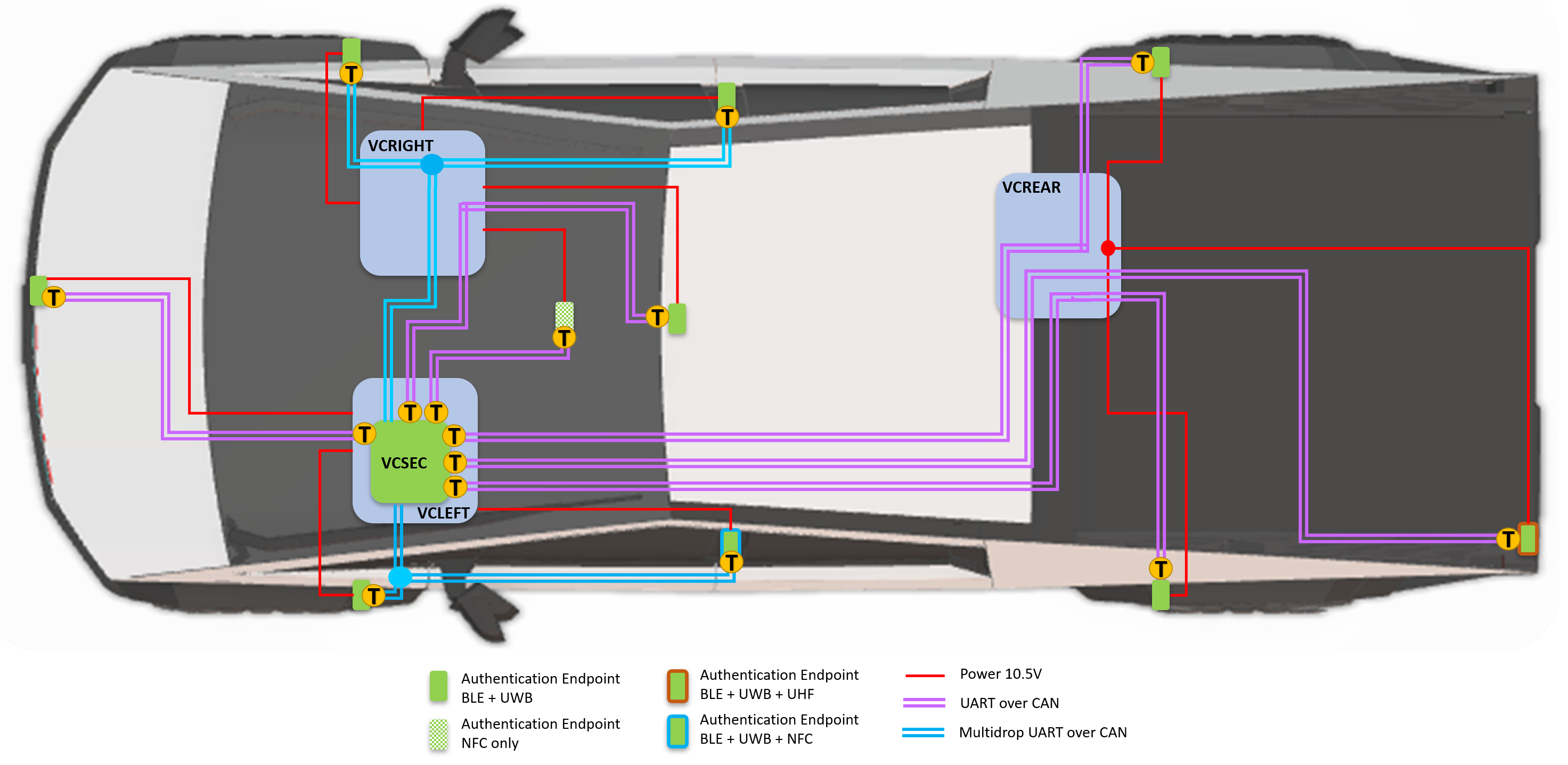
The Cybertruck authentication system has VCSEC (Vehicle Controller Security) as the primary controller. The system uses authentication end points, which accept different methods to authenticate a user to obtain various levels of access to the vehicle.
 |
|---|
| Endpoint Communication Diagram |
System Operationlink
VCSEC is the primary controller that is responsible for communicating with all the authentication endpoints, vehicle controllers, and making decisions regarding the authentication status of the vehicle. VCSEC communicates to other controllers via CAN and Etherloop. Power to the endpoints is controlled by the VCLEFT, VCRIGHT, and VCREAR. VCSEC can request to cycle the power of an endpoint if needed.
Authentication Methodslink
There are three ways to interact with the authentication system on Cybertruck:
-
Phone Key:
- Communicates via BLE (Bluetooth Low Energy) for both its passive and active features.
- Uses UWB (Ultra-Wide Band) for passive features if supported by the phone.
- Supports simultaneous use of three phone keys with the vehicle.
Note
UWB is supported only on iPhone 11 and above.
-
NFC (Near-Field Communication) Key Card:
- Communicates via the electromagnetic field induction between the vehicle's antenna (B-pillar or wireless phone charger) and the key card's antenna, which activates when it is placed close to the readers.
- Enables the phone key on Android to function as an NFC card.
- Serves as a backup in case the phone key is unavailable.
Note
When using a phone that is paired to multiple vehicles, using Phone Key as NFC will choose the correct vehicle on its own.
-
Remote Access:
- Communicates via the internet and requires connectivity on both the vehicle and phone, typically cellular or Wi-Fi.
Note
Phone key (BLE, UWB) and NFC key card do not require an internet connection.
Note
Keyfob products are not compatible with Cybertruck.
Note
Vehicle supports up to 19 authentication devices.
Componentslink
VCSEClink
VCSEC is consolidated inside the Left Controller. VCSEC manages all vehicle security and communicates with the customer's authentication device (phone or key card) via multiple endpoints located throughout the vehicle. VCSEC communicates to each of the endpoints via Universal Asynchronous Receiver / Transmitter (UART) over CAN bus or multi-drop UART over CAN bus; it communicates to the rest of the vehicle via CAN bus.
Important
Replacement of VCSEC (replacement of Left Controller module) will require all the keys (NFC and phone keys) to be paired again.
Authentication End Pointslink
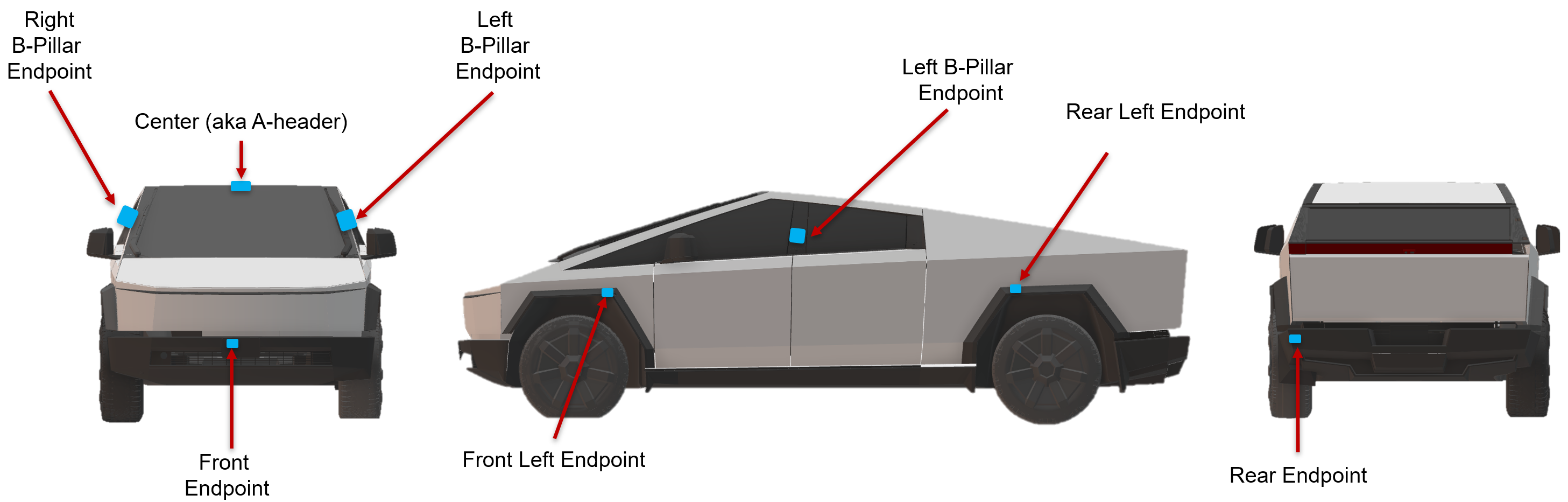
Cybertruck authentication endpoints support both Bluetooth Low energy (BLE) and Ultra-wide band (UWB). The wireless charger in the center console also functions as a NFC authentication endpoint.
 |
|---|
| Location | BLE | UWB | NFC | UHF |
|---|---|---|---|---|
| Center (A-header) | ✔ | ✔ | ||
| Front | ✔ | ✔ | ||
| Front Left | ✔ | ✔ | ||
| Front Right | ✔ | ✔ | ||
| Left B-Pillar | ✔ | ✔ | ✔ | |
| Right B-Pillar | ✔ | ✔ | ||
| Rear Left | ✔ | ✔ | ||
| Rear Right | ✔ | ✔ | ||
| Rear | ✔ | ✔ | ✔ | |
| Wireless Charger | ✔ |
Note
The user's phone will only connect to the Interior A-header authentication end point. All the other endpoints are used for location sensing of the phone via BLE or UWB.
Phone Keylink
The phone key extends the capabilities of the Tesla app on compatible mobile devices, serving as a dual-function local key for the vehicle, in addition to the existing Remote Access features. Before a vehicle can be paired as a key, the vehicle must be present in customer's MyTesla account. Once Paired, the mobile device automatically connects to the registered vehicle. Passive features will use either BLE or UWB to authenticate the vehicle. UWB is given priority, provided the user's device supports it, and the feature is enabled.
UWB uses message travel time instead of signal strength for device localization. This allows the vehicle to know the precise location of the phone key. This method protects the user against relay attacks, which makes UWB a more secure method for vehicle authentication.
Note
UWB still needs Bluetooth to be turned ON in the users phone since it is required to connect to the interior A-header authentication endpoint.
NFC Cardlink
The Near Field Communication (NFC) key card is a durable, waterproof device that contains no power source of its own. NFC uses electromagnetic induction to enable wireless power transfer and communication with a powered key card reader. NFC technology requires close proximity to the reader antenna to function, usually within about 4 cm. NFC key card serves as a backup for phone key for situations like a dead phone battery or phone hardware malfunction.
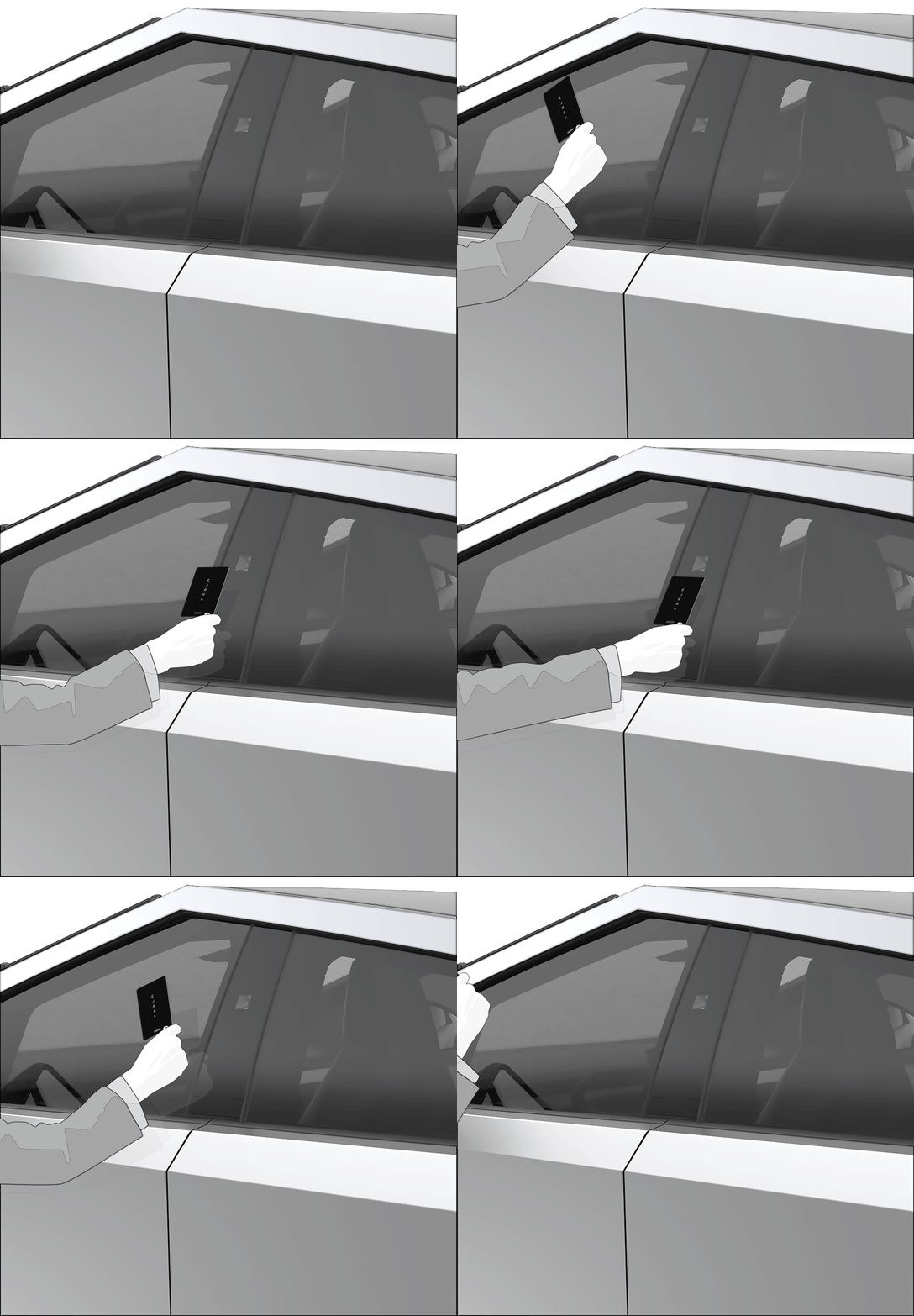
The orientation of the NFC key card is important to achieve optimal detection distance and authentication time. It should be oriented vertically at the B-pillar. Tapping or presenting the NFC key card to the reader is the preferred usage method. Swiping may cause failure to complete the authentication process.
 |
|---|
Some items, such as NFC-enabled cards like badges and credit cards, other metallic objects, or even a thick layer of ice and snow, can interfere with the electromagnetic field and cause severe degradation of performance. Severe bending, cracking, cutting, melting, or other mutilation of the NFC key card will cause permanent damage to the key card and may prevent proper operation. This includes a hole punch for a key ring.
The NFC readers on the vehicle have multiple power states to reduce power consumption and prevent unwanted interaction with NFC devices if already authenticated. The reader performance is at maximum in the Always Read power state, which it enters when it can anticipate user interaction or when it attempts to read an NFC card from the low power state (Read on Wake). Pressing the driver door open button will keep the B-pillar reader in Always Read for 20 seconds and can improve key card authentication performance if the first attempt does not succeed.
Pairing and Removallink
Pairing of two NFC key cards occurs at the factory and is included with every vehicle. However, additional cards can be purchased and paired if the customer desires additional or has a lost or damaged one. To pair a new NFC key card, the new card must be placed on the wireless charger and the pairing routine initiated. To remove a lost key card, the corresponding key slot must be identified and erased. Both pairing and removal are processes that can be performed by the customer via the touchscreen.
Note
A NFC key card can be paired to multiple Tesla vehicles. If user has access to multiple Tesla vehicles, they can just carry one NFC key card as backup for all the cars.
Tesla Chargerlink
When pressing the charge handle button on a Tesla Supercharger, the charge handle sends a UHF (Ultra High Frequency) signal to the rear authentication endpoint which triggers the vehicle to open its charge port door.
Door Locking and Unlockinglink
Active vs. Passive Lock / Unlock:link
- An active lock / unlock is defined as a user press on the mobile device lock / unlock button, or a user tap of the NFC card on a reader.
- A passive lock / unlock is defined as any automatic locking / unlocking of the vehicle which was not initiated by a specific user, such as Walk-Up Unlock or Walk-Away Lock.
Vehicle lock/unlock indicators:link
When the vehicle receives an active lock or unlock request, the hazard lights will flash along with an audible indication. A mislock will occur if any vehicle closure (doors) are detected to be open at the time of the lock request.
- Lock: One flash and audible indication.
- Unlock: Double flash and double audible indication.
- Mislock (failure to lock): Triple flash and triple audible indication.
Note
Mislock will not trigger for an open frunk or tailgate.
Locking features:link
The Walk-Away Lock feature will lock the vehicle if: - The feature is enabled on the touchscreen (UI_walkAwayLock = 1). - A user is not detected in the vehicle (UI_displayOnForUser == FALSE). - The vehicle is not in Accessory or Drive mode. - The mobile device has not been recently detected near the vehicle. - All doors are closed.
Note
Any active unlock request will temporarily disable Walk-Away Lock for 3 seconds or until the vehicle enters Drive mode or the vehicle is active Locked.
Note
A phone key shall not be regarded as walking away if the user explicitly disconnects their BLE connection.
Drive-Away Lock will lock the vehicle when the vehicle is under the following conditions: - Vehicle speed exceeds 5 mph. - Vehicle power state is in Drive. - Driver is in the vehicle. - All the doors are closed.
If Child Lock is enabled, the rear doors will not unlock from an interior handle open request.
Unlocking features:link
- If Unlock on Park is enabled, the vehicle will unlock all closures when the vehicle shifts to Park or if the park button is pressed while in Park.
- Passive Unlock is consistently active and will unlock the vehicle when the door open button is pushed as long as the phone key or key fob is present and authenticated. The option to disable passive entry is available in the mobile app.
- If the vehicle is locked, an open request from inside the vehicle will be honored, with the exception of the Child Lock feature. However, the closure will remain locked and cannot be opened from the exterior.
- Passive unlock also has a feature called selective passive unlock. Which can be triggered by the frunk release button, tonneau buttons, and the tailgate release that will only unlock that closure instead of the entire vehicle.
Operating Flow Chartlink
NFC Authenticationlink
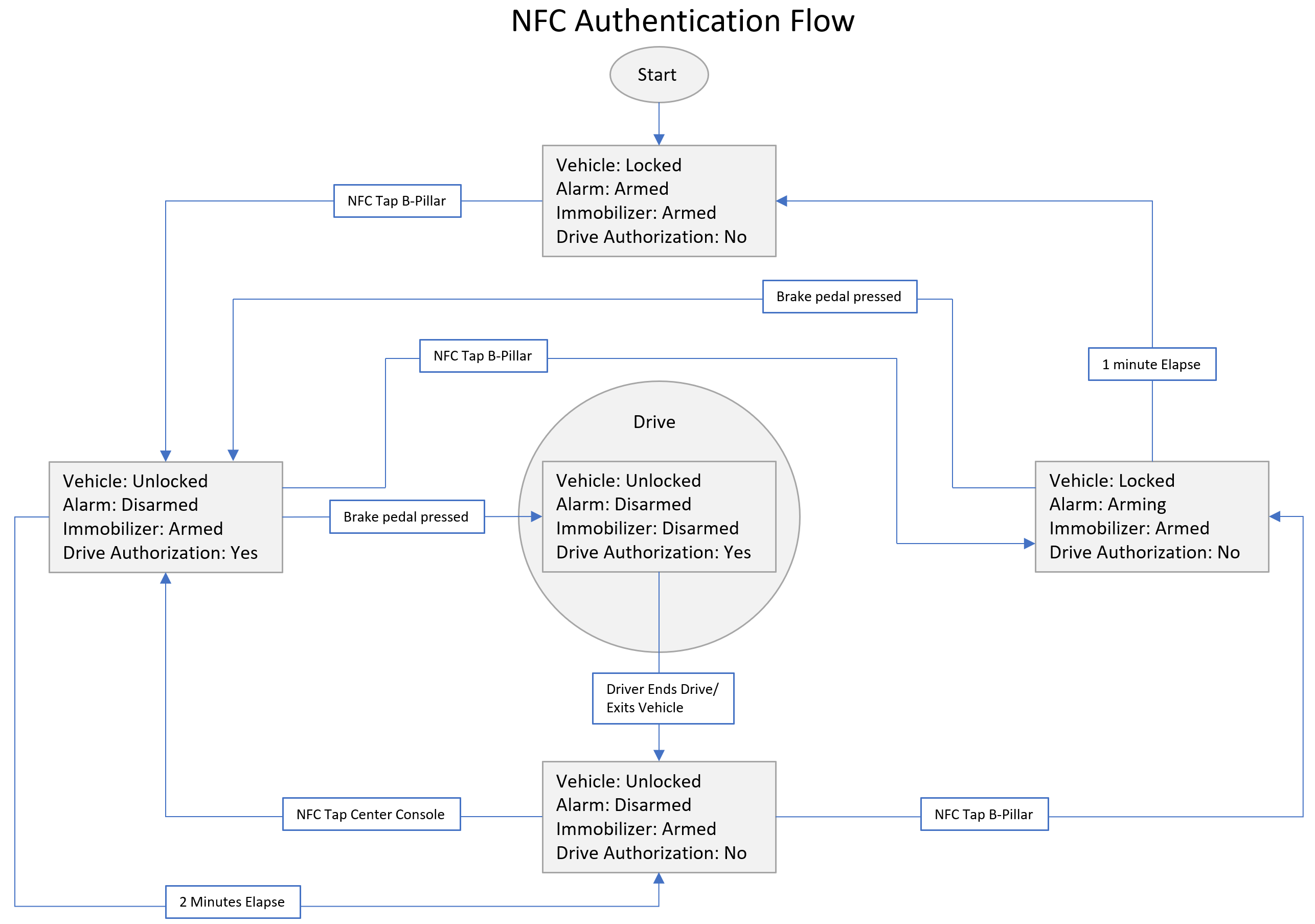
When using an NFC key card to authenticate the vehicle, VCSEC determines a key is active when an authenticated NFC card is scanned.
 |
|---|
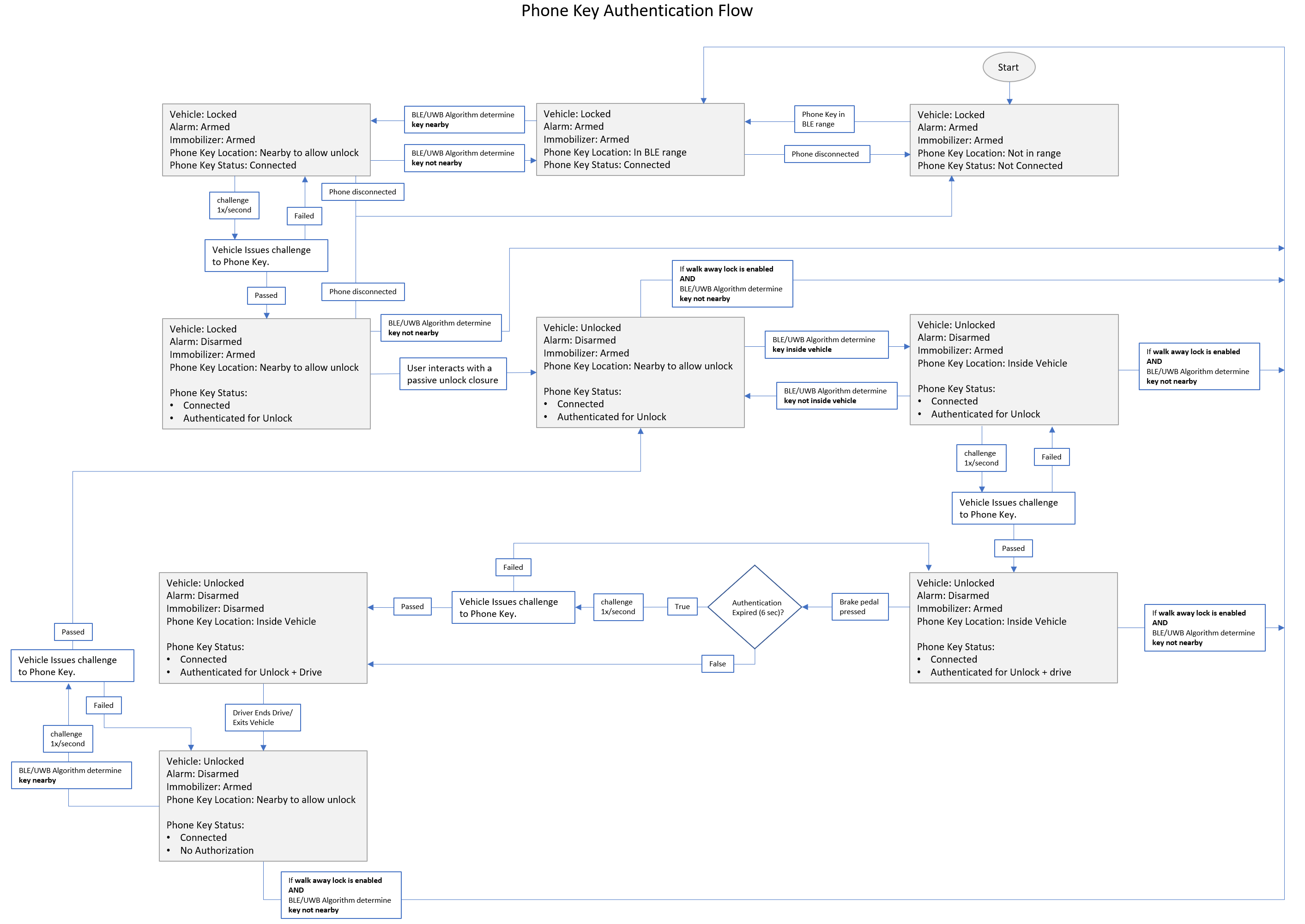
Phone Key Authenticationlink
 |
|---|
The vehicle continuously advertises its identity via the BLE endpoints. This advertisement is read by the Tesla app when in range of the vehicle. The phone will automatically form a Bluetooth connection with the vehicle.
Once connected, the vehicle determines if the phone is near the vehicle; this process is referred to as localization. This localization can be done either by UWB or BLE. Priority if given to UWB if available. For details on localization see the respective BLE and UWB localization sections.
Once the phone is determined to be near the vehicle via localization. The vehicle attempts to authenticate the vehicle for unlocking. The phone receives an encrypted challenge from VCSEC, and the phone key replies with its encrypted response. If the response is validated by VCSEC, it then authenticates the key to unlock the vehicle.
When the user interacts with a passive unlock closure, the VCSEC checks authentication status and unlocks if authenticated. If no phone has been authenticated, the vehicle checks during the next 1-4 seconds, depending on the closure for the phone to be localized near the vehicle. If the phone becomes localized near the vehicle in that time frame, the vehicle does the authentication challenge response described previously and unlocks if it is successful.
In parallel to the authentication for unlock, there is additional authentication for driving the vehicle. This localization does a more strict check for the phone being inside the cabin. If localized in this region, the vehicle authenticates drive via challenge response with the phone over BLE. This authentication expires after six seconds and will automatically be refreshed when the driver presses the brake pedal if the phone is still localized near the passenger cabin.
 |
|---|
Note
It is possible for BLE/UWB Algorithm to determine key is inside the vehicle before detecting it to be nearby.
Note
The expiration of authentication is not reflected in the VCSEC_authenticationStatus signals and is only used internally for disarming the immobilizer.
BLE Localizationlink
Once the phone and center BLE are connected, vehicle exterior endpoints start sensing BLE and report Received Signal Strength Indicator (RSSI) values. The strength of these RSSI values are used to determine where the phone is in proximity to the vehicle.
Limitation
When part of the users body is between the phone and the nearest BLE antenna localization performance may be significantly degraded.
Note
Vehicle does not log RSSI values in drive state.
VCSEC implements complex models on the reported RSSI values to determine if a key is present nearby. Signals to use:
- VCSEC_frontLeftBLEAntennaRSSI
- VCSEC_frontRightBLEAntennaRSSI
RSSI signal ranges:
- No signal (RSSI) → -127dB.
- Very poor signal strength (RSSI) → less than -80dB.
- Poor signal strength (RSSI) → less than -70dB.
- Fair signal strength (RSSI) → between -70dB and -60dB.
- Good signal strength (RSSI) → between -60dB and -50dB.
- Excellent signal strength (RSSI) → greater than -50dB.
Note
The more positive the RSSI value, the better the signal strength (e.g., an RSSI value of -50dB is greater than an RSSI value of -80dB).
UWB Localizationlink
Ultra-wideband (UWB) is a wireless ranging/distance measurement protocol designed for short-range connections using radio waves. Ultra-WideBand operates across a broader range of the frequency spectrum and incorporates time of flight technology to acquire precise distance information.
After the phone connects to the vehicle via BLE, the vehicle sets up UWB ranging sessions between the phone and up to six BLE endpoints on the vehicle. After these sessions have been set up, the vehicle starts getting distance measurements to the phone.
The endpoints on Cybertruck that are configured to do UWB ranging are:
- Center
- Front
- Front Left
- Rear
- Rear Left
- Right
Note
UWB will only be available with the currently selected vehicle in the mobile app.
Once the phone and center BLE are connected, vehicle exterior endpoints start running UWB ranging. Ranging involves the computation of time of flight (ToF) between devices, which corresponds to the total time taken for challenge/response packets to travel back and forth.
Signals to Check the phones distance from each of the endpoint:
- VCSEC_UWBFrontLeftDistance
- VCSEC_UWBFrontRightDistance
Active Key for Profile Selectionlink
Active key is the closest passively authenticated device to the B-pillar when the driver door is opened. This will be done by UWB or BLE localization. Performance is better when UWB is used. If a profile is linked to the active key, it will be automatically selected when the vehicle is unlocked.
Important Signalslink
| Signal Name | Description | Values |
|---|---|---|
| VCSEC_frontLeftBLEAntennaRSSI | BLE signal strength | |
| VCSEC_frontRightBLEAntennaRSSI | BLE signal strength | |
| VCSEC_UWBFrontLeftDistance | UWB Distance measurement | |
| VCSEC_UWBFrontRightDistance | UWB Distance measurement | |
| VCSEC_lockRequestType | Lock request type | "0-"LOCK_REQUEST_NONE" ; 1-"LOCK_REQUEST_PASSIVE_SHIFT_TO_P_UNLOCK" 2-"LOCK_REQUEST_PASSIVE_PARKBUTTON_UNLOCK" 3-"LOCK_REQUEST_PASSIVE_INTERNAL_HANDLE_UNLOCK" 4-"LOCK_REQUEST_PASSIVE_DRIVE_AWAY_LOCK" 5-"LOCK_REQUEST_PASSIVE_BLE_WALKUP_UNLOCK" 6"LOCK_REQUEST_PASSIVE_BLE_EXTERIOR_CHARGEHANDLEBUTTON_UNLOCK" 7-"LOCK_REQUEST_PASSIVE_BLE_EXTERIOR_HANDLE_UNLOCK" 8-"LOCK_REQUEST_PASSIVE_BLE_INTERIOR_HANDLE_UNLOCK" 9-"LOCK_REQUEST_PASSIVE_BLE_LOCK" 10-"LOCK_REQUEST_CRASH_UNLOCK" 11-"LOCK_REQUEST_ACTIVE_UI_BUTTON_UNLOCK" 12-"LOCK_REQUEST_ACTIVE_UI_BUTTON_LOCK" 13-"LOCK_REQUEST_ACTIVE_REMOTE_UNLOCK" 14-"LOCK_REQUEST_ACTIVE_REMOTE_LOCK" 15-"LOCK_REQUEST_ACTIVE_NFC_UNLOCK" 16-"LOCK_REQUEST_ACTIVE_NFC_LOCK" 17-"LOCK_REQUEST_ACTIVE_BLE_UNLOCK" 18-"LOCK_REQUEST_ACTIVE_BLE_LOCK" 19-"LOCK_REQUEST_PASSIVE_INTERNAL_LOCK_PROMOTION" 20-"LOCK_REQUEST_PASSIVE_AUTO_PRESENT_DOOR_REQUEST" 21-"LOCK_REQUEST_KEYFOB_OPEN_DOOR_REQUEST" " |