Rear Trunklink
Last updated: October 20, 2023
The Model Y rear trunk is a storage compartment located at the rear of the vehicle. The cargo space can be accessed by opening a powered liftgate, which is electrically operated by a powered struts controlled by the left vehicle controller and by a power cinch latch controlled by the right vehicle controller.
Components Descriptionlink
Strutslink
The Model Y is equipped with struts to raise the liftgate. The left-side strut is a power strut and the right-side one is a passive spring strut.
The power strut is an electrical actuator driven by VCLEFT and contains two hall sensors to track the position of the liftgate.
Physical Switcheslink
Exterior Release Switchlink
 |
|---|
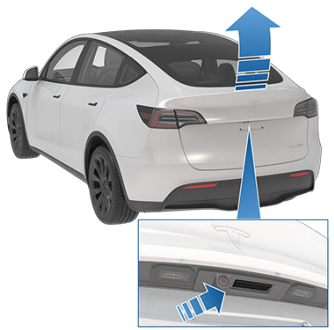
The liftgate exterior release switch is located is located under the rear trunk's exterior handle. It is a simple contact switch with a direct connection to VCRIGHT.
The exterior release switch can be used to open the liftgate if the vehicle is unlocked.
Liftgate Shutface Buttonlink
 |
|---|
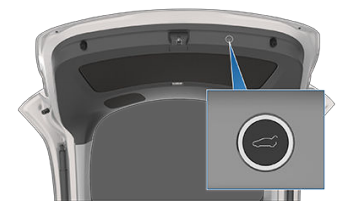
The liftgate shutface button is located on the underside of the liftgate. The button connects to VCRIGHT and controls the liftgate to close when pressed.
The shutface button is also used to set the height of opening of the liftgate (see the Adjusting the Opening Height for details).
Liftgate Latchlink
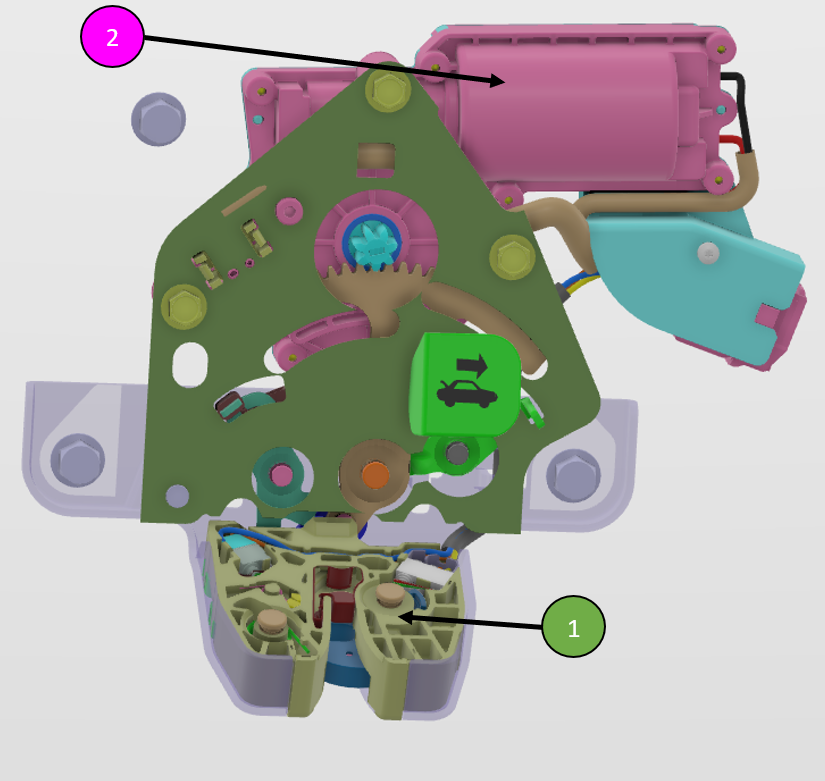
The liftgate latch is a single component with built-in primary and secondary latch positions and integrates an electric motor for the cinching and power release functionalities.
 |
|---|
| 1. Rear trunk latch 2. Latch motor |
 |
|---|
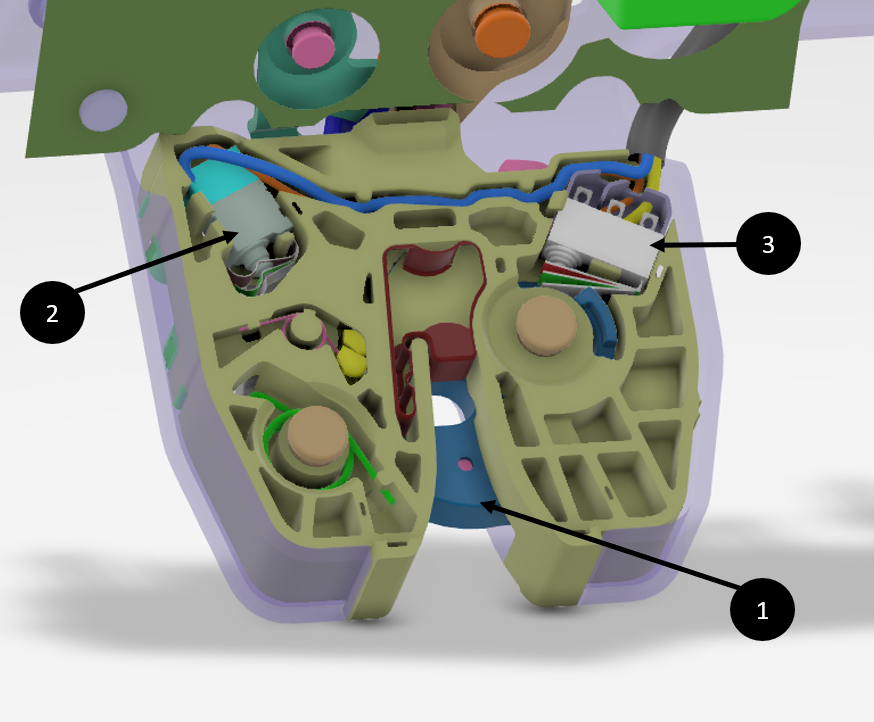
| 1. Latch claw: the portion of the latch that hooks around the striker to ensure closure 2. Pawl switch: indicates if the latch is secondary position 3. Claw switch: indicates if the latch is primary position 4. Latch pawl (not shown on the picture): portion of the latch that moves the claw in and out of place |
The rear trunk is held close by a striker located on its underside. When closed, the striker is engaged inside both the latch primary and secondary mechanisms.
When the rear trunk is closed, the powered struts retract and lower the liftgate until the striker engages into the latch secondary position. The latch then takes over and pulls the striker into the primary position.
Component Operationlink
User Interactionlink
Opening the Rear Trunklink
There are four methods of opening the rear trunk:
- Press the rear trunk area of the key fob twice within 500m.
- Press the rear trunk button on the Tesla mobile app.
- Touch CONTROLS > REAR TRUNK on the touchscreen.
- If the vehicle is unlocked, press the exterior release button.
- The exterior release button is a simple contact switch. Upon pressing, the right vehicle controller detects a closed path to ground.
Closing the Rear Trunklink
With the liftgate opened, there are five methods of closing the rear trunk:
- Pull down the liftgate and push firmly until it is fully closed.
- Press the rear trunk button of the key fob twice within 500m.
- Press the rear trunk button on the Tesla mobile app.
- Touch CONTROLS > REAR TRUNK on the touchscreen.
- Press the liftgate shutface close button.
- The shutface close button is a simple contact switch. Upon pressing, the right vehicle controller detects a closed path to ground.
Adjusting the Opening Heightlink
The liftgate opening height is adjustable and can be set by following these three steps:
- Open the liftgate, and then manually lower the trunk to the desired opening height.
- Press and hold the liftgate shutface close button for five seconds until a confirmation chime is heard.
- Confirm the liftgate is set it to the desired height by closing the liftgate and then reopening it.
Rear Trunk Latchlink
The rear trunk latch integrates a motor to enable the automatic operation of the liftgate. This motor can spin in both directions to cinch or release.
There is one switch detecting the home position of the motor and its status is classified as followed:
| Latch Motor | Home Switch |
|---|---|
| "Home" Position | Not Pressed |
| "Unhomed" Position | Pressed |
There are two switches detecting the position of the latch and their status are classified as followed:
| Trunk Latch | Pawl Switch | Ratchet/Claw Switch |
|---|---|---|
| Primary Position (Closed) | Not Pressed | Not Pressed |
| Secondary Position (AJAR) | Not Pressed | Pressed |
| Open Position | Pressed | Pressed |
| Open Position | Pressed | Not Pressed |
If a release request is received by the right controller:
- The latch motor actuates and spins in the release direction, performing a release actuation, for a maximum of 6 seconds.
- The release actuation stops when the ratchet and pawl switches are pressed for 20ms, classifying the latch as opened, or if the motor stalls for 100ms.
- The latch waits 500ms.
- The latch motor actuates and spins in the cinching direction, performing a reset actuation, for a maximum of 3 seconds.
- The reset actuation stops when the home switch is not pressed, classifying the latch motor at the home position, or if the motor stalls for 100ms.
With the liftgate is open, the right controller cinches close the latch if the pawl switch is not pressed, indicating that the liftgate is being closed as the secondary position is engaged.
- The latch motor actuates and spins in the cinching direction, performing a cinching actuation, for a maximum of 6 seconds.
- The release actuation stops when the ratchet and pawl switches are not pressed for 50ms, classifying the latch as closed, or if the motor stalls for 100ms.
- The latch motor actuates and spins in the release direction, performing a reset actuation, for a maximum of 3 seconds.
- The reset actuation stops when the home switch is not pressed, classifying the latch motor at the home position, or if the motor stalls for 100ms.
Serviceabilitylink
There are multiple signals providing information on the liftgate and rear trunk latch logged by the different vehicle controllers. All the signals mentioned in the following sections are logged by messages posted on the Vehicle (VEH) CAN Bus.
Rear Trunk Latchlink
The rear trunk latch status is reported by VCRIGHT signal VCRIGHT_trunkLatchStatus and can be monitored to diagnose rear trunk latch related issue. The latch status is mainly determined by the value of the latch switch(es) but also rely on different conditions to detect potential malfunction in the system operation.
VCRIGHT_trunkLatchStatus |
Description |
|---|---|
8 LATCH_FAULT |
The trunk latch detected a stalling condition or timed out from its previous state. |
7 LATCH_DEFAULT |
Default trunk latch status when initializing the latch state machine. |
6 LATCH_TIMEOUT |
|
5 LATCH_AJAR |
The trunk latch is in AJAR position (primary unlatched but not secondary). |
4 LATCH_OPENING |
The trunk latch is performing a release actuation. |
3 LATCH_CLOSING |
The trunk latch is performing a cinching actuation. |
2 LATCH_CLOSED |
The trunk latch is closed. |
1 LATCH_OPENED |
The trunk latch is opened. |
0 LATCH_SNA |
The left vehicle controller sets different alerts to report unexpected or special events, listed in the table below:
| Alert | Description |
|---|---|
VCLEFT_a352_liftgateClosingLatchEntryFailed |
Liftgate failed to close. |
VCLEFT_a355_liftgateUnexpectedStop |
Liftgate stopped unexpectedly while opening or closing. |
VCLEFT_a357_liftgateUncalibrated |
Liftgate latch closed at unexpected liftgate opening angle. |