Infotainmentlink
Last updated: October 20, 2023
Overviewlink
Infotainment is a general term used to describe how a customer accesses vehicle settings, information, entertainment, climate controls, and audio. It has since grown to encompass navigation, connectivity, voice recognition, and mobile app and mobile controls. The Intel-based infotainment board is replaced by an AMD-based system in October 2021.
Note
For the AMD-based infotainment system Theory of Operation, see the following documents:
A top-level view of the entire infotainment system, as seen through the touch display, is shown in the table below. All these features run on the Infotainment and Connectivity Electronic Control Unit (ECU) (Infotainment ECU) but some external components are needed.
Table 1. Infotainment System Overview
| User Interface Element | Description | Related Hardware |
|---|---|---|
| Bluetooth (BT) | Displays information from mobile phone features such as calendar, calls, call history, contacts, and dial pad. Plays music from mobile phone. | Bluetooth antenna |
| Wi-Fi connectivity | Allows vehicle to be connected via Wi-Fi. | Wi-Fi antenna |
| Cellular connectivity | Gives the vehicle access to cellular networks (LTE). | Connectivity card with SIM card (eSIM) and LTE antenna. |
| Media player | Internet radio (TuneIn or Spotify), streaming (Slacker), phone media, USB input, and FM/AM radio stations based on region. | Tuner Module, FM antenna, amplifier, component for Bluetooth, and LTE. |
| Maps and navigation | Maps, routing, traffic information, and charging network provided by Tesla. | Driver Assistance System (DAS) electronic control unit (ECU) and LTE components. |
| Browser | Application used to access the internet on the center display. | LTE components. |
| Rear-view camera | Allows driver to see objects behind the vehicle in addition to using the rear view mirror. Rear-view access is routed through the DAS ECU (more information available in the DAS section of Theory of Operation). | Rear-view camera component and DAS ECU |
| Voice recognition | Processes spoken commands and interacts with the phone via BLE. Requires internet connection. | LTE component, steering wheel controls, and microphone. |
| Vehicle controls | All vehicle controls such as driving, displays, doors, lights, suspension, etc. | Car computer and vehicle controllers (front, left, right, security). |
| Settings | All vehicle settings such as profiles, DAS, security, language/units, etc. | -- |
| Charging | Charging information, current limitation, charge scheduling, and charge port control. | For more information on charging, refer to Charging section of the Theory of Operation. |
| Climate control | Seat and in cabin climate control. Front and rear defrost. | -- |
| Energy | Average consumption and projected vehicle range. | -- |
| Phone | Address book and in vehicle calling. | BT antenna |
| Toybox | Location of Tesla easter eggs and Telsa Arcade. | -- |
| Entertainment | Access to Theater Mode. | -- |
| Software update | Firmware release notes, starting / scheduling updates, update preferences. | -- |
| Tesla Mobile App | Method of communicating and controlling the vehicle from the customer's phone. | -- |
Updating Vehicle Firmwarelink
The infotainment system is updated periodically by a process called a firmware update. During a firmware update, the Infotainment ECU, Autopilot computer, and onboard control modules are all updated if needed. This process is managed by a program called the ice-updater, or Updater, that lives on the Infotainment ECU.
Car Computerlink
The car computer is made up of two ECUs: the Infotainment and Connectivity ECU (Infotainment ECU) and the Driver Assistance ECU (DAS ECU). Unlike the Model S and Model X, the car computer is completely separate from the touch screen. The Infotainment ECU is the central interface for the Model 3 infotainment systems. The Infotainment ECU module contains a central processor, Ethernet switch, audio amplifiers, a connectivity card, and the Gateway. The on-board diagnostic interface (ODIN) also runs on the Infotainment ECU. The Infotainment ECU is located next to the DAS ECU with the heatsink plate between them, making the pair into the single module.
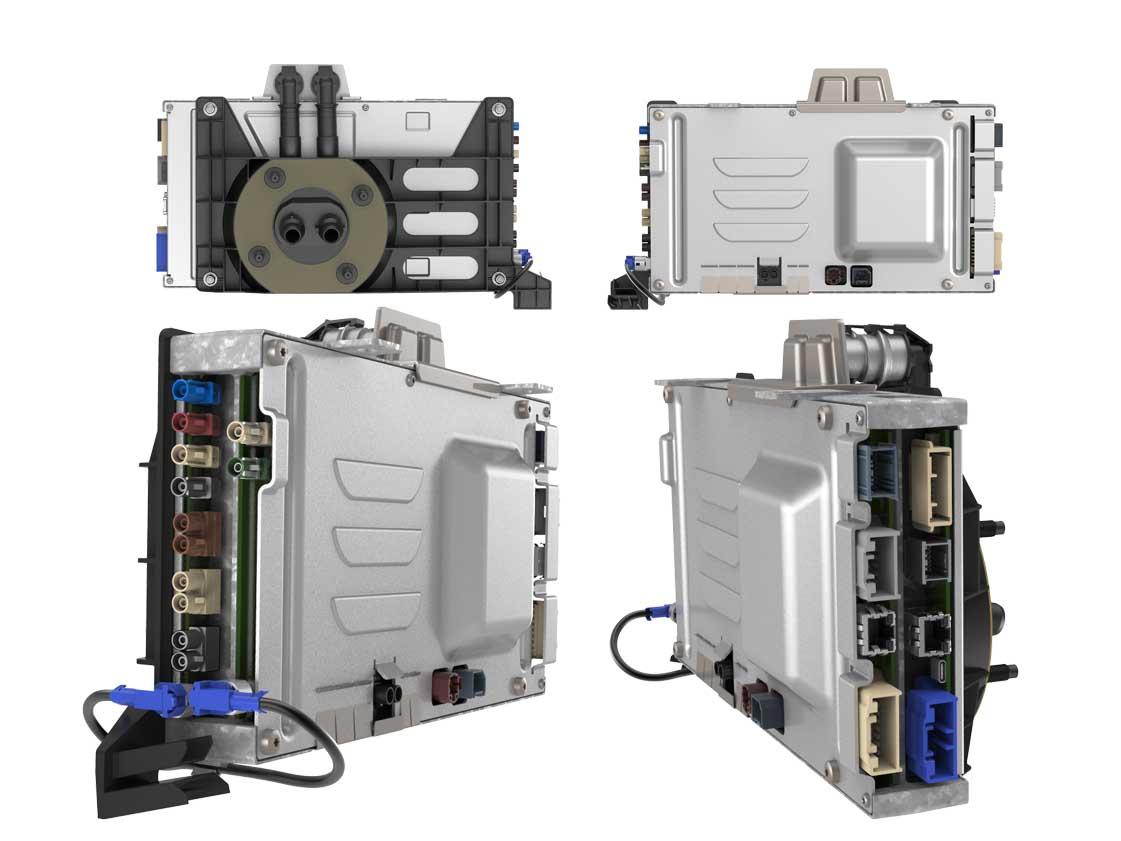 |
|---|
| Car Computer, Overview (HW 2.5 Shown) |
Note
The noticeable physical differences between DAS ECU hardware (HW) versions 2.5 and 3 are the Connectivity Card arrangement and the lack of DAS connections on HW 3.
The Connectivity Card on the start of production car computer, or HW 2.5, is a removable cartridge. The card on the most recent version of the computer, or HW 3, requires removal of the front cover to access. The front cover on the car computer can be removed without disconnecting the cooling lines and majority of electrical connections. Refer to the Service Manual for more information.
The Infotainment ECU interfaces with the external modules listed below:
- Microphone array
- Premium audio module
- Radio/tuner module
- Touch display unit
- Front USB hubs
Infotainment and Connectivity ECUlink
The Gateway in the car computer has the same function as the Gateway in the Model S and Model X. It handles CAN traffic for the chassis, vehicle, and private networks. The execution of UDS routines will be initiated through the Gateway, which can communicate with each ECU, and the Gateway-diagnostic interface (gw-diag). It also authenticates access to the car computer via Ethernet for diagnostic purposes.
The Gateway has the following functions:
- Handles CAN traffic, UDS routines.
- Real-time clock serves as the reference clock for the rest of the vehicle.
- Interfaces with microSD card for log storage.
- Stores vehicle configuration.
The RING pin on the Connectivity Card (SMS wake request) is wired to the WAKE pin on the Gateway, meaning SMS wake requests will wake the Gateway, which will in turn send wake signals over Ethernet to the other modules. The Gateway also has a microSD card for logging purposes. This microSD card is serviceable on both hardware variants.
The Ethernet switch is an integral part of vehicle communication. It is a 6-port GB switch that links several major components of the infotainment system:
- Intel Gordon Peak BMP
- Gateway
- Radio/Tuner Module
- Connectivity Card
The Ethernet switch also provides a communication link with the DAS ECU and Diagnostic Port access. The switch is programmed with security measures to ensure that each client has an approved port and a list of approved hosts to communicate with. Each port is therefore programmed to a specific device and they cannot be switched around for security purposes.
Note
If the car computer is running its Production Linux Kernel (PLK) or online image, the ethernet switch will block pings from unknown host. In other words, if pinging the Infotainment ECU or GTW using Cygwin or similar linux emulator, it is expected to fail. The port is unlocked when running in the Emergency Linux Kernel (ELK) or recovery, and in that case the ICE/GTW are expected to respond to pings.
Car computer Power Sequencelink
Power is first directed to the Gateway from the front vehicle controller (VCFront). During the Gateway application boot process, LED D10 flashes quickly. Once the Gateway application is booted, LED D11 is illuminated and LED D10's flashes slow down. Power is then supplied to the BMP and the Gateway microSD card. Once the BMP boots the Production Kernel Image, it then sends power to the display indicated by illumination of LED D79. It is important to note that D13 and D79 LEDs are visible once the passenger footwell cover is removed. These LEDs can be used to quickly identify which state of the boot process the car computer is in. For instance, if LED D79 is not illuminated, the BMP is not running in the Production Linux Kernel could either be unresponsive or running in the Emergency Linux Kernel. Similarly, if LED D13 is not illuminated, then the Gateway could be unresponsive or not running its application.
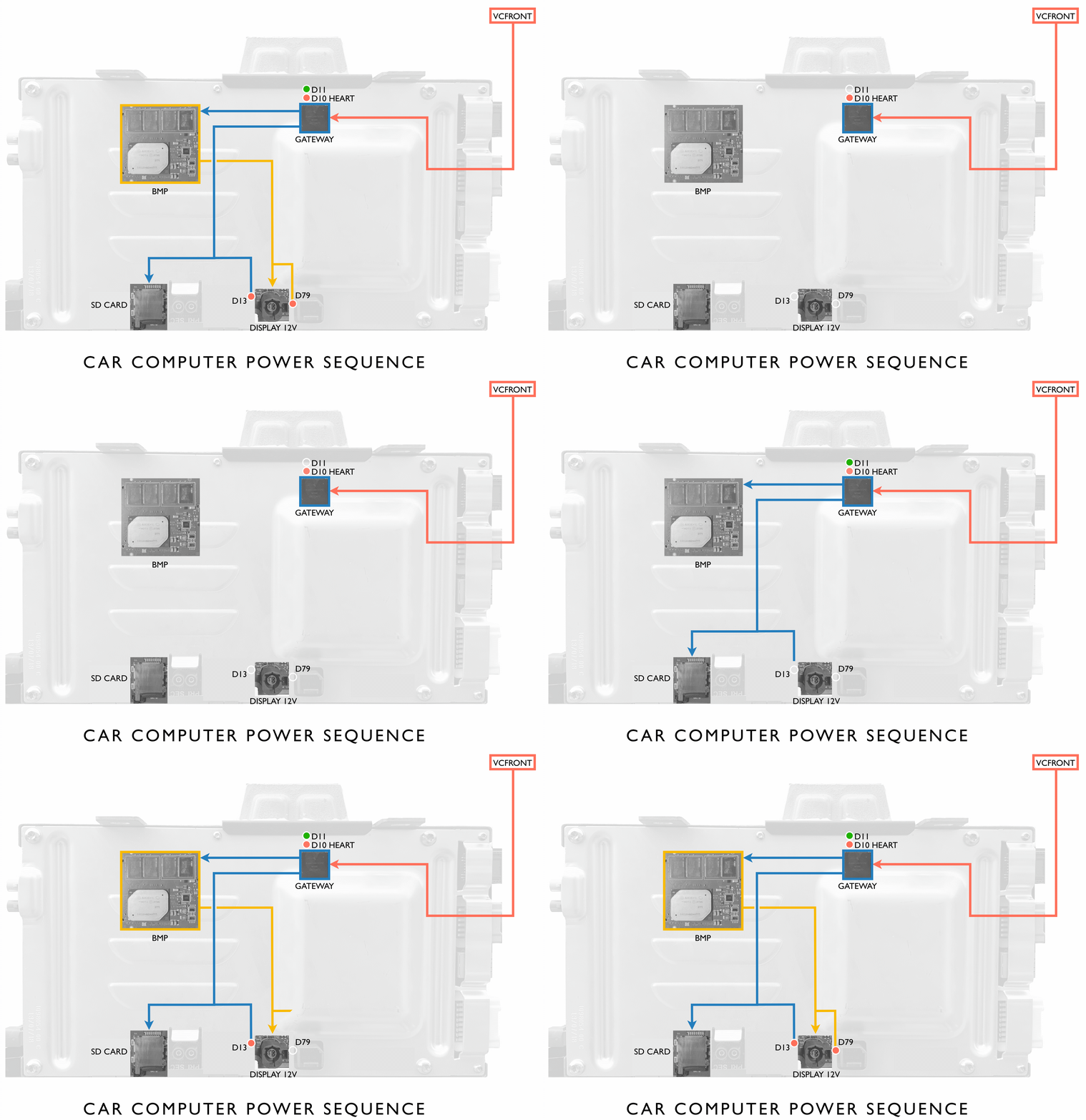 |
|---|
Bluetooth and Wi-Filink
Specification:
- Bluetooth/WiFi RF Transducer
- I2S/UART and PCIe output
- Coaxial connectors
Component Descriptionslink
Unlike the module of the Model S and Model X, the Model 3 has integrated most of the Bluetooth stack into the Intel processor. Two antennas pick up RF data which is digitized by the Bluetooth/WiFi chip. It uses I2S for digital audio and UART as the host controller interface. The processing for input and microphone output is done on the Intel processor. Some key features include:
- Twin antennas support both 2.4GHz and 5GHz WiFi
- 802.11ac compatible
- basic hardware interface
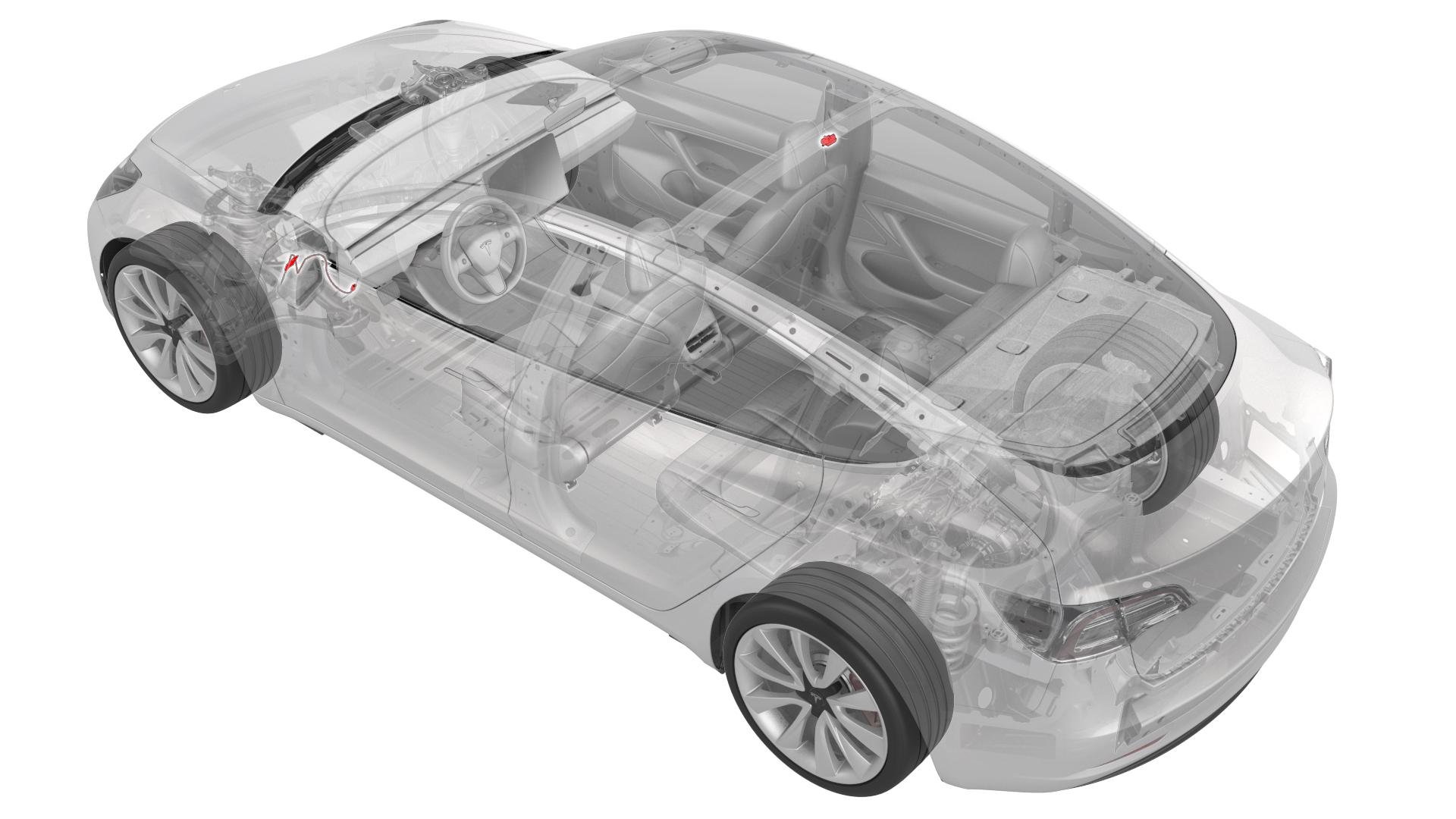
The antenna in the side mirror can not be serviced separately and must be replaced with the entire mirror assembly.
 |
|---|
Audiolink
Base Audiolink
The on-board base audio is driven by two DAC amplifiers (4x40W output power). The base audio configuration has eight speakers, each delivering up to 40W output:
- 4 on the doors, 1 each
- 3 on the Instrument Panel: left, center, and right
- 1 pedestrian warning.
| Qty | Image | Size | Type | Location | Amplifier | Power |
|---|---|---|---|---|---|---|
| 1 | Center Channel | 100 mm | High Mid-range | Instrument panel | Base | 40w / 2Ω |
| 2 | Left & Right | 100 mm | High Mid-range | Instrument panel | Base | 40w / 2Ω |
| 2 | Left & Right | 170 mm | Woofer | Front Door | Base | 40w / 2Ω |
| 2 | Left & Right | 100 mm | High Mid-range | Rear Door | Base | 40w / 2Ω |
Premium Audiolink
The premium audio module is external to the car computer. It has an A2B chip (slave) for communication. Since the premium audio package has eight additional speakers, this module contains two audio drivers at two different power output levels
- DAC Amplifier (4x40W output power)
- Left and right rear doors
- Left and right parcel shelf
- DAC Amplifier (4x80W output power)
- Left and right door subwoofer
- Sub VC1 and Sub VC2
| Qty | Image | Size | Type | Location | Amplifier | Power |
|---|---|---|---|---|---|---|
| 1 | Center Channel | 100 mm & 25 mm | High Mid & Tweet | Instrument panel | Base | 40w / 2Ω |
| 2 | Left & Right | 100 mm | High Mid-range | Instrument panel | Base | 40w / 2Ω |
| 2 | Left & Right | 25 mm | Tweeter | Mid A-Pillar | Base | 20w / 4Ω |
| 2 | Left & Right | 100 mm | High Mid-range | Rear parcel shelf | Premium | 40w / 2Ω |
| 2 | Left & Right | 55 mm | High Mid-range | Upper A-Pillar | Base | 40w / 2Ω |
| 2 | Left & Right | 100 mm | High Mid-range | Rear door | Premium | 40w / 2Ω |
| 2 | Left & Right | 200 mm | Woofer | Front door | Premium | 80w / 4Ω |
| 1 | LFE Channel | 200 mm | Sub-woofer | Rear quarter | Premium | 2x 80w / 4Ω |
Radio and Tuner Modulelink
The combined radio/tuner module has four antennas: two for FM and two for DAB/HD. There is no XM or AM radio in the Model 3. This module receives radio data from the FM/DAB antenna, which connects to the white coaxial socket. The 10-pin connector provides power, ground and Tuner-ICE communication via automotive Ethernet standard 100BASE-T1, which is converted to RMII before reaching the Gateway. This datagram includes station, song, artist information, and artwork where applicable (HD radio). Note that the pink coaxial socket is not used. The antennae are built into the rear glass.
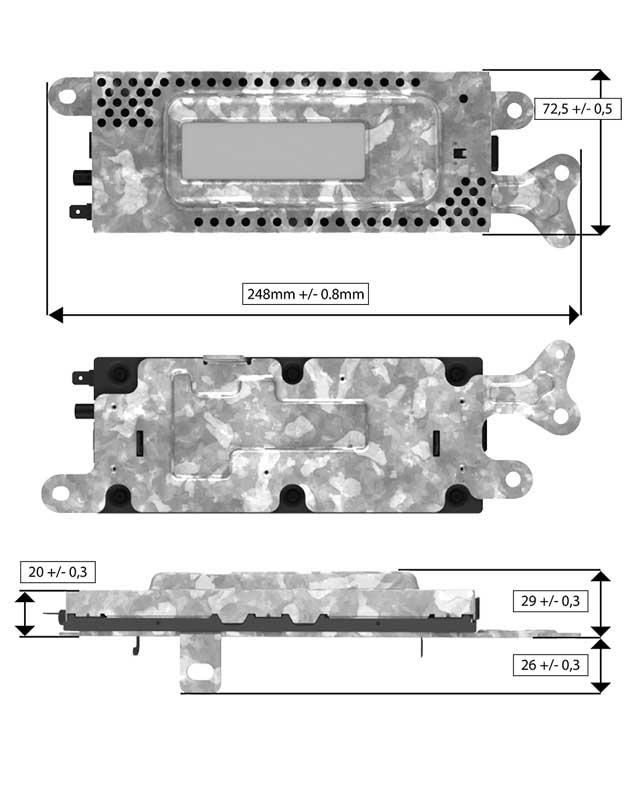 |
|---|
| Radio/Tuner Module |
Connectivity Cardlink
The connectivity card has two cellular coaxial antennae in a single connector that communicates with the modem. Cell connectivity means the rest of the vehicle can be put into asleep mode while the modem sits in a low-power paging mode and wakes all systems when it receives a page from the network (for example, wake or poke SMS). The card has a Wake input from the Intel Gordon Peak and a Ring output for waking the Gateway when an SMS is received. Audio is passed over I2S directly to the ICE. All other data is passed over Ethernet. Some key features:
- Supports eUICC soft SIM.
- Card is removable from the car computer.
- Does NOT hold the external SIM card.
Touchscreenlink
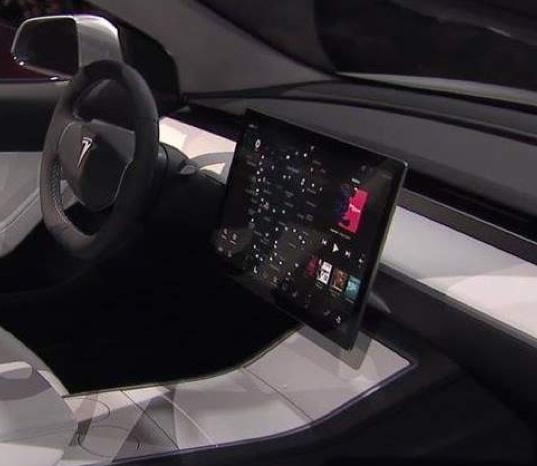
The integrated touchscreen (15" 1920x1200 display) handles all the processing for the touch controller and display locally. The touchscreen and its firmware are made by a third-party supplier. This is the only user interface in the vehicle aside from the steering wheel buttons, so it provides essential driver information such as vehicle speed and gear. It also displays information related to cabin HVAC function, in-vehicle entertainment, maps and navigation, etc.
The touchscreen is external to the car computer, and can be removed without accessing the car computer. It has a single 6-conductor HSD connector, 12V supply.
 |
|---|
| Touchscreen in vehicle |
Microphone Modulelink
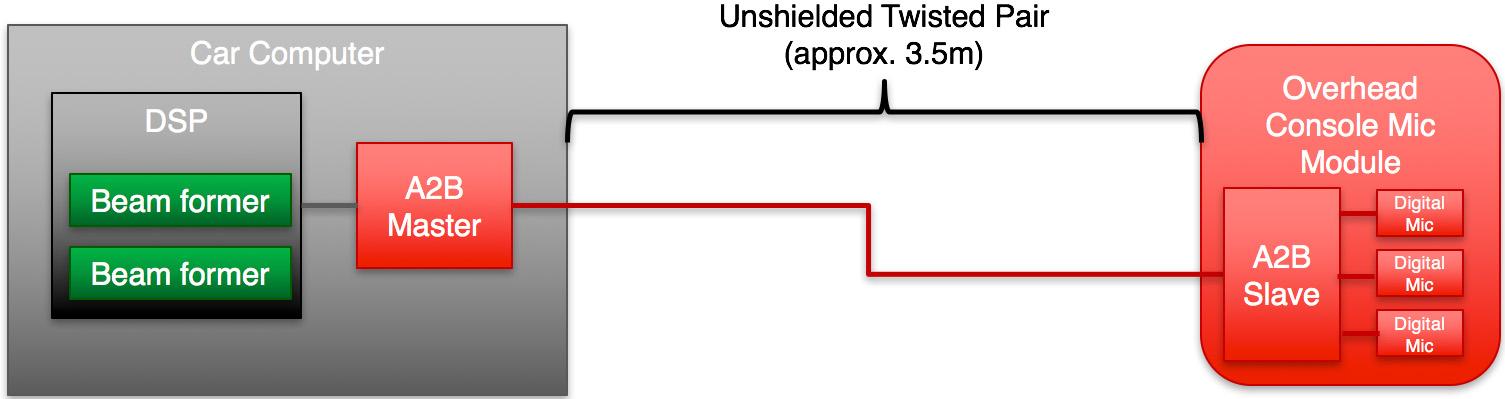
The microphone module has three digital microphones and one A2B (Automotive Audio Bus) chip (slave). The microphone module is connected to the master controller and the audio module that is internal to the car computer, making it an essential part of audio communication. The module is installed in the headliner near the rear-view mirror. The module sends digital audio data over time-division multiplexing (TDM) to the car computer. This is a twisted pair. Phone call data is sent on to the Bluetooth module and voice recognition is processed on the car computer.
 |
|---|
| Unshielded Twisted Pair |
External USB Modulelink
The external console USB hub has two USB and two high-current ports. These may be used for charging devices, reading music files on USB drives, or smart phone input. Unlike the Model S and Model X, the Model 3 does not use USB for anything else, and there is no chance of USB devices interfering with other systems such as the modem or touchscreen. While the format-restrictions remain in place, the impact is restricted to the USB device itself. The front and rear ports are powered by 4-pin battery connectors, which provide 12V input and ground. Additionally, the front ports are connected to a fused, regulated USB-mini port on the Infotainment and Connectivity ECU for media purposes.
UI Vocabularylink
 |
|---|
| Diagram of the center display UI |
|
Infotainment Glossarylink
| Acronym | Definition |
|---|---|
| A2B | Automotive Audio Bus. Used for the audio system. |
| BMP | Intel BGA (ball-grid array) Module Package, the system on a chip that runs the infotainment system. |
| BT | Bluetooth |
| GTW | Gateway |
| PCI | Peripheral Component Interconnect. A communication bus. |
| TDM | Time Division Multiplexd format. It is used with A2B audio. |