Infotainmentlink
Last updated: September 18, 2024
Overviewlink
Infotainment is a general term used to describe how a customer accesses vehicle settings, information, entertainment, climate controls, and audio. It has since grown to encompass navigation, connectivity, voice recognition, and (to a point) mobile app and mobile controls.
Infotainment Evolutionlink
2021+ Model S/X continue the evolution of the Tesla Infotainment system with the introduction of the AMD Ryzen system on chip and the carry-over of the gen3 Gateway. Before we delve into the operation of this new generation of Infotainment let's take a moment to review the nomenclature surrounding evolution of infotainment up to this point.
| Customer Facing / Central Processing Unit (CPU) | Model S/X NVIDIA Tegra | Model S/X Intel Atom | Model 3/Y Intel Atom | Model S/X/3/Y AMD Ryzen |
|---|---|---|---|---|
| Configuration Nomenclature | mcu | mcu_transition | ice | infoz |
| Software Nomenclature | cid | ice | ice | infoz |
| Gateway | classic | classic | gen3 | gen3 |
| Updater | cid-updater | sx-updater | ice-updater | zen-updater |
| Toolbox Article Tag | [Info-Tegra] | [Info-Atom] | [Info-Atom] | [Info-Ryzen] |
Note
Toolbox article tags may further specify mode ([Model S/X] or [Model 3/Y]) if the issue described is specific to CPU and Model.
Car Computerlink
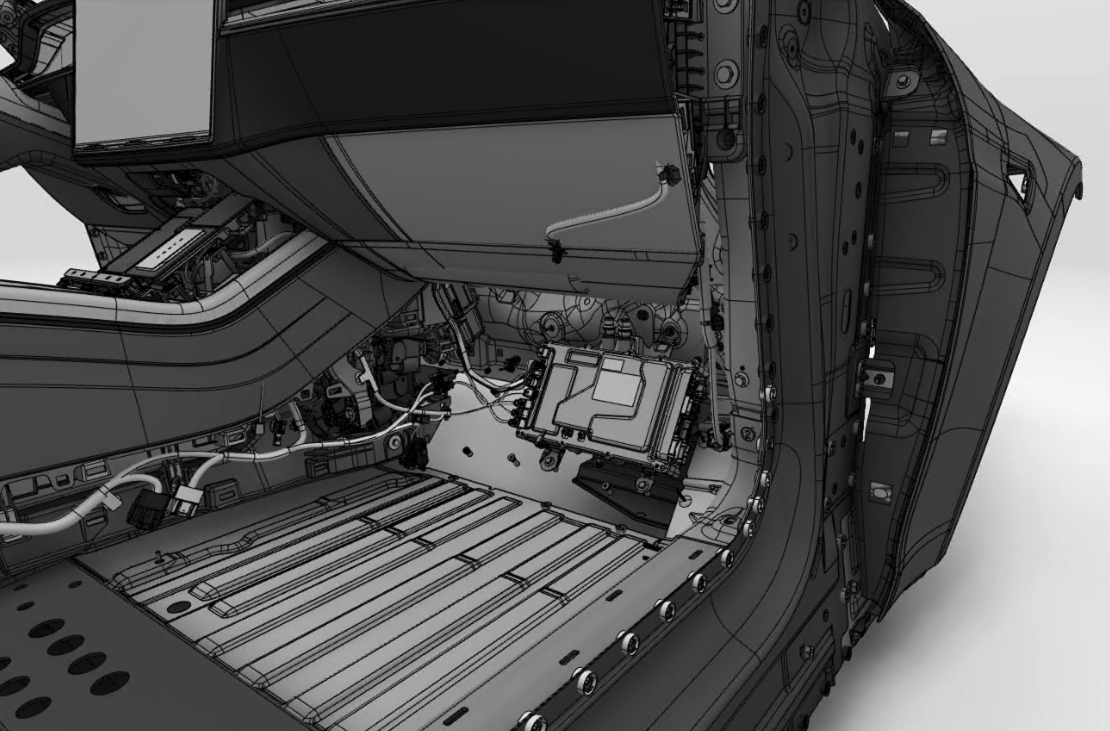
2021+ Model S introduces Model S/X to the car computer form factor pioneered with Model 3. The car computer is mounted in the passenger front footwell and is cooled by the vehicle's cooling system.
 |
|---|
| Car computer location |
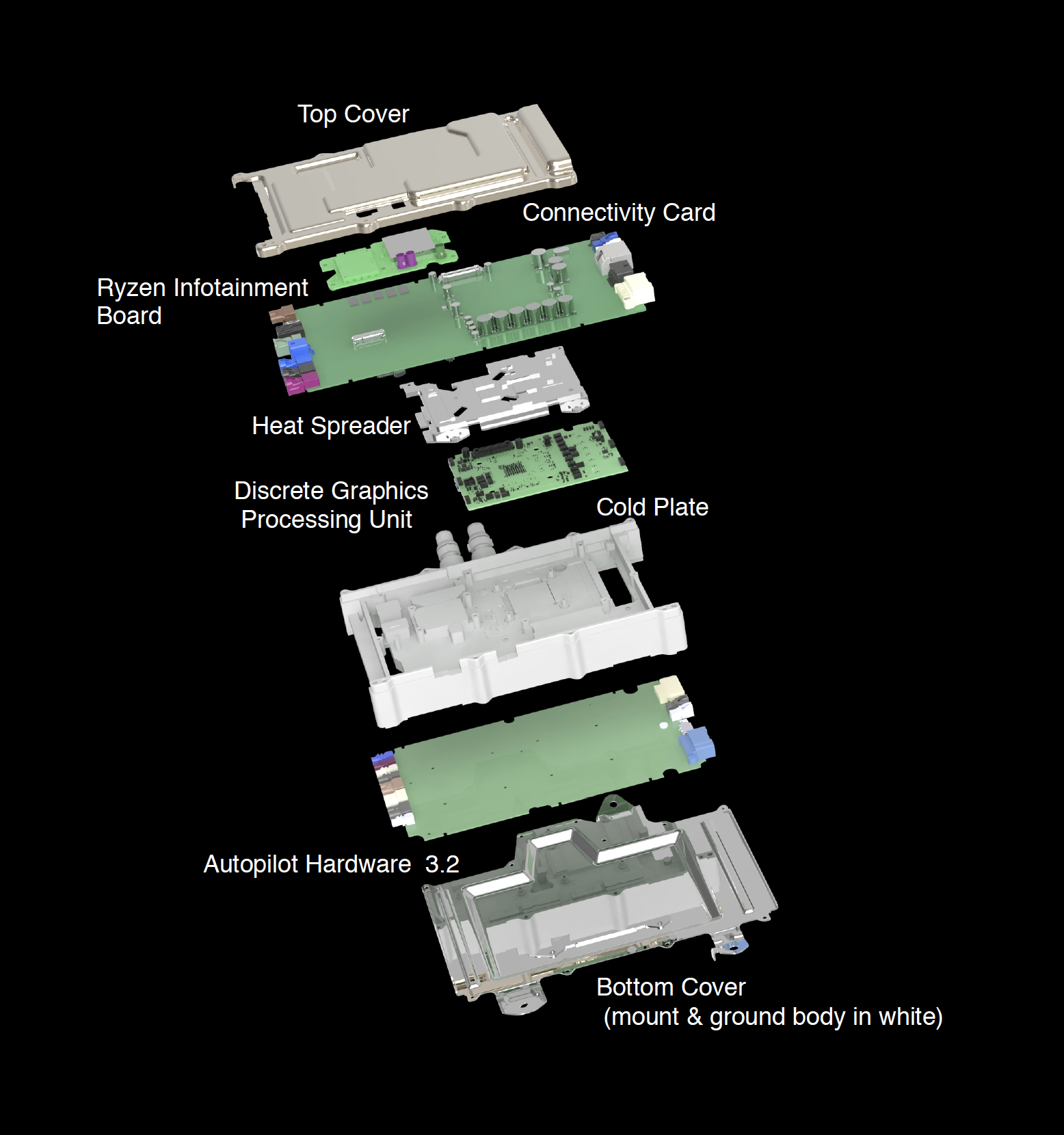
The car computer consist of a cold plate, top and bottom cover, and four printed circuit board assemblies:
- Quectel-GL connectivity card
- Ryzen infotainment board
- Discrete Graphics Processing Unit (dGPU)
- Autopilot hardware 3.2
Top cover is designed with serviceability in mind and allows for easy access to the only serviceable PCBA, the Quectel-GL connectivity card.
The connectivity card and dGPU are daughter boards of the Ryzen infotainment board.
The Autopilot board sits under the bottom cover and connects to the Ryzen infotainment board via a gigabit ethernet jumper.
The bottom cover also acts as the car computer's mounting bracket and ground path to the body in white.
 |
|---|
| Car computer main component overview |
Ryzen Infotainment Boardlink
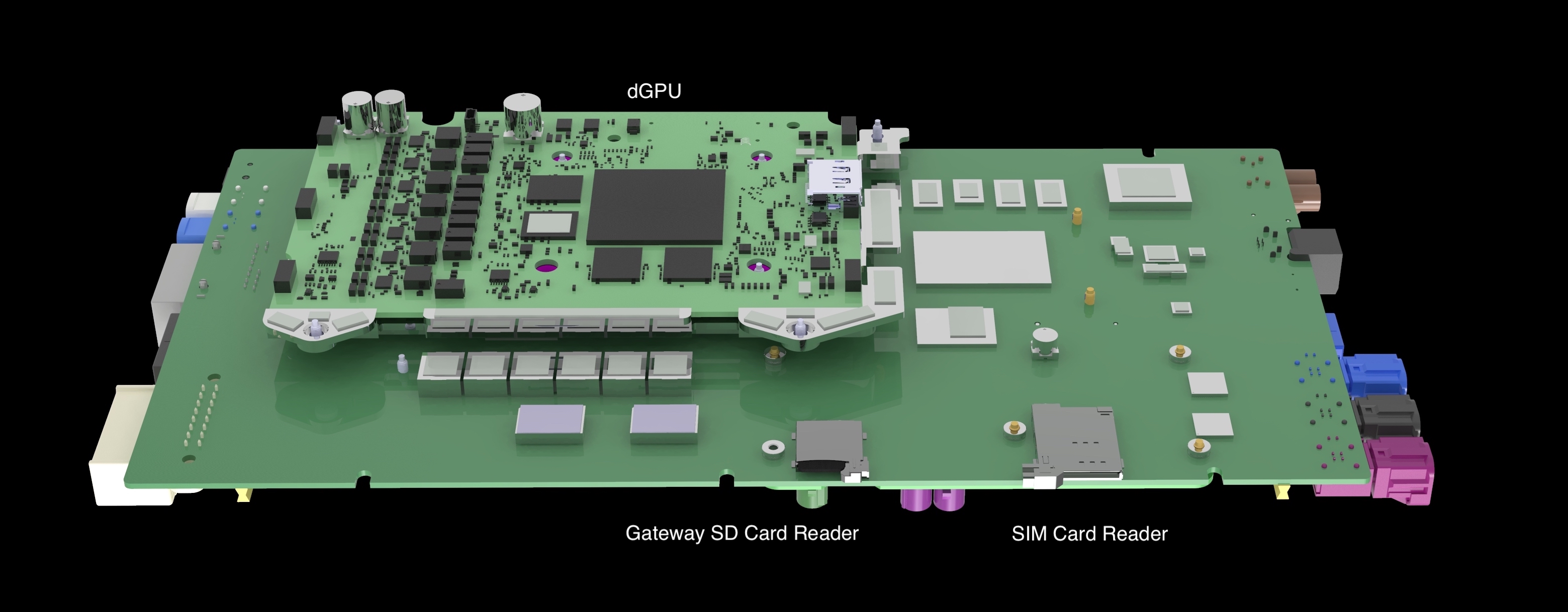
The top of the Ryzen infotainment board is the side that faces the cold plate. This side of the board contains the following major components:
- AMD Ryzen CPU
- Gateway
- Audio Digital Signal Processor (aDSP)
- Bluetooth/Wi-Fi module
- Ethernet switch
- Gateway microSD card reader
- SIM card reader
 |
|---|
| Top of Ryzen Infotainment Board |
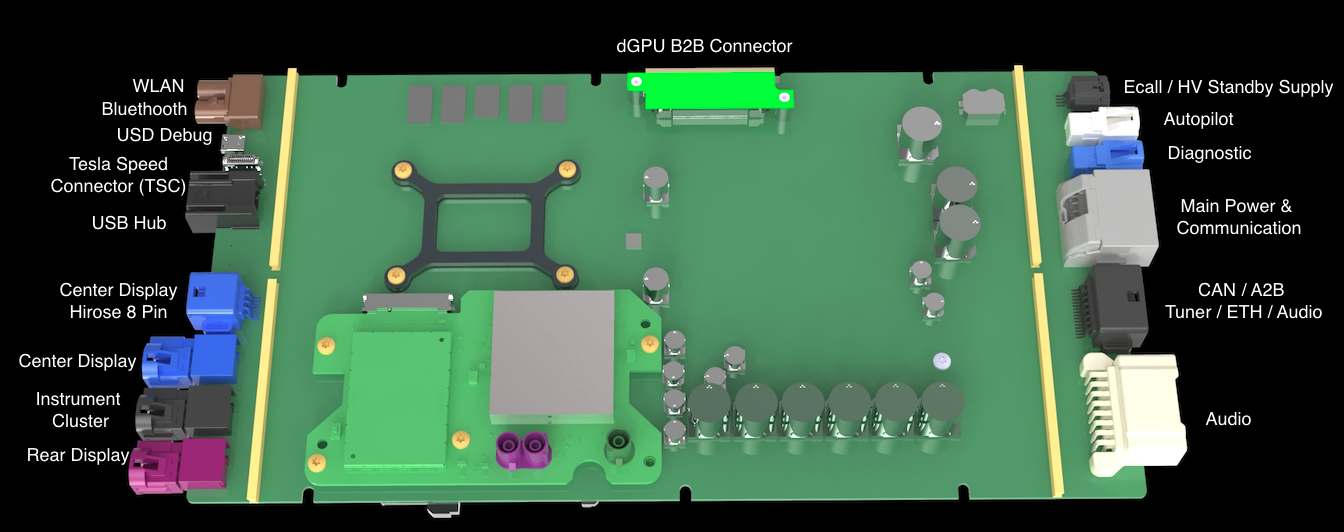
The bottom of the Ryzen infotainment board is the side facing the top cover and contains the following major components:
- Connections to vehicle harness
- Connectivity card connector and mounting
- dGPU board to board connector
- Real time clock battery
 |
|---|
| Bottom of Ryzen Infotainment Board |
Gatewaylink
2021+ Model S continues the evolution of Tesla Infotainment by introducing the gen3 Gateway to Model S/X. Despite its name (derived from the development name of Model 3) this is the second generation of Tesla Gateway and was first introduced in the Model 3. The gateway is a microcontroller which contains three CPU's (2 160 MHZ 32-bit and 1 80MHz 32-bit), 6MB flash memory and 768 KB of RAM. The Gateway serves many functions of not only the Infotainment System but the entire car.
- Routing: Routes CAN data which enables module communication between CAN buses.
- Vehicle Configurations: Stores vehicle configuration data on in on-chip NVRAM.
- Logging: Records selective CAN signal data and stores on its microSD card.
-
Update: Controls and determines required vehicle states, securely fetches and distributes packages for each updatable module, and is specific to InfoZ selection of kernel bank to boot the UI.
-
Touch Via Gateway: Analyzes touch data from the Display, and forwards it to the UI.
Gateway Communicationlink
The gen3 Gateway in 2021+ Model S communicates with several modules over a variety of protocols.
- Ethernet switch via a Reduced Media-Independent Interface (RMII).
- Touchscreen over I2C to a Multiplexer which splits the signal with Ryzen.
- MicroSD card over a Secure Digital Input/Output (SDIO) connection.
- Audio Digital Signal Processor (ADSP) over a Serial Peripheral Interface (SPI).
- Ryzen over a Universal Asynchronous Receiver-Transmitter (UART) connection.
The gen3 Gateway in 2021+ Model S also benefits from some dedicated wake lines:
- Ring line from the Quectel (LTE-GTW-RING).
- Wake line from the Audio Digital Signal Processor (ADSP-GTW-WAKE).
- Wake line to the Audio Digital Signal Processor (GTW-ADSP-WAKE).
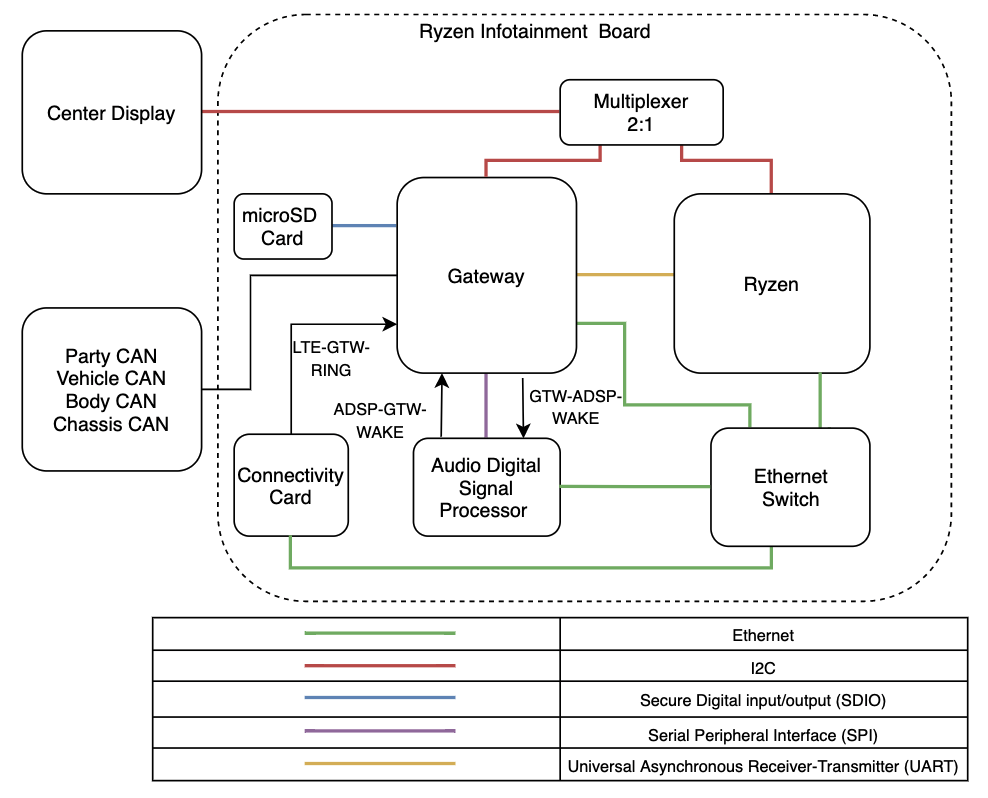 |
|---|
| Gateway Communication Overview |
Touch via Gatewaylink
With the loss of the stalk and the addition to select drive gears via the touchscreen, the Gateway for 2021+ Model S takes on a new responsibility of analyzing touch data. This is accomplished by routing touch-reliant data from the touchscreen over I2C to the Gateway's CPUs for analysis then sending it over UART to the Ryzen.
The touchscreen is connected to the Gateway via a I2C Bus. When touch is asserted, the touchscreen sends an interrupt via the touch interrupt line. Once Gateway sees the interrupt, touch data can be retrieved over the I2C bus.
Gear shift requests are first analyzed by the Gateway's touch core, then validated by the Gateway's main core, and sent to the CAN core where they leave the Gateway to the master drive inverter.
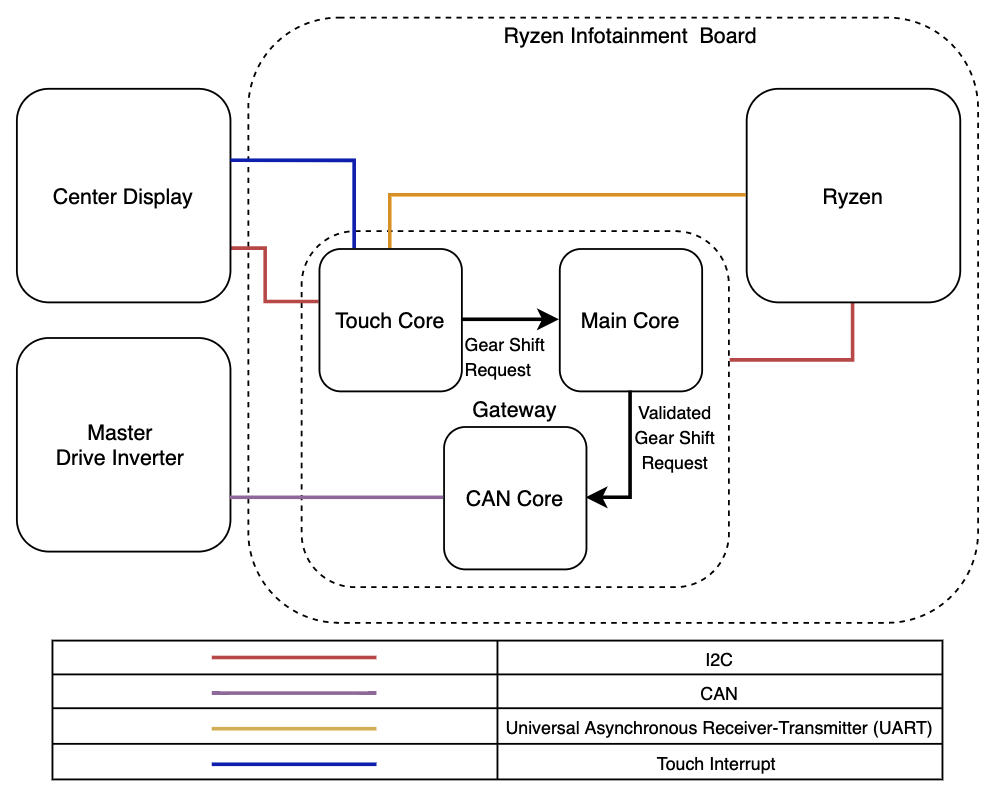 |
|---|
| Touch Via Gateway Overview |
Gateway microSD Reader and Cardlink
The gateway uses a 16GB microSD card that is serviceable and can be accessed via a provision in the car computer's cold plate.
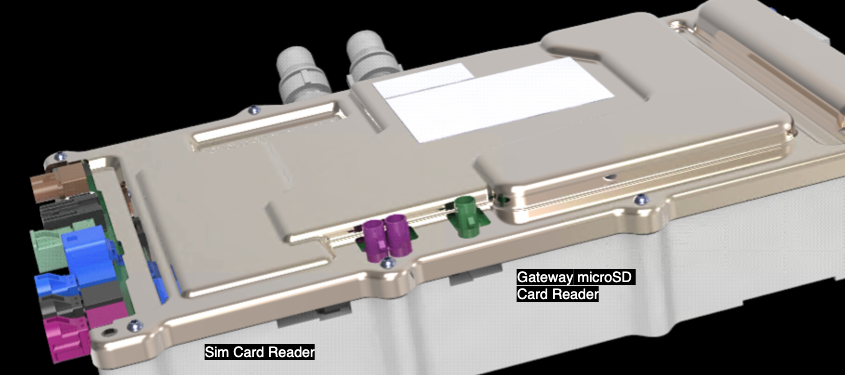 |
|---|
| Gateway microSD Card Reader Location |
The microSD card can be formatted over a local connection while the vehicle is in Park and a Gateway alert for the microSD is present using the PROC_ICE_X_FORMAT-SD-CARD action. The card can also be formatted remotely for user groups with or without a microSD card alert for Toolbox users with elevated remote execution permissions. If the latter is needed, escalate a Toolbox session with adequate justification.
The card is spring ejected by release of the locking tab. The locking tab will automatically engage during installation once the spring ejection force is overcome.
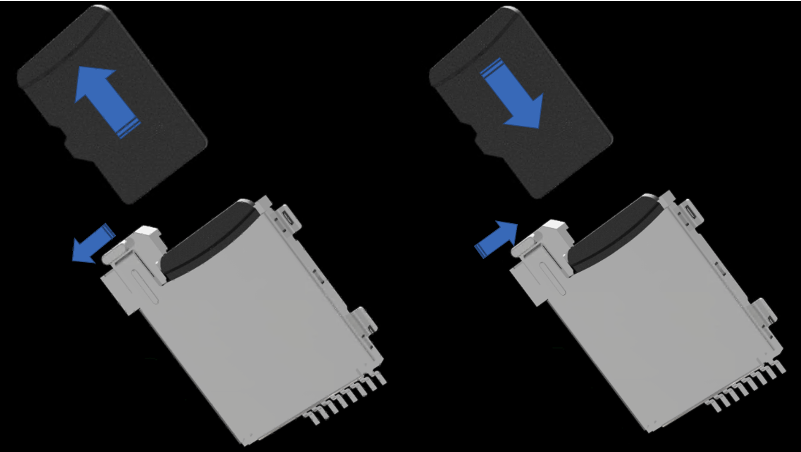 |
|---|
| Gateway microSD Card Eject / Inject |
Discrete Graphics Processing Unit (dGPU)link
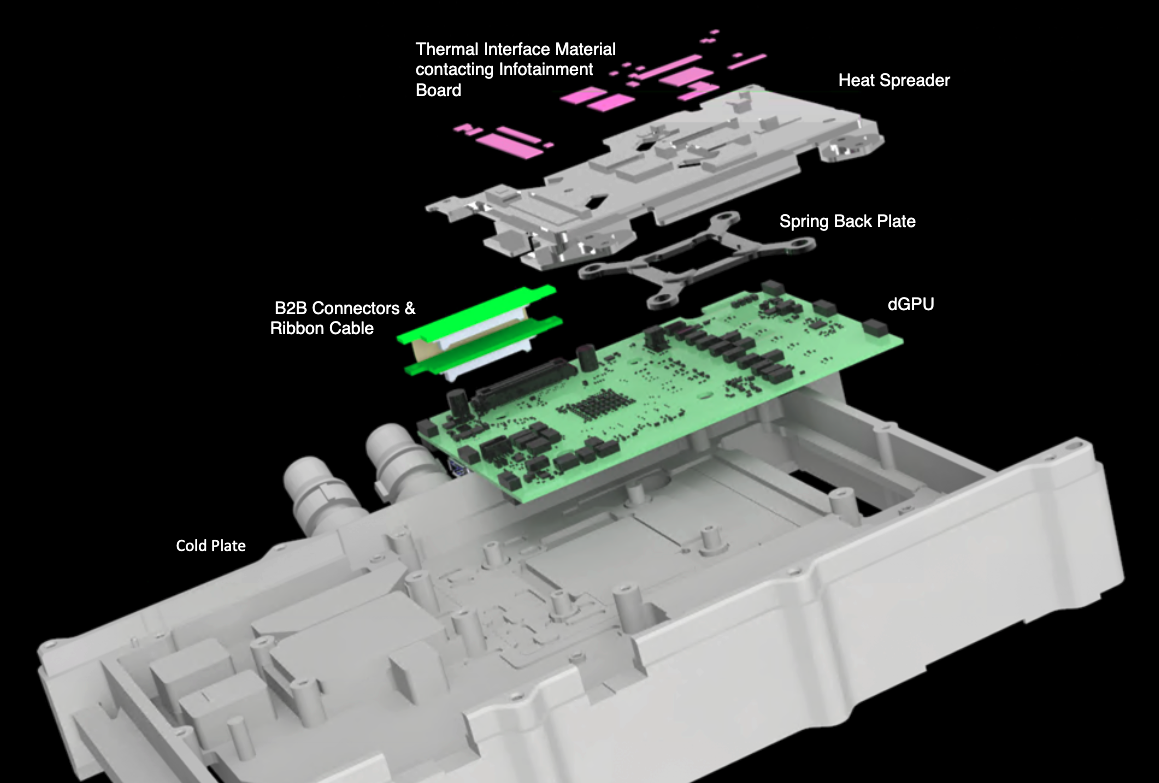
The dGPU enhances the gaming capabilities of the infotainment system. The dGPU is a daughter board to the Ryzen infotainment board and is mounted to the cold plate. Thermal interfacing material, a heat spreader, and a spring back plate help to transfer heat from the Ryzen infotainment board to the cold plate.
 |
|---|
| Discrete Graphics Processing Unit Location |
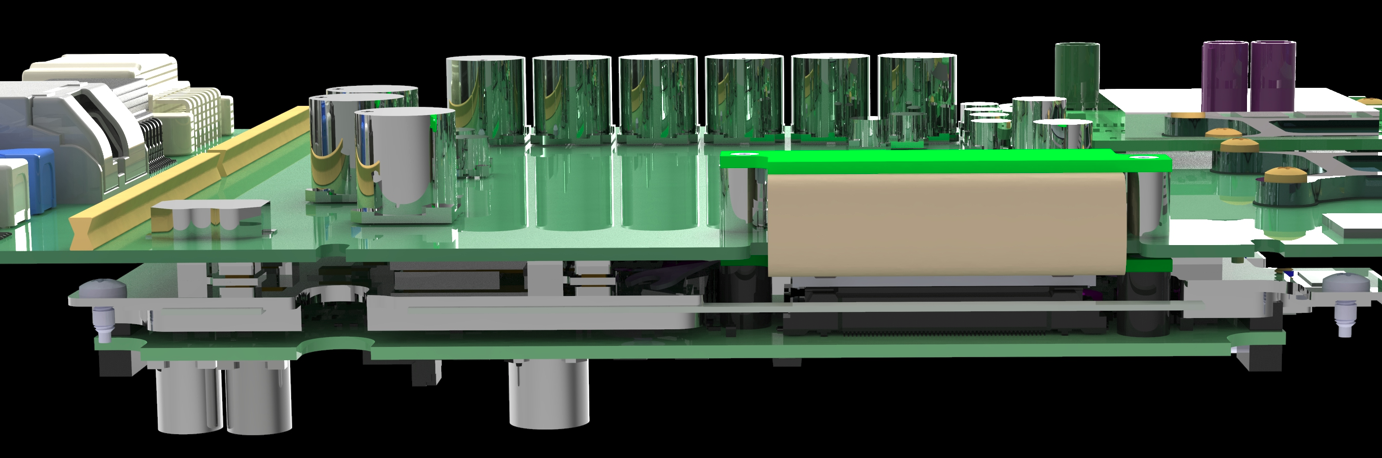
The dGPU is connected to the Ryzen infotainment board via a flexible printed circuit and mezzanine connector combination, which wraps around to the bottom of the board.
 |
|---|
| dGPU Connection |
dGPU Communicationlink
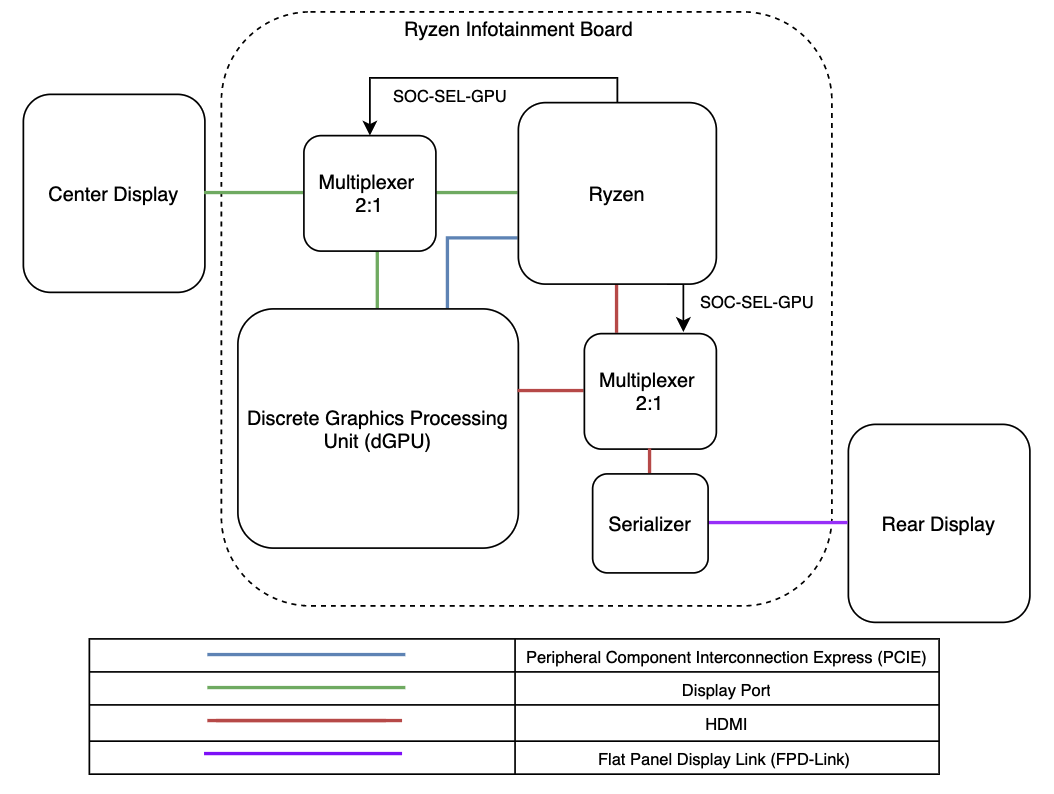
The dGPU communicates with the Ryzen directly over a peripheral component connection express. The Ryzen also controls two multiplexers which switch inputs between the dGPU and Ryzen for each display. A display port connection is used for the dGPU to connect with the touchscreen, and a HDMI connection is used to connect the to the rear display serializer which then connects to the rear display over a flat panel display link.
 |
|---|
| dGPU Communication |
Displayslink
Three displays come as standard equipment for the 2021+ Model S/X.
Touchscreenlink
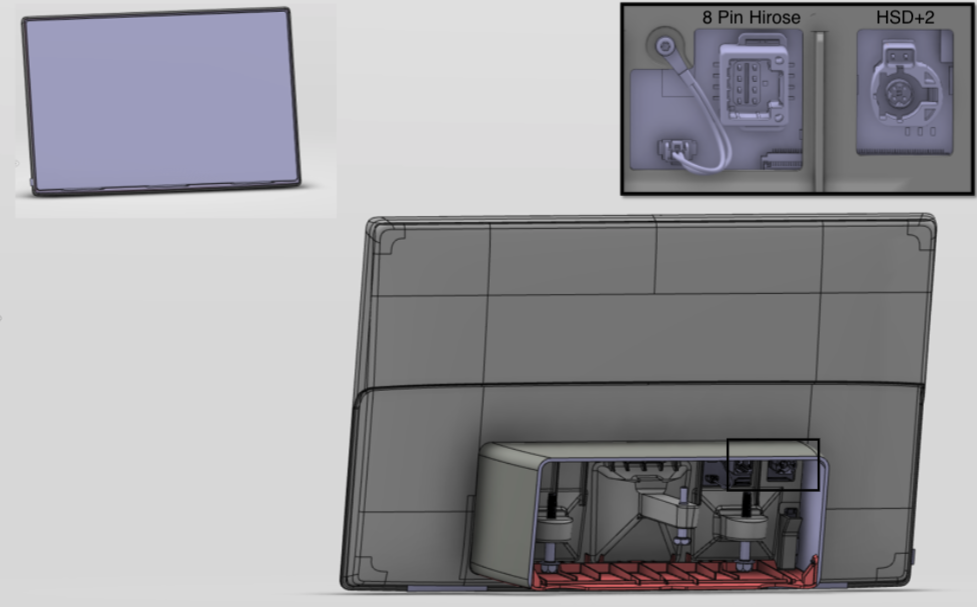
The 2021+ Model S Model S uses a 17" high definition narrow bezel touchscreen with a 2200x1300 resolution. The screen is capable of tracking 10 inputs via its AIT (advanced in-cell touch) embedded touch sensor. This in-cell touch technology integrates the touch sensor layer within the display panel itself, rather than having a separate layer for the touch sensors. The touchscreen is Serviced as a entire assembly. It connects to the car computer via a HSD+2 and 8-pin hirose connector.
 |
|---|
| Touchscreen |
Instrument Clusterlink
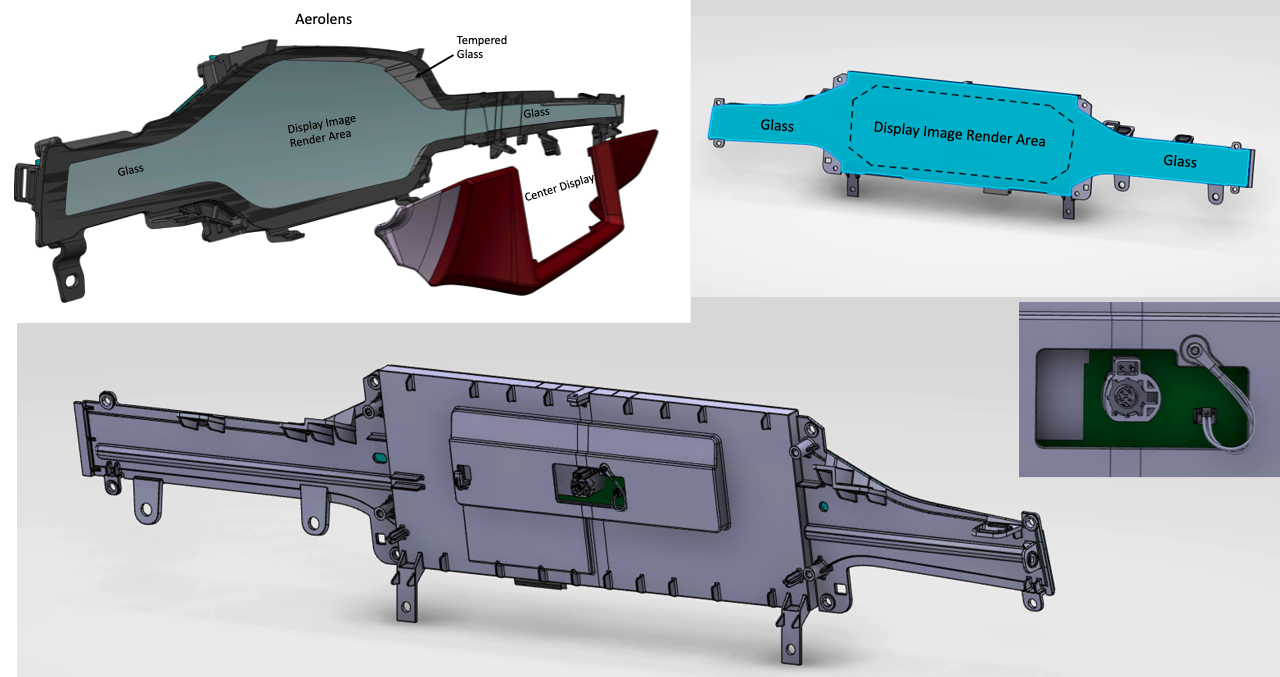
The vehicles instrument cluster is a 12.3" high definition display with an attached glass that extends beyond the image render area accommodating the AreoLens instrument panel design. The display is connected to the car computer via a HSD+2 cable with the HSD portion carrying serialized data and the +2 portion providing power and ground for the display LED's and buck converter.
 |
|---|
| Instrument Cluster |
Rear Touchscreenlink
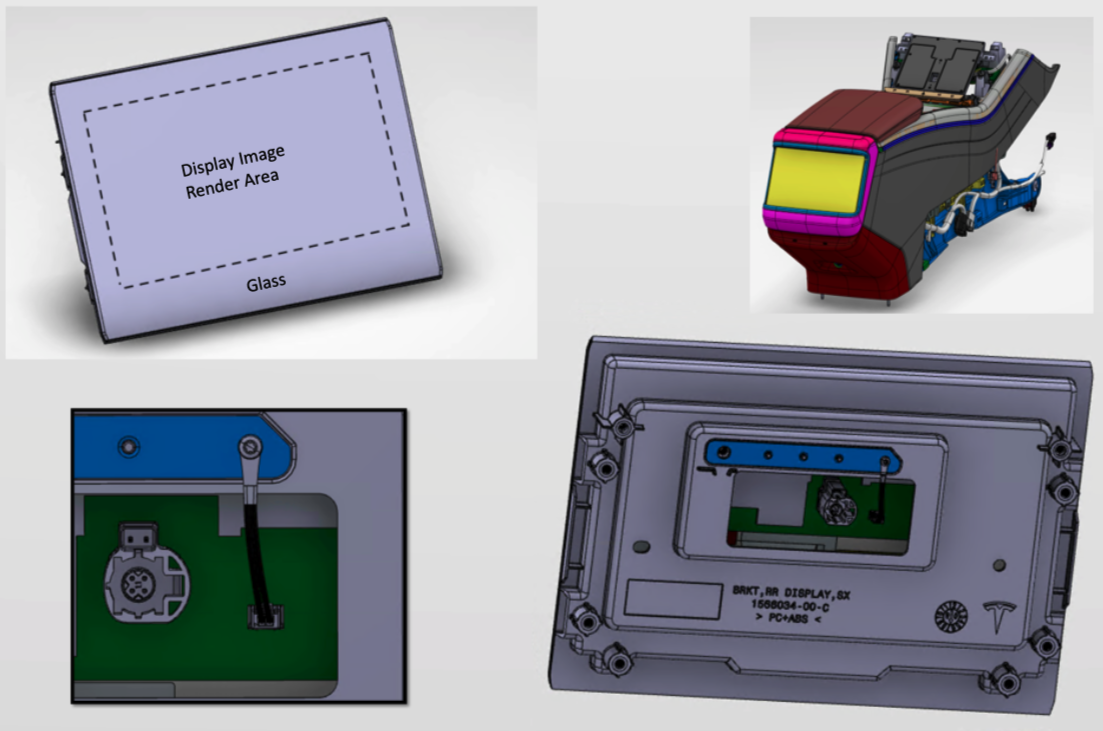
Since start of production to an approximate build date of September 2022 (Europe) or December 2022 (North America), 2021+ Model S Model X has been equipped with an 8" rear display that has a resolution of 1280x720. The display offers full touch as well as video streaming capabilities. This display acts as the control for the AirWave climate control in the second row. The display is connected to the car computer via a HSD+2 cable with the HSD portion carrying serialized data and the +2 portion providing power and ground for the display LED's and buck converter.
 |
|---|
| Rear Touchscreen Start of Production |
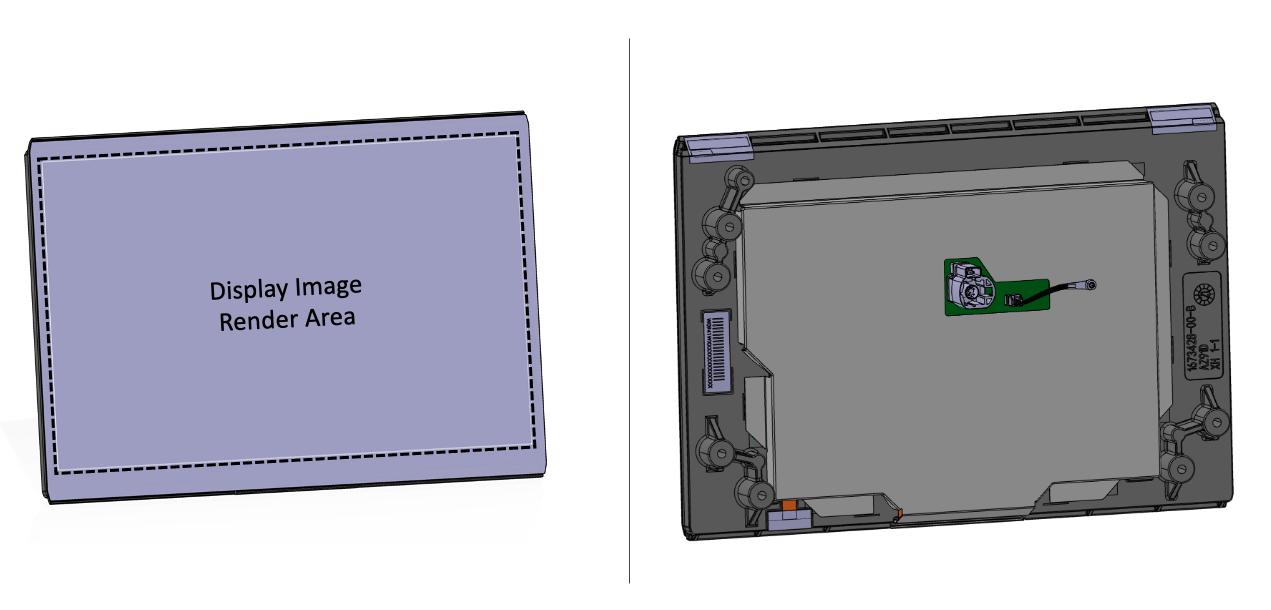
Since an approximate build date of September 2022 (Europe) or December 2022 (North America) to present, 2021+ Model S Model X is equipped with a 9.4" rear display is with a resolution of 1440x900.
 |
|---|
| Rear Touchscreen Europe September 2022, North America December 2022 - Present |
Touchscreen Communicationlink
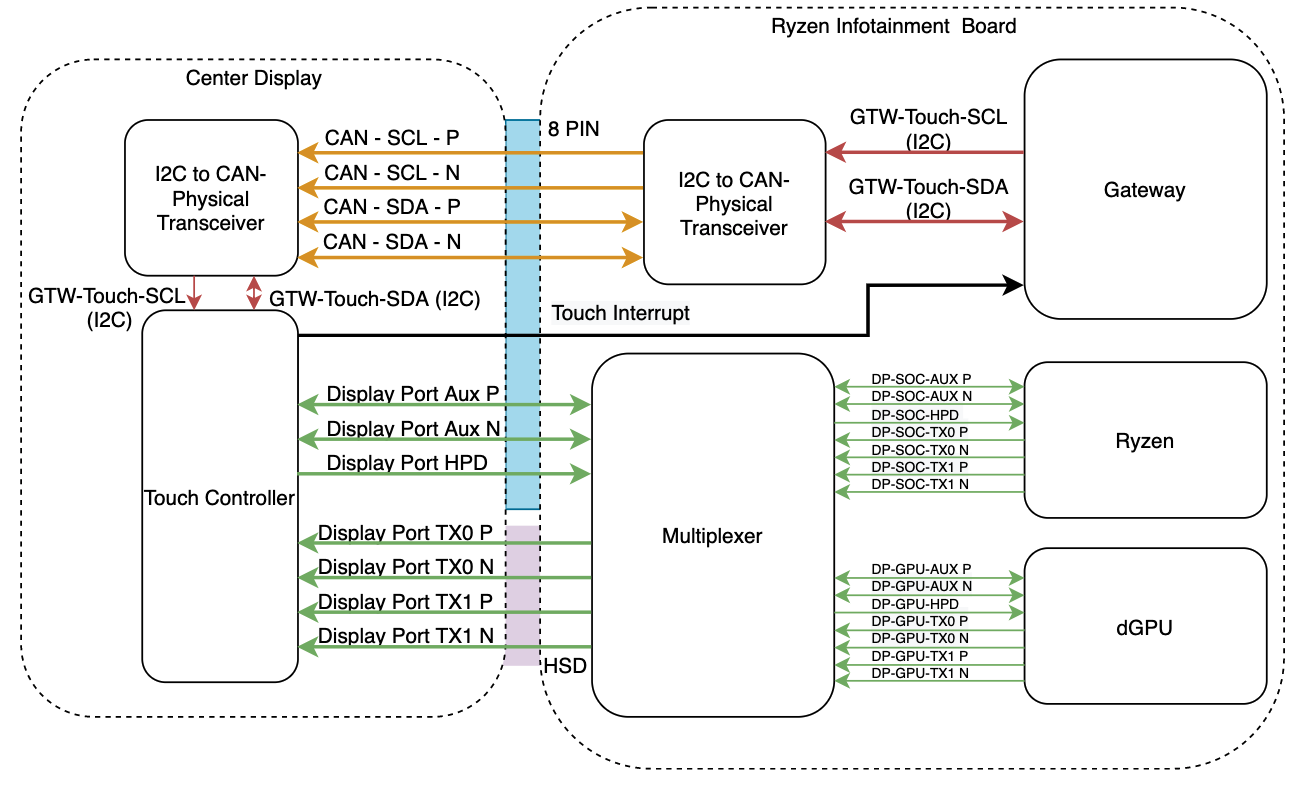
The touchscreen is connected to the car computer via two separate connections. One is a HSD+2 Connector which carries display port on the four pins of the HSD and power/ground with the two (+2) additional wires. The second display cable is a eight pin connector which carries I2C, display port auxiliary, and the touch interrupt line.
The I2C communication protocol is typically only used for on-board communication. As with larger communication distances the bus is more susceptible to electromagnetic interference, different ground potentials, and high power demands. In order to enable the long distance I2C communication (which connects the touchscreen's touch controller to the Gateway) a pair of I2C to CAN physical transceivers are used. One in the Ryzen infotainment board and one in the touchscreen. These transceivers convert the single ended I2C lines into differential lines.
 |
|---|
| Touchscreen Communication |
Bluetooth, Wi-Fi, and Cellular Connectivitylink
Modular Bluetooth, Wi-Fi, and LTE Antennae Moduleslink
2021+ Model S introduces a new modular antenna design for connectivity, each module contains:
- One wideband antenna for 2.4GHz Bluetooth or 2.4GHz/5GHz Wi-Fi.
- One wideband antenna for LTE/UMTS/GSM.
The part is not carried over from Model 3/Y. 2021+ Model S antennae have a smaller profile to facilitate better packaging in the A-Header (structural beam joining the left and right A pillars).
There is a single part number for the antenna module, both sides are identical, but their usage is dictated by their functional connection.
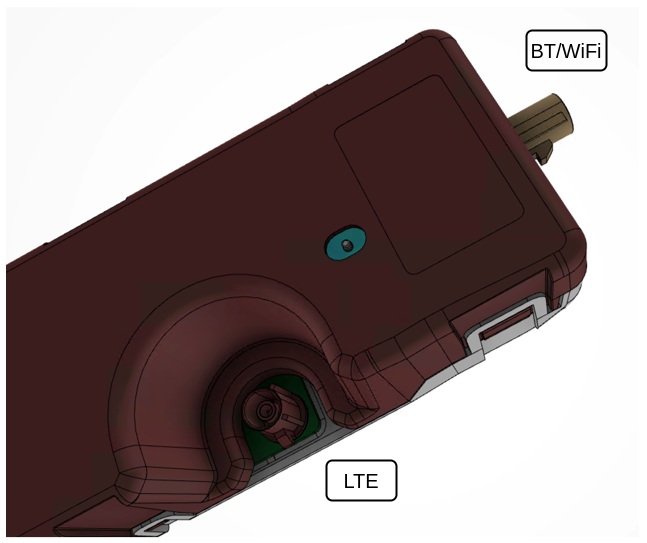 |
|---|
| Modular BT / Wi-Fi / LTE Antenna Module Connectors |
| Antenna | Connector | Supported Frequency Bands | Supply Voltage | Expected (\Omega) |
|---|---|---|---|---|
| LTE | Claret-Violet FAKRA |
698-960 MHz 1710-2170 MHz 2500-2690 MHz |
0 v | 10 K(\Omega) |
| BT / Wi-Fi | Beige FAKRA |
2400-2484 MHz 5150-5850 MHz |
0 v | 10 K(\Omega) |
2021+ Model S uses 2 of these antenna modules located behind the headliner on the left and right side of the A header, a total of 4 antennas per vehicle. They operate as follows:
- 1 dedicated Wi-Fi antenna mounted RH side that supports the 2.4GHz and 5GHz Wi-Fi MIMO.
- 1 switched antenna mounted LH side that supports either the 2.4GHz Bluetooth or 2.4GHz and 5GHz Wi-Fi MIMO.
- 2 LTE antennas functioning as a 2x2 MIMO pair
- 2 Wi-Fi antennas are functioning as a 2x2 MIMO pair
Multiple-input multiple-output (MIMO) means both antennas can be used either as dual inputs or dual outputs. This is beneficial for signal reception strength by allowing antenna diversity.
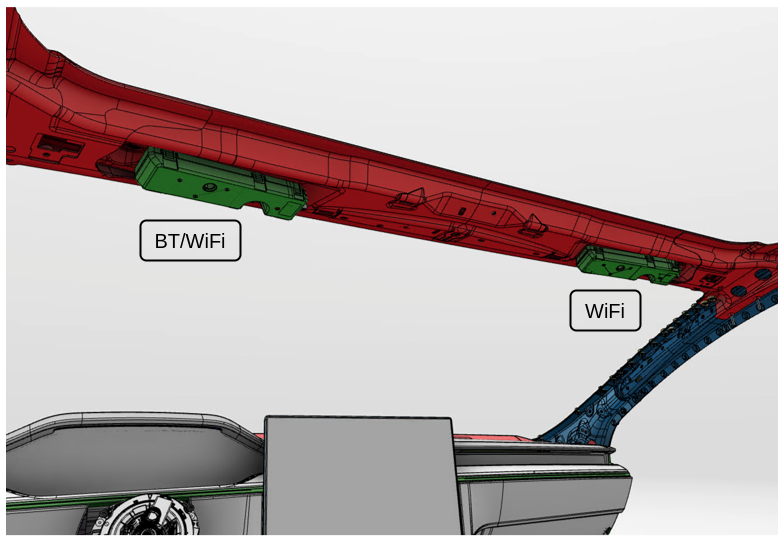 |
|---|
| Modular antennae locations |
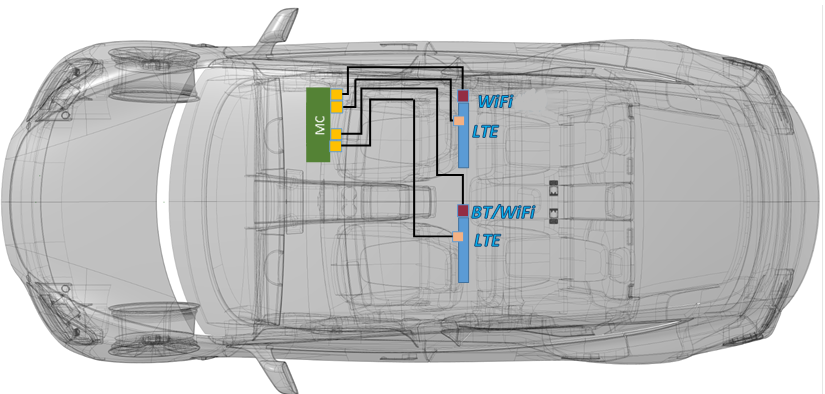 |
|---|
| Antenna module left and right side locations |
Cellular Connectivity Cardlink
The Quectel connectivity card in 2021+ Model S shares the same printed circuit board (PCB) outline, M.2 connector, and fixtures as the previous Telit connectivity card. The card, which mounts to the car computer in the same location as the Telit variant, is replaceable.
Note
Refer to the Service Manual for the specific replacement procedure.
Single worldwide modem variant for 2021+ Model S:
- AG525RGL - Global markets
Connections out from the card are:
- Two FAKRA connectors for connections to the cell antennae.
- One M.2 connector to the main infotainment board.
The connectivity card on 2021+ Model S is capable of managing the setup and maintenance of an active cellular data connection independently of the main infotainment system. This feature allows the modem to maintain an active data connection while the vehicle is asleep.
All of the configurations needed for a data connection is stored on and handled by the modem.
Low power statelink
The modem can be put into a low power state by the Infotainment system. When the low power state is active, the modem maintains an active data link but uses a less aggressive strategy for network search. The modem can be woken up by the Infotainment system to come back to full power mode.
Wake on IPlink
The ability of the connectivity card to setup and maintain an end-to-end data connection, along with the low power mode, forms a foundation for a new remote wake system for the vehicle. Wake on Internet Protocol (IP) wakes the vehicle via a message over a data connection rather than via SMS.
When the vehicle is requested awake by the mobile app, Tesla servers send a message directly to the modem in the vehicle. A messaging client runs on the modem and when the modem receives the new wake message, the modem wakes the gateway. The gateway then wakes the Infotainment system.
This new feature will not be active at product launch.
SMS Wakelink
2021+ Model S supports the established system of remote vehicle wake via SMS. When the vehicle is requested awake by the mobile app, Tesla servers send a message to the cell network provider for the vehicle, and the cellular network provider sends an SMS to the modem in the vehicle.
When the modem receives an SMS, the modem wakes the gateway, which then wakes the Infotainment system.
Connectivity Card Interfaceslink
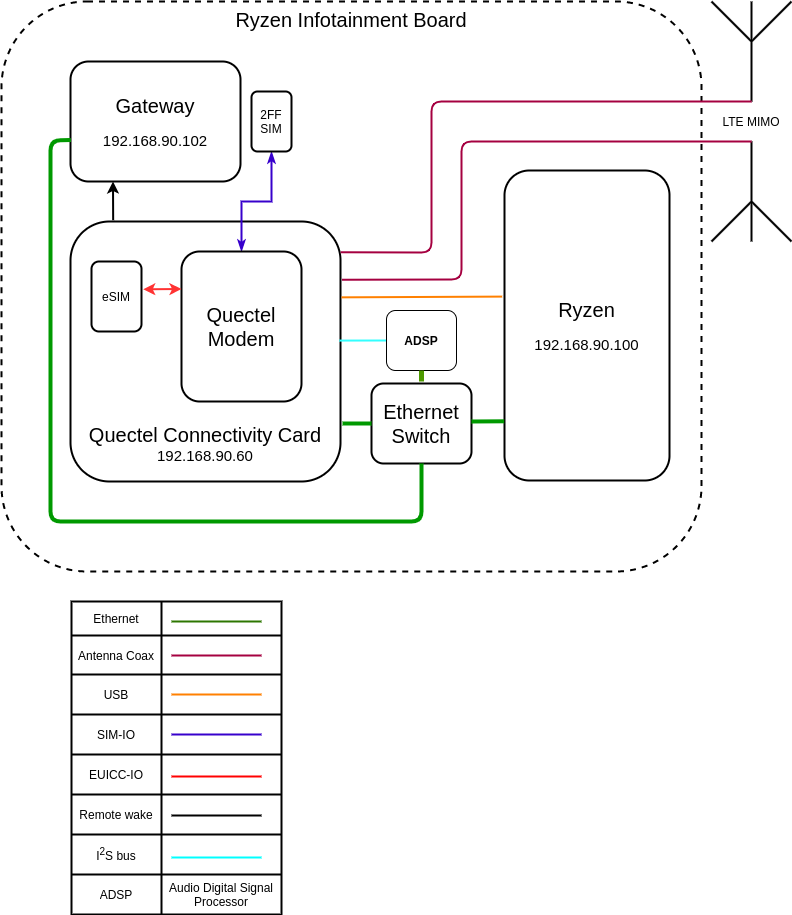 |
|---|
| Cellular Connectivity Functional Diagram |
-
Ethernet is the primary data and control interface:
- eth0
- Modem IP address 192.168.90.60
- eth0
-
Antennas:
- Connections for the shielded coaxial cable connections to the antenna
- GPIO pins provide specific control / state information between the 2 systems:
- Low power mode control is an input to the modem.
- Remote vehicle wake control (LTE-GTW-RING) is an input to the gateway.
- Modem status is an output from the modem.
- Modem software crash indication is an output from the modem.
- SIM card interfaces:
- Input-Output to the embedded MFF2 SIM (eSIM)
- Input-Output to the removable 2FF SIM (standard removable SIM)
- Audio interfaces:
- Bi-directional audio data passes over the Inter-Ic Sound (I$^2$S) bus.
- Audio control data passes over the Inter-Integrated Circuit (I$^2$C) bus.
- Debug:
- The debug interface is connected to the Infotainment system via USB.
- The USB connection facilitates updating / re-flashing modem firmware.
Cell Vitalslink
The following vitals are supported in firmware. More may be supported in later firmware versions.
Cell Sim: 89011704272500000000link
- Integrated Circuit Card Identity (ICCID) is a 20 digit ID for the active subscription.
- If the value is n/a, either:
- The ICCID has not been read yet.
- The ICCID cannot be read.
- If the value is n/a, either:
Model: AG525RGLlink
- Modem model code:
- If the value is n/a, either:
- The model code has not been read yet.
- The model code cannot be read.
- If the value is n/a, either:
IMEI: 864228040000000link
- International Mobile Equipment Identity (IMEI) is a 15 digit ID for the modem hardware.
- If the value is n/a, either:
- The IMEI has not been read yet.
- The IMEI cannot be read.
- If the value is n/a, either:
Cell EID: 89033024208100344600000000000000link
- Embedded Universal Integrated Circuit Card Identity (eUICC ID) is a 32 digit ID for the universal SIM card.
- If the value is n/a, either:
- The EID has not been read yet.
- The EID cannot be read.
- If the value is n/a, either:
Cell signal: 80 %link
- Percentage representation of received signal strength:
- If the value is n/a, then both:
- The cell bars are crossed out on the User Interface (UI).
- The cellular data connection is not connected.
- If the value is n/a, then both:
Cell bars: 4link
- Number of cell bars visible on the UI cell indicator:
- Possible values are 1 through 5.
- If the value is n/a, then both:
- The cell bars are crossed out on the UI.
- The cellular data connection is not connected.
System Mode: 4Glink
- Type of data access technology, which is visible on the UI cell indicator:
- Possible values are 2G, 3G, and 4G:
- 2G (also referred to as GSM / GPRS / EDGE) is the second generation cellular network technology and provides the lowest rates of data transfer for the vehicle.
- 3G (also referred to as UMTS / WCDMA / HSPA+) is the third generation cellular network technology and provides medium rates of data transfer for the vehicle.
- 4G (also referred to as LTE / LTE Advanced) is the fourth generation cellular network technology and provides the highest rates of data transfer for the vehicle.
- Possible values are 2G, 3G, and 4G:
Reg Status: Registeredlink
- Network registration status:
- Registered means the device is registered in the home network.
- A device is connected in the home network if the device is connected to the subscription provider's network in the country where the subscription is billed.
- Roaming means device is registered in a foreign network.
- A device is connected in a foreign network if the device is connected to any other network than the subscription provider's network, which is common if the device is outside the country where the subscription is billed.
- BaseStationSearch means the device is not registered and searching for a radio network.
- NotSearchingForOperator means the device is not registered and not performing a search for a radio network.
- Undefined means the device has been denied registration to a radio network.
- Unknown means the device registration status is not known.
- Registered means the device is registered in the home network.
PS State: attachedlink
- Network packet switched attach status.
- Attached means the modem is attached to the packet switched domain of the cellular network.
- Not attached is the opposite of attached.
All Vitals Are: --link
- Data from the modem is not available.
- Data flows from
modem > ofono > qtcar-connman > vitals. - A functional problem anywhere along that data path can cause all vitals to be "--", or as it is often verbally described, blank.
- Wi-Fi and cell data are both handled by qtcar-connman. If the Wi-Fi vitals are present, then qtcar-connman is functional.
Vehicle Log Datalink
The vehicle will log alerts related to the cellular connectivity system when errors are detected.
Bluetooth and Wi-Fi Systemlink
2021+ Model S carries over the previous Bluetooth and Wi-Fi system used in Models 3 and Model Y.
Audio Systemlink
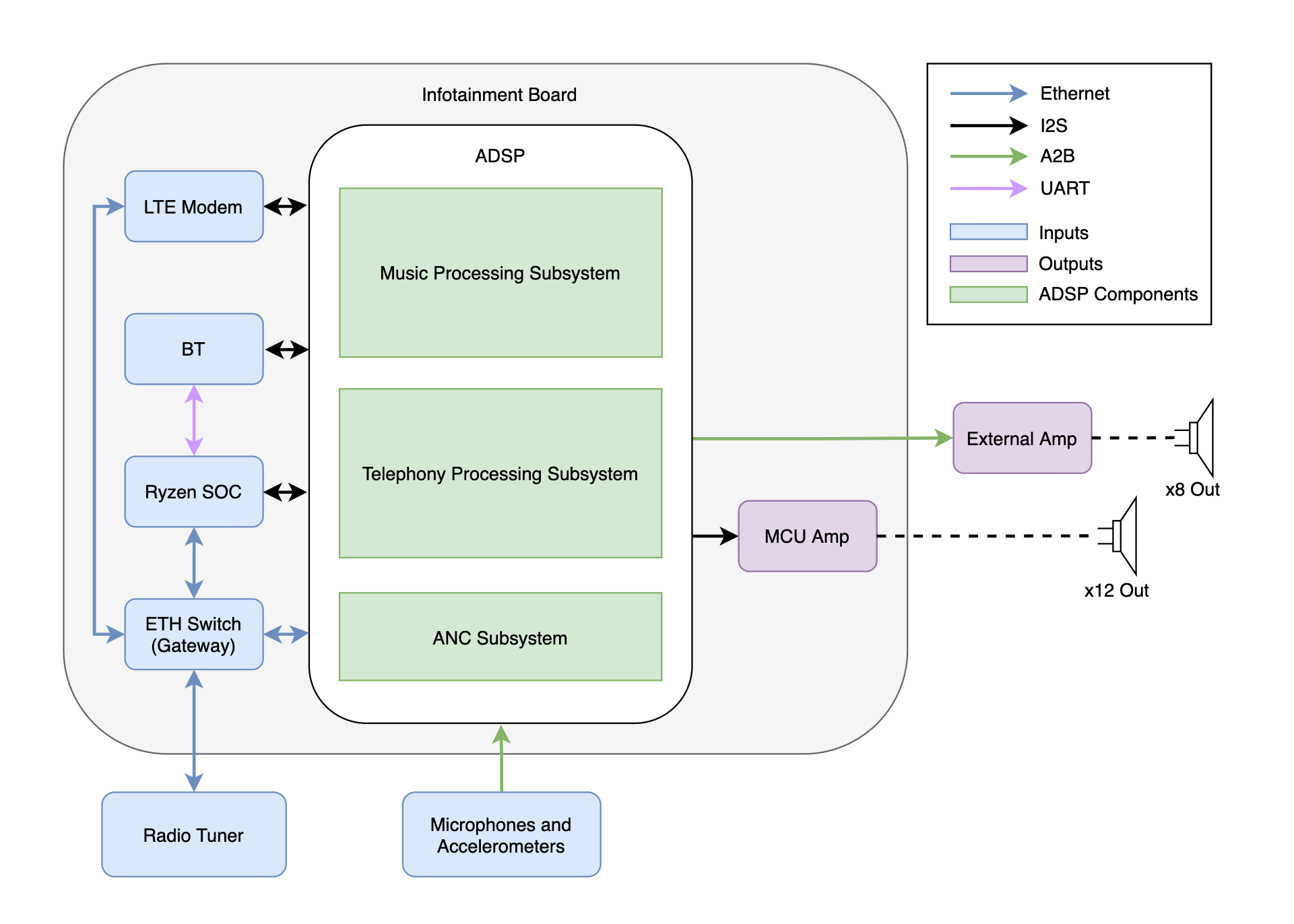
2021+ Model S only comes with the Premium Audio standard, and there is no Base Audio option. This vehicle comes with 24 speakers total, 2 amplifiers, and 1 Audio Digital Signal Processor (ADSP). Of the 24 speakers, 22 are for the sound system, 1 is for the Pedestrian Warning System (PWS), and 1 is the emergency speaker for AutoPilot. The speakers are powered by the Media Control Unit (MCU) amplifier located on the Infotainment Board and the external amplifier located behind the right rear trunk trim. The emergency speaker is controlled and powered by the Autopilot board, and not the MCU.
There are 2 separate sets of microphones used for the Telephony and Active Noise Cancellation (ANC) subsystems. The Telephony microphones are located on the headliner, and the ANC microphones are located in the front and rear seats.
The Music, Movie, Gaming, Telephony, and ANC audio processing is completed by a dedicated ADSP located on the Infotainment Board.
Audio System Architecturelink
A high-level architecture diagram of the inputs and outputs to the ADSP is shown in the image below. The external amplifier is located in the trunk of the vehicle, while the MCU amplifier is a collection of 3 amplifiers located on the Infotainment Board.
 |
|---|
| Audio System Architecture |
Speakerslink
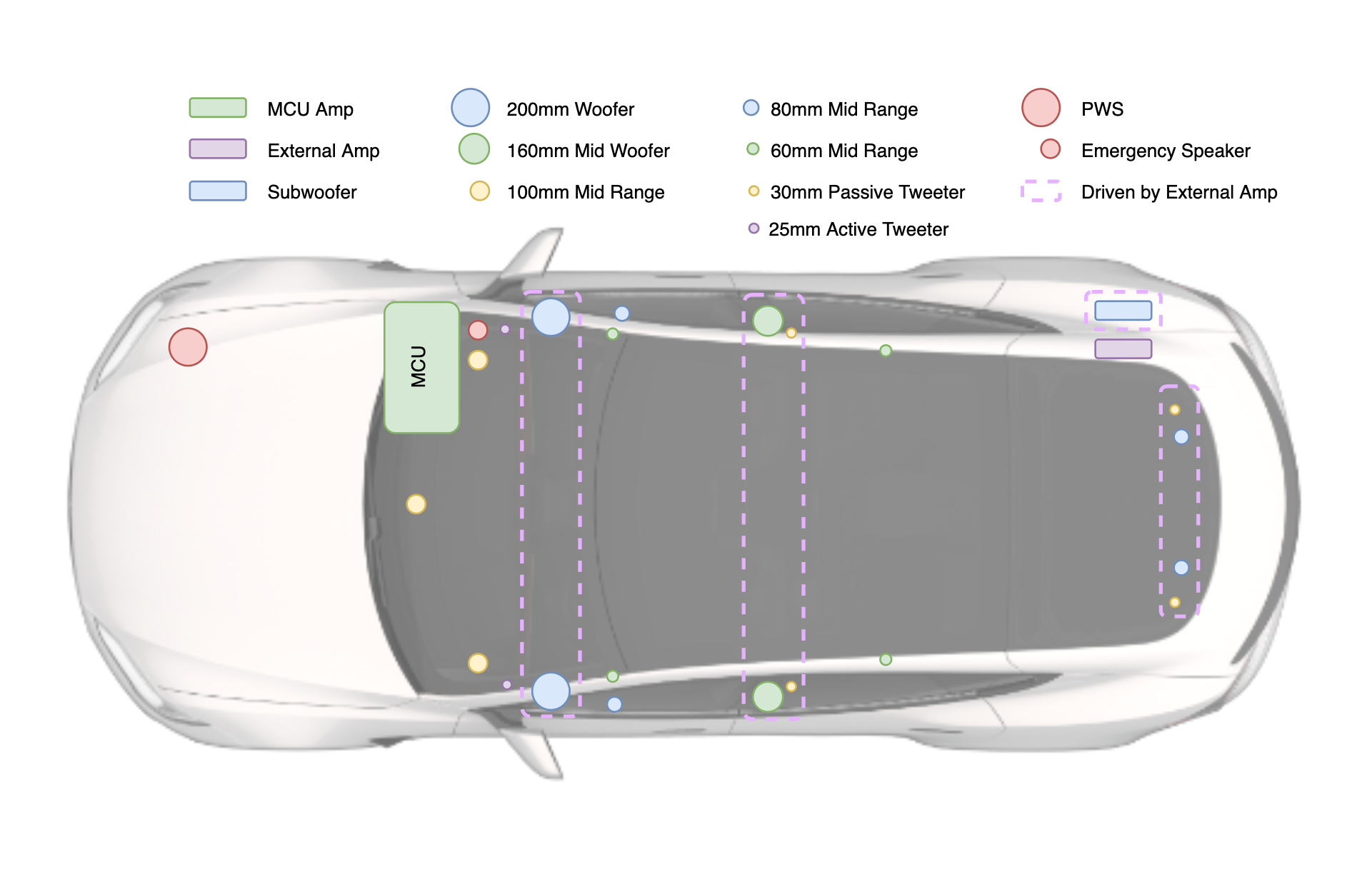
2021+ Model S contains 24 speakers. The diagram below outlines the placement of the speakers and their amplifier configuration.
 |
|---|
| Speaker Placement |
Speaker Listlink
| Qty | Image | Size | Type | Frequency Response | Location | Amplifier |
|---|---|---|---|---|---|---|
| 1 | Center Channel | 100mm | Midrange | 200Hz-13kHz | Instrument Panel | MCU |
| 2 | Left & Right | 100mm | Midrange | 200Hz-13kHz | Instrument Panel | MCU |
| 2 | Left & Right | 25mm | Active Tweeter | 3.5kHz-20kHz | Mid A-Pillar | MCU |
| 2 | Left & Right | 60mm | Midrange | 200Hz-13kHz | Upper A-Pillar | MCU |
| 2 | Left & Right | 200mm | Woofer | 50Hz-200Hz | Front Door | External |
| 2 | Left & Right | 80mm | Midrange | 200Hz-13kHz | Front Door | MCU |
| 4 | Left & Right | 160mm & 30mm | Midwoofer & Passive Tweeter | 60Hz-3.2kHz / 3.2kHz-30kHz | Rear Door | External |
| 2 | Left & Right | 60mm | Midrange | 200Hz-13kHz | Rear Headliner | MCU |
| 4 | Left & Right | 80mm & 30mm | Midrange & Passive Tweeter | 200Hz-13kHz / 3.2kHz-30kHz | Liftgate | External |
| 1 | LFE Channel | 200mm | Subwoofer Enclosure | 30Hz-90Hz | Rear Quarter | External |
| 1 | Mono | 80mm | PWS | 300Hz-5kHz | Aeroshield | MCU |
| 1 | Mono | 67mm | Emergency Speaker | 250Hz-4kHz | Front Passenger Footwell | AP Board |
Note
The midwoofers and passive tweeters in the rear doors are connected to the same input signal (one input signal per side). Similarly, the midrange woofers and passive tweeters in the liftgate are also connected to the same input signal, separate from the speakers in the rear doors. As such, these speakers make up a single row in the Speaker Placement table shown above.
Note on Serviceabilitylink
The connections for the A-Pillar tweeter and A-Pillar midrange speakers are only differentiated by the length of the cable. If force is applied to the cables, it is possible these connections could be swapped, which will damage the tweeter over time. It is important these connections are established correctly, and the connections can be tested with a multimeter.
Shown below is a table of the correct mapping of the connectors, pin numbers, and respective speakers.
| Connection (Positive / Negative) | Harness Placement | Speaker |
|---|---|---|
| AMP1_1_P / AMP1_1_N | Left Lower A-Pillar | Tweeter |
| AMP2_1_P / AMP2_1_N | Right Lower A-Pillar | Tweeter |
| AMP3_2_P / AMP3_2_N | Left Upper A-Pillar (Headliner) | Midrange |
| AMP3_4_P / AMP3_4_N | Right Upper A-Pillar (Headliner) | Midrange |
Amplifierslink
As mentioned previously, 2021+ Model S has a single Premium Audio trim. The vehicle still contains 2 amplifiers: 1 located on the MCU (MCU amplifier) and 1 located in the trunk (external amplifier). Together, these amplifiers drive the 22 speaker sound system plus the PWS speaker. When determining the output channels from the amplifiers, there are some important aspects to note:
- The 30mm passive tweeters (4) do not require their own driven input channels and are wired in parallel with their respective paired drivers.
- The subwoofer is counted as a single speaker, but it requires 2 driven inputs.
- The emergency speaker is driven and controlled separately by the autopilot board.
This results in a total of 21 output channels, 12 from the MCU amplifier, 8 from the external amplifier and 1 from the AutoPilot amplifier.
MCU Amplifierlink
The MCU amplifier has 3 Digital to Analog Converter (DAC) amplifiers (4x40W output power) accounting for a total of 12 channels. The layout is given below:
- 2 midrange on the front doors (1 for each door)
- 3 midrange on the instrument panel (left, center, and right)
- 4 midrange on the upper A-Pillar trim and rear headliner
- 2 tweeters on the front lower A-Pillar trim
- 1 pedestrian warning speaker on the aeroshield
External Amplifierlink
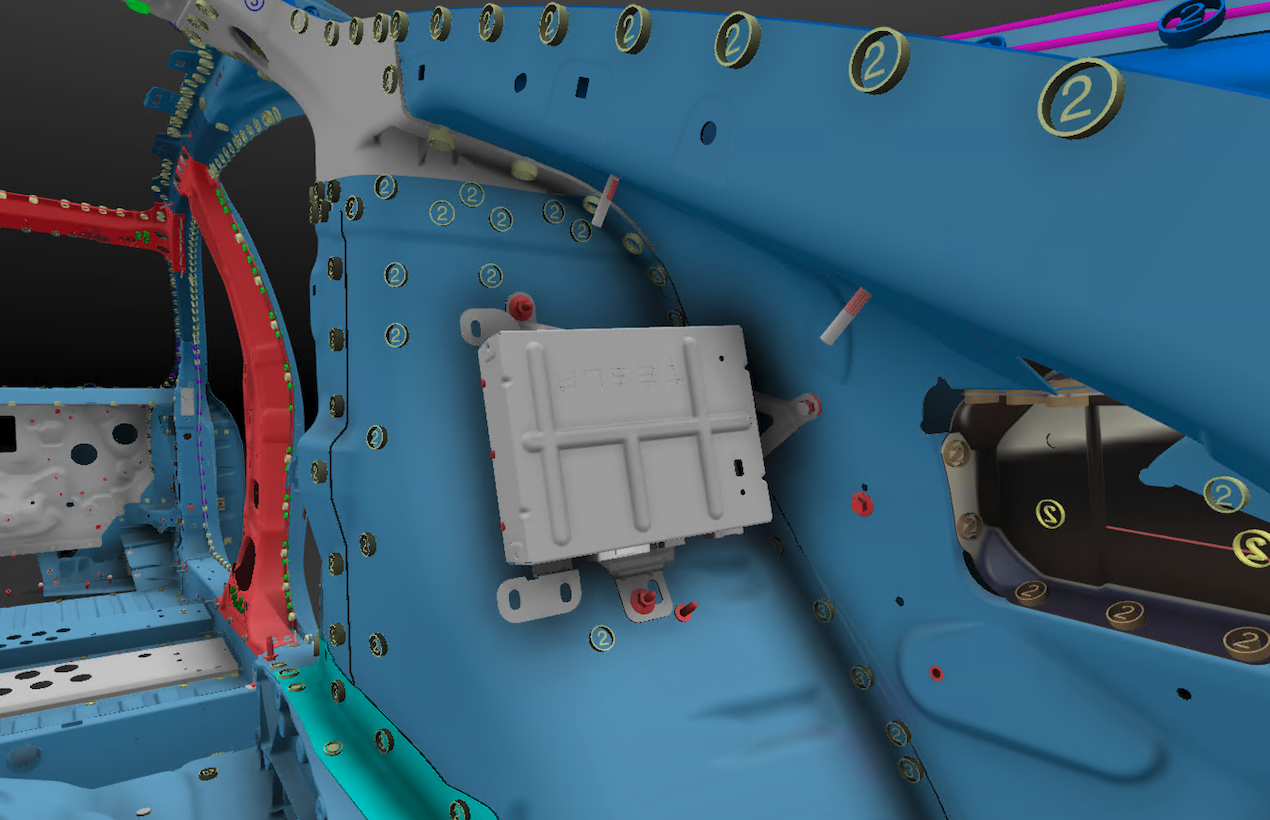
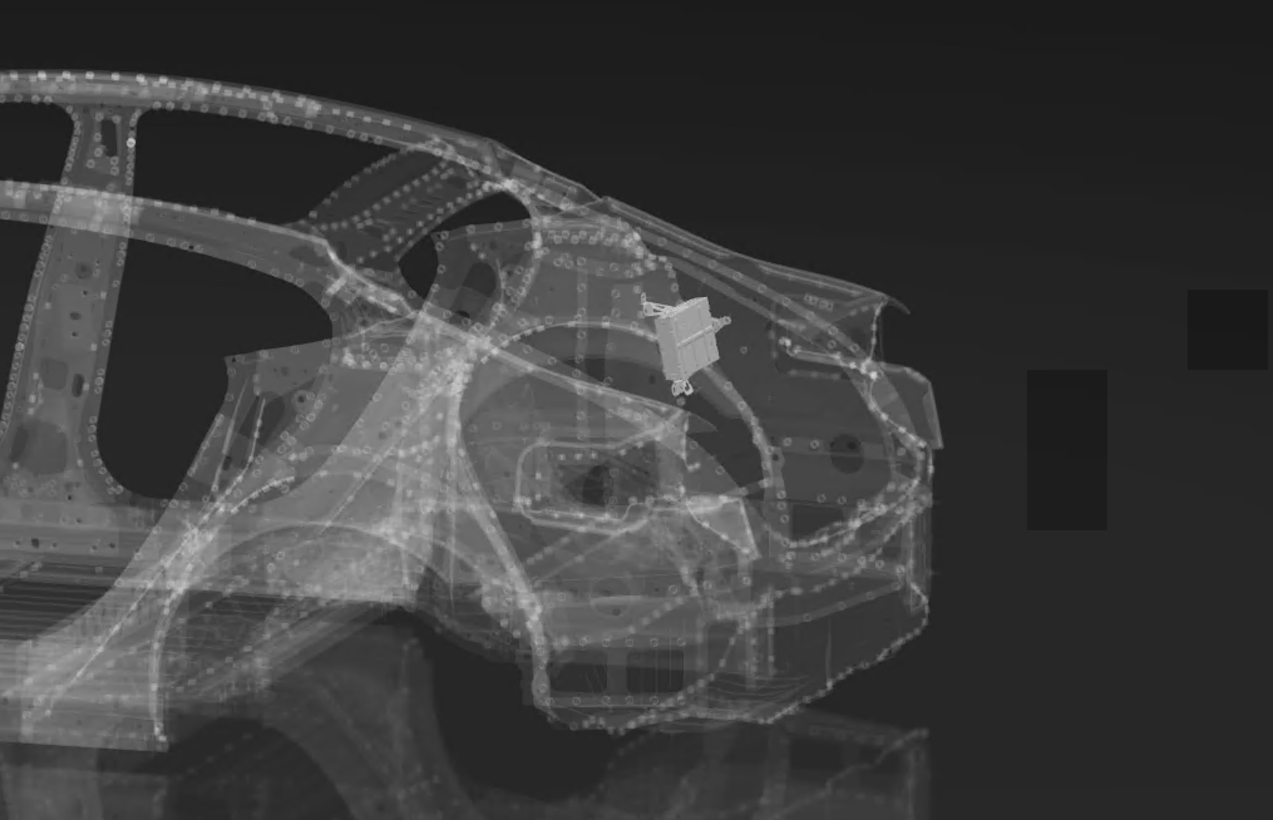
The external amplifier is an additional audio amplifier located behind the trunk trim and was formerly known as the Premium External Amplifier. It contains 2 DAC amplifiers, which account for 8 channels. It has an A2B chip (slave) for communication. The layout is given below:
- DAC Amplifier (4x40W output power):
- Connected speakers are located at the left (1) and right (1) rear doors, as well as the left (1) and right (1) sides of the liftgate
- DAC Amplifier (4x80W output power):
- Connected speakers are the left (1) and right (1) front door woofers and the subwoofer (1) in the trunk
 |
 |
|---|---|
| External Amplifier Location |
Note
It is important to point out that the system is not reliant on the A2B Bus or the external amplifier for chimes or other critical audio.
A2B Audio Buslink
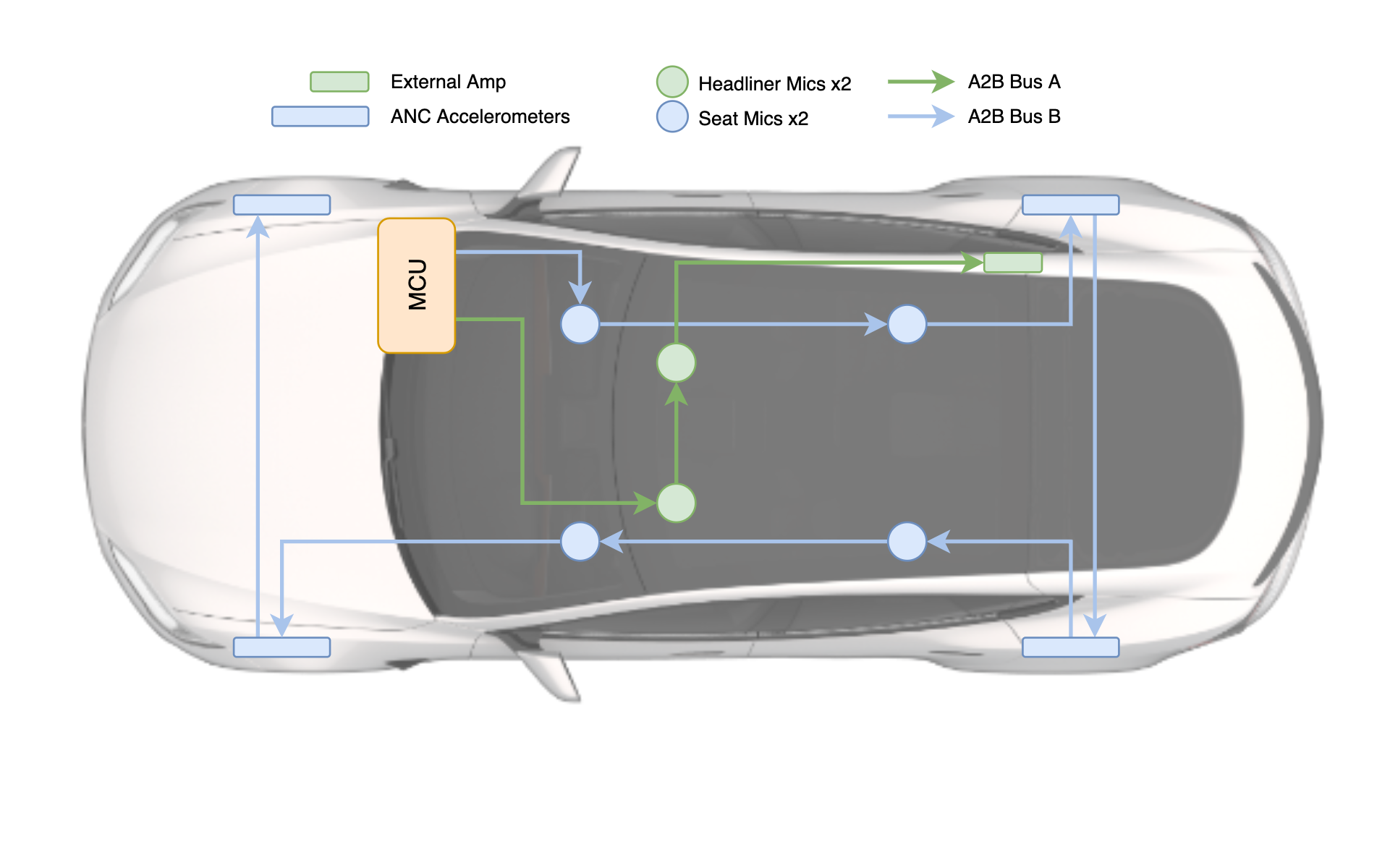
2021+ Model S contains 2 A2B audio busses: A2B Bus A and A2B Bus B. The A2B Bus A is used for the main audio system, and connects the Infotainment Board to the headliner mics and rear external amplifier. The A2B Bus B is used for the ANC system, and connects the Infotainment Board to the seat microphones and accelerometers.
 |
|---|
| A2B Architecture - Bus A (left), Bus B (right) |
Antenna / Radio Tunerlink
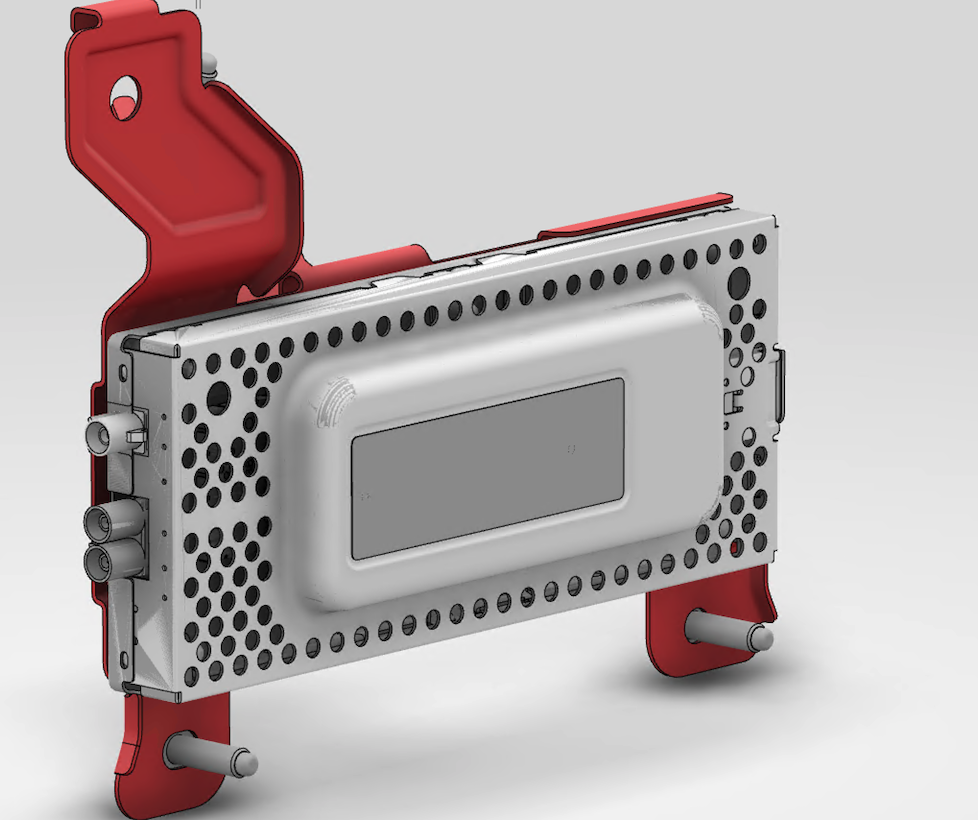
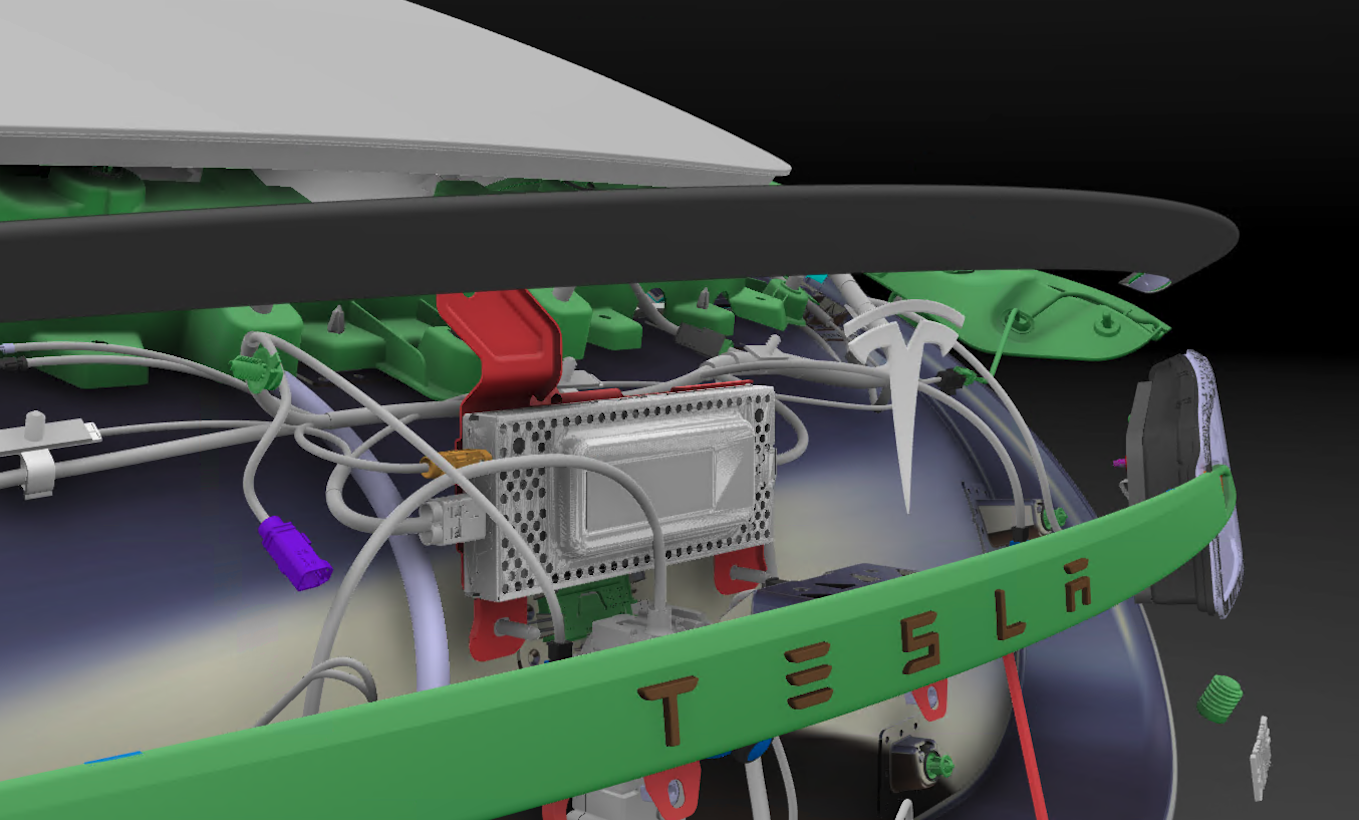
2021+ Model S uses the same tuner found in the previous generation of Model S/X vehicles. Power is provided to the tuner module via the right vehicle controller (VCRIGHT). Communication to the Infotainment Board is made over a 2-wire Ethernet connection housed in the same connector. The radio tuner contains FM, HD Radio, and SiriusXM Satellite Radio (for North America).
 |
 |
|---|---|
| Radio Tuner Located in the Liftgate |
The SiriusXM antenna is located on the C-Header. The FM and DAB antennas are on the backlite and are connected to 2 FM antenna amplifiers, which are found on the left and right sides of the liftgate.
Microphones / Active Noise Cancellation (ANC)link
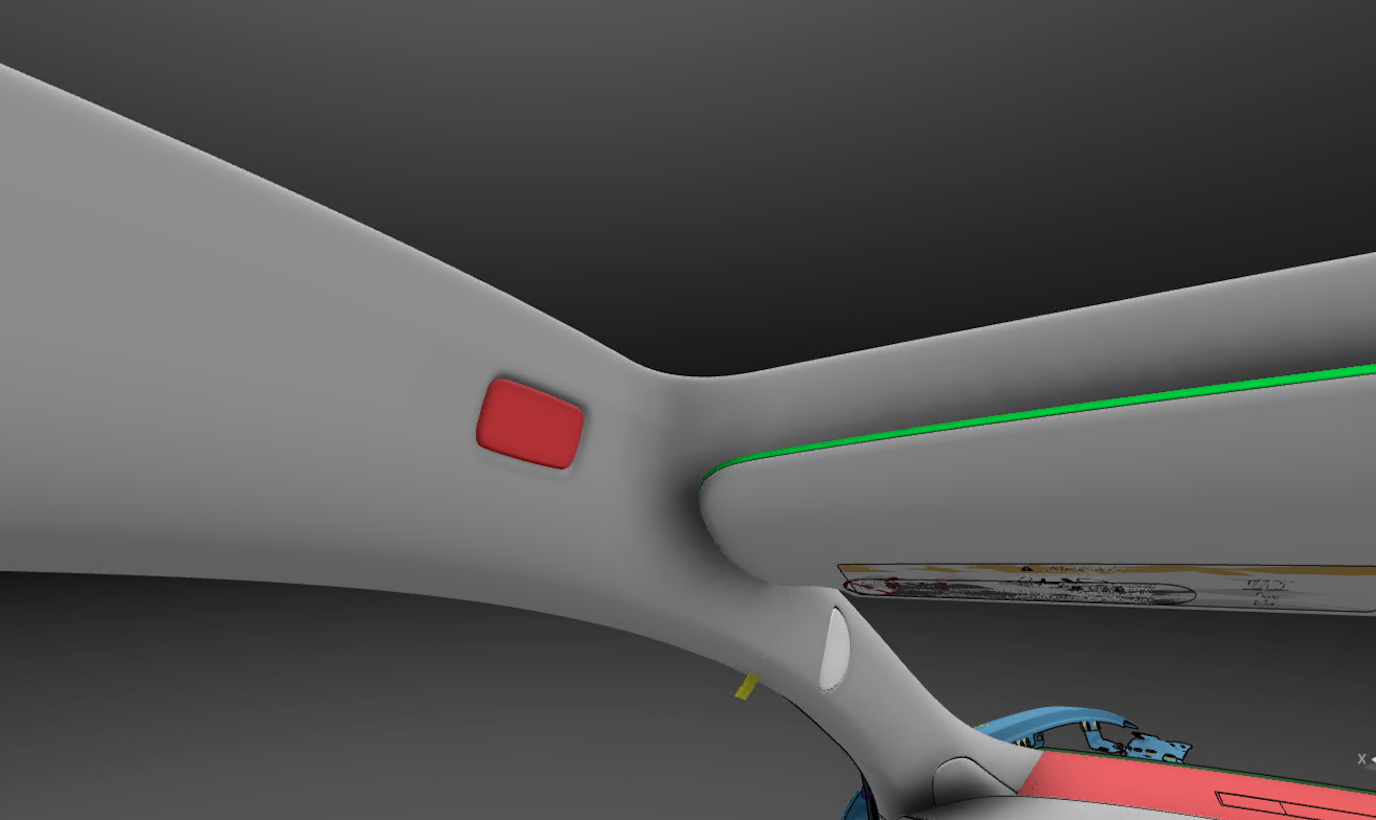
2021+ Model S contains 4 digital Micro-ElectroMechanical System (MEMS) headliner microphones, 8 digital MEMS seat microphones, and 4 3-axis accelerometers. The 4 MEMS headliner microphones are used for Telephony (calls and voice commands), while the 8 seat microphones and 4 accelerometers are used for the ANC subsystem.
 |
|---|
| Microphone Module in the Headliner |
Active Noise Cancellation (ANC)link
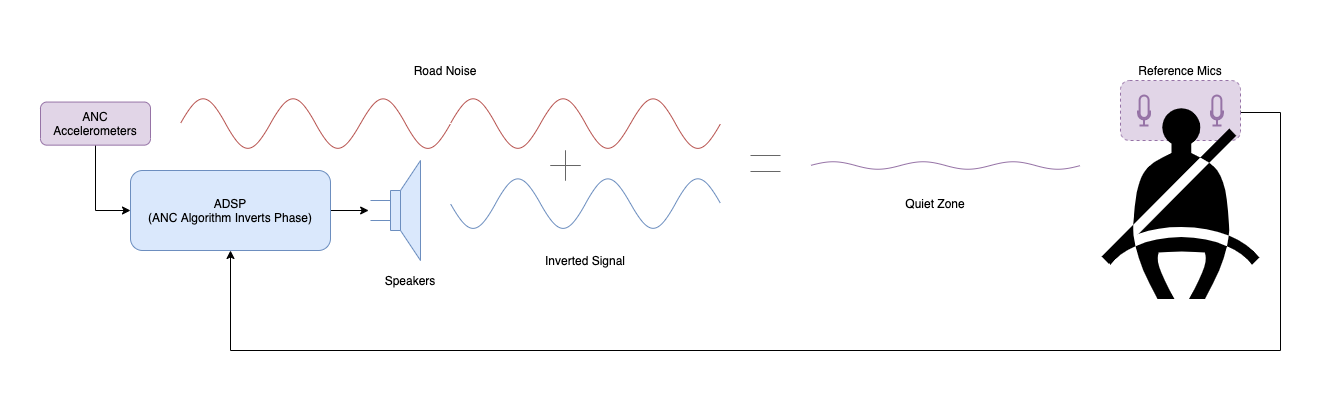
The ANC System consists of 4 pairs of digital MEMS seat microphones (8 microphones total), 4 ANC sensors (accelerometers), the ADSP, and speakers. The high-level concept of the ANC system is to cancel any unwanted audio signal (like road noise) by adding an additional signal of the inverse phase.
It may seem counter intuitive to be adding more noise to achieve less overall sound, but this concept takes advantage of a physics phenomenon called destructive interference. Essentially, when two waves of the same frequency meet, they sum together, and the resulting wave is what is heard. If the two signals are the inverse phase of one another, they will cancel each other out completely, leaving silence in an ideal world and reduced noise in practice.
For the 2021+ Model S ANC system, the accelerometers act as the input for road noise. The ADSP then inverts the phase of the unwanted sound wave and outputs the inverted wave from the speakers to cancel out the unwanted noise inside the cabin. Since it is difficult to cancel out higher frequencies without precise microphone / speaker relative to ear placement, the 2021+ Model S ANC only works up to about 300Hz.
The ANC accelerometers are located at each wheel and can be seen in the A2B bus diagram in the A2B section. The ANC seat microphones are located in the headrest of each seat, which have 1 microphone on each side of the passenger. The microphones are located here so they are as close to the customers' ears as possible, allowing the ANC algorithm to best tune for the "quiet zones" around the customers heads.
Since the algorithm is optimized for these localized "quiet zones", if the passenger moves their head around the cabin or slouches in the seat, the ANC effect will be less prominent, and they may hear more of the undesired road noise.
 |
|---|
| Active Noise Cancellation (ANC) |
Note
The front and rear ANC are only operational independently. This means either the noise cancellation is active in the front or rear seats. This is a physical limitation of the speakers in the vehicle.
Audio Serviceabilitylink
Replaceable Components:
- All speakers
- External amplifier
- Tuner
- Antenna amplifiers
- ANC accelerometers
- Telephony headliner microphones
- Front seat ANC microphones
- Rear seat ANC microphones
Non-Replaceable Components:
- ADSP - part of the Infotainment Board
- MCU amplifier - part of the Infotainment Board
External USB Modulelink
2021+ Model S comes with two (2) USB modules and one (1) USB-C port located in the glove box.
The front USB module is located in the middle of the center console and includes two (2) USB-C ports. Both USB-C ports support power and data transfer.
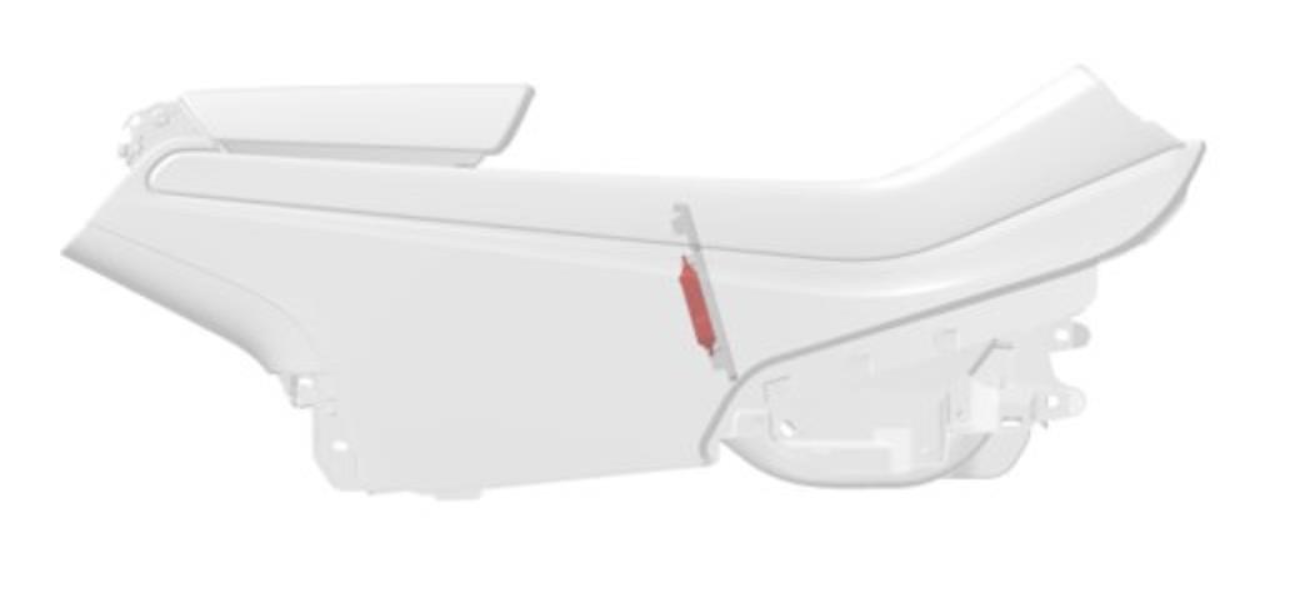 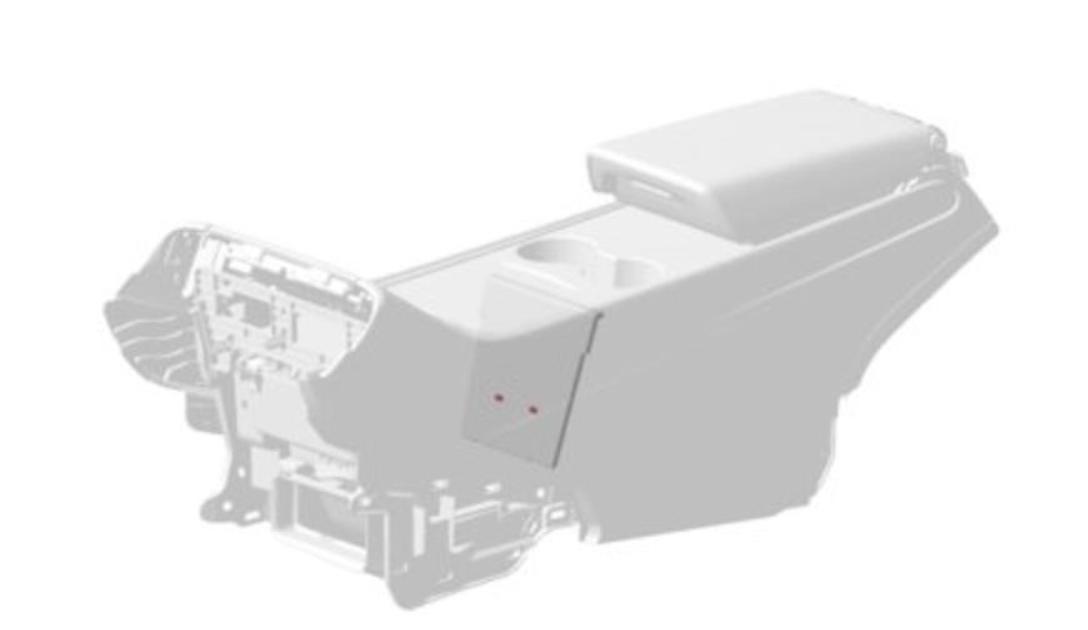 |
|---|
| Location of the Front USB-C ports |
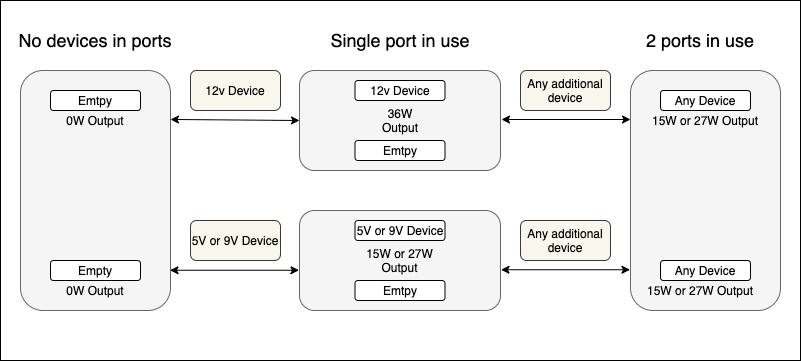
Maximum charge current for each USB-C is 3.0 Amps at 5V, 9V, and 12V. Both USB ports are USB 2.0, and offer maximum transmission rates up to 480 Megabits per second (Mbps). Each USB-C port is rated at maximum power of 36W. Two (2) USB-C ports are rated at maximum power of 27W each.
 |
|---|
| Front USB functional state diagram |
The rear USB module is located at the back of the center console, under the rear display and includes two (2) USB-C ports. The rear USB-C ports can only be used for charging, and do not support data transfer.
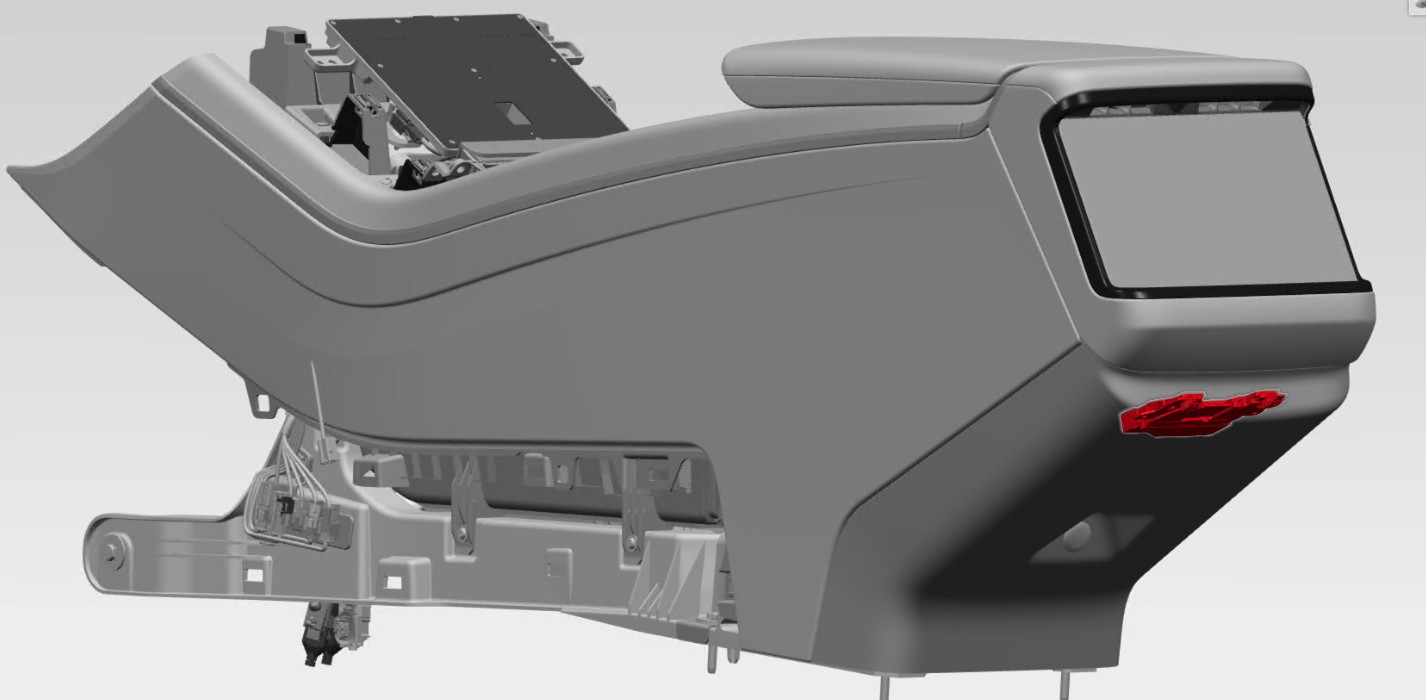 |
|---|
| Location of the rear USB-C ports |
Maximum charge current for each rear USB-C port is 3 Amps at 5V, and 9V. Both USB ports are USB 2.0 capable of charging up to 27W each.
The front and rear USB hubs are powered by 4-pin connector, used as a pass-thru power for the inductive charger. Additionally, the front ports are connected to a fused, regulated USB-mini port on the Infotainment ECU for media purposes.
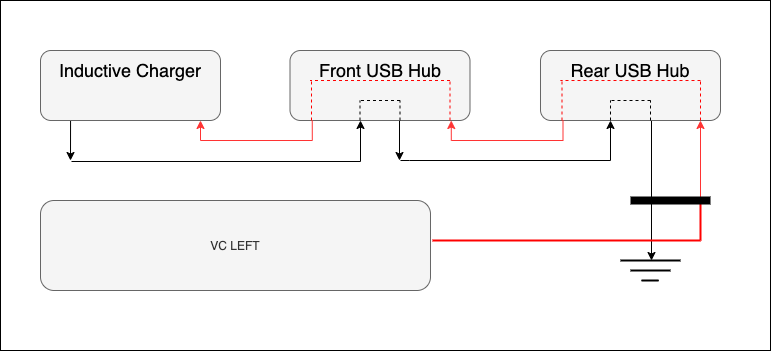 |
|---|
| Vehicle Power Architecture |
An additional USB-C 3.0 Type-A is located in the glove box and offers a charge rate up to 12W, and USB 3.1 transmission rates. It is ideal for fast data transfer related features.
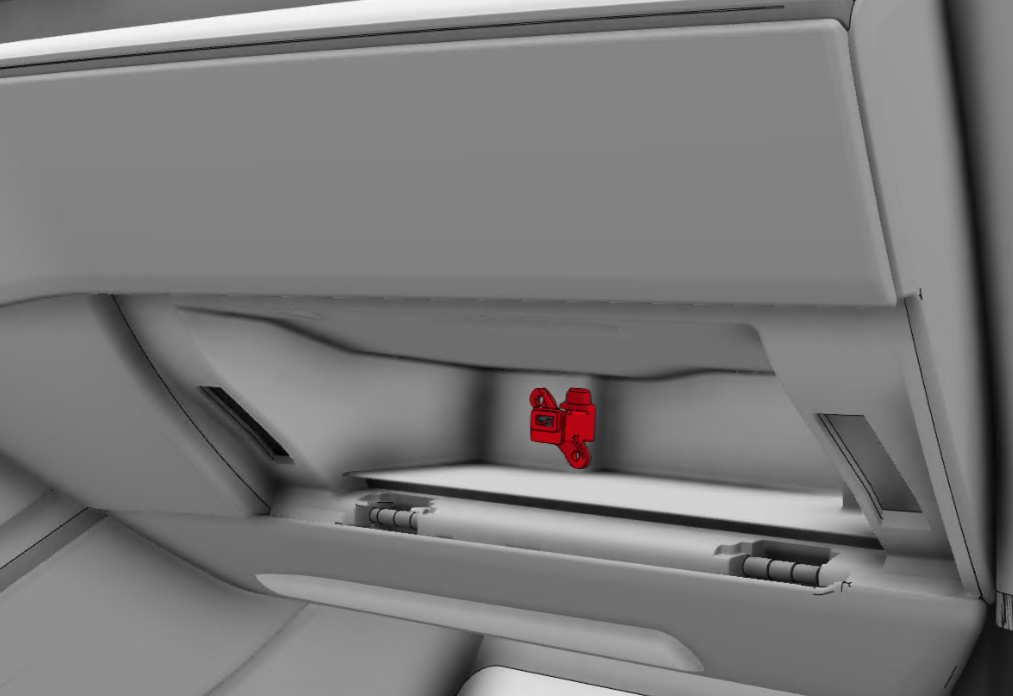 |
|---|
| Location of the glovebox USB-C port |
Inductive Charginglink
2021+ Model S comes with an inductive charger that sits in the front of the center console.
The inductive charger is powered through the USB-C port in the front USB hub. The connection to the car computer allows the charger to communicate with the car computer to indicate if/when a phone is charging. All phones capable of wireless charging (Qi Certified) can be charged using this wireless charger. The charging platform is capable of charging one phone on either side at a time, or two phones at the same time.
The wireless charger provides up to 15 watts.