Keyslink
Last updated: October 20, 2023
Component Overviewlink
The Model X key fob is an active and passive communication device designed to interact with the vehicle security controller. It can be used by the customer to lock or unlock the vehicle, open the front trunk as well as open / close the powered liftgate and rear “Falcon” doors.
Central Body Controller (BCCEN) Locationlink
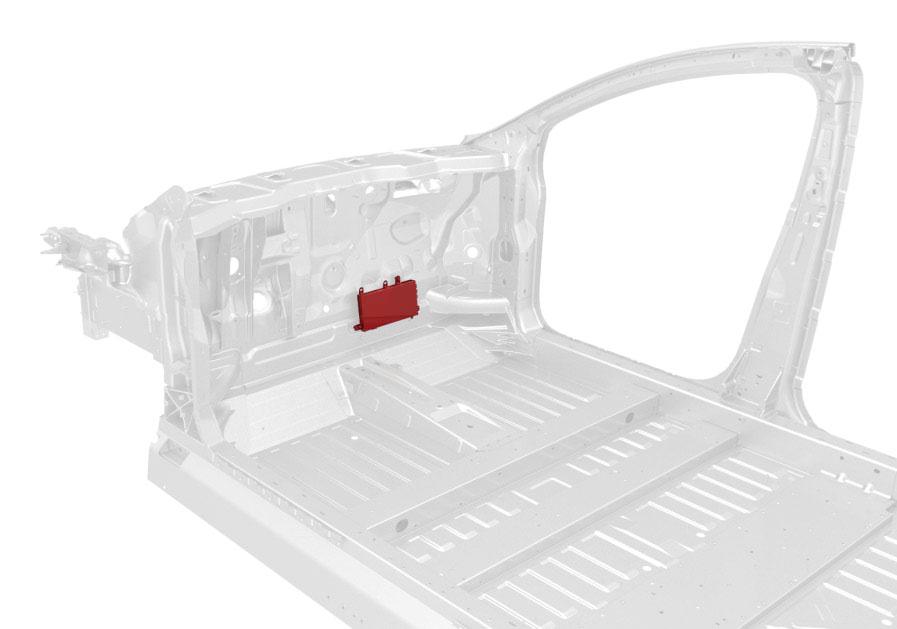 |
|---|
Key Foblink
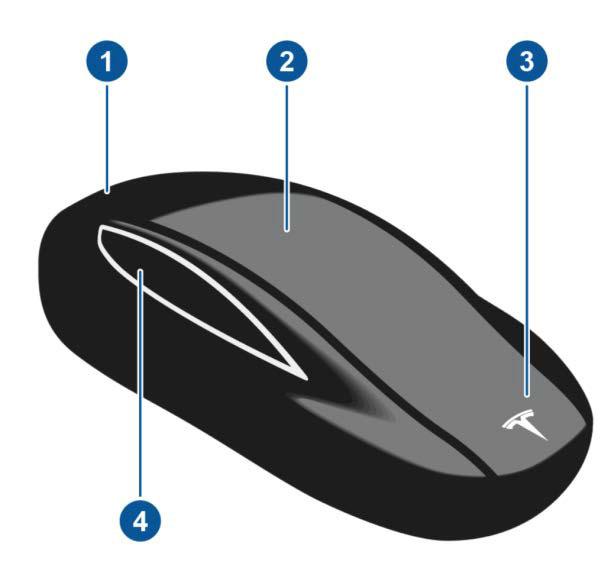
The Model X Key fob has four different buttons:
 |
|---|
| 1. Open/close trunk 2. Lock/unlock all 3. Open/close front trunk 4. Open/close 2nd row door (second button on other key fob side) |
| Model X Key fob |
 |
|---|
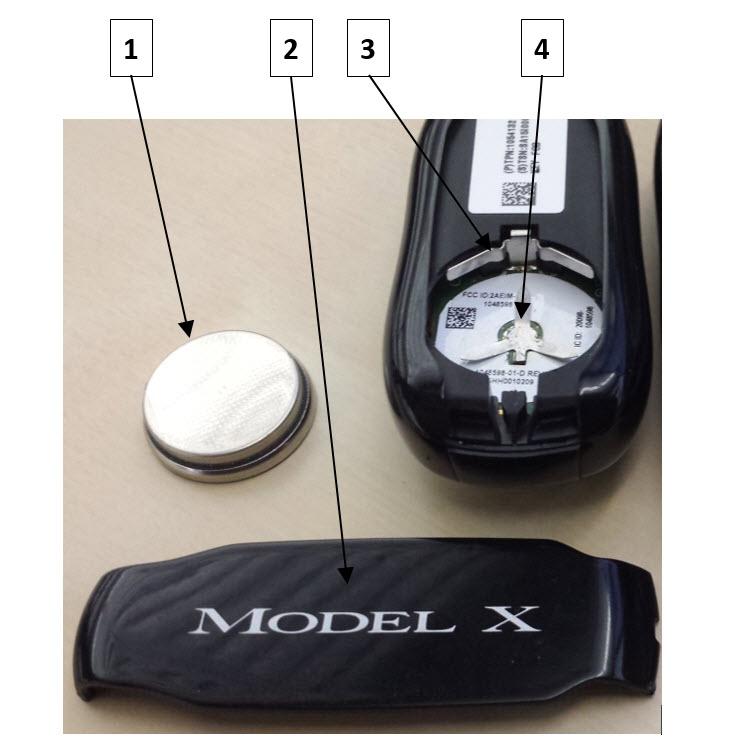
| 1. Key Fob Battery 2. Key Fob Back Cover 3. Battery Positive Terminal Contact 4. Battery Negative Terminal Contact |
Low Frequency (LF) Radio Coillink
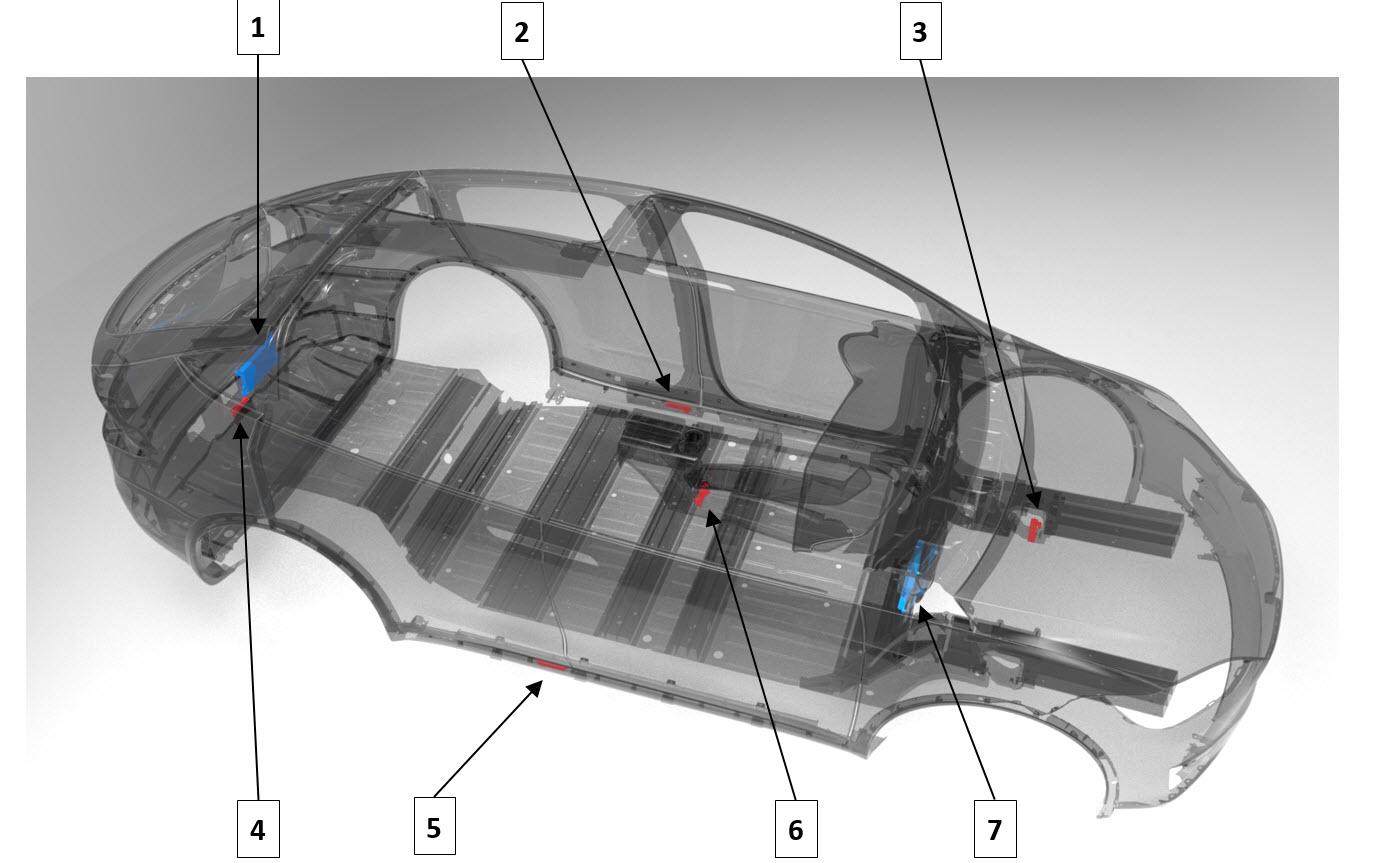
There are 5 LF Radio Coils connected to the Central Body Controller (BCCEN).
Note
In the wiring diagrams, the coils are labeled PKE (Passive Keyless Entry).
 |
|---|
| 1. Rear Body Controller (BCREAR) (included for reference, not part of the key system) 2. PKE Coil Left Rocker (also called Driver Rocker Panel) 3. PKE Coil Front 4. PKE Coil Rear (also called Trunk) 5. PKE Coil Right Rocker (also called Passenger Rocker Panel) 6. PKE Coil Center Console 7. Central Body Controller (BCCEN) |
Bluetooth Low Energy (BLE) Radio Antennaslink
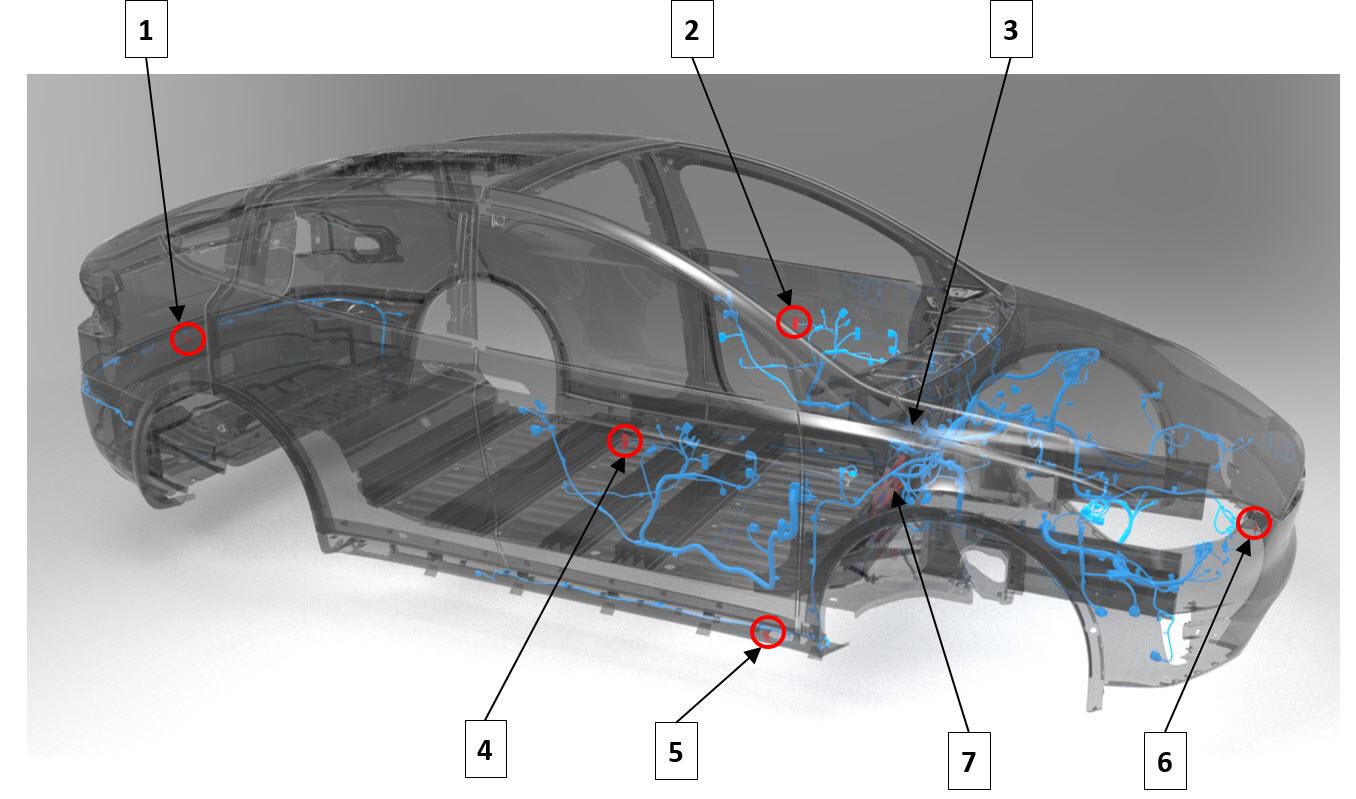
Six BLE (Bluetooth low energy) antennas throughout the vehicle are used as the primary communication method with the key fob. BLE antennas are a part of the main wiring harness and not serviceable independently from the harness. The antennas connect directly to the Central Body Controller via coaxial cables that run through several of the main harnesses.
 |
|---|
| 1. Rear BLE 2. RH (Right Hand) Front Door BLE 3. RH (Right Hand) Rocker BLE 4. LH (Left Hand) Front Door BLE 5. LH (Left Hand) Rocker BLE 6. Front BLE 7. Central Body Controller (BCCEN) |
Ultra High Frequency (UHF) Antennalink
Although it is not technically a component of the key system, the Ultra High Frequency (UHF) Antenna is used by the central security controller to open the charge port when requested from the charge cable handle. The antenna is integrated into the rear lift gate glass defroster. Pressing the “proximity / latch” button on the charge handle will send a wireless request to the vehicle to open the charge port door. If the vehicle is unlocked, the central body controller opens the charge port door. The UFH antenna is not used for anything other than the charge port.
General Operationlink
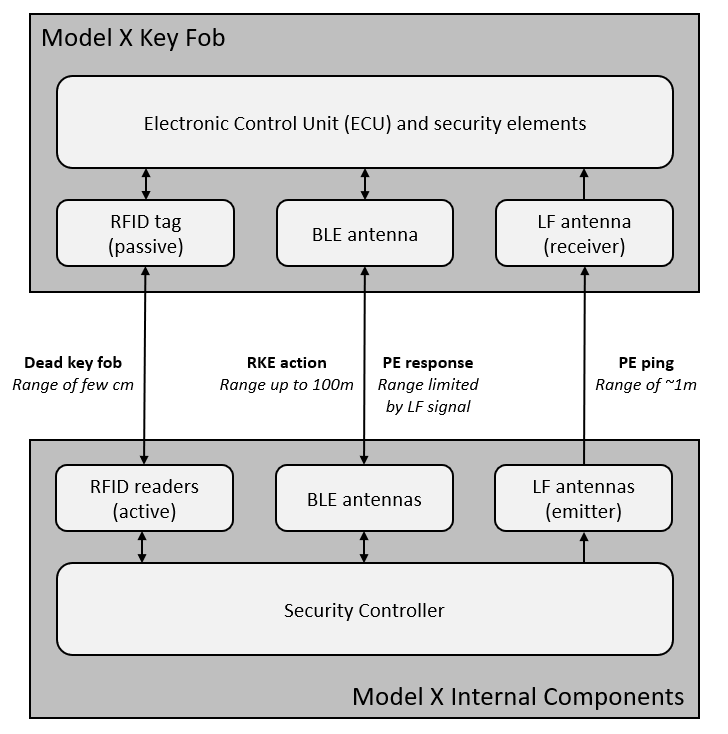
The key and security system is designed to seamlessly allow the user with the correct key fob to lock and unlock the vehicle, enter the vehicle, enable Drive, and control other advanced features. The system will also block any unauthorized attempts to use the vehicle. Two Tesla key fobs are provided to every customer at the time of delivery. The system allows up to eight keys to be paired and used simultaneously. The system can operate in passive entry (PE) mode that automatically unlocks and locks the vehicle as the user approaches or leaves the vehicle. If enabled, the key will also automatically present the front door (depending on the approach angle of the driver), allowing the user to enter the vehicle without interacting with any physical button. The key system also has button commands, or Remote Keyless Entry (RKE), on the key fob that will initiate various vehicle functions including locking / unlocking the vehicle, and opening / closing falcon doors, charge port, rear liftgate, and front trunk. Finally, the key system authenticates and localizes the key within the vehicle to enable Drive when it is requested via a brake pedal press.
The below diagram gives an overview of how the key fob can interact with the vehicle security system.
 |
|---|
Starting Communicationlink
The vehicle constantly sends out LF pings that include the CarID (last 5 digits of the VIN of the vehicle) while it is in all states. In a quiet environment, this can be heard as a barely audible clicking from the center console LF coil.
The key filters out any ping that does not match its CarID. If the CarID does match, then the key will send an encrypted authentication message to the vehicle over BLE. If the vehicle has been paired to that key, it will respond correctly over BLE and key communications will begin. At this point the key is considered present. If the vehicle is not paired to that key, then the communication will be ignored and the key will return to sleep.
Key Localizationlink
After communication over BLE begins, the vehicle will begin to attempt to localize the position of the key.
Key location is used for:
-
Drive rail enable:
-
If key is “inside vs outside.”:
-ey vectoring: - Key position over time (approaching or leaving) and direction. - Auto-present door feature.
Key Authenticationlink
If the brake pedal is pressed and the key position has already been determined to be inside, then the vehicle will attempt to authenticate the key before enabling drive.
If the key fob is authenticated, then the Central Body Controller will turn on the drive rail. The Central Body Controller continues to ping the key after Drive authentication to confirm that it is still present. This is called the Drive Away Key Check. If the key becomes unavailable, a warning appears but Drive is not disabled.
The conditions for the Drive Away Key Check are:
- The speed first transitions above 5mph.
- After the vehicle transitions out of Park gear.
- Any door closes.
Note
Key fob information is not updated until after a drive rail authentication. If an alert is present for low key battery voltage, it will not be cleared until the next drive rail authentication with that key after battery replacement.
Drive Unit Immobilizerlink
After the key is authenticated, the Central Body Controller will send commands to the Drive Unit to release the immobilizer lock and enable drive. The immobilizer is a key authentication method that is similar to the key fob to central body controller authentication method. It transfers information over an encrypted channel with symmetric Advanced Encryption Standard (AES) keys. The immobilizer is implemented in all markets on all vehicles. The immobilizer needs to be initialized on new BCCEN or drive inverters after replacement. The process is performed using Toolbox and cannot be reversed. Once the immobilizer has been learned to each component, the components will no longer work with any other vehicle.
Info
Advanced Encryption Standard (AES) is a symmetric block cipher used to protect classified information and is implemented in software and hardware throughout the world to encrypt sensitive data.
Unlocking/Lockinglink
Locking and unlocking from the key fob can be done though two methods:
- Remote keyless entry: The buttons on the fob must be pressed to unlock the vehicle.
- Passive entry: The vehicle unlocks when the key comes into range.
The “Door Unlock Mode” setting on the touchscreen has 2 options:
- Driver:
- The first request only unlocks the drivers door.
- The second request unlocks all doors.
- All: The first request unlocks all doors.
Remote Keyless Entrylink
In most vehicles, Remote Keyless Entry refers to any operation that unlocks the vehicle without the use of physical key. Since our system has no physical key at all, the RKE system refers to any button press on the key fob. The operations for remote keyless entry are:
- Lock/Unlock
- Lock: press the top-center of the key fob once.
- Unlock: press the top-center of the key fob twice.
- Power Liftgate
- Open while closed: double press the Trunk area of the key fob.
- Close while opened: double press the Trunk area of the key fob.
- Close while opened: press the top-center of the key fob once.
- Charge Port Door
- Open: press and hold the Trunk area of the key fob.
- Charge Port Door will close if the vehicle is locked and there is no cable plugged into the vehicle.
- Falcon Wing Door
- Open or Close: double press the respective side of the key fob’s Falcon Wing Door.
- Close while opened: press the top-center of the key fob once.
- Front Door
- Close while opened: press the top-center of the key fob once.
- Front Trunk
- Open: double press the front trunk area of the key fob.
Tip
Pressing the lock button on the key fob will close all opened powered closures (Front, Falcon Doors and Trunk).
Tip
Pressing the respective door button on the key fob again after RKE close has started will stop that closure.
Passive Entrylink
Passive entry allows the vehicle to lock / unlock without the customer interacting with key fob buttons. This option can be enabled via the touchscreen:
- Enabled “Walk Away Door Lock” will lock all doors when the key is not within range of the vehicle or 8 seconds.
- Disabled “Walk Away Door Lock” will not lock any door based on key location.
Unlocking the vehicle with RKE or Interior Unlock temporary disables Walk Away Locking until either:
- 60 seconds elapse.
- The drive rails turn on.
- The vehicle is with the key.
Passive locking and unlocking is also impacted by the “Auto Front Door” feature:
- Enabled “Auto Front Door” will:
- Unlock doors and power open the driver door when the key fob is detected approaching the driver door.
- Power close the driver door and lock biased on “Walk Away Door Lock” setting when the key fob is detected leaving the driver door.
- Disabled “Auto Front Door” will:
- Not automatically open or close the driver door biased on key fob location.
- All other powered front door requests will still work, including:
- Brake press to close.
- RKE lock request to close.
- Exterior/interior switch request to close.
- Exterior/interior switch request to open.
- Open angle is dynamically determined by the falcon ultrasonic sensor.
Self-Presenting Front Doorlink
Openinglink
- The front door will only allow automatic opening based on key fob location when:
- MCU Auto Present Doors is ON.
- Vehicle is not in Factory Mode.
- Driver is not Present.
- Drive rail is off.
- The front door will not automatically open if it is closed and locked.
- If the key fob approaches from the front of the vehicle, the door will do the following:
- Open slightly
- Wait until the key fob passes the front door and a close obstacle is detected by the falcon door ultrasonic sensor
- Open wide quickly
- If the key fob approaches from any direction other than the front, the door shall open wide slowly.
Closinglink
- The front door will only allow automatic closing based on key fob location when:
- MCU Auto Present Doors is ON.
- Vehicle is not in Factory Mode.
- The driver front door closes automatically for any of the following reasons:
- The key fob is detected as moving away from the vehicle and the driver door is open.
- The key fob has not been detected for 3 seconds and the driver door is open.
- The key fob sends a RKE lock request to the vehicle from a fob button request.
- The brake is pressed.
Proactive Obstacle Detectionlink
- The front door reads the 2nd row door ultrasonic sensor's limiting value to determine if there are nearby obstacles.
- The front door only opens as far as the sensors allow the 2nd row door to open.
- The door ignores any changes in the limit less than 1 second before an open request.
Reactive Obstacle Detectionlink
- The door shall use the door position (encoder counts) and torque (derived from motor current) to reactively detect obstacles.
- If the door is in motion and detects an obstacle it shall stop moving.
- The door motor timeouts after 5 seconds if it cannot reach the desired position.
Opening and closing profileslink
| Profile name | Maximum Target Position | Max Acceleration | Max Deceleration | Maximum Speed |
|---|---|---|---|---|
| Open Narrow | 5 degrees | 60 deg/s^2 | 90 deg/s^2 | 15 deg/s |
| Open Wide Fast | 45 degrees | 175 deg/s^2 | 30 deg/s^2 | 25 deg/s |
| Open Wide Slow | 45 degrees | 40 deg/s^2 | 12 deg/s^2 | 25 deg/s |
| Close Normal | -10 degrees | 30 deg/s^2 | 50 deg/s^2 | 42 deg/s |
Starting and Drivinglink
Enabling Drive is an entirely electronic process and requires that the Central Controller authenticates the Drive request is coming from a source that is known to Tesla. Two options that exist are using the key fob provided by Tesla or a remote start request from the customer's mobile application.
Key Fob Drivinglink
When the key fob is inside the vehicle, it will silently authenticate itself to BCCEN when the brake is pressed. All that is required from the user with a key fob is to enter the vehicle and press the brake pedal and shift to Drive with the gear selector stalk.
Keeping Drive enabled with the vehicle stationary requires 2 of the follow inputs:
- Driver seat belt buckled.
- Driver door latched.
- Driver present (biases on Seat Belt Reminder switch in the seat cushion).
Remote Startlink
Remote start is the process where an internet connected cell phone with the Tesla mobile app can act as the key fob for a short time. The process requires that a customer:
- Is logged into their Tesla account
- Has permissions to operate that vehicle
- Has internet connection
- Has a vehicle with internet connection
- Has a vehicle that is capable of entering Drive
Once remote start is enabled, the vehicle is authenticated and will enter Drive for the next 2 minutes. This acts exactly as it would if the key was physically present for 120 seconds. Once Drive is enabled, the system will not verify the presence of a key and will stay in Drive until the drive ends.
Dead Key Foblink
In the case of a dead key fob battery, the key fob can be used to unlock and start the vehicle using internal Radio Frequency Identification (RFID).
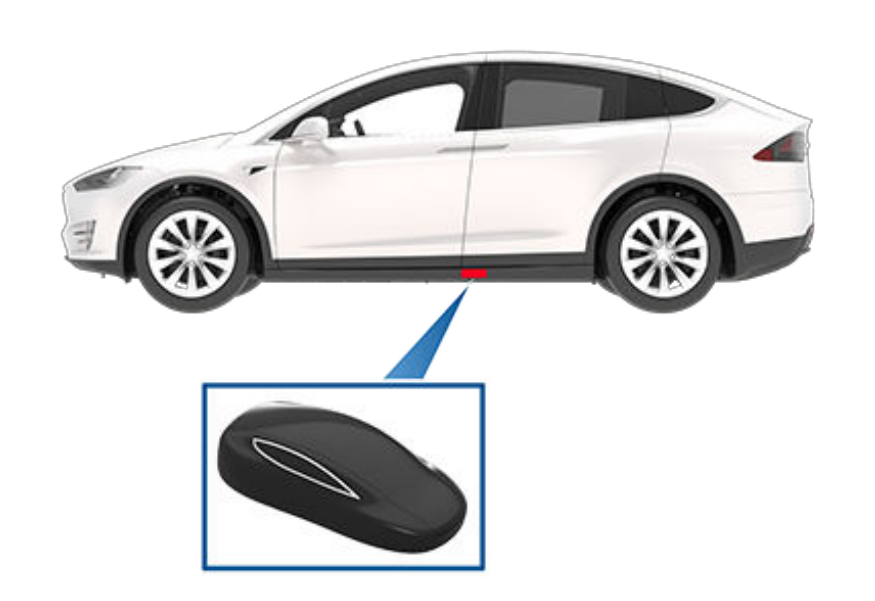
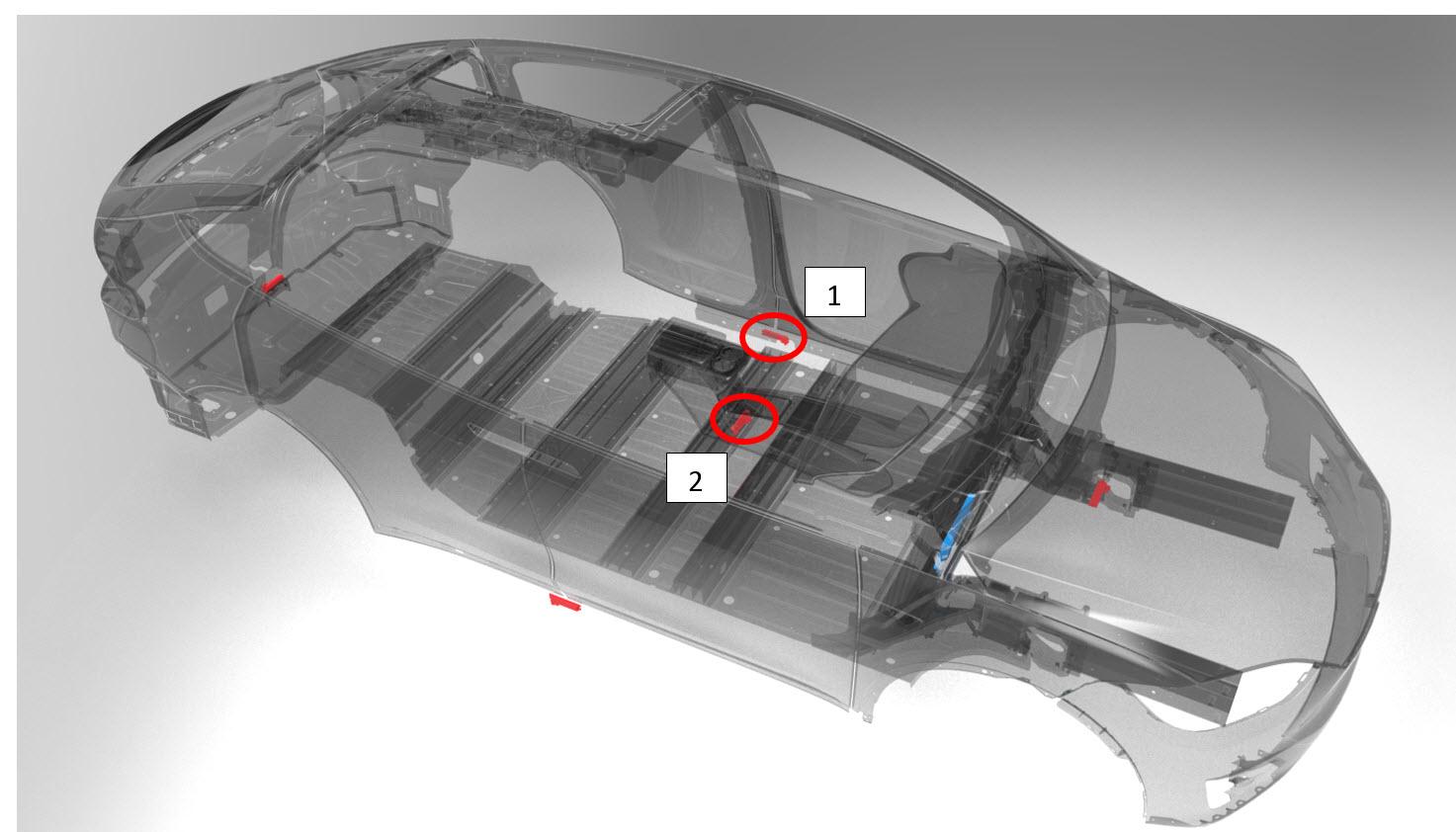
To unlock the vehicle, the dead key can be placed directly next to the driver side rocker panel LF coil. The coil sits at the split line of the front and falcon doors. The vehicle will confirm the key using RFID and will unlock all doors.
Placing the dead key in the center console near the center LF coil will allow Drive authorization. Once Drive is enabled, the system will not verify the presence of a key again.
 |
|---|
| Dead Key Fob reader spot on Left Hand Drive Model X |
 |
|---|
| 1. Driver Rocker Panel LF Coil (Dead Key Unlock) 2. Center Console LF Coil (Dead Key Drive) |
Key Diagnosticslink
Connecting to Keyslink
Keys need to be made discoverable before they can be connected with the BLE dongle.
If the key is programed to a vehicle, then it it is possible to make them visible by connecting to the vehicle over Ethernet and selecting “Enable Key Fob Discovery”. The connected Central Body Controllers will wake up any keys with a matching CarID (last 5 digit of the VIN of the vehicle) so they can be displayed automatically. Double clicking on blue keys in the Key Fob Info area will connect to them. Key fob data can be shown by right clicking and refreshing data.
If the keys are new or have an unknown CarID, then holding the lock button for 4 seconds will make them discoverable. They will remain discoverable for another 4 seconds and can be connected to during that time. After the key fob has gone back to sleep, release the lock button and hold it again to wake it back up. Additionally, the keys will always go discoverable when power cycled. Removing and replacing the battery will often allow Toolbox to immediately detect and connect to the key.
Warning
Be careful when inserting the battery into the key. Do not damage the contacts by bending them or breaking them off.
Refreshing Central Datalink
Clicking refresh in the BCCEN info area will populate all important key information into the panel from the connected vehicle. The information is a snapshot of the central state when the button is pressed. If the Central Body Controller needs to be updated or initialized, the indicators next to the refresh button will turn red. Clicking the indicators will begin the procedure to bring the central controller up to date.
Useful CAN Signalslink
When using the mobile app to lock/unlock the vehicle, the following CAN signals change:
BDY_BCCEN_vehicleLockStatus= previous state >RKE_LOCKED/RKE_UNLOCKED
However, if the key is not detected, the signals below are also displayed:
BDY_BCCEN_keyLocation=KEY_LOCATION_UNKNOWN
It is only when the customer then uses the app to remotely start the vehicle (enable keyless driving) that the key signals change as listed below:
BDY_BCCEN_keyLocation=KEY_LOCATION_INSIDE
These key signals then revert back to KEY_LOCATION_UNKNOWN when the drive rail switches off.
Key Pairinglink
The procedure to program a key fob for a Model X can be found in the Service Manual, under section "17 Electrical" > "1745 Keyless Entry and security" > "Key Fob - Program".
Important step when replacing a Central Body Controller (BCCEN)
When replacing a BCCEN, unpair all key fobs associated with the vehicle following instructions in the Service Manual.
Failure to complete this step will prevent any previously paired key fobs from being programmed to the new BCCEN, resulting in the inoperability of affected key fobs.