Towinglink
Last updated: October 20, 2023
Note
Impact on Range: Towing a trailer and carrying accessories increases vehicle weight and drag. As a result, driving range can decrease significantly. Although Trip Planner attempts to adjust estimates based on Trailer Mode, actual energy consumption may vary. Plan trip length and charging destinations accordingly.
Overviewlink
The Tow Ball package allows a trailer to be Towed or an additional accessories Rack (i.e. Skis, Snowboards, Bicycle etc.). If a towbar is fitted to the vehicle, the configuration cfg_towpackage is TESLA_REV1.
Tow Capacitylink
Refer to the Owner's manual for most up to date towing capacity information. It is intentionally left out of this section to avoid conflicting information.
Tesla recommends a separate braking system on trailers with a loaded weight of over 1000 lbs (450 kg). The braking system must be appropriate for the weight of the trailer. Follow the instructions provided by the trailer brake manufacturer to ensure that trailer brakes are properly installed, adjusted, and maintained.
The tongue weight is the downward force that the weight of the trailer exerts on the hitch. It must not be less than the trailer load by 10% North America or 4% Europe/APAC. Carrying a significant amount of equipment, passengers, or cargo in the tow vehicle can reduce the tongue weight it can handle, which also reduces the maximum towing capacity. Maximum towing capacity is calculated assuming the Gross Vehicle Weight Rating (GVWR) is not exceeded.
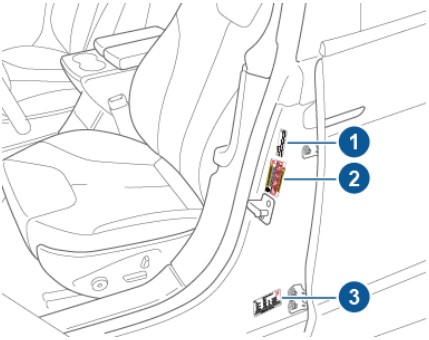
The GVWR is printed on the Vehicle Certification Label on the Drivers B-Pillar.
 |
|---|
| 1. Towing Label 2. Tire and Loading Information Label 3. Vehicle Certification Label |
Warning
Do not overload the vehicle. Overloading has an adverse effect on braking and handling.
Towing Componentslink
Tow Barlink
 |
|---|
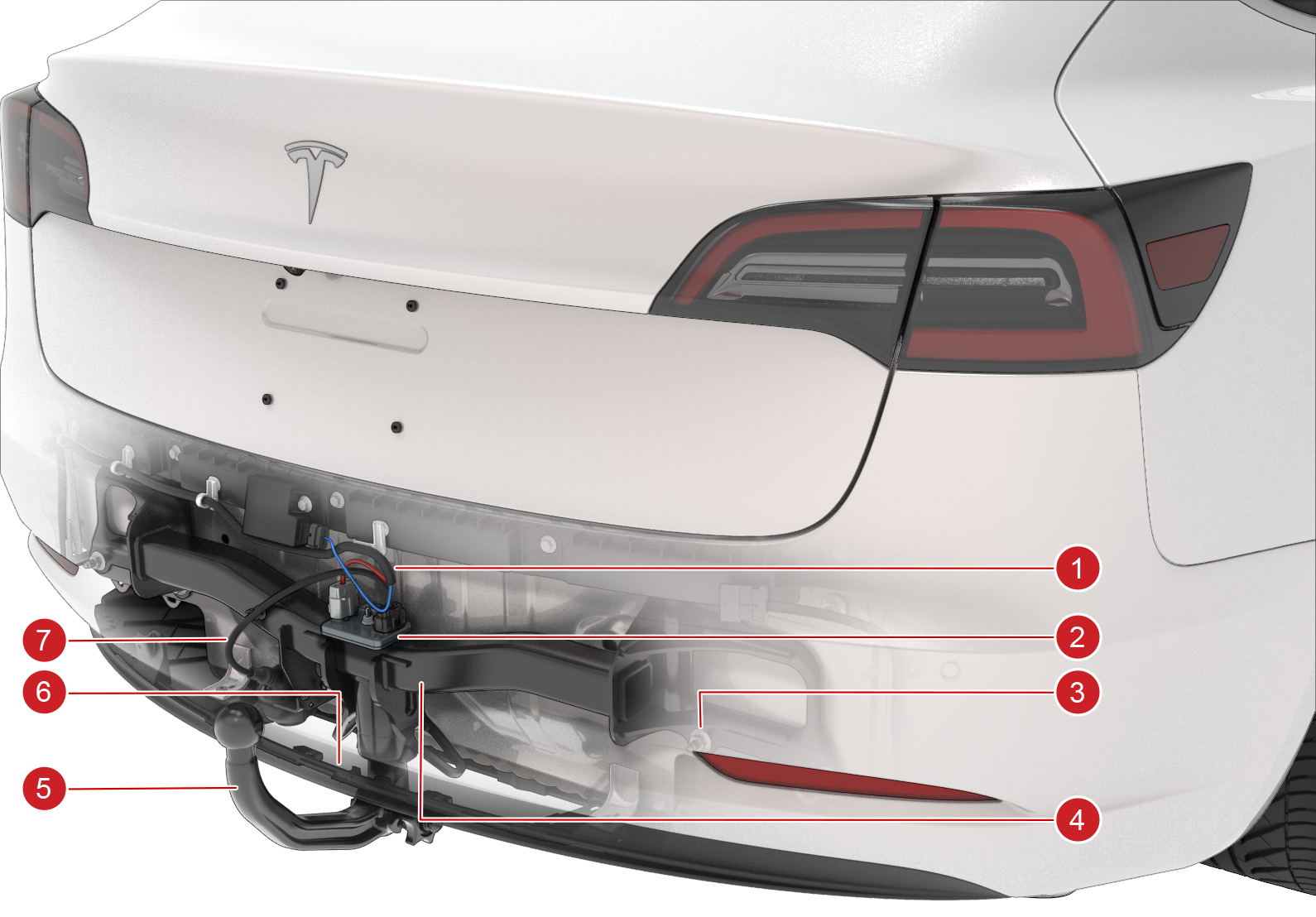
| 1. Vehicle Harness to X041 2. Trailer Light Controller 3. Bolted Connection to Body 4. Tow Bar 5. Detachable Tow Ball 6. Trailer Electrical Connector 7. Vehicle Rear Undertray |
| Tow Bar Assembly |
The tow bar permanently replaces the rear bumper beam, using the same bolted joints on the rear of the body. The Ball/Hitch adapter faces down and accepts the specific TESLA spring-latching hitches. It is covered with a plastic cap when not in use.
An electrical connector is attached to the tow bar and is protected by a spring flap when not in use. There are also two holes for trailer safety chains which act as a redundant securing method when towing.
Tow Balllink
 |
|---|
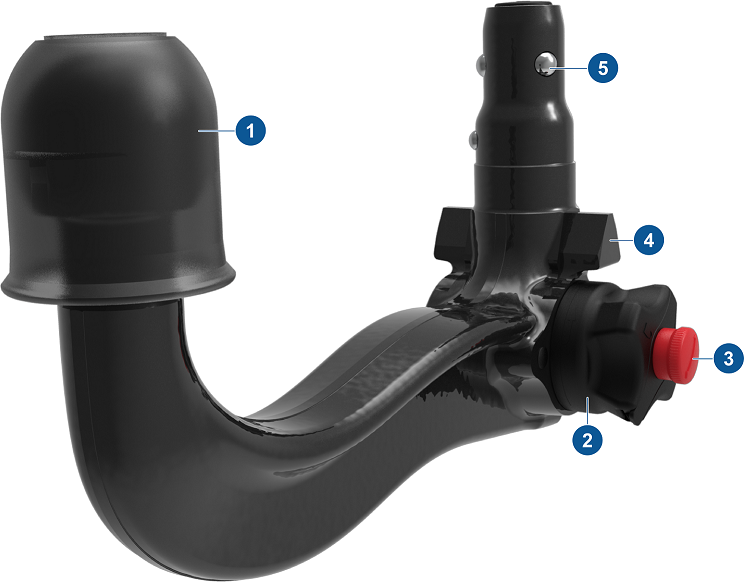
| 1. 50mm Ball and Cap 2. Sprung Release Latch 3. Lock Cylinder 4. Alignment Tabs 5. Locking Detents |
| Ball neck |
Wiringlink
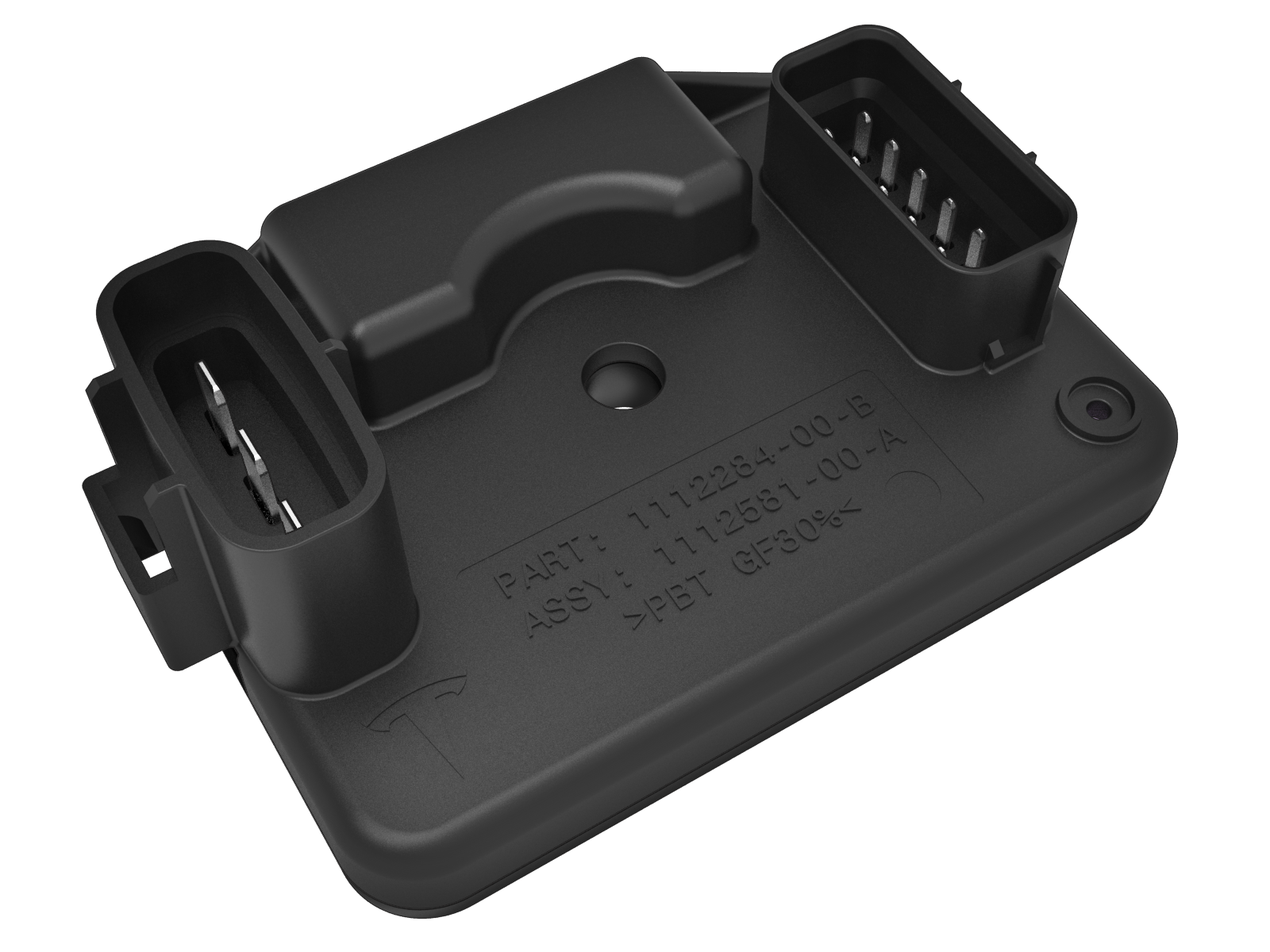
The trailer lights are controlled by a Trailer Light Controller (TLC). The Trailer Light Controller is powered by VCLEFT (Vehicle Controller Left) communicates with VCLEFT over LIN. The Trailer Light Controller is situated on top of the Tow Bar Assembly.
 |
|---|
| Trailer Light Controller |
Electrical Adaptorslink
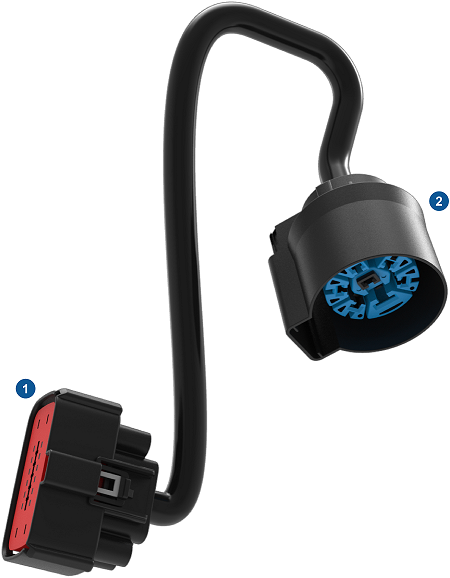
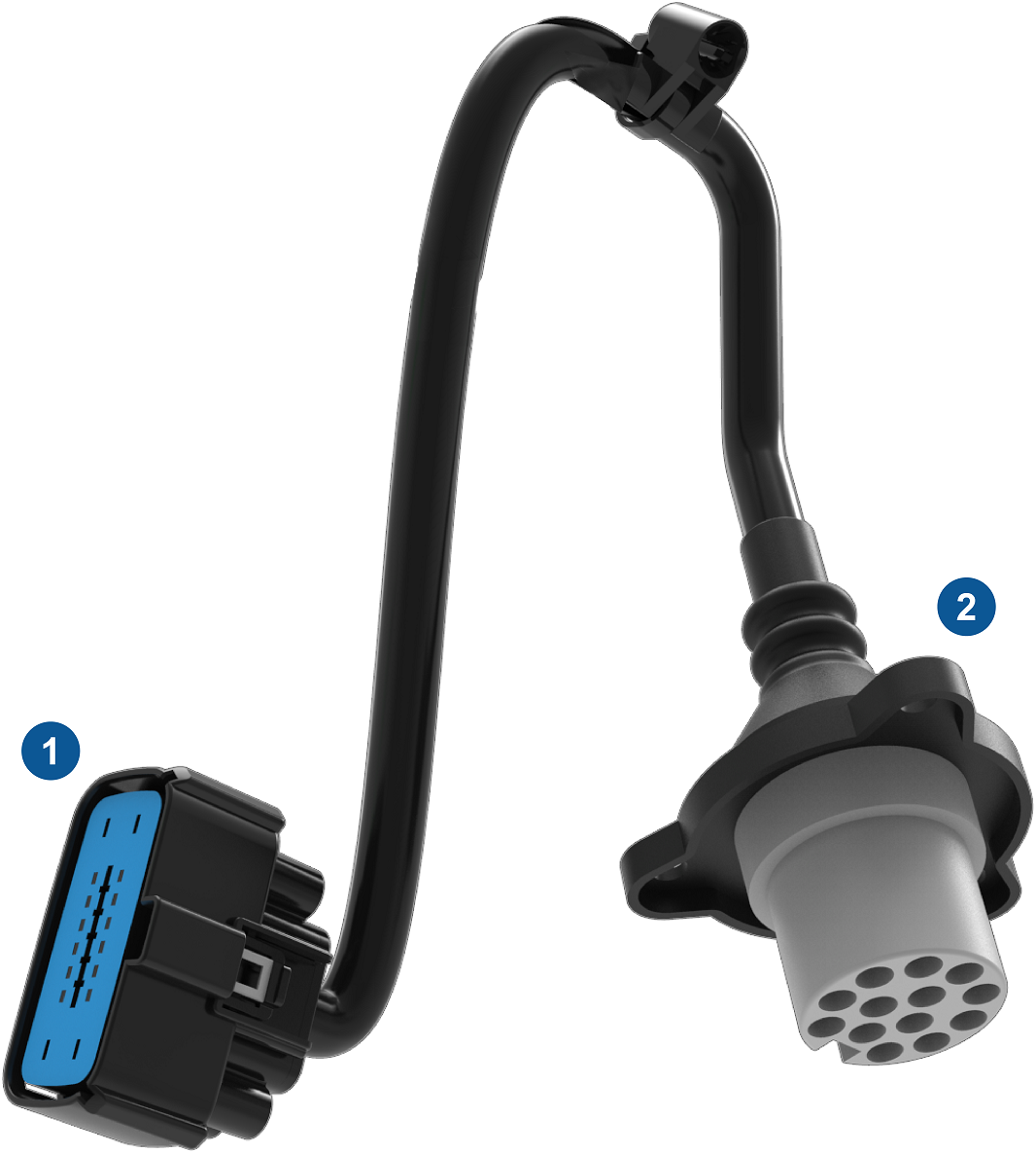
Each vehicle with Tow Package is fitted with an eletrcial connector to power the trailer lights. Because differen regions use different trailer connectors, therer are different adapters available. All adapters start at the vehicle harness connector, which carries brake and lighting circuits.
North America
 |
|---|
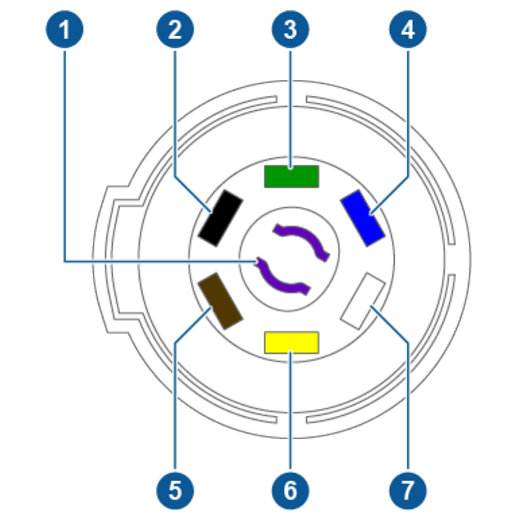 |
| 1. Reverse Lights (Purple) 2. 12V Power (Red or Black) 3. Right Turn Signal and Brake Light (Green) 4. Brake Controller Output (Blue) 5. Tail Lights and Running Lights (Brown) 6. Left Turn Signal and Brake Light (Yellow) 7. Ground (White) |
EMEA/APAC
 |
|---|
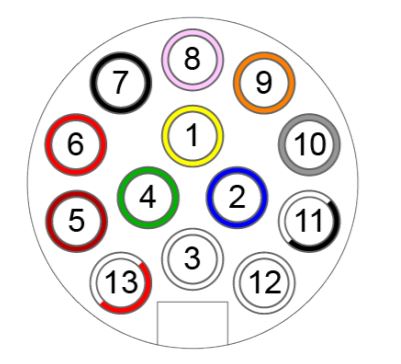 |
| 1. Left Turn Signal (Yellow) 2. Rear Fog (Blue) 3. Ground for Pins 1-8 (White) 4. Right Turn Signal (Green) 5. Right Tail Lamp (Brown) 6. Stop Lamps (Red) 7. Left Tail Lamp (Black) 8. Reverse Lamps (Pink) 9. 12V Power - Permanent (Orange) 10. 12V Power - Switched/Ignition (Grey) 11. Ground for Pin 10 (Black/White) 12. Trailer Brake Control Output (Light Grey) 13. Ground for Pin 9 (Red/White |
Australia Connector
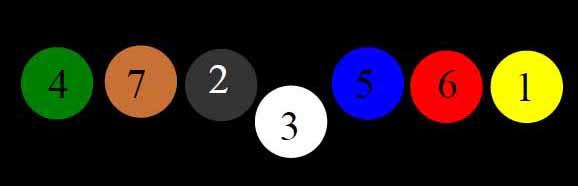 |
|---|
| 1. Left turn signal lamp (Yellow) 2. Reverse lamps (Black) 3. Ground (White) 4. Right turn signal lamp (Green) 5. Trailer brake control (Blue) 6. Stop lamps (Red) 7. Tail lamps (Brown) |
Tow Operationlink
Trailer Modelink
Warning
Trailer Mode must always be active when towing a trailer.
Do not rely on automatic detection to engage Trailer Mode, always check to ensure Trailer Mode is engaged.
Manual Selectionlink
To engage or exit Trailer Mode manually, use the touchscreen Controls > Pedals & Steering > Trailer Mode.
Electrical Detectionlink
When plugging in a trailer's electrical connection, it automatically engages Trailer Mode and the blue telltale will be lit of no electrical faults are detected. When unplugging a trailer's electrical connection, the vehicle will display the red telltale indicating an electrical fault. This is expected as the vehicle cannot differentiate between an intentional or uninentional disconnection of the electrical connector. The user always has to manually turn off Trailer Mode through the UI.
Trailer mode is automatically engaged when the TLC senses current on one the trailer outputs.
Trailer mode does not automatically disengage when the trailer connector is unplugged. The user has to manually exit trailer mode via the touch screen. The reason for this is that the vehicle does not know the difference between the user disconnecting the trailer connector and a scenario where the there is an electrical fault eg. when the trailer connector accidentally falls out of the socket for example.
Mass Estimationlink
The Drive Inverter (DI) monitors motor torque and vehicle acceleration to estimate the combined mass of the vehicle and trailer (if present). By judging the mass, the Drive Inverter makes the determination of whether a trailer is present by comparing the estimated mass to fixed threshold values. In earlier firmware versions, the vehicle would automatically engage Trailer Mode is heavy load was detected. The mass estimator does not auto-engage Trailer Mode.
Instrument Displaylink
One of the following indicators display on the instrument panel:
 |
|---|
| Trailer Mode Active: |
| The vehicle detected anelectrical connection and Trailer Mode is engaged automatically. |
 |
|---|
| Trailer Mode Disabled: |
| The vehicle detected an electrical connection but Trailer Mode is disabled by the user through the UI. This is normal when carrying a bike rack. |
 |
|---|
| Trailer Mode Fault: |
| Trailer Mode is engaged but the vehicle detected a fault in the electrical system. |
Trailer Mode behaviorslink
The vehicle uses Trailer Mode and trailer detection to adjust behaviors, operating parameters, and functions to better suit the driving experience while towing a trailer. This is subject to change. Refer to the owner's manual for an up-to-date list of features that are affected by Trailer Mode.
Diagnosticslink
Gateway configurationslink
| Configuration | Platform | Possible values | Description |
|---|---|---|---|
| cfg_towing | S, S refresh, X | TeslaRev1 | Tow package installed |
| none | No tow package installed | ||
| cfg_towpackage | 3, Y, Palladium S, Palladium X | TESLA_REV1 | Tow package installed |
| NONE | No tow package installed |