Doorslink
Last updated: December 22, 2023
Overviewlink
The doors open when an exterior or interior release button is pressed. They are operated by a door presenter actuator, which pushes the door out by a few degrees to let the user grab it by the belt area, and a latch with a built-in release actuator. Each door incorporates a dedicated controller responsible for operating the door actuators, sensors, and lights.
Doors can be opened from the outside using exterior switches located at the bottom of the B and C pillars. From the inside, the door can be opened using a button situated on the interior door panel. In the event that the interior door button is inoperable, the door can also be opened by using the manual release handle, which is located near the window switches on the front doors and in the map pocket on the rear doors.
The doors also incorporate a frameless window that partially lowers upon opening. For more information, see the Windows section.
Specificationslink
The door system includes:
- VCDOOR
- Door presenter
- Door latch
- Exterior release switch
- Interior release switch
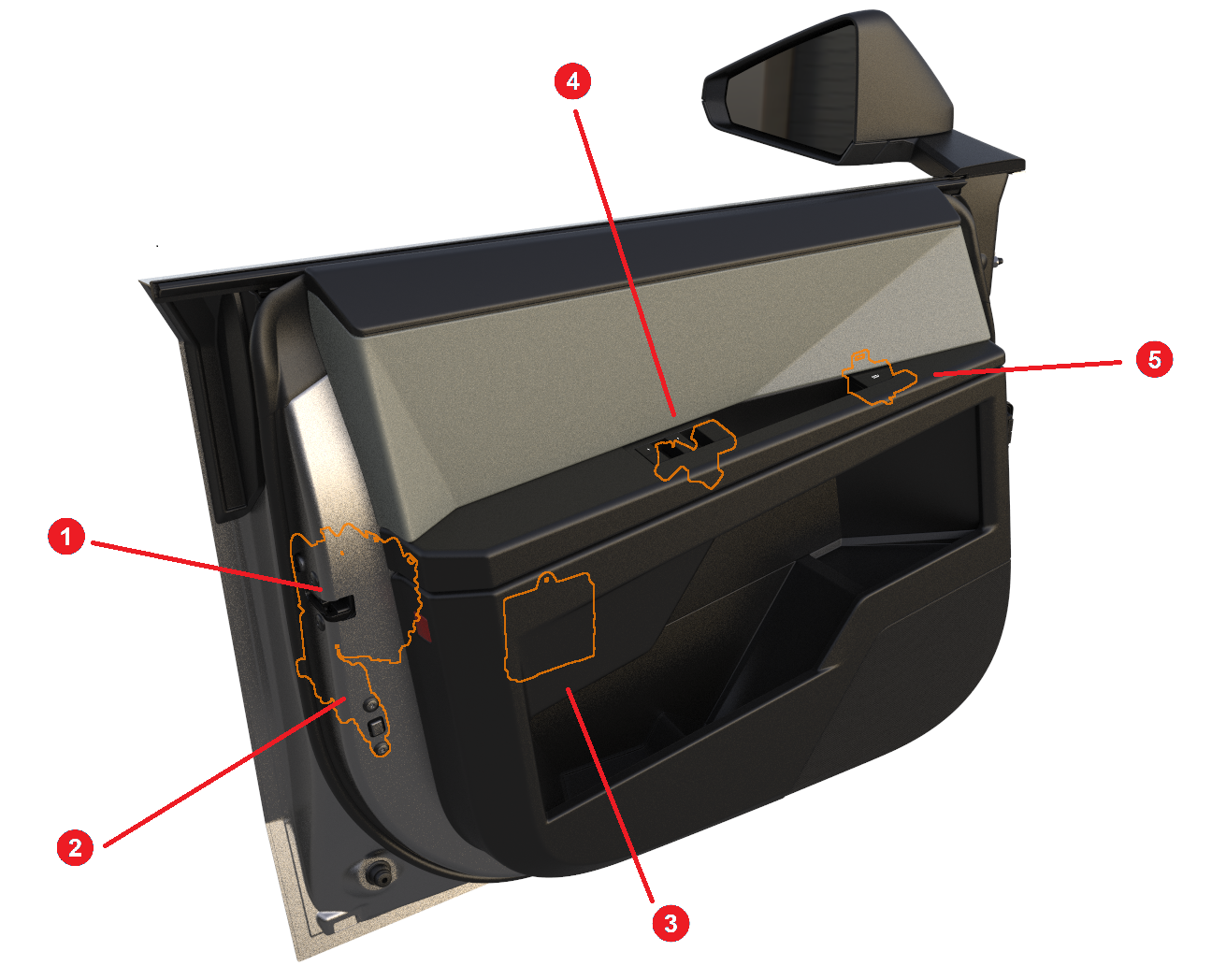 |
|---|
| 1. Latch 2. Door presenter 3. VCDOOR 4. Manual release handle 5. Release button |
| Door system - Overview |
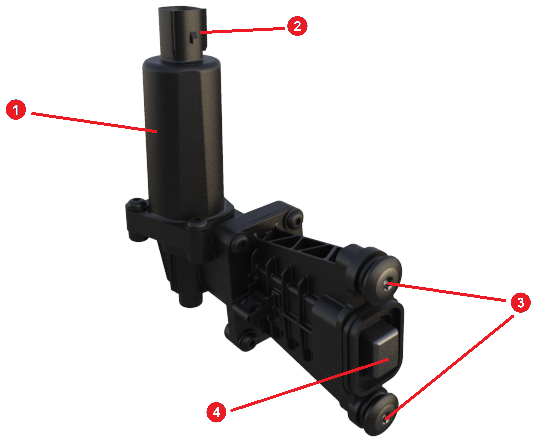 |
|---|
| 1. DC motor housing 2. Connector 3. Door attachment bolts 4. Actuator tip |
| Door presenter - Detailed view |
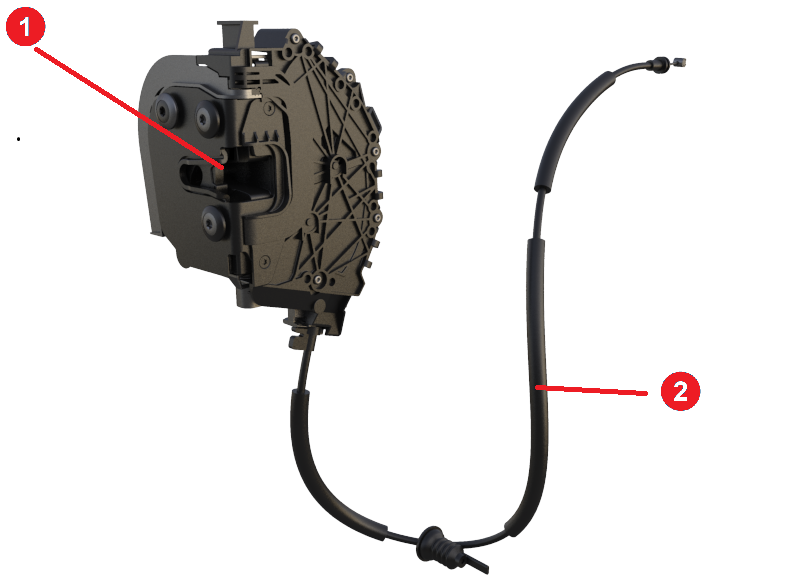 |
|---|
| 1. Latch and release actuator 2. Manual release cable |
| Door latch - Detailed view |
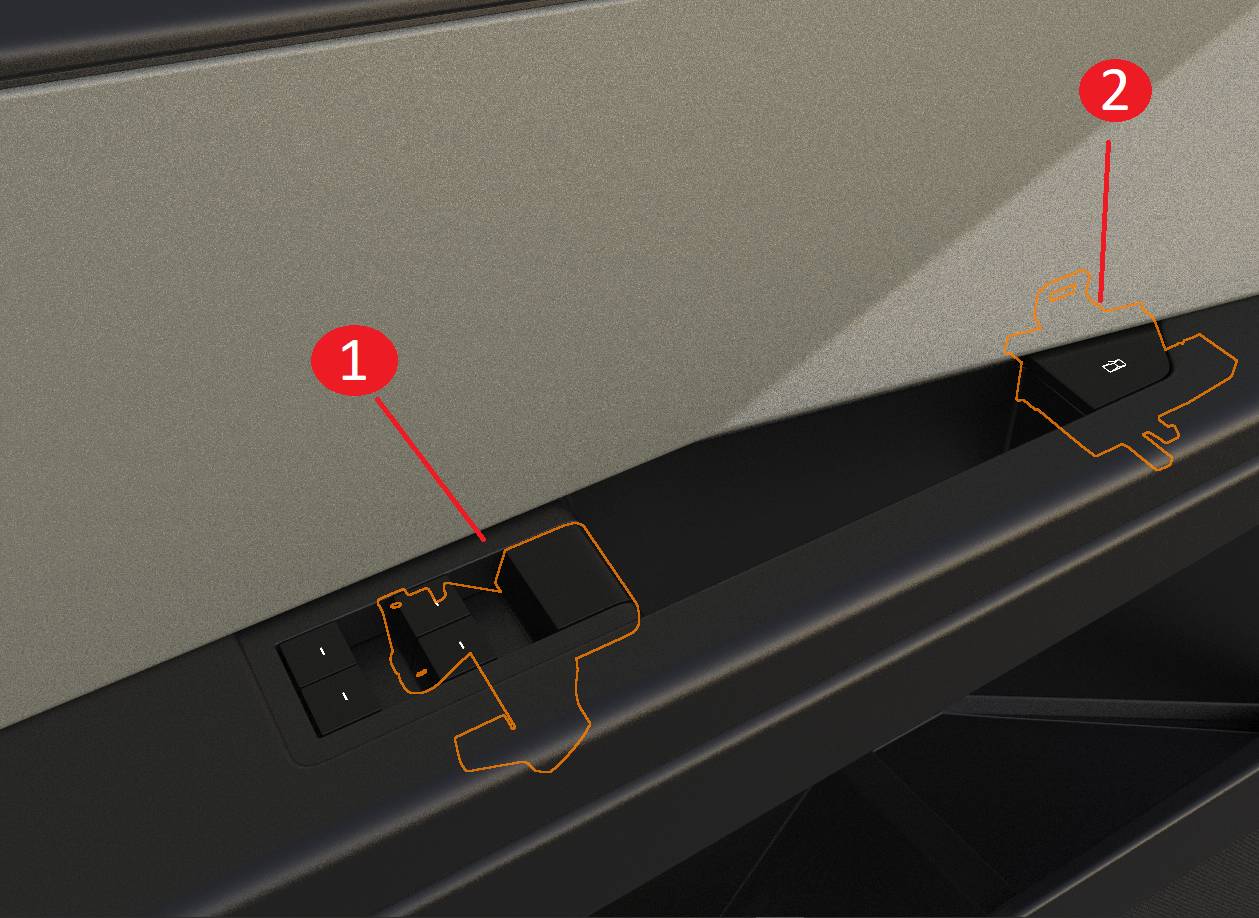 |
|---|
| 1. Mechanical release handle 2. Electrical release switch |
| Front door interior release switch and mechanical release handle |
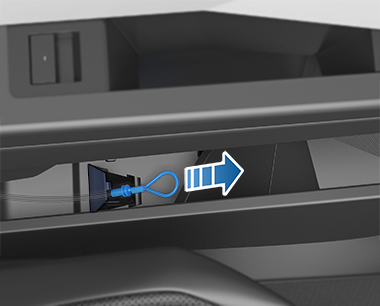 |
|---|
| Rear door emergency release cable location |
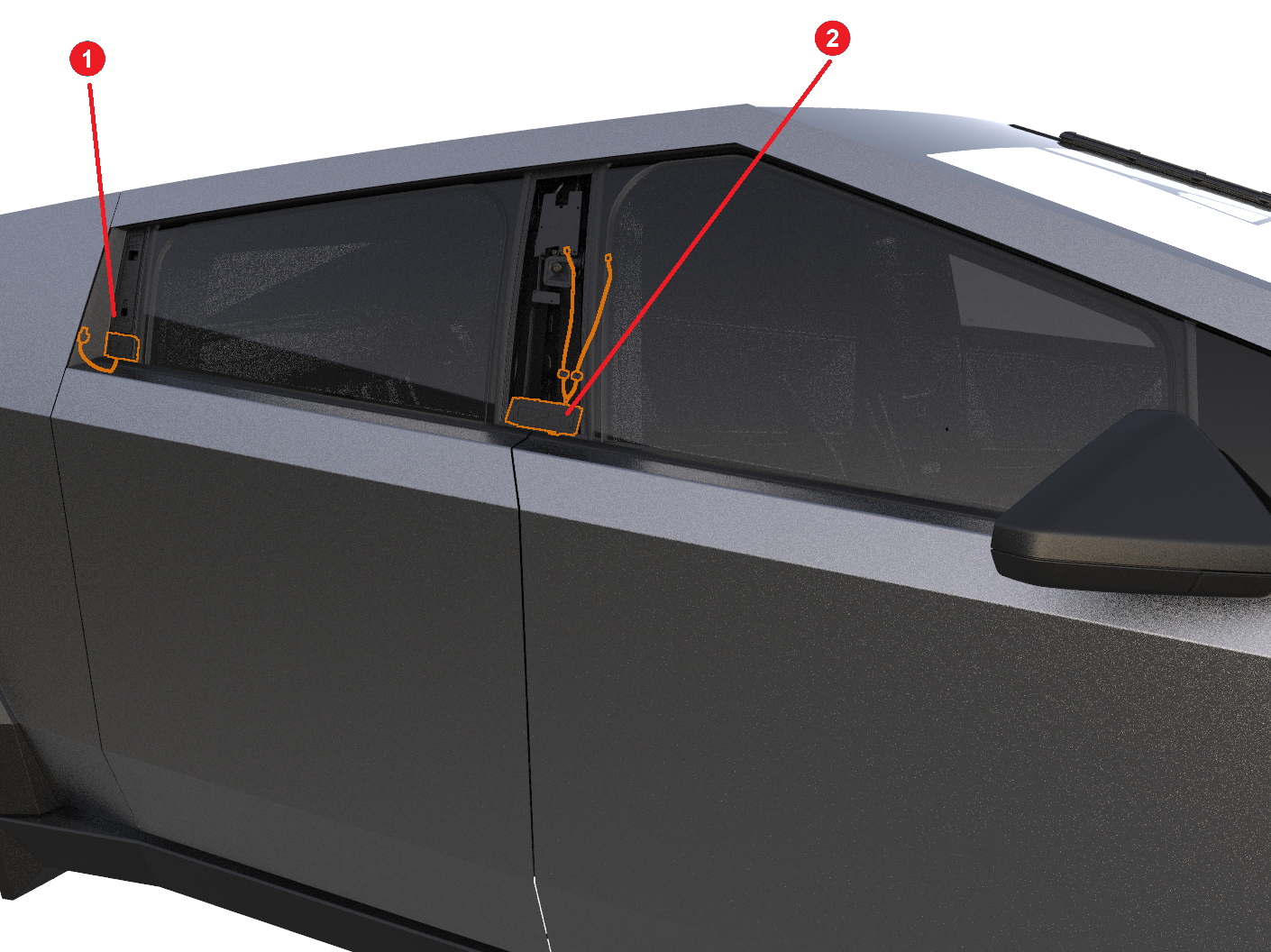 |
|---|
| 1. Mechanical release handle 2. Electrical release switch |
| Door exterior release switches (right side shown) -- Detailed view |
From the exterior, the doors can only be released if the vehicle is parked and unlocked.
From the interior, pressing the door release switch will always open the door if the vehicle is not in motion, even if the vehicle is locked. Note that for the rear doors, the first interior release switch press will only unlock the vehicle (if locked), and a second press will be required to release the door.
If the vehicle is locked and the alarm armed, pressing the interior release switch without will trigger the alarm if there is no active, paired key authenticated by the vehicle security controller.
When requested to open, the doors open by a few degrees to allow the user to grab it by the belt area, where the belt line seal is located. This is done by first releasing the latch using a built-in release actuator, and then by pushing the door out using the door presenter.
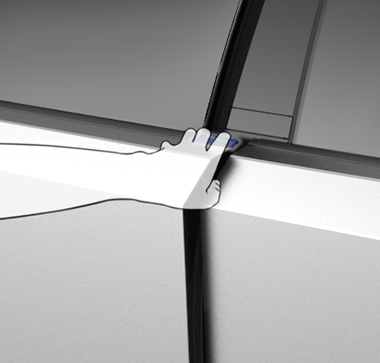 |
|---|
| Illustration depicting where to grab the door |
The door presenter is only actuated if the release request comes from the exterior release switch. If the release request comes from the inside, the user can push the door out without needing the assistance of the presenter.
VCDOOR is the vehicle controller for the door actuators, sensors, and lights. Each door has its own dedicated controller, with its name extended by the door's location to clearly indicate its association.
| Door location | Door controller name |
|---|---|
| Front Left | VCDOOR FL |
| Front Right | VCDOOR FR |
| Rear Left | VCDOOR RL |
| Rear Right | VCDOOR RR |
VCDOORs are powered by the MV bus from VCLEFT for the left doors, and from VCRIGHT for the right doors. Left door controllers communicate over the BDY LEFT CAN bus, and right door controllers communicate over the BDY RIGHT CAN bus.
VCDOOR controls the door presenter, door latch, and interior release switch. The exterior release switches are controlled by different controllers: the front and rear left switches are controlled by VCLEFT, the front right switch by VCRIGHT, and the rear right by VCREAR.
The diagram below summarizes the doors communication and power architecture.
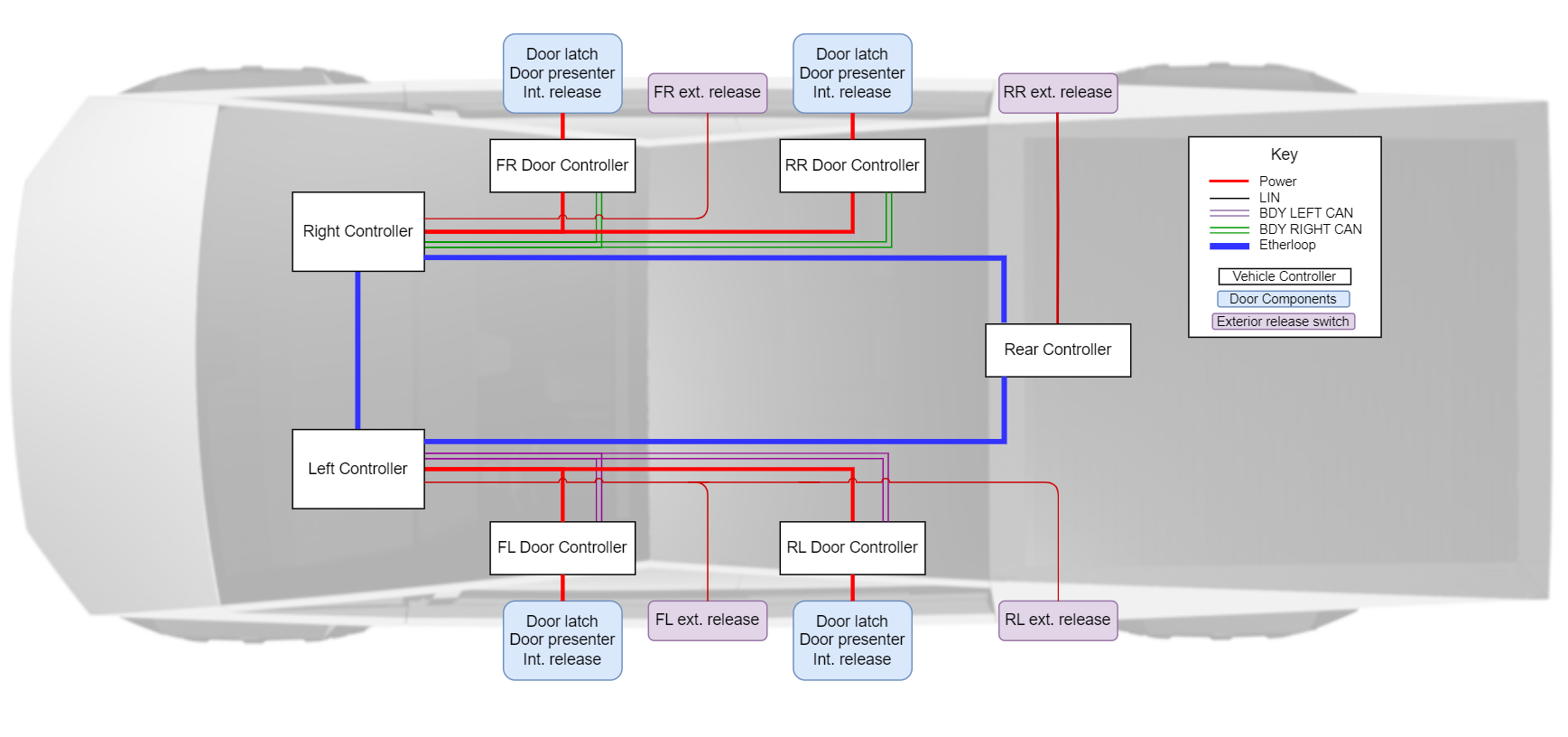 |
|---|
| Overview of doors communication and power architecture |
Operationlink
There are three methods to open the door:
- By pressing the interior door release switch, which is directly detected by the corresponding VCDOOR.
- By pressing the exterior door release switch, which is detected by either VCLEFT, VCRIGHT or VCREAR, and communicated over Etherloop/CAN to the corresponding VCDOOR.
- In the event that the interior door release switch is inoperable, by pulling the mechanical release handle.
Note
Pulling the manual release handle will not trigger a latch release actuation. The handle is connected to the latch mechanical release cable which releases the latch manually.
When performing a manual release, the window will only short-drop once the latch is reported open.
If an opening request is received, the vehicle is unlocked (only if request comes from exterior) and not in motion (vehicle speed below 0.5 kph):
- If the opening request comes from the interior release switch
- The door latch is released using the built-in latch release actuator.
- If the opening request comes from the exterior release switch, and the door presenting conditions are met:
- The door presenter actuates to the body position and soft-stalls against the door.
- The door latch is released by actuating the built-in electrical actuator.
- Once the latch is released, the door presenter position changes as it soft-stalls against the door and starts pushing it.
- Once the presenter position change is detected (a few encoder counts), the door presenter actuates to the presented position with a high duty cycle.
Pre-requisite
The door will only present if the door presenter is calibrated (zero position is known). See Door presenter section for more information.
If the door presenter was actuated, it will remain in the presented position until one of the following conditions is met:
- VCDOOR built-in Inertial Measurement Unit (IMU) detects the door opening angle is exceeding a certain value.
- VCDOOR built-in IMU detects the door opening speed is exceeding a certain value.
- The door has been open for 60 seconds.
Once that one of the above conditions is true, the door presenter will retract to the zero position, against the inner door panel.
The door can be closed manually by pushing it toward the vehicle with enough force to engage the latch in the fully closed position.
Note
The latch does not have a cinch actuator to soft-close the door.
Door vehicle controller (VCDOOR)link
The VCDOOR is the vehicle controller that operates the door actuators, lights, and sensors. It is powered directly from the MV bus, which is stepped down to 16V for all actuators and sensors except the window regulator.
The VCDOOR contains an IMU to estimate the door position, which is required to know when the door presenter can be retracted.
Note
If the door presenter retracts while the door is only opened due to the presenter being extended, then the door will slowly close until it leans on the latch, reducing the gap to grab the belt area and open the door.
The VCDOOR has an internal firmware configuration indicating where it is physically installed on the vehicle (e.g., front left). This configuration is also called the controller sub-usage, and is required to know which CAN node the controller has to communicate on.
The different VCDOOR sub-usage can be learned by controlling their eFuses, which is done by:
- Powering off the VCDOORs by opening the eFuses that power each controller.
- Turning on the VCDOOR physically connected to the Front Left door by closing the corresponding eFuse.
- Cycling through the different VCDOOR nodes until one respond.
- Re-writing that VCDOOR location to be Front Left.
- Repeating steps #1 to #4 for Front Right, Rear Left, and Rear Right.
The VCDOORs sub-usage auto-learn can be triggered by a dedicated ODIN routine. See the Serviceability section for more information.
Info
By default, VCDOOR sub-usage is set to Front Left.
In case of a vehicle power loss, VCDOOR will receive 12V from the jump post (if connected) to release the door latch. VCDOOR can also boost the jump post voltage to 48V using an internal buck converter. This will allow the window to short-drop since the window regulator operates at 48V.
Door presenterlink
The door presenter is an actuator that pushes the door out of the vehicle body by a few degrees, allowing the user to grab the door from the belt area and bring it to the desired position. It contains a DC motor connected to a clutch and gear mechanism, which converts the motor's rotational motion to linear motion to extend or retract the presenter. It also integrates a hall sensor to measure the position of the presenter.
The door presenter will operate between five positions:
| Position name | Physical position |
|---|---|
| Fully retracted | Zero position |
| Homed | Body position minus 5 mm |
| Primed | Body position minus 0.5 mm |
| At Body | Body position |
| Presented | Extended past 50 mm |
Info
The presenter moves to the primed position when vehicle is in park gear and retracts to homed position when the vehicle becomes in motion. This is to reduce the impact of the chassis movement and vibration on the presenter.
When a door opening request from an exterior release button is received:
- The door presenter moves from the primed to the body position and soft-stalls against the door opening.
- The door latch releases.
- The presenter starts pushing the door as soon as the latch is opened, but with low force since it is soft-stalling against the door.
- Once the controller see the presenter encoder count value changed, it actuates the presenter with a high duty cycle to reach the presented position, pushing the door out.
- The door presenter speed is monitored to follow pre-defined speed profiles, and its duty cycle is adjusted accordingly.
- Once any of the following is true, the presenter retracts all the way to the fully retracted position.
- Door opening angle exceeds a few degrees.
- Door swing speed exceeds a threshold value.
- Door state has been open for some time, then the presenter will retract to the home position.
If the door opening request comes from the inside, then the door presenter will not be actuated since the user can grab the interior handle to push the door open while exiting the vehicle.
The door presenter needs to have a calibrated zero position (aka fully retracted) to operate. The door presenter will attempt to calibrate if:
- Presenter is not calibrated and door is in the OPEN or CLOSED state.
- Controller is reset/wakes with the door open, regardless of whether the presenter is calibrated or not.
The door presenter also learns the body position, which improves the speed at which the presenter soft-stall against the door, reducing the overall time it takes for the door to present. The door presenter will attempt to learn body position if:
- The vehicle is stationary.
- The door is closed.
- The door presenter is calibrated (zero position is known).
- The body position is unknown.
If following an exterior release request, the door presenter does not detect any movement after the latch release, or the latch release fails, then the door presenter will perform an ice breaking actuation to overcome any binding force preventing the door from opening, like frost. During an ice breaking actuation, the presenter is controlled with a higher duty cycle than during a presenting actuation to break the ice that binds the door to the vehicle body.
The door presenter motor has a clutch that disengages the motor gear if enough force is applied, allowing the door presenter to free roll.
Latchlink
The side door latch is a standard non-cinching latch with a primary and secondary claw position. The main claw holds the striker in position and is prevented from moving by a rotating pawl internal to the latch.
The latch is primarily released with an electronic signal from a body controller, but also includes a manual mechanical release cable in both the front and rear doors. The front mechanical release can be located on the interior door panel, in front of the window switchpack. The rear door manual release can be located underneath the mat of the map pocket on the door. Service will release the latch if 48V is lost, but it is not advised for vehicle owners to use.
Serviceabilitylink
In the event the door is not functioning as expected, the first step is to understand what functionality is impacted.
- Door latch does not function as expected.
- Door presenter does not function as expected.
- Multiple door components are not functioning as expected, including the door latch, door presenter and side window.
- This indicates that the corresponding VCDOOR is likely not functioning as expected.
Once determined, the diagnosis should focus on understanding which aspect of the component operation is impacted.
Overviewlink
VCDOOR reports the main door state with a dedicated CAN signal.
| CAN signal name | CAN signal values | Description |
|---|---|---|
VCDOORxx_presentingDoorState |
10 PRESENTING_DOOR_STATE_UNPRIMING_PRESENTER 9 PRESENTING_DOOR_STATE_PRIMING_PRESENTER 8 PRESENTING_DOOR_STATE_ICEBRAKING 7 PRESENTING_DOOR_STATE_PRESENTING 6 PRESENTING_DOOR_STATE_RELEASING_LATCH 5 PRESENTING_DOOR_STATE_WAITING_FOR_PRESENTER 4 PRESENTING_DOOR_STATE_WATING_FOR_SHORT_DROP 3 PRESENTING_DOOR_STATE_OPEN 2 PRESENTING_DOOR_STATE_CLOSED 1 PRESENTING_DOOR_STATE_INIT 0 PRESENTING_DOOR_STATE_UNKNOWN_SNA |
Door presenting state |
The last door request source is also reported by VCDOOR.
| CAN signal name | CAN signal values | Description |
|---|---|---|
VCDOORxx_lastDoorRequestSource |
4 DOOR_REQUEST_SOURCE_ECU 3 DOOR_REQUEST_SOURCE_VCSEC 2 DOOR_REQUEST_SOURCE_EXTERIOR_HANDLE 1 DOOR_REQUEST_SOURCE_INTERIOR_BUTTON 0 DOOR_REQUEST_SOURCE_UNKNOWN |
Last door actuation request source |
VCDOORlink
Diagnosislink
VCDOOR controls the different door components, so any condition affecting it may result in multiple door functionalities not working as expected.
- If the VCDOOR has a power or ground issue, the door will not release electrically.
- If this occurs, the door can only be opened by using the interior mechanical release handle.
- If the VCDOOR sub-usage is incorrect, then the wrong window may be operated.
- For example, the rear left VCDOOR is replaced with a new one, which is configured by default as front left.
- If the sub-usage auto-learn routine is not performed, then the rear left window will also move when commanding the front left window.
Note
Refer to the diagram "Overview of doors communication and power architecture" to identify the relevant power and communication lines for a given VCDOOR.
If any of the above conditions are true, the corresponding VCDOOR will be reported as Missing In Action (MIA) by other controllers. The table below provides an non-exhaustive list of the corresponding alerts for each VCDOOR.
| Alert name | Description |
|---|---|
EGGLEFTVC_a170_VCDOORFL_MIA |
One or more messages from the front left door controller is not received. |
EGGLEFTVC_a168_VCDOORRL_MIA |
One or more messages from the rear left door controller is not received. |
EGGRIGHT1_a167_VCDOORFR_MIA |
One or more messages from the front right door controller is not received. |
EGGRIGHT1_a171_VCDOORRR_MIA |
One or more messages from the rear right door controller is not received. |
Note
If more controllers are reported as MIA, there could be an issue with the corresponding CAN BUS.
In addition, each VCDOOR low voltage power state is reported by a CAN signal which have four different values:
0 LV_OFF1 LV_ON2 LV_GOING_DOWN3 LV_FAULT
The table below describes the corresponding CAN signal for each VCDOOR.
| CAN signal name | Description |
|---|---|
VC_leftFrontDoorLVState |
Front left door controller low voltage power feed status |
VC_leftRearDoorLVState |
Rear left door controller low voltage power feed status |
VC_rightFrontDoorLVState |
Front right door controller low voltage power feed status |
VC_rightRearDoorLVState |
Rear right door controller low voltage power feed status |
VCDOOR contains an IMU to estimate the door opening angle to know when the door presenter should be retracted. If the IMU is not working as expected, the door presenter may not retract as expected. If an IMU fault is detected by a VCDOOR, the following alert will be set.
| Alert name | Description |
|---|---|
VCDOORxx_a202_IMUFaultDetected |
A fault in the IMU has been detected. |
Note
Replace VCDOORxx in the table above by the exact controller name, for example VCDOORFL for the front left door.
Repair routinelink
When a VCDOOR is replaced, it is required to run the sub-usage auto-learn ODIN routine to configure the controller. This can be done from the vehicle User Interface (UI), by navigating to the Doors panel under the Closures section in Service Mode.
Alternatively, the routine can also be run from Toolbox 3, by connecting locally to the vehicle and searching in the Actions tab for Cybertruck/tasks/PROC_X_DOOR-CONTROLLER-ADDRESSING.
Door presenterlink
Diagnosislink
If the door presenter does not function as expected, it may cause the presenter to not extend or to be stuck in an extended position.
- If the door presenter does not extend, confirm the door presenter is calibrated.
- If calibrated, there might be an issue with the door presenter assembly, power, or with its alignment to the door panel.
VCDOOR reports the door presenter state and position with dedicated CAN messages.
| CAN signal name | CAN signal values | Description |
|---|---|---|
VCDOORxx_presenterState |
11 DOOR_PRESENTER_STATE_CALIBRATING 10 DOOR_PRESENTER_STATE_PRIMING 9 DOOR_PRESENTER_STATE_ICEBREAKING 8 DOOR_PRESENTER_STATE_RETRACTING 7 DOOR_PRESENTER_STATE_SETTLING 6 DOOR_PRESENTER_STATE_HOMING 5 DOOR_PRESENTER_STATE_PUSHING 4 DOOR_PRESENTER_STATE_SOFT_STALLING 3 DOOR_PRESENTER_STATE_MOVING_TO_BODY 2 DOOR_PRESENTER_STATE_FINDING_BODY 1 DOOR_PRESENTER_STATE_STOPPED 0 DOOR_PRESENTER_STATE_UNKNOWN_SNA |
Door presentation actuation state |
VCDOORxx_presenterPosState |
5 DOOR_PRESENTER_POSITION_STATE_PRESENTED 4 DOOR_PRESENTER_POSITION_STATE_AT_BODY 3 DOOR_PRESENTER_POSITION_STATE_PRIMED 2 DOOR_PRESENTER_POSITION_STATE_HOMED 1 DOOR_PRESENTER_POSITION_STATE_RETRACTED 0 DOOR_PRESENTER_POSITION_STATE_UNKNOWN_SNA |
Door presenter position |
VCDOORxx_presenterCalibrated |
0 or 1 |
Door presenter calibration status (equals to 1 when calibrated) |
VCDOORxx_presenterBodyPosSaved |
0 or 1 |
Door presenter body position learning status (equals to 1 when learned) |
VCDOOR monitors the state of the door presenter at all times and may trigger alerts when specific conditions are detected.
| Alert name | Description | Impact | Correction |
|---|---|---|---|
VCDOORxx_a400_presenterUncal |
Door presenter is not calibrated | Door will not perform presenting actuation | Attempt to calibrate the presenter using the calibration routine. If issue persists, inspect the door presenter and its harness |
VCDOORxx_a401_presenterUnknownBodyPosition |
Door presenter body position is unknown | Door presenting actuation will be slower | Close the door to let the door presenter learns the body position. If issue persist, inspect the door presenter and its harness |
VCDOORxx_a402_presenterUnexpectedStop |
Door presenter stopped unexpectedly while actuating | Door actuation may not complete | See payload data for more information on the stopping condition |
VCDOORxx_a409_presenterStuckOut |
Door presenter is stuck in the extended position | User may not be able to close the door | Attempt to calibrate the presenter using the calibration routine. If issue persists, inspect the door presenter and its harness |
VCDOORxx_a411_presenterDisconnected |
Door presenter undercurrent indicate it is likely disconnected | Door presenter will not actuate | Investigate the presenter harness and connector |
The presenter's stopping condition is reported by a CAN message.
| CAN signal name | CAN signal values | Description |
|---|---|---|
VCDOORxx_presenterStoppingCond |
4 DOOR_PRESENTER_STOP_COND_STATE_TIMEOUT 3 DOOR_PRESENTER_STOP_COND_ENCODER_STALL 2 DOOR_PRESENTER_STOP_COND_CURRENT_SPIKE 1 DOOR_PRESENTER_STOP_COND_CURRENT_STALL 0 DOOR_PRESENTER_STOP_COND_NONE |
Door presenter stopping condition |
Repair routinelink
If a door presenter is replaced, it is required to calibrate it by running the corresponding door presenter calibration ODIN routine. This can be done from the vehicle UI, by navigating to the Doors panel under the Closures section in the Service Mode Application.
Alternatively, the routine can also be run from Toolbox 3 by connecting locally to the vehicle and searching in the Actions tab for the appropriate calibration routine name.
| Door location | Routine name |
|---|---|
| Front left | PROC_VCDOOR_X_DOOR-PRESENTER-CALIBRATE-FL |
| Rear left | PROC_VCDOOR_X_DOOR-PRESENTER-CALIBRATE-RL |
| Front right | PROC_VCDOOR_X_DOOR-PRESENTER-CALIBRATE-FR |
| Rear right | PROC_VCDOOR_X_DOOR-PRESENTER-CALIBRATE-RR |
Latchlink
Diagnosislink
If the door latch does not function as expected, it may cause the door to not release or close as expected, or cause the latch state to be incorrect. Before diagnosing a door latch issue, always confirm whether the door latch status is correct.
- If the door latch status is incorrect, there might be an issue with the latch switch itself or with the wiring between the latch and the corresponding VCDOOR.
- If the door latch status is correct, and the latch does not release as expected, confirm from which request source this happened on.
- If the issue only happens when using the interior release switch or the exterior release switch, it might cause an issue with the switch.
- If it happens from both switches but not from the interior manual release handle, there might be an issue with the release actuator.
- If the latch does not release from any sources, there might be an issue with the latch internal mechanical assembly.
- If the door latch status is correct, and the latch does not close as expected, there might be an issue with the release actuator being stuck in the release position, or with the latch internal mechanical assembly.
In addition, the VCDOOR reports the latch and latch AJAR switch status with dedicated CAN messages.
| CAN signal name | CAN signal values | Description |
|---|---|---|
VCDOORxx_latchStatus |
8 "LATCH_FAULT"7 "LATCH_DEFAULT"6 "LATCH_TIMEOUT"5 "LATCH_AJAR"4 "LATCH_OPENING"3 "LATCH_CLOSING"2 "LATCH_CLOSED"1 "LATCH_OPENED"0 "LATCH_SNA" |
Door latch state |
VCDOORxx_latchAjarSwitch |
0 or 1 | Door latch AJAR switch state |
Info
When the latch is closed, VCDOORxx_latchAjarSwitch is equal to one