Keyslink
Last updated: September 18, 2024
Component Overviewlink
Security Controller (VCSEC)link
Power Distributionlink
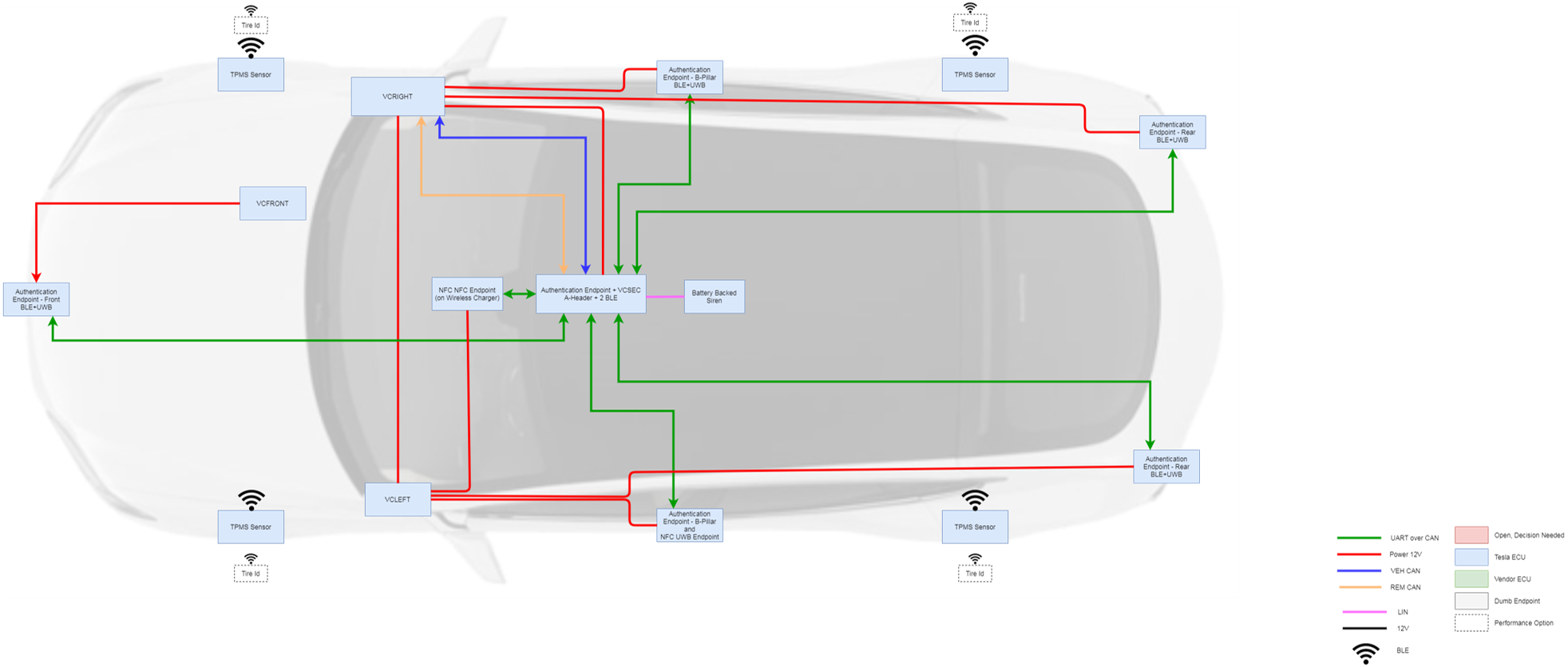
The security controller (VCSEC) is powered by the right vehicle controller (VCRIGHT). The left hand (LH) B-pillar and left rear Bluetooth Low Energy (BLE) endpoint antennas receive power from the left vehicle controller (VCLEFT). The right hand (RH) B-pillar and right rear BLE antennas receive power from VCRIGHT, while the front BLE antenna is powered by the front vehicle controller (VCFRONT).
Note
The VCSEC will only sleep when there are no BLE authentication devices connected to the center BLE endpoint.
Communicationlink
VCSEC manages all vehicle security and communicates with the customer's authentication device (phone, key fob, or key card) via multiple endpoints located throughout the vehicle. In addition to the BLE antenna and Near Field Communication (NFC) reader integrated into VCSEC in the touchscreen, there are 5 other BLE antennas, commonly referred to as "endpoints" in the vehicle:
- One inside the left B-pillar below the camera.
- One inside the right B-pillar below the camera.
- Two mounted to the rear bumper beam (one on either side of the vehicle).
- One mounted to the front bumper beam.
BLE Antennas (Endpoints)link
Each of the BLE endpoints connected to VCSEC communicate to VCSEC via a dedicated Universal Asynchronous Reciever / Transmitter (UART) serial bus. VCSEC communicates with the rest of the vehicle via the Vehicle Controller Area Network (VEH CAN) and Remote (REM) CAN-Buses. VCSEC retains the last known values of the following signals in case they become invalid (SNA) or the message stops being received (MIA). VCSEC will also use the last valid values if a valid value has not been received since the last controller reboot.
To reduce battery energy consumption and prevent issues with phones trying to connect to multiple endpoints, a BLE connection is only ever made with the central BLE endpoint in VCSEC. Since a BLE connection is only made between a BLE authentication device and the center endpoint, the other BLE endpoints act as peripherals, running sniffers to search for BLE signals, which they relay to the center BLE endpoint.
A BLE sniffer is a program that runs on BLE chips in the endpoints that only receive BLE signals but do not transmit. After sniffers have been initiated on the left, right, or rear endpoints, VCSEC will request Received Signal Strength Indicator (RSSI) values from the sniffers every 50ms. If the RSSI value has not been updated on the sniffer for 2s, VCSEC will consider the RSSI value not valid (SNA).
 |
|---|
| BLE endpoint locations |
Keys and Vehicle Securitylink
Overviewlink
There are 4 ways to interact with the security system on 2021+ Model S:
- Phone Key:
- Communicates via BLE for both its passive and active features.
- Near-Field Communication (NFC) Key Card:
- Communicates via the electromagnetic field induced between the antenna in the vehicle (B-pillar or touchscreen) and the antenna in the key card. It is powered when it is placed close to the readers.
- Key Fob:
- Communicates via BLE.
- Remote Access:
- Communicates via the internet and requires connectivity of both devices, typically cellular or Wi-Fi.
Behaviorslink
Device Localizationlink
The active key is to be determined by VCSEC based on the following precedence:
- An authenticated NFC device.
- An authenticated BLE device via Remote Keyless Entry (RKE).
- The closest passively authenticated device based on the Received Signal Strength Indicator (RSSI) reported by the driver side B-pillar endpoint and the center endpoint in the touchscreen. Both endpoints must be greater than -80dB.
- RSSI signal ranges:
- No signal (RSSI) → -127dB.
- Very poor signal strength (RSSI) → less than -80dB.
- Poor signal strength (RSSI) → less than -70dB.
- Fair signal strength (RSSI) → between -70dB and -60dB.
- Good signal strength (RSSI) → between -60dB and -50dB.
- Excellent signal strength (RSSI) → greater than -50dB.
- RSSI signal ranges:
Important note: The more positive the RSSI value, the better the signal strength (e.g. an RSSI value of -50dB is greater than an RSSI value of -80dB).
Authenticationlink
Authentication devices include an NFC card, a key fob, or a user's mobile device.
- VCSEC supports up to 8 paired NFC cards.
- VCSEC supports up to 8 paired mobile devices.
- The center BLE endpoint can connect to up to 4 key fobs.
 |
|---|
| Vehicle authentication |
Door Locking and Unlockinglink
When the vehicle receives an RKE lock or unlock request, the hazard lights will flash along with an audible indication. A mislock will occur if any vehicle closure (doors, frunk, trunk) are detected to be open at the time of the lock request.
- Lock: one flash and audible indication.
- Unlock: double flash and double audible indication.
- Mislock (failure to lock): triple flash and triple audible indication.
Active vs. Passive Lock / Unlock:
- An active lock / unlock is defined as a user press on the mobile device lock / unlock button, the key fob lock / unlock button, or a user touch of the NFC card on a reader.
- A passive lock / unlock is defined as any automatic locking / unlocking of the vehicle which was not initiated by a specific user, such as Walk-Up Unlock or Walk-Away Lock.
Locking features:
- The Walk-Away Lock feature will lock the vehicle if:
- The feature is enabled on the touchscreen.
- The vehicle is not in Accessory or Drive mode.
- The mobile device has not been detected inside the vehicle for 7 seconds.
- All doors and trunk are closed.
- Note:
- Any RKE unlock request will temporarily disable Walk-Away Lock for 60 seconds, or until the vehicle enters Drive mode or the vehicle is RKE or Remote Locked.
- Any interior unlock request will temporarily disable Walk-Away Lock for 60 seconds, or until the vehicle enters Drive mode or the vehicle is RKE or Remote Locked.
- If the phone key is not detected by any BLE endpoint antenna for at least 5 minutes, the vehicle will lock immediately after the device disconnects.
- Drive-Away Lock will lock the vehicle when the vehicle is under the following conditions:
- Vehicle speed exceeds 5 mph.
- Vehicle power state is in Drive.
- Driver is in the vehicle.
- All the doors are closed.
- If Child Lock is enabled, the rear doors will not unlock from an interior handle open request.
Unlocking features:
- If Unlock on Park is enabled, the vehicle will unlock all closures when the vehicle shifts to Park or if the park button is pressed while in Park.
- Passive Unlock is always active and will unlock the vehicle when a handle is pulled, as long as the phone key or key fob is present and authenticated.
- If the vehicle is locked, an open request from inside the vehicle will be honored, with the exception of the Child Lock feature. However, the closure will remain locked and cannot be opened from the exterior.
Phone Keylink
The phone key extends the capabilities of the Tesla Mobile App on compatible mobile devices to act as both a passive and active local key to the vehicle, in addition to existing Remote Access features. Once paired to the vehicle, the mobile device automatically connects to the vehicle registered to the customer's MyTesla account, as long as the requirements are met. The vehicle continually advertises its identity via the 3 BLE endpoints. This advertisement is read by the Tesla Mobile App. The phone key automatically communicates with a nearby 2021+ Model S, and when it receives an encrypted challenge from VCSEC, the phone key replies with its encrypted response. If the response is validated by VCSEC, the vehicle is authenticated, activating passive and active features.
Unique Behaviorslink
Because the phone key takes the place of the key fob, many of the behaviors associated with key fobs will also apply to the phone key, such as:
- If the phone key is left inside 2021+ Model S, then 2021+ Model S will remain unlocked.
- If the phone key is present for a period of inactivity longer than 5 minutes, 2021+ Model S will stop monitoring its location. It will resume if interaction with the vehicle begins again.
- If the mobile device battery dies within the 5-minute period, it will appear as if the phone key left the vehicle vicinity, triggering Passive Lock if enabled.
- If the mobile device battery dies outside of the 5-minute period, 2021+ Model S will not see the phone key leave the vehicle vicinity. Passive Lock, if enabled, would not be triggered.
- If Remote Access or an NFC key card is used to lock 2021+ Model S while the phone key is inside the vehicle, the vehicle will lock. However, the passive features will still be active and a pull on the handle will trigger Passive Unlock.
- Note: A touchscreen lock from the interior disables Passive Unlock.
Pairing And Removallink
In order to initially pair the phone key to the vehicle, the following must be true:
- The vehicle must be associated with the customer's MyTesla account.
- The customer must be signed into the Tesla Mobile App on a compatible device and have 2021+ Model S selected if the customer owns multiple Tesla vehicles.
- Bluetooth must be enabled on the mobile device.
- One already paired NFC key card must be present to authenticate when requested.
To remove a paired phone key: 1. Navigate to Key Management via the touchscreen: Vehicle Settings → Locks. 2. Find the device to be removed, and select the trash icon to begin the removal process.
A paired NFC key card is required to remove a device, similar to the pairing procedure. A mobile device can also "forget" a vehicle phone key pairing by clicking the information icon next to the phone key line on the Tesla Mobile App, and selecting "Forget This Vehicle" at the bottom. Deleting and reinstalling the Tesla Mobile App on a mobile device will delete the old identification key and pairing to the vehicle on the device. However, it will not remove the old identification key from the vehicle, and the device would have to be paired again.
Requirementslink
If VCSEC is replaced, the phone key must be re-paired to the vehicle. If the left, right, or rear BLE antennas are replaced, the phone key will still be paired to the vehicle. However, the phone key will not automatically connect to these endpoints because their unique identifiers have changed. To restore connectivity, the pairing should be deleted via the touchscreen or forgotten via the Tesla Mobile App and then re-paired. This has the potential to impact customer experience when attempting to enter the driver door (driver endpoint) or open the trunk (rear endpoint).
More phone key requirements:
- Requires a mobile device that supports Bluetooth Low Energy (BLE).
- Must be compatible with devices running Apple iOS 10 or later and Android v5.0 Lollipop or later.
- Android OS requires that location permissions are enabled.
- Android OS requires that location services are enabled.
- Must be compatible with the latest version of the Tesla Mobile App.
- The customer must be signed into the Tesla Mobile App.
- The correct vehicle must be selected or active in the app.
- For passive features, the Tesla Mobile App must have permission to run in the background.
- Bluetooth must be enabled for phone key operation.
- The mobile device must be unlocked after restarting the device for phone key operation.
NFC Key Cardlink
The Near Field Communication (NFC) key card is a durable, waterproof device that contains no power source of its own. It functions using electromagnetic induction, which facilitates wireless power transfer and communication with a powered key card reader. NFC technology requires close proximity to the reader antenna to function, usually within about 4 cm.
There are two NFC readers on 2021+ Model S: one in the driver side B-pillar applique halfway down (under the camera), and one integrated with the wireless phone charger in the center console.
The orientation of the NFC key card is important in order to achieve optimal detection distance and authentication time. It should be oriented vertically at the B-pillar and horizontally at the touchscreen. Tapping or presenting the NFC key card to the reader is the preferred usage method. Swiping may cause failure to complete the authentication process.
Some items, such as NFC-enabled cards like badges and credit cards, other metallic objects, or even a thick layer of ice and snow, can interfere with the electromagnetic field and cause severe degradation of performance. Severe bending, cracking, cutting, melting, or other mutilation of the NFC key card will cause permanent damage to the key card and may prevent proper operation. This includes a hole punch for a keyring.
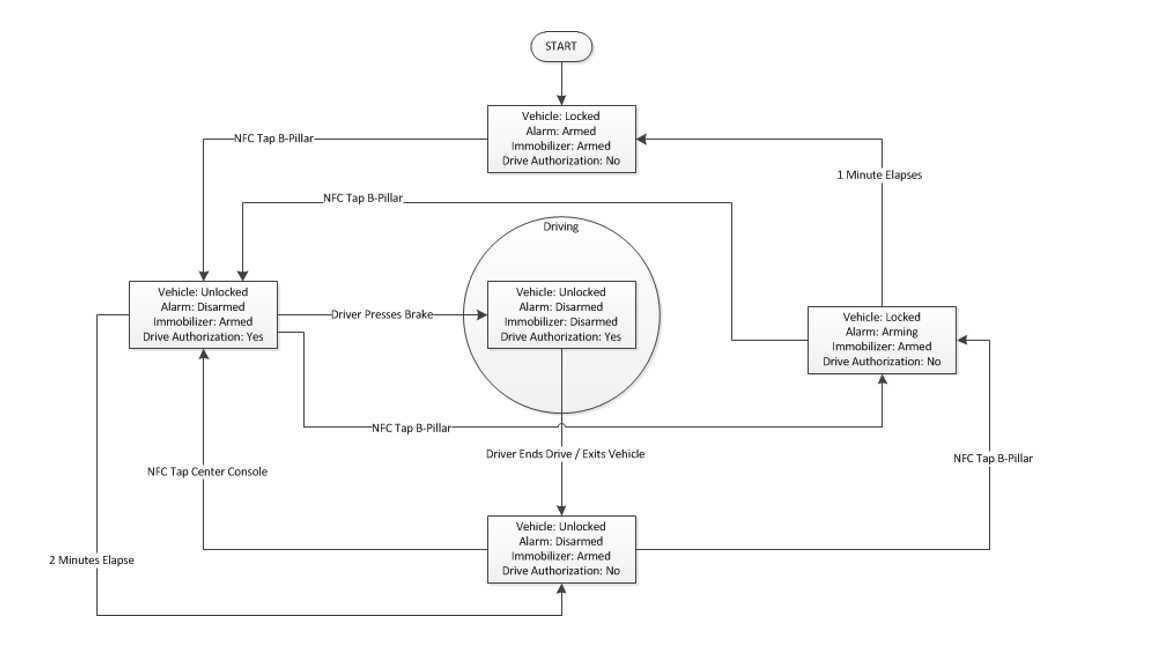
Presenting the key card at either reader will authenticate the vehicle for Drive, although only presenting the key card at the B-pillar reader will trigger a lock or unlock sequence.
Authentication for Drive will expire after two minutes of inactivity, at which point the NFC key card would have to be presented to the reader again. This means that the driver need only present the key card to the B-pillar reader to unlock and authenticate the vehicle for drive. The driver does not need to present it again to the touchscreen reader unless the 2-minute timer expires. If the timer does expire, the driver will receive a pop-up prompt on the touchscreen with instructions to tap the NFC card to the reader. A paired NFC key card is required in order to pair a new phone key for the first time.
The NFC readers on the vehicle have multiple power states to reduce power consumption and prevent unwanted interaction with NFC devices if already authenticated. The reader performance is at maximum in the Always Read power state, which it enters when it can anticipate user interaction (door handle pull for B-pillar reader or Accessory state for touchscreen reader) or when it attempts to read an NFC card from the low power state (Read on Wake). Pulling the driver door handle will keep the B-pillar reader in Always Read for 20 seconds and can improve key card authentication performance if the first attempt does not succeed.
Pairing and Removallink
Pairing of two NFC key cards occurs at the factory and is included with every 2021+ Model S. However, additional cards can be purchased and paired if the customer desires additionals or has a lost or damaged one. In order to pair a new NFC key card, the new card must be placed on the touchscreen reader and the pairing routine initiated. In order to remove a lost key card, the corresponding key slot must be indentified and erased. Both pairing and removal are processes that can be performed by the customer via the touchscreen.
Key Foblink
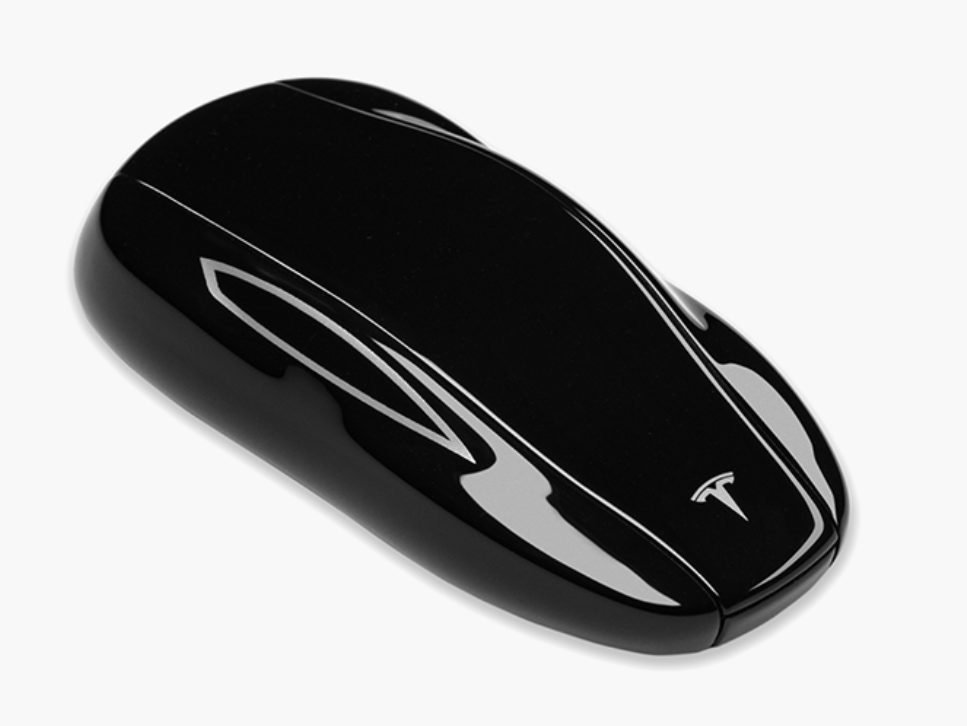
The key fob is the traditional way for customers to access their vehicle and is ideal for those who don't use the phone key feature. The key fob is available as an optional equipment in the Tesla Shop and includes a coin cell battery.
To learn more about the key fob and how to use it, you can check out this video (link) from our support page.
The key fob offers RKE features, locking 2021+ Model S when pressing the key fob top area once and unlocking it when pressing twice. It is equipped with Passive Entry hardware, unlocking and locking 2021+ Model S when the key fob is within 1 meter. The key fob can also be used like an NFC key card.
 |
|---|
| 2021+ Model S key fob |
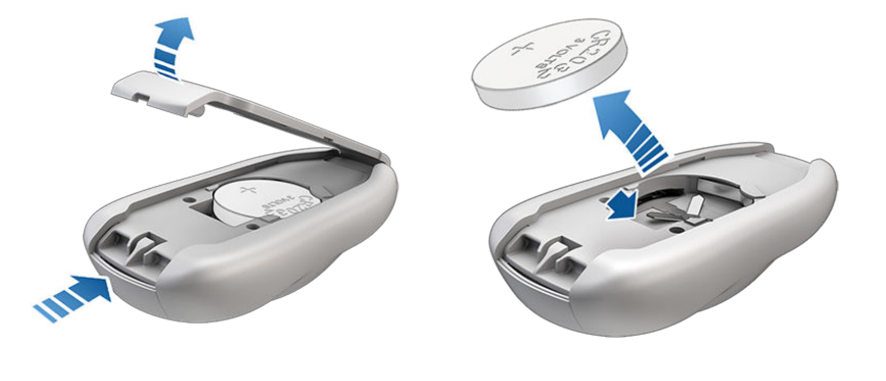
The key fob is powered with a coin cell battery (type CR2032) and is estimated to last with normal use for two years. If passive entry features it not used, it will last longer. To replace the battery, place the key fob button-side down on a soft surface and use a small flat-bladed tool to release the bottom cover. Remove the battery by gently lifting it away from the retaining clips, and insert the new battery with the "+" side facing up.
 |
|---|
| Changing the key fob battery |
Key fobs can be paired to any number of vehicles, and their NFC feature can be used anytime with any vehicle paired to it. However, the RKE and PE features only work on the last vehicle the key fob had NFC interaction with. Tapping the key fob to another paired vehicle will switch it to that vehicle.
Note that key fobs are also compatible with Model 3, and can be paired to any number of 2021+ Model S vehicles and Model 3 vehicles.
Remote Keyless Entrylink
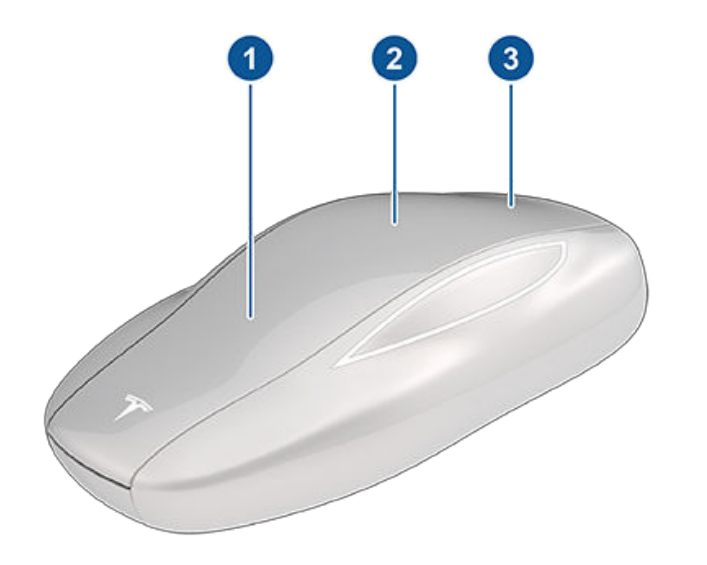
The key fob communicates via Bluetooth to the 3 BLE endpoints of the vehicle whenever one of its buttons is actuated. Radio equipment with a similar frequency can affect the key fob operation. If this happens, move the key at least 30cm away from other electronic devices.
 |
|---|
The three numerated buttons correspond to:
- Front trunk button
- Double-press to open the front trunk.
- Lock / Unlock button
- Single-press to lock doors and trunks (all doors and trunks must be closed).
- Double-press to unlock doors and trunks.
- Rear trunk button
- Double-press to open or close the powered rear trunk.
- If moving, press once to stop the powered trunk movement.
- Hold down for 1 to 2 seconds to open the charge port.
The key fob can also be used to prime Summon the vehicle, if enabled. Hold down the top button to activate prime Summon, and press the frunk or trunk button to move the vehicle forward or backward after priming.
Note: Summon activation via key fob is only available in the following countries: USA, Mexico, Canada, China, Australia, New Zealand, South Korea, and Taiwan.
Passive Entrylink
If enabled in the vehicle security settings, 2021+ Model S automaticaly unlocks when a key fob is present, authenticated, and a door handle is pulled. Key fob presence is determined using the signal strength measured by BLE endpoints. If one the 3 BLE endpoints' signal strength value exceeds a defined threshold, the key fob will be considered as present. Similarly, if a key fob is determined to be leaving and Walk-Away Lock is enabled, the vehicle will lock. When present, the key fob authenticates the vehicle for Drive and disarms the immobilizer.
The key fob has a built-in Intertial Measurement Unit (IMU), which monitors key fob movement and will enter sleep state after 5 minutes of being stationary while in range. This functionality increases the key fob battery life. Shake or press a button of the key fob to wake it up.
Dead Key Foblink
In the event the battery dies, the key fob can be used like a NFC key card to unlock the vehicle and authenticate for Drive. Place the key fob flat-side on the B-pillar reader to unlock the vehicle and authenticate for Drive within 2 minutes. If there is no activity during this time, the vehicle will need another authentication to enter Drive at either the touchscreen or B-pillar reader.