Connectivitylink
Last updated: October 20, 2023
Antenna Overviewlink
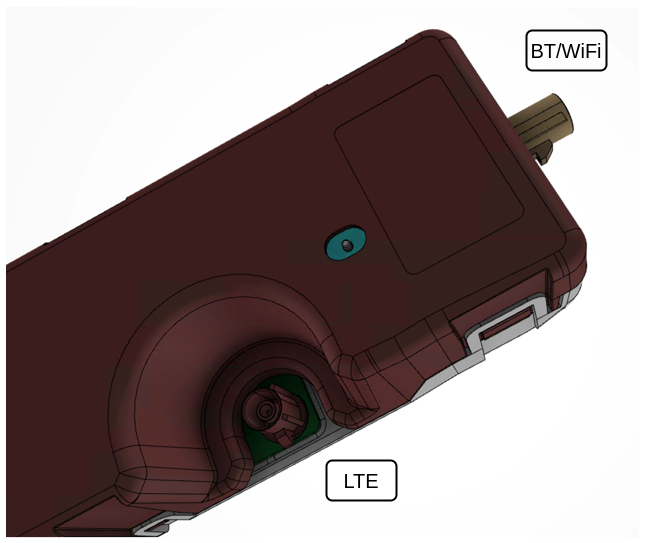
Info-Ryzen Model 3 uses a modular antenna design for connectivity that contains the following components:
- 1 wideband antenna for 2.4GHz Bluetooth or 2.4GHz / 5GHz Wi-Fi
- 1 wideband antenna for LTE / UMTS / GSM
The part is not carried over from Info-Atom Model 3. Info-Ryzen Model 3 antennae have a smaller profile to facilitate better packaging in the A-Header (structural beam joining the left and right A pillars).
There is a single part number for the antenna module since both sides are identical. However, their usage is dictated by their functional connection.
 |
|---|
| Modular BT / Wi-Fi / LTE Antenna Module Connectors |
| Antenna | Connector | Supported Frequency Bands | Supply Voltage | Expected (\Omega) |
|---|---|---|---|---|
| LTE | Claret-Violet FAKRA |
698-960 MHz 1710-2170 MHz 2500-2690 MHz |
0 v | 10 K(\Omega) |
| BT / Wi-Fi | Beige FAKRA |
2400-2484 MHz 5150-5850 MHz |
0 v | 10 K(\Omega) |
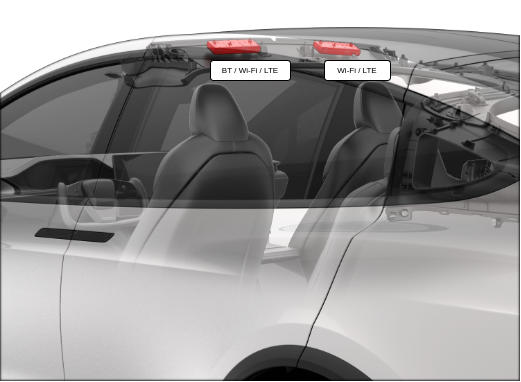
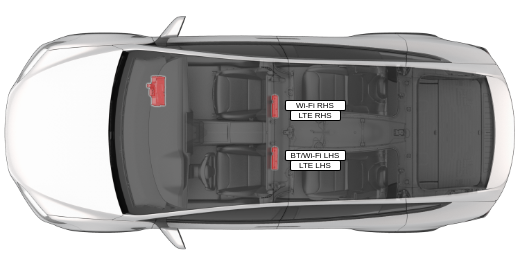
Info-Ryzen uses 2 of these antenna modules located behind the headliner on the left and right side of the A header, meaning there are a total of 4 antennas per vehicle. For vehicles using the QualComm QCA6595 module, they operate as follows:
- 1 dedicated Wi-Fi antenna mounted LH side that supports the 2.4GHz and 5GHz Wi-Fi MIMO
- 1 switched antenna mounted RH side that supports either the 2.4GHz Bluetooth or 2.4GHz and 5GHz Wi-Fi MIMO
- 2 LTE antennas functioning as a 2x2 MIMO pair
Multiple-input multiple-output (MIMO) means both antennas can be used either as dual inputs or dual outputs. This is beneficial for signal reception strength by allowing antenna diversity.
Note that vehicles built before June 27, 2022 use an LG Innotek (LGIT) module, rather than the QualComm QCA6595 module. As a result, the location of the Wi-Fi/Bluetooth antenna and the dedicated Wi-Fi antenna are switched on such vehicles. See the table below for compability and the respective locations of each antenna.
| Manufacturer | Model | Compatibility | Location of Wi-Fi/BT Antenna | Location of Wi-Fi Antenna |
|---|---|---|---|---|
| Qualcomm | QCA6595 | Info-Ryzen | RH side | LH side |
| LG Innotek | BCM4359 | Info-Ryzen and Info-Atom | LH side | RH side |
 |
|---|
| Modular Antennas Locations |
 |
|---|
| Antenna Module LH and RH Side Locations |
Cellular Connectivity Cardlink
The Quectel connectivity card shares the same printed circuit board (PCB) outline, M.2 connector, and fixtures as the previous Telit connectivity card. The card, which mounts to the car computer in the same location as the Telit variant, is replaceable.
Note
Refer to the Service Manual for the specific replacement procedure.
Single worldwide modem variant for Infotainment - Ryzen:
- AG525RGL - Global markets
Connections out from the card are:
- 2 FAKRA connectors for connections to the cell antennas
- 1 M.2 connector to the main Infotainment board
The connectivity card on Info-Ryzen is capable of managing the setup and maintenance of an active cellular data connection independently of the main Infotainment system. This feature allows the modem to maintain an active data connection while the vehicle is asleep.
All of the configurations needed for a data connection is stored on and handled by the modem.
Low power statelink
The modem can be put into a low power state by the Infotainment system. When the low power state is active, the modem maintains an active data link, but it uses a less aggressive strategy for a network search. The modem can be woken up by the Infotainment system to come back to full power mode.
Wake on IPlink
The ability of the connectivity card to setup and maintain an end-to-end data connection, along with the low power mode, forms a foundation for a new remote wake system for the vehicle. Wake on Internet Protocol (IP) wakes the vehicle via a message over a data connection rather than via SMS.
When the vehicle is requested awake by the mobile app, Tesla servers send a message directly to the modem in the vehicle. A messaging client runs on the modem and when the modem receives the new wake message, the modem wakes the gateway. The gateway then wakes the Infotainment system.
This new feature will not be active at product launch.
SMS Wakelink
Info-Ryzen supports the established system of remote vehicle wake via SMS. When the vehicle is requested awake by the mobile app, Tesla servers send a message to the cell network provider for the vehicle, and the cellular network provider sends an SMS to the modem in the vehicle.
When the modem receives an SMS, the modem wakes the gateway, which then wakes the Infotainment system.
Connectivity Card Interfaceslink
 |
|---|
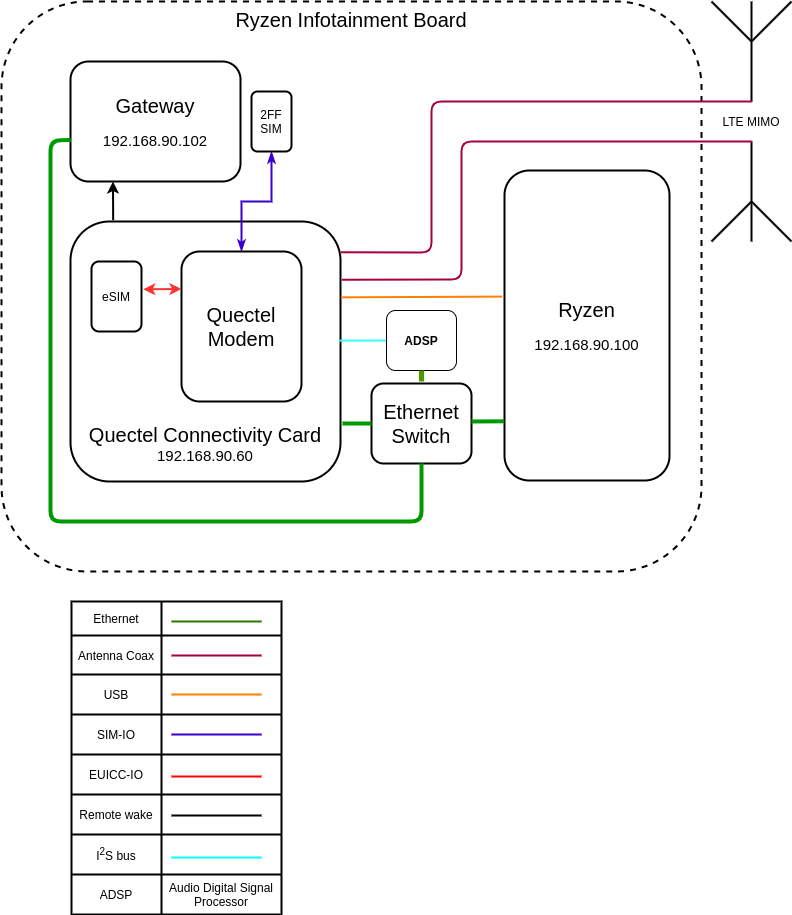
| Cellular Connectivity Functional Diagram |
-
Ethernet is the primary data and control interface:
- eth0
- Modem IP address 192.168.90.60
- eth0
-
Antennas:
- Connections for the shielded coaxial cable connections to the antenna
- GPIO pins provide specific control / state information between the 2 systems:
- Low power mode control is an input to the modem.
- Remote vehicle wake control (LTE-GTW-RING) is an input to the gateway.
- Modem status is an output from the modem.
- Modem software crash indication is an output from the modem.
- SIM card interfaces:
- Input-Output to the embedded MFF2 SIM (eSIM)
- Input-Output to the removable 2FF SIM (standard removable SIM)
- Audio interfaces:
- Bi-directional audio data passes over the Inter-Ic Sound (I$^2$S) bus.
- Audio control data passes over the Inter-Integrated Circuit (I$^2$C) bus.
- Debug:
- The debug interface is connected to the Infotainment system via USB.
- The USB connection facilitates updating / re-flashing modem firmware.
Cell Vitalslink
The following vitals are supported in firmware.
Cell Sim: 89011704272500000000link
- Integrated Circuit Card Identity (ICCID) is a 20 digit ID for the active subscription.
- If the value is n/a, either:
- The ICCID has not been read yet.
- The ICCID cannot be read.
- If the value is n/a, either:
Model: AG525RGLlink
- Modem model code:
- If the value is n/a, either:
- The model code has not been read yet.
- The model code cannot be read.
- If the value is n/a, either:
Cell bars: 4link
- Number of cell bars visible on the UI cell indicator:
- Possible values are 1 through 5.
- If the value is n/a, then both:
- The cell bars are crossed out on the UI.
- The cellular data connection is not connected.
System Mode: 4Glink
- Type of data access technology, which is visible on the UI cell indicator:
- Possible values are 2G, 3G, and 4G:
- 2G (also referred to as GSM / GPRS / EDGE) is the second generation cellular network technology and provides the lowest rates of data transfer for the vehicle.
- 3G (also referred to as UMTS / WCDMA / HSPA+) is the third generation cellular network technology and provides medium rates of data transfer for the vehicle.
- 4G (also referred to as LTE / LTE Advanced) is the fourth generation cellular network technology and provides the highest rates of data transfer for the vehicle.
- Possible values are 2G, 3G, and 4G:
Reg Status: Registeredlink
- Network registration status:
- Registered means the device is registered in the home network.
- A device is connected in the home network if the device is connected to the subscription provider's network in the country where the subscription is billed.
- Roaming means device is registered in a foreign network.
- A device is connected in a foreign network if the device is connected to any other network than the subscription provider's network, which is common if the device is outside the country where the subscription is billed.
- BaseStationSearch means the device is not registered and searching for a radio network.
- NotSearchingForOperator means the device is not registered and not actively performing a search for a radio network.
- Undefined means the device has been denied registration to a radio network.
- Unknown means the device registration status is not known.
- Registered means the device is registered in the home network.
PS State: attachedlink
- Network packet switched attach status.
- Attached means the modem is attached to the packet switched domain of the cellular network.
- Not attached is the opposite of attached.
All Vitals Are: --link
- Data from the modem is not available.
- Data flows from
modem > ofono > qtcar-connman > vitals. - A functional problem anywhere along that data path can cause all vitals to be "--", or as it is often verbally described, blank.
- Wi-Fi and cell data are both handled by qtcar-connman. If the Wi-Fi vitals are present, then qtcar-connman is functional.
Vehicle Log Datalink
The vehicle will log alerts related to the cellular connectivity system when errors are detected.
Bluetooth and Wi-Fi Systemlink
Infotainment - Ryzen carries over the previous Bluetooth and Wi-Fi system used in Infotainment - Atom.