Exterior Lights
Component locationlink
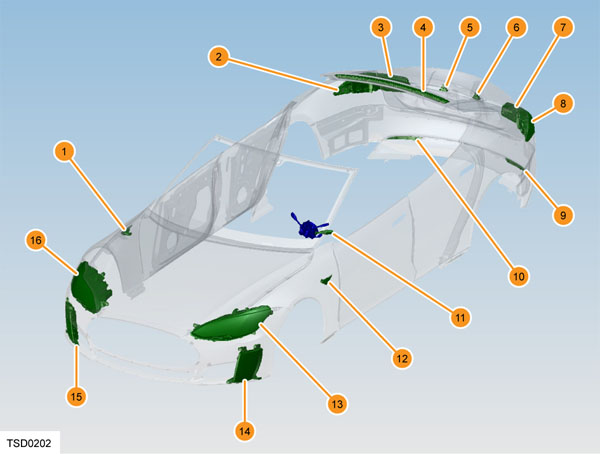 |
|---|
| 1. Side repeater 2. Rear quarter tail light 3. Liftgate mounted tail light 4. High mounted brake light 5. License plate light 6. License plate light 7. Liftgate mounted tail light 8. Rear quarter tail light 9. Reflex reflector 10. Reflex reflector 11. Steering column controls 12. Side repeater 13. Headlamp assembly 14. Front fog/cornering light assembly 15. Front fog/cornering light assembly 16. Headlamp assembly |
These components allow Model S to be equipped with:
- Low and high beam headlamps
- Cornering lights
- Parking lights
- Side lights (USA only)
- Daytime running lights (DRL)
- Front fog lights
- Side marker lights (except EU models)
- Turn signal lights
- Brake lights
- High mounted brake light
- Reverse light(s)
- Rear fog light - European specification
- License plate lights
- Rear reflex reflectors
Component descriptionlink
Exterior lightslink
Note
Differences between SAE (North America) and ECE (Europe) configurations, as well as updates to headlamp design will be discussed in a later table. Pictures may not represent configuration of headlight depending on region, but location described will be correct.
Headlamplink
The headlamp is the main source of light on the road for the Model S. There are 3 different headlamp versions fitted to the Model S throughout the years.
- High Intensity Discharge Unit (HID)
- D3S 35W High Intensity Discharge unit - USA and Canadian specification
- D8S 25W High Intensity Discharge unit - European specification
- HB3 Halogen bulb
- LED unit (Model S Refresh)
Pre-Refresh headlamps (built before October 2016) are directly controlled by the Body Control Module (BCM). This means that each of the lights is controlled directly from the BCM.
Refresh headlamps (built after October 2016) have an LED light source LIN controlled by the BCM. This means that the BCM commands the relevant lights inside the headlamp via LIN. A controller inside the headlamp receives these LIN commands and turns on and off the requested light.
Pre-refresh headlamp configuration:link
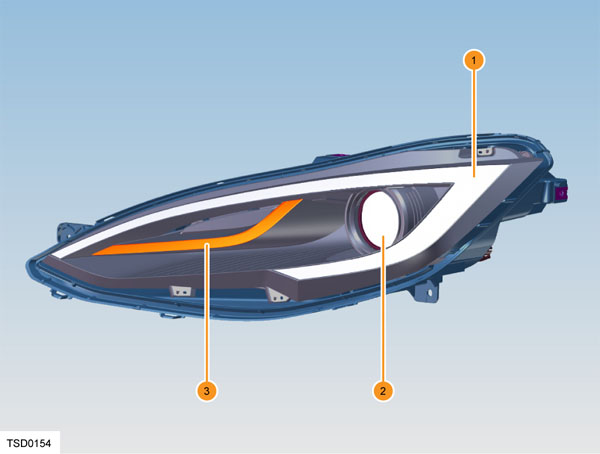 |
|---|
| 1. Diffused Signature Light 2. Low and high beam headlamp 3. Turn signal |
Refresh (since October 2016) headlamp configuration:link
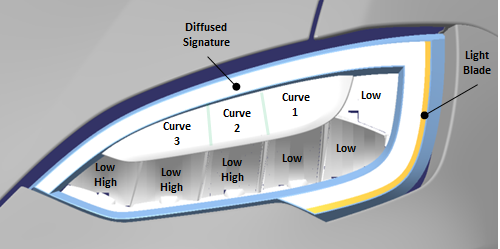 |
|---|
The Light Blade shown in the photo is different for SAE (North America) and ECE (Europe) markets.
- For ECE:
- The light blade consists of a daytime running light (DRL Light Blade) beside the diffused signature in addition to the amber turn signal light blade.
- For SAE:
- The additional DRL Light Blade is not present. There is only an amber turn signal light blade.
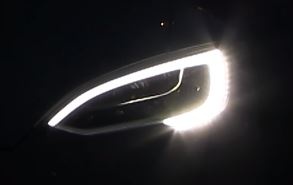 |
|---|
| DRL Light Blade and Diffused Signature (ECE only) |
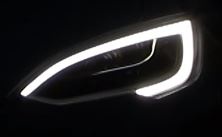 |
|---|
| Diffused Signature only (SAE and ECE) |
Front fog lightlink
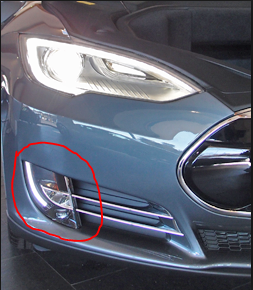
There are 2 specification levels of front fog light:
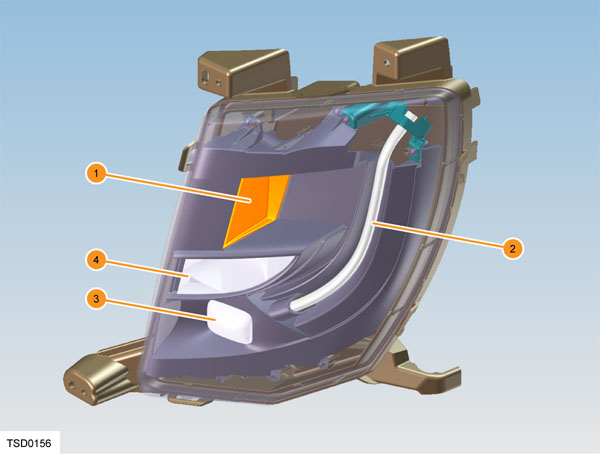
- High specification unit has a cornering light included in addition to the front fog light and side marker light.
- Low specification unit does not have cornering light on the low specification unit.
On European specification vehicles, there is no side marker light in either of the high or low specification units.
The front fog light assembly is secured to the front fascia unit with 3 crews. The height of the fog light beam can be adjusted using the screw behind the front fascia.
The front fog light assembly is non-serviceable and must be replaced as an assembly.
The cornering lamps are angled outwards from the center line of the vehicle and augment the headlamps during cornering.
 |
|---|
| Front fog light |
 |
|---|
| 1. Side marker (USA Only) 2. Light Pipe 3. Fog light 4. Cornering light |
Tail light - Bodylink
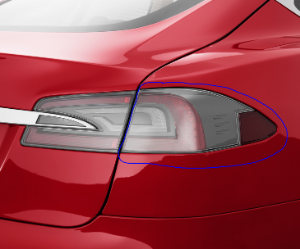
The tail light assembly is secured to the rear quarter panel with 3 nuts and to the charge port with 4 screws. This assembly contains LEDs for part of the tail light (the remainder are part of the tail light assembly on the liftgate).
The brake lights and turn signals use the same LEDs as the tail lights, but the brightness is increased. The side marker uses 3 LEDs on the side of the light assembly.
The change in brightness is controlled by an LED Driver Module (LDM) mounted inside each light. This module changes the Pulse Width Modulation (PWM) signal to the LEDs to increase the brightness.
The assembly is non-serviceable and must be replaced as an assembly.
 |
|---|
| Tail light - body |
Tail light - Liftgatelink
The liftgate tail light assembly is secured to the liftgate with 4 nuts. This assembly contains LEDs for part of the tail light (the remainder are part of the tail light assembly on the rear quarter) and the reverse lights.
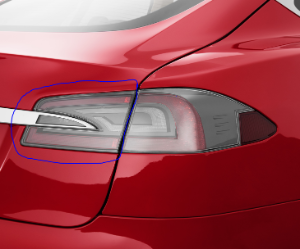 |
|---|
| Tail light - liftgate |
Side repeaterslink
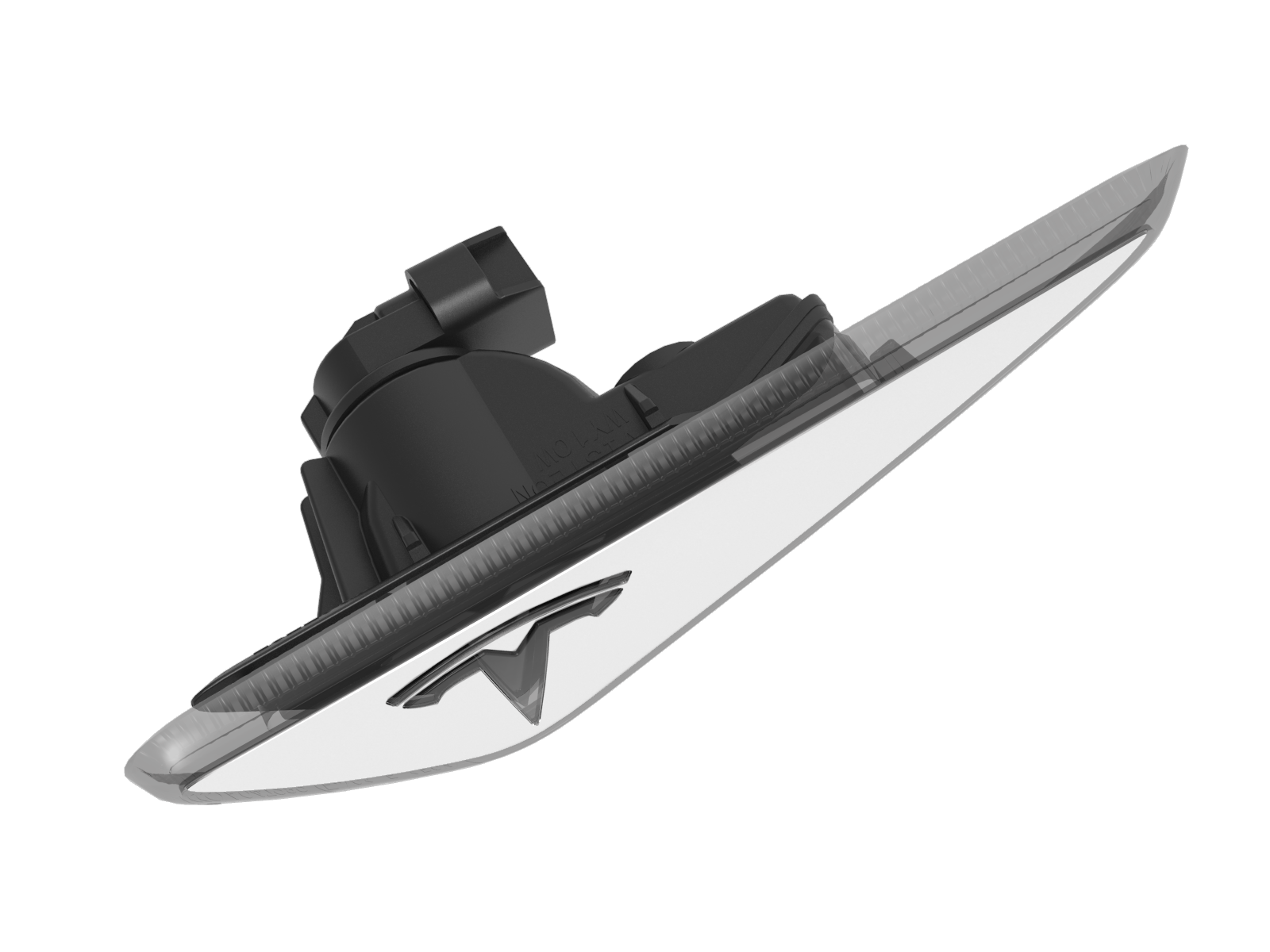
The side repeater lights are fitted to each front fender. They are secured in place by plastic clips. The side repeater lights are outputs of the door control modules, not the BCM.
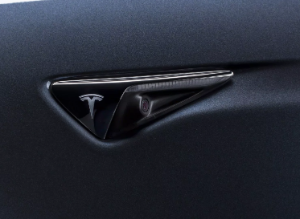
Side repeater for cars produced before 12-Oct-2016 (no camera) contains a W10W bulb that can be replaced. Side repeater for cars produced after 12-Oct-2016 (camera) have a non-serviceable LED.
 |
|---|
| Side repeater with W10W bulb and without camera |
 |
|---|
| Side repeater with LED and camera |
Brake light (CHMSL)link
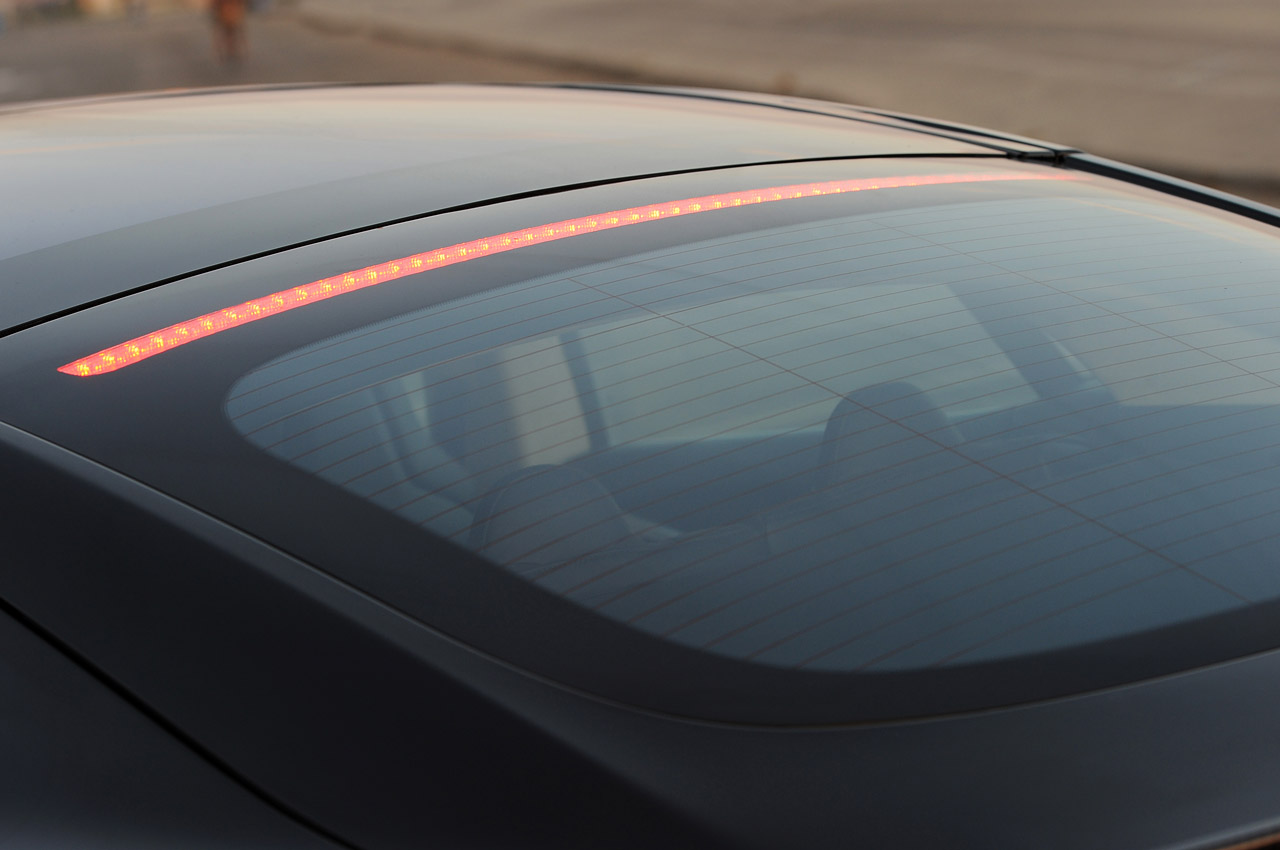
The high mounted brake light contains LEDs and is glued to the liftgate glass. The glass must be removed in order to remove the light.
The brake lights are controlled by the BCM in response to direct input from the brake pedal switch and requests from other control modules, like the drive unit. The brake lights are turned on when:
- Pressing the brake pedal.
- Using regenerative braking.
- Applying the parking brake in dynamic mode.
 |
|---|
| Brake light |
License plate lightslink
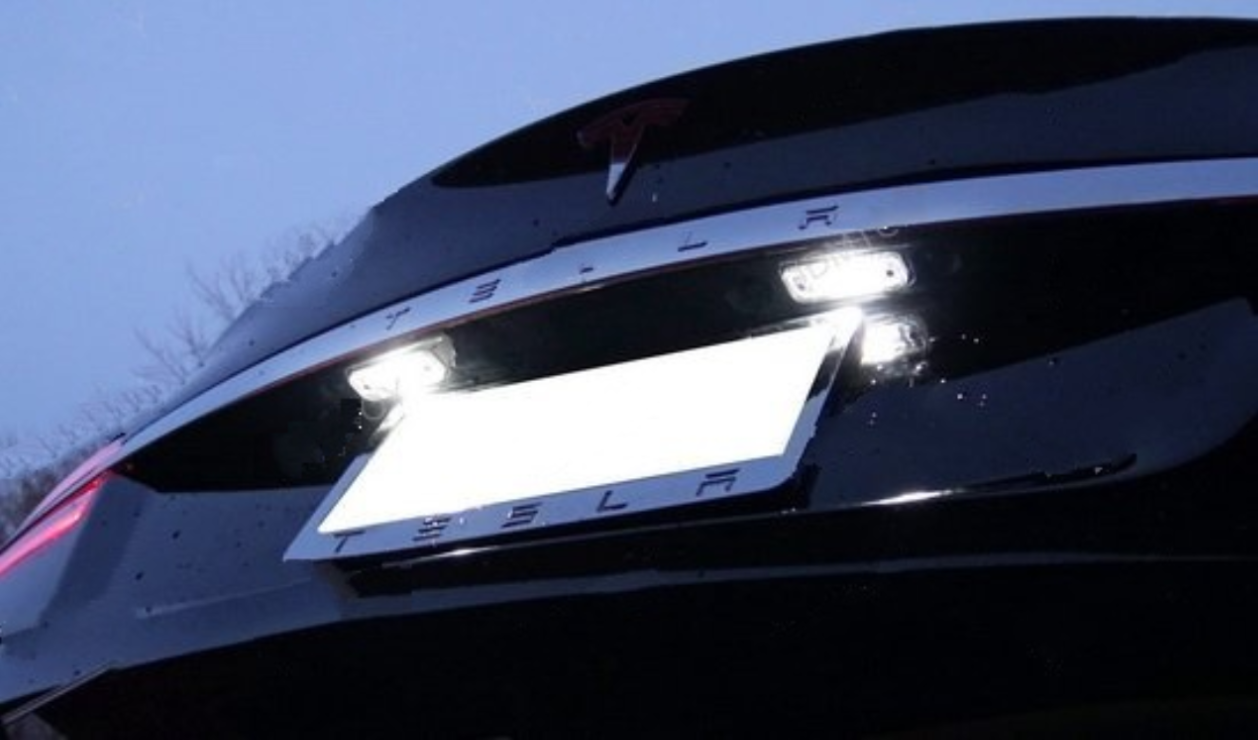
The two license plate lights are mounted on the lower edge of the liftgate, held in place by the applique.
License plate lights for cars produced before 16-Aug-2015 contains a serviceable W5W bulb. License plate lights for cars produced after 16-Aug-2015 contain a non-serviceable LED.
 |
|---|
| License plate lights |
Reflectorlink
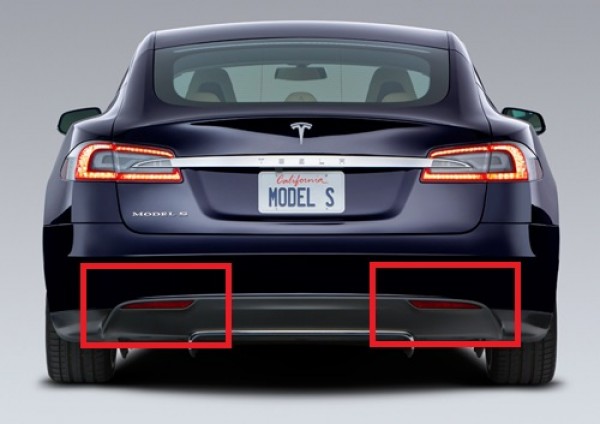
Reflex reflectors are mounted in the lower portion of the rear bumper.
 |
|---|
| Reflectors |
Interior lights:link
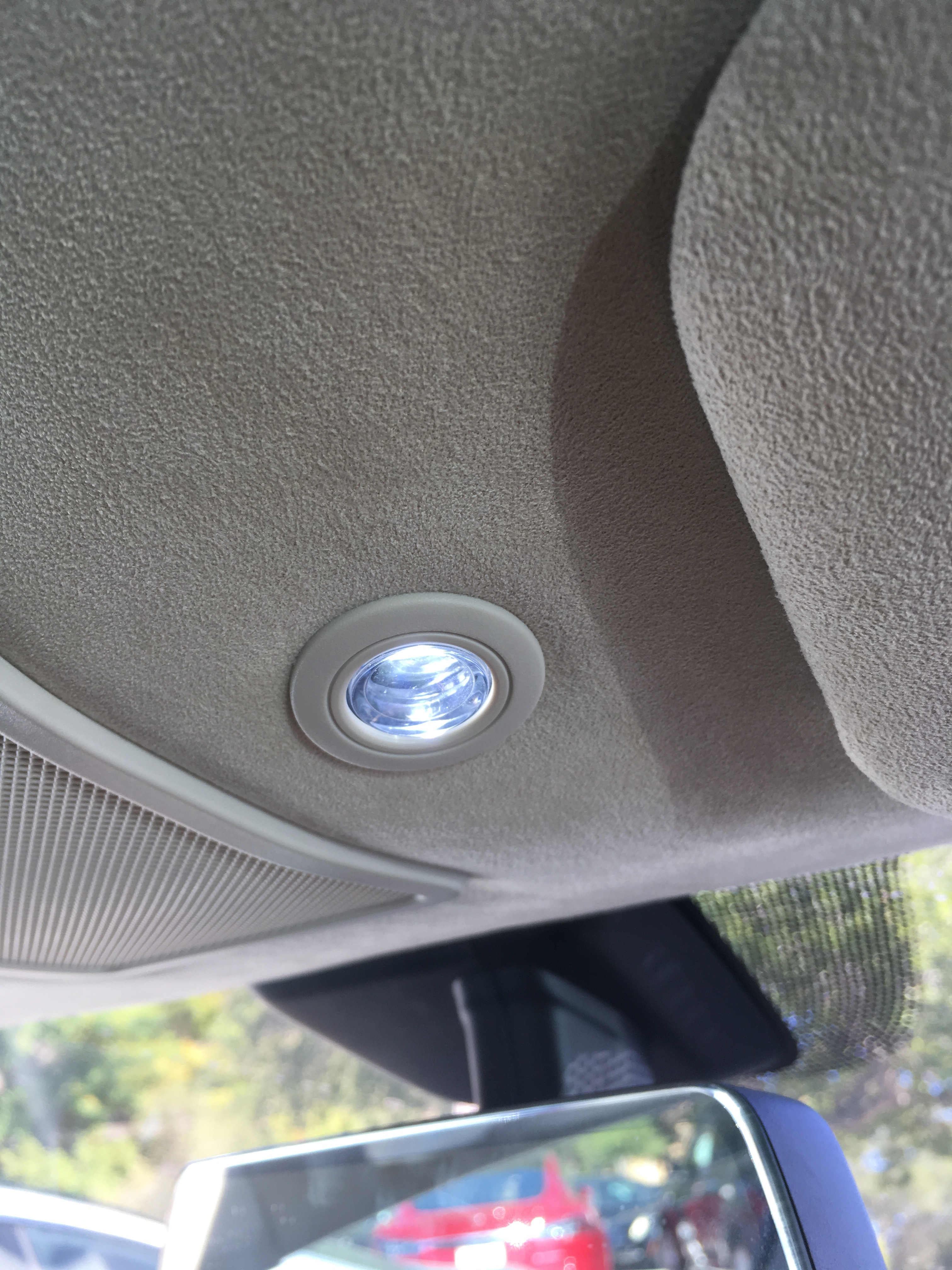
Four map lights provide internal light to the cabin. They can be activated from the screen or by pressing them. They are located on the headliner by the rear view mirror, as well as on the rear passenger side trim above the rear doors.
 |
|---|
| Front interior map light |
Note
There are 2 light color variants of the map lights. The white tint (6000-7000K) was used on cars built before 18-Sep-2015. The warmer yellow tint (2900-3200K) for cars built after this date.
Frunk latch lightlink
 |
|---|
| Frunk latch light |
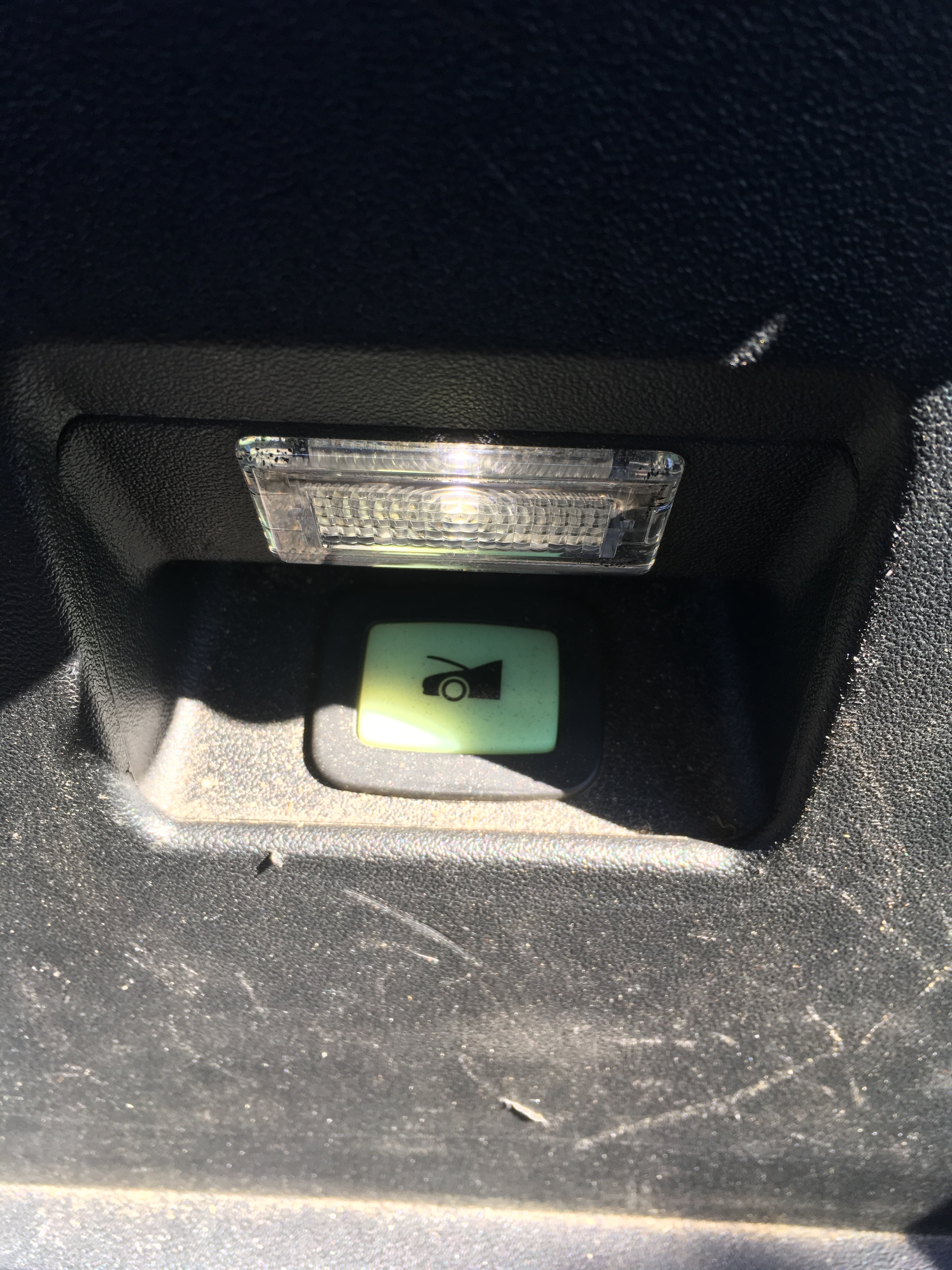
The frunk latch light provides internal light to the frunk upon opening. It is located at the very front of the vehicle.
Liftgate latch lightlink
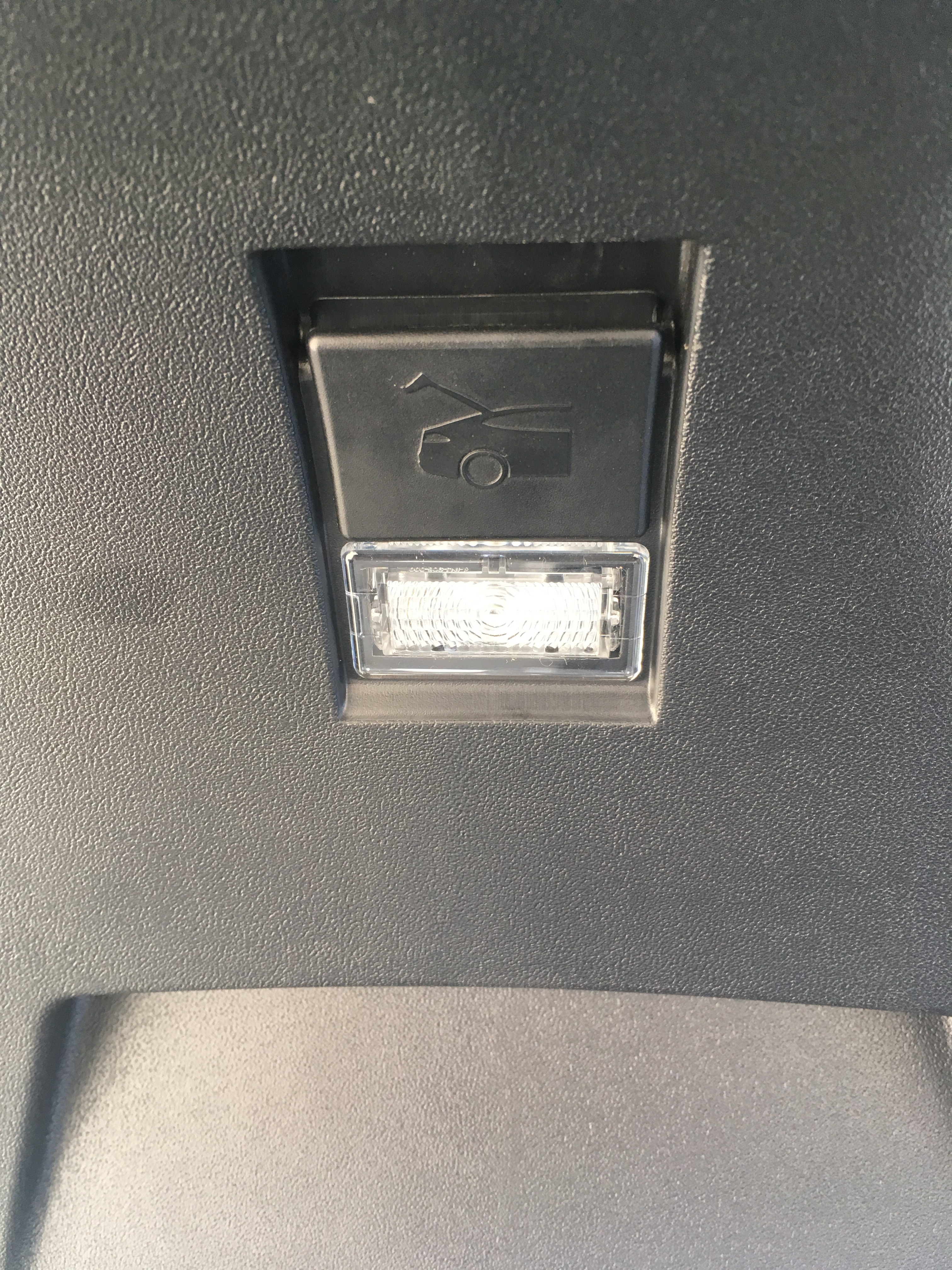 |
|---|
| Liftgate latch light |
The liftgate latch light serves to locate the internal release latch for the liftgate. It is located on the liftgate door.
Rear cargo lightslink
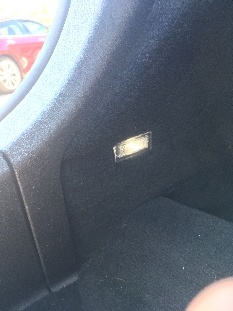 |
|---|
| Rear cargo lights |
The rear cargo lights provide illumination to the trunk and are located on the side trunk trim.
Door face lightlink
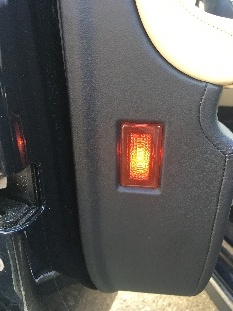 |
|---|
| Door face light |
The door face light is located on the side of the door trim and serves to provide notification to onlookers that the door has been opened.
Door puddle lightlink
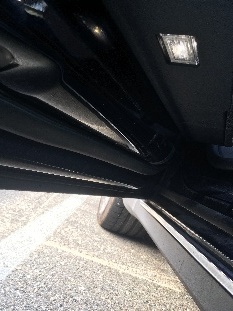 |
|---|
| Door puddle light |
The door puddle light illuminates the ground below the door and gives passengers/driver warning of debris external to the vehicle on exiting.
Footwell lightlink
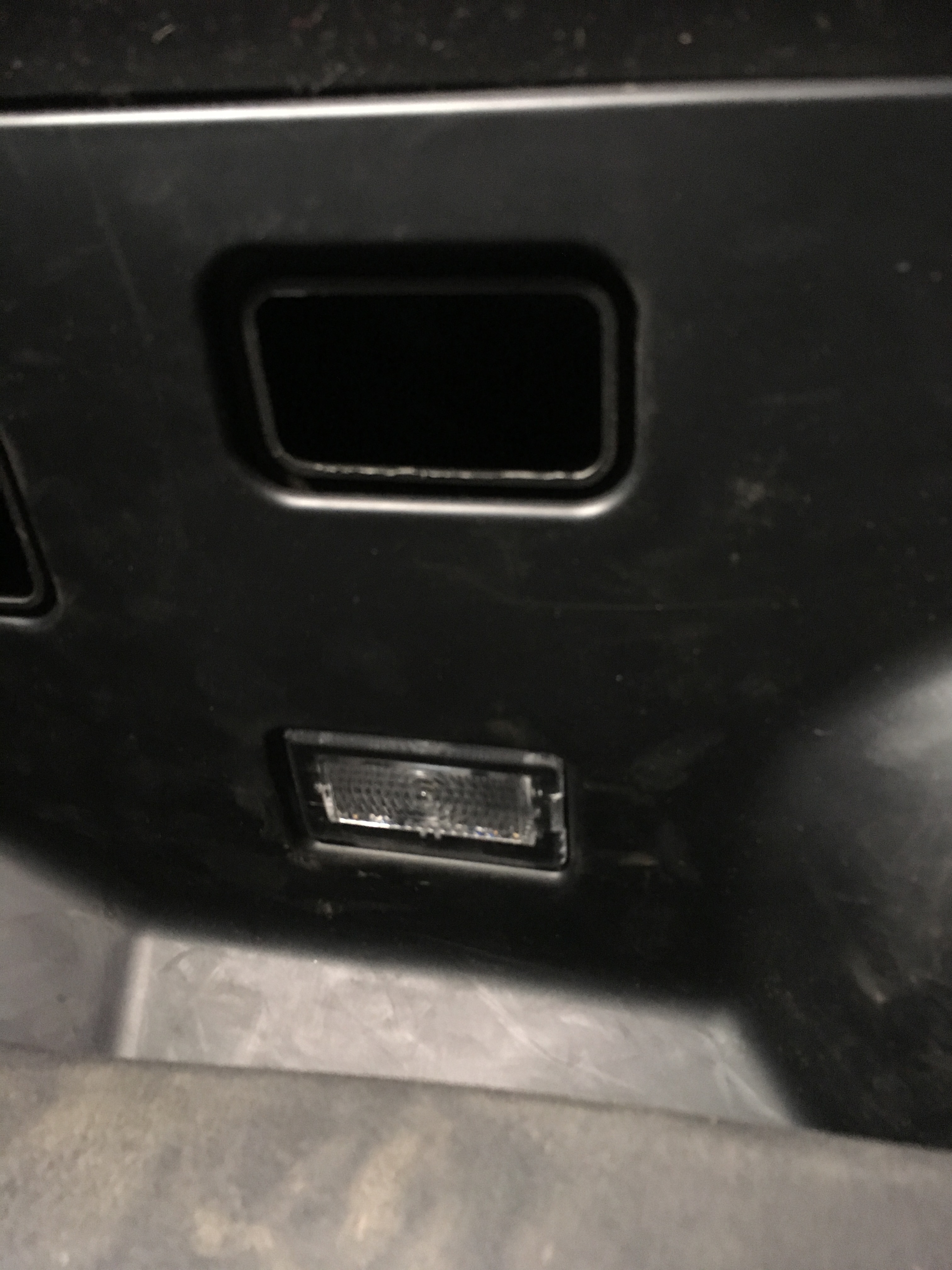 |
|---|
| Footwell light |
The footwell light illuminates the driver and passenger footwells. It is located under the steering wheel (driver side) and glovebox (passenger side).
Glovebox lightlink
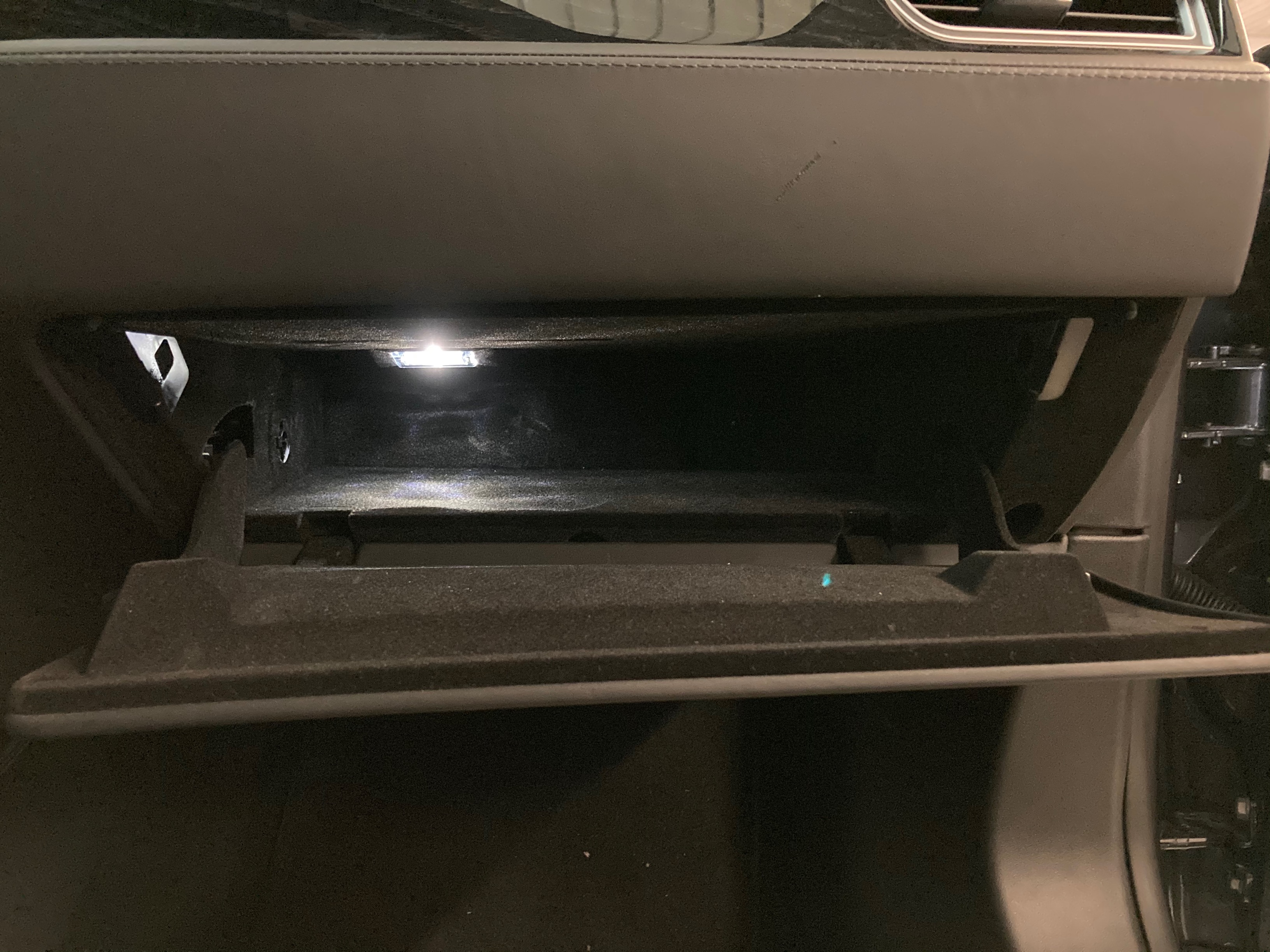 |
|---|
| Glovebox light |
The glovebox light is inside the glovebox. It activates whenever the glovebox is open.
Vanity lightlink
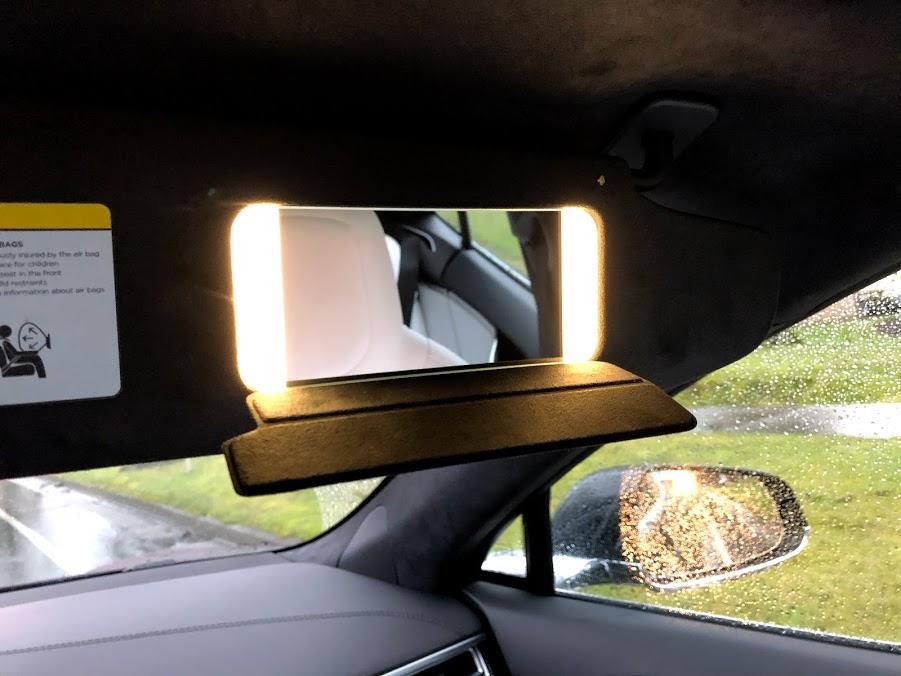 |
|---|
| Vanity light |
The vanity lights are on the driver and passenger vanity mirror. These were installed starting in March 2018.
System architecture:link
Note
All system architecture diagrams assume a Left Hand Drive (LHD) vehicle for the purposes of referring to the Driver Door Module on the left of the vehicle.
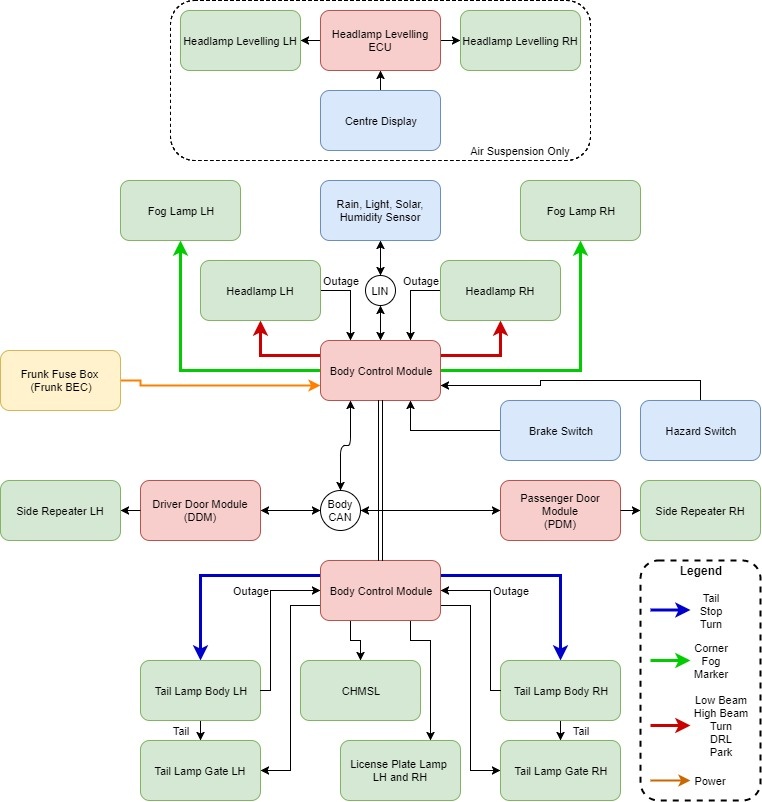
Operation of all exterior lights is controlled by the Body Control Module (BCM), which responds to requests from:
- Light switch function of the touchscreen.
- Ambient light information from the Rain Light Sensor or the fish-eye camera.
- Turn signal stalk.
- Hazard switch.
- Drive Inverter (deals with reverse light and brake light requests).
Exterior lighting architecture for vehicles built before October 2016:link
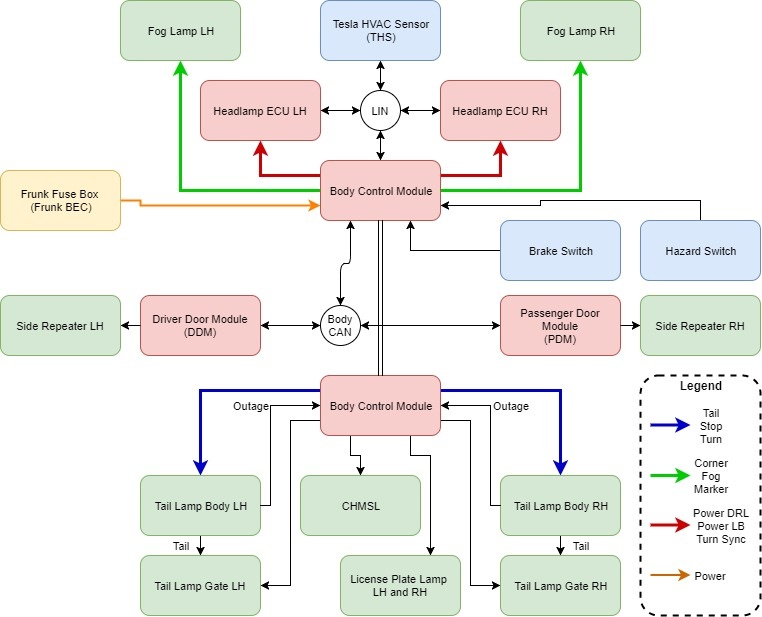
Exterior lighting architecture for vehicles built after October 2016:link
CAN Architecture for the exterior lighting System:link
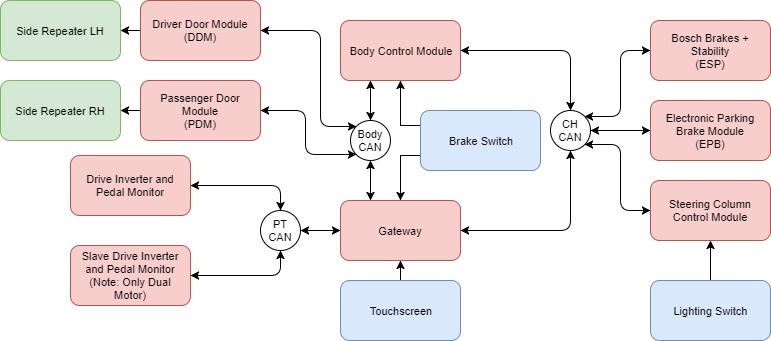
The BCM receives signals from several sources:
-
CAN messages from the steering column control module and the touchscreen control headlamp and turn signal operation.
-
CAN messages from the Drive Inverter control brake light operation in response to regenerative braking, and reverse light operation when the Reverse gear is selected.
-
CAN messages from the Electronic Park Brake (EPB) activate the brake lights in response to dynamic parking brake application.
-
A direct input from the brake pedal switch turn on the brake lights when the pedal is pressed.
-
CAN messages from the Electronic Stability Program (ESP) module activate the brake lights during a stability control intervention.
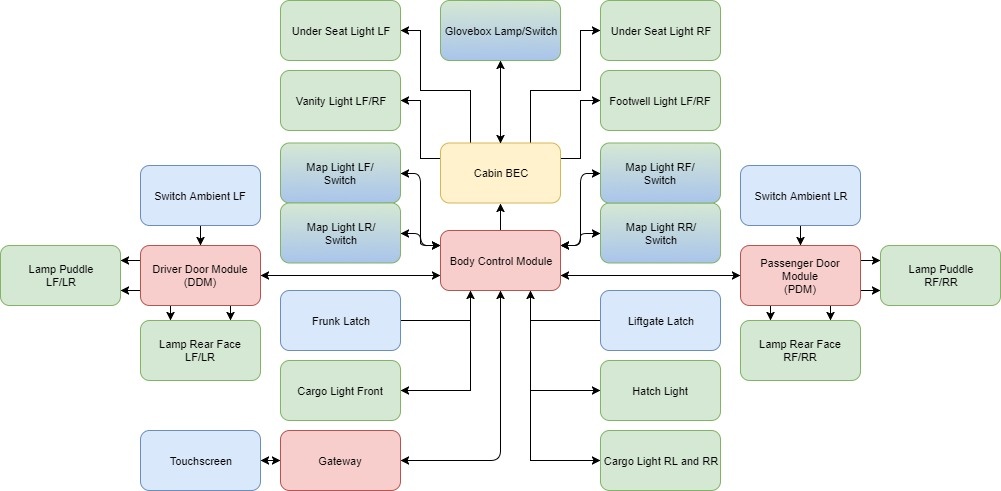
Interior Lighting Architecture:link
Operationlink
The Model S exterior lights can be controlled from the touchscreen, from the Steering Column Control Lever (SCCM) and from the mobile app (headlamp flash only).
Headlampslink
- If DOME lights are turned on, all interior dome (map) lights turn on when the Model S is unlocked, or a door is opened upon exiting, or gear-shifted into P (Park). They turn off after 60 seconds, or when the Model S is locked, or when shifted into a driving gear.
- If set to AUTO, dome lights turn on only when little or no light is detected.
- If AMBIENT lights are turned on, the lights on the door armrests turn on whenever the headlights are on.
- If AUTO HIGH BEAM is turned on, high beam headlights turn on and off automatically based on whether or not light is detected in front of the Model S.
- Touch to turn fog lights (if equipped) on or off. Fog lights operate only when low beam headlights are on. Fog lights do not operate when headlights are turned off or when high beam headlights are on.

- The front fog indicator displays on the instrument panel whenever the front fog lights are on.
- Exterior lights (headlights, tail lights, side marker lights, parking lights, and license plate lights) are set to AUTO each time the Model S is started.
- AUTO: Exterior lights automatically turn on when driving in low lighting conditions. If the light sensor fails, the lights revert to ON. If this is changed to a different setting, lights always revert to this AUTO setting on the next drive.
- OFF: Exterior lights turn off until manually turned back on or until the next time the Model S is driven. If daytime running lights are a regional requirement, the exterior lights used for this purpose do not turn off.
- PARKING: Only the side marker lights, parking lights, tail lights and license plate lights turn on.
- ON: Exterior lights turn on. If the vehicle is not in Drive mode, the lights remain on until they are switched off. An audible alert sounds if the driver's door is opened while the headlamps are turned on and the vehicle is not in Drive mode.
Note
The Model S has a series of lights along the lower rim of the headlights, also referred to as "signature" lights. These lights automatically turn on whenever the Model S is powered on and a driving gear is engaged. In the U.S. only, these lights turn off to conserve energy when the Range Mode setting is turned on.
Operation from the Touchscreen:link
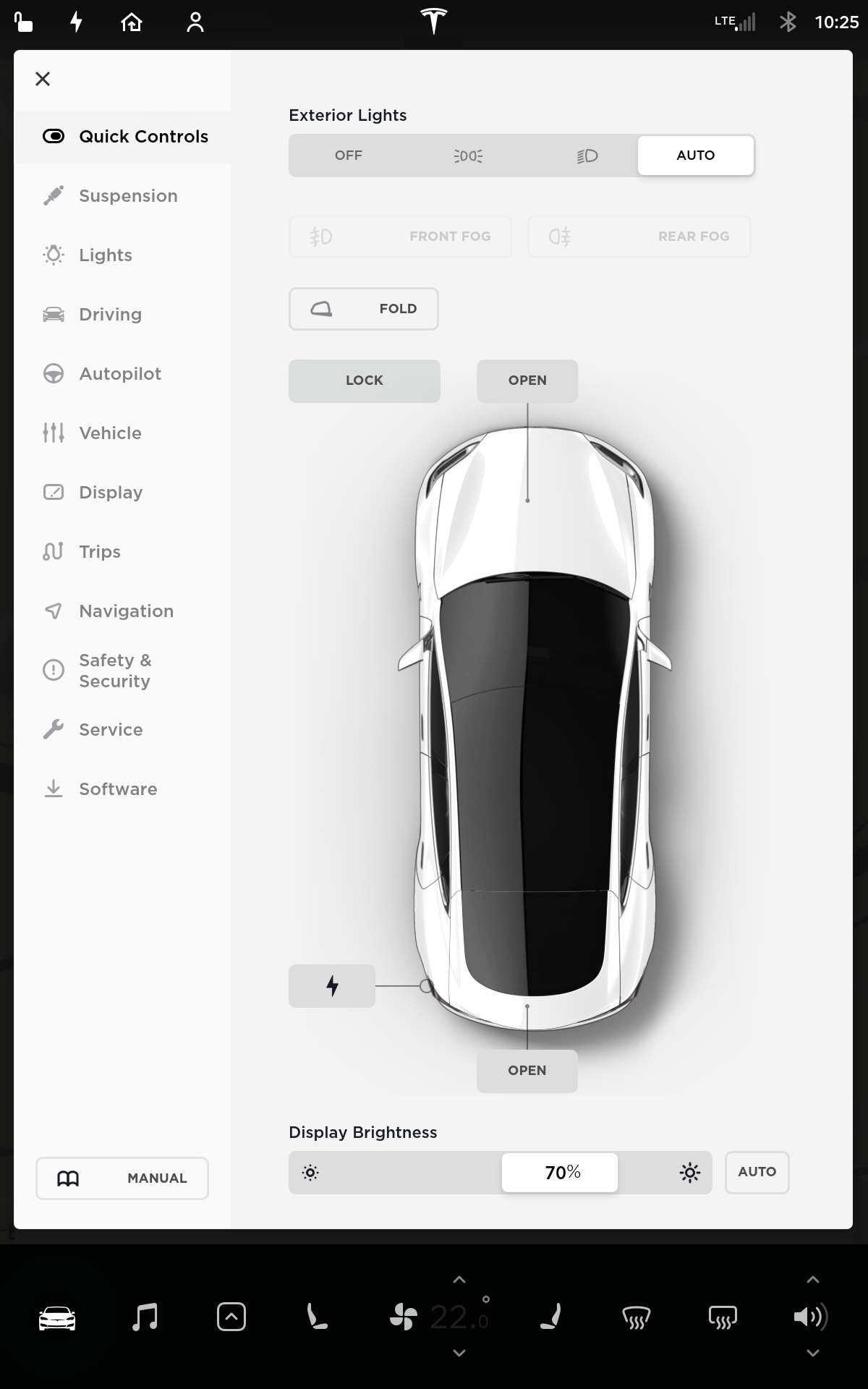 |
|---|
| Quick Controls UI |
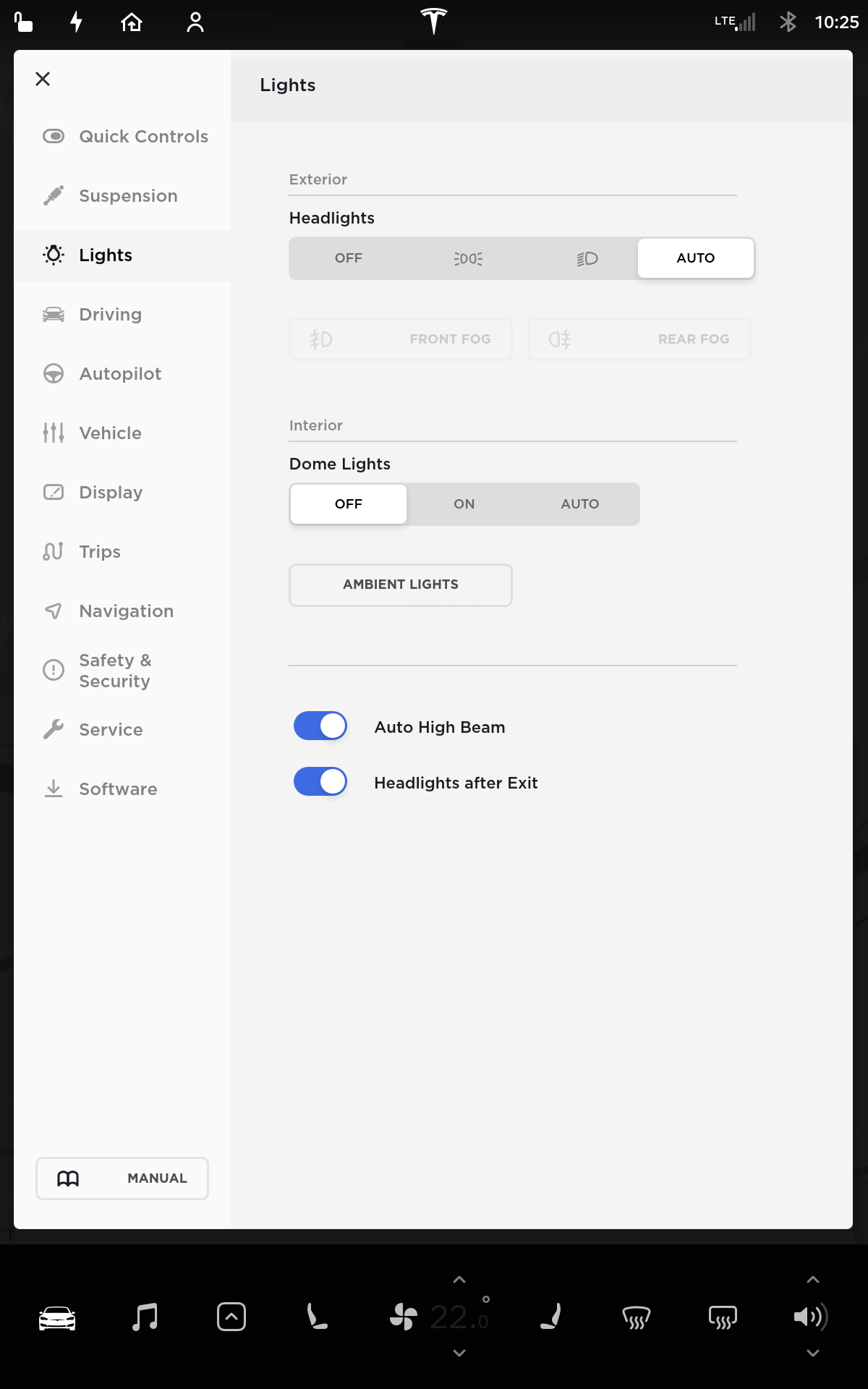 |
|---|
| Lights Control UI |
Operation from the SCCM (Steering Column Control Lever):link
 |
|---|
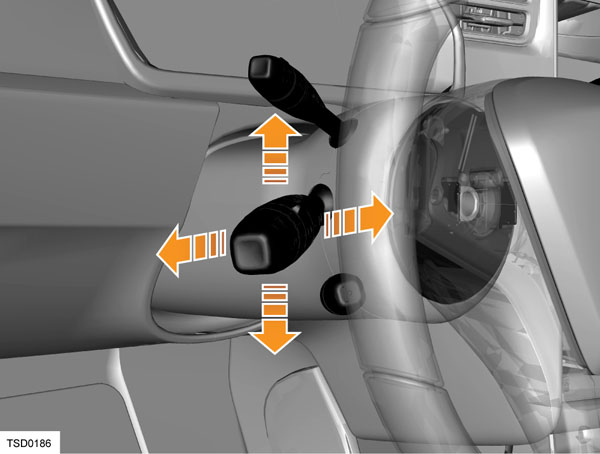
| Left stalk controls lights |
The headlamp low/high beams and turn signals are all operated by using the left steering column control lever.
Back/Forthlink
To operate the headlamp high beam, push the lever forward. The lever locks in the forward position until the lever is pulled back again.
Note
When AUTO HIGH BEAM is turned on, pushing the stalk will only turn on the high beam if no incoming light is detected by the forward facing camera.
To flash the high beam, pull the lever backwards. The lever return back into the idle position when the lever is released.
| Icon | Description |
|---|---|
 |
High beam lamps are on and Auto Highbeam is off or unavailable. |
 |
High beam lamps are on while Auto Highbeam is engaged. |
 |
High beam lamps are off while Auto Highbeam is engaged. So the vehicle detects approaching traffic. |
Up/Downlink
Move the lever down to operate the left turn signals, or up to operate the right turn signals. The turn signals continue to operate until canceled by the steering wheel, or until the lever is returned to the central position. By momentarily holding the lever up or down against the spring pressure and then releasing it, the turn signals flash three times to indicate a lane change.
 |
|---|
| The corresponding turn signal indicator lights up on the instrument panel when a turn signal is operating. There is also an audible clicking sound. |
Hazard lightslink
To operate the hazard warning flashers, the button located to the left of the touchscreen is pressed. Pressing the button again turns off the hazard warning flashers.
If the vehicle is involved in a collision that causes the airbags to deploy, the hazard warning lights automatically turn on. Hazard lights are operable even when a key is not near the Model S.
Headlights after exitlink
When driving is stopped and the Model S is parked in low lighting conditions, the exterior lights automatically turn on. They automatically turn off after one minute or when the Model S is locked. This feature can be turned on and off using the touchscreen. Touch Controls > Settings > Vehicle > Headlights After Exit. When Headlights After Exit is set to Off, the headlights turn off when the park gear is engaged.
Front Lighting Truth Tableslink
Headlamps, front fog lights, and and tail lights appear differently in the SAE (North America) and ECE (Europe and Pacific) markets. This section is meant to distinguish the differences in lighting configurations:
The following tables detail when the headlamps are on for different regions:
SAE Behaviourlink
| Signature/Park | DRL Light Blade (refresh only) | Turn Light Blade | Low Beam | High Beam | Curve Lighting****Uplevel Only > curveLightingType = Varroc | Fog | Cornering light**(in fog lamp assembly)** | Light Pipe | Side Marker | ||
|---|---|---|---|---|---|---|---|---|---|---|---|
| Master Lighting Switch | Off | On (Full Intensity) unless: > In Park Gear | N/A | N/A | Off | N/A | Off | N/A | Off | Off | Off |
| Parking | On (Parking Intensity) | Off | Off | Off | Off | Off | |||||
| On | On (Parking Intensity) | On | On1 when: > Vehicle Turning | On2 when: > Vehicle Turning | Off | Off | |||||
| Nighttime Auto | On (Parking Intensity) | On | On1 when: > Vehicle Turning | On2 when: > Vehicle Turning | Off | Off | |||||
| Daytime Auto | On (Full Intensity) | Off | Off | Off | Off | Off | |||||
| Overriding User Inputs | Fog | No Change | No Change | No Change | No Change | No Change | No Change | On | No Change | No Change | No Change |
| Highbeam Stalk Push3 | No Change | No Change | No Change | No Change | On | No Change | No Change | No Change | No Change | No Change | |
| Highbeam Stalk Pull | No Change | No Change | No Change | No Change | On | No Change | No Change | No Change | No Change | No Change | |
| Turn Stalk | No Change | No Change | On2 | No Change | No Change | No Change | No Change | On2 unless: > Reverse Gear | On | On | |
| Hazard | No Change | No Change | On | No Change | No Change | No Change | No Change | No Change | No Change | No Change | |
| Reverse Gear | No Change | No Change | No Change | No Change | No Change | No Change | No Change | On when: > Low Beams ON | No Change | No Change |
| Notes: |
|---|
| 1 Assuming Adaptive Lighting Switch is set to ON |
| 2 On the same side of the turn indicator or steering direction |
| 3 If automatic high beam switch is ON, high beams switch ON/OFF automatically depending on traffic conditions |
ECE Behaviorlink
| Position/DRL | DRL Light Blade**(refresh only)** | Turn Light Blade | Low Beam | High Beam | Curve Lighting**(Uplevel Only >** curveLightingType = Varroc) | Fog | *Cornering* light**(in fog lamp assembly)** | Light Pipe | ||
|---|---|---|---|---|---|---|---|---|---|---|
| Master Lighting Switch | Off | On (Full Intensity) unless: > In Park Gear | On unless: > In Park Gear | N/A | Off | N/A | Off | N/A | Off | Off |
| Parking | On (Full Intensity) unless: > In Park Gear (Position intensity) | On unless: > In Park Gear | Off | Off | Off | Off | ||||
| On | On (Position Intensity) | Off | On | On1 when: > Vehicle Turning | On2 when: > Vehicle Turning | Off | ||||
| Nighttime Auto | On (Position Intensity) | Off | On | On1 when: > Vehicle Turning | On2 when: > Vehicle Turning | Off | ||||
| Daytime Auto | On (Full Intensity) unless: > In Park Gear (Position intensity) | On unless: > In Park Gear | Off | Off | Off | Off | ||||
| Overriding User Inputs | Fog | No Change | Off | No Change | No Change | No Change | No Change | On | No Change | On |
| Highbeam Stalk Push3 | No Change | Off | No Change | No Change | On | No Change | No Change | No Change | No Change | |
| Highbeam Stalk Pull | No Change | No Change | No Change | No Change | On | No Change | No Change | No Change | No Change | |
| Turn Stalk | No Change | Off2 | On2 | No Change | No Change | No Change | No Change | On2 unless: > Reverse Gear | No Change | |
| Hazard | No Change | Off | On | No Change | No Change | No Change | No Change | No Change | No Change | |
| Reverse Gear | No Change | No Change | No Change | No Change | No Change | No Change | No Change | On when: > Low Beams ON | No Change |
| Notes |
|---|
| 1 Assuming Adaptive Lighting Switch is set to ON |
| 2 On the same side of the turn indicator or steering direction |
| 3 If automatic high beam switch is ON, high beams switch ON/OFF automatically depending on traffic conditions |
Regional Exceptions:link
Canada Exceptionslink
| ****Diffused Signature** ** | DRL Light Blade | Turn Light Blade | Low Beam | High Beam | Curve Lighting (Uplevel Only) | Fog | Cornering | ||
|---|---|---|---|---|---|---|---|---|---|
| Master Lighting Switch | Off | On (Full Intensity) unless: > In Park Gear | N/A | N/A | On unless: > In Park Gear | N/A | Off | N/A | Off |
| Parking | On (Parking Intensity) | On unless: > In Park Gear | Off | Off | |||||
| On | On (Parking Intensity) | On | On1 when: > Vehicle Turning | On2 when: > Vehicle Turning | |||||
| Nighttime Auto | On (Parking Intensity) | On | On1 when: > Vehicle Turning | On2 when: > Vehicle Turning | |||||
| Daytime Auto | On (Full Intensity) | On unless: > In Park Gear | Off | Off | |||||
| Overriding User Inputs | Fog | No Change | No Change | No Change | No Change unless: On (for DRL) → OFF | No Change | No Change | On | No Change |
| Highbeam Stalk Push3 | No Change | No Change | No Change | No Change | On | No Change | No Change | No Change | |
| Highbeam Stalk Pull | No Change | No Change | No Change | No Change | On | No Change | No Change | No Change | |
| Turn Stalk | No Change | No Change | On2 | No Change | No Change | No Change | No Change | On2 unless: > Reverse Gear | |
| Hazard | No Change | No Change | On | No Change | No Change | No Change | No Change | No Change | |
| Reverse Gear | No Change | No Change | No Change | No Change | No Change | No Change | No Change | On when: > Low Beams ON |
Japan Exceptionslink
| ****Diffused Signature** ** | DRL Light Blade | Turn Light Blade | Low Beam | High Beam | Curve Lighting (Uplevel Only) | Fog | Cornering | ||
|---|---|---|---|---|---|---|---|---|---|
| Master Lighting Switch | Off | Off | N/A Forbidden | N/A | Off | N/A | Off | N/A | Off |
| Parking | On (Position Intensity) | Off | Off | Off | |||||
| On | On (Position Intensity) | On | On1 when: > Vehicle Turning | On2 when: > Vehicle Turning | |||||
| Nighttime Auto | On (Position Intensity) | On | On1 when: > Vehicle Turning | On2 when: > Vehicle Turning | |||||
| Daytime Auto | Off | Off | Off | Off | |||||
| Overriding User Inputs | Fog | No Change | No Change | No Change | No Change | No Change | No Change | On | No Change |
| Highbeam Stalk Push3 | No Change | No Change | No Change | No Change | On | No Change | No Change | No Change | |
| Highbeam Stalk Pull | No Change | No Change | No Change | No Change | On | No Change | No Change | No Change | |
| Turn Stalk | No Change | No Change | On2 | No Change | No Change | No Change | No Change | On2 unless: > Reverse Gear | |
| Hazard | No Change | No Change | On | No Change | No Change | No Change | No Change | No Change | |
| Reverse Gear | No Change | No Change | No Change | No Change | No Change | No Change | No Change | On when: > Low Beams ON |
| Notes |
|---|
| 1 Assuming Adaptive Lighting Switch is set to ON |
| 2 On the same side of the turn indicator or steering direction |
| 3 If automatic high beam switch is ON, high beams switch ON/OFF automatically depending on traffic conditions |
Tail Light Configuration Truth Table:link
Liftgate Side Tail Light Configuration:link
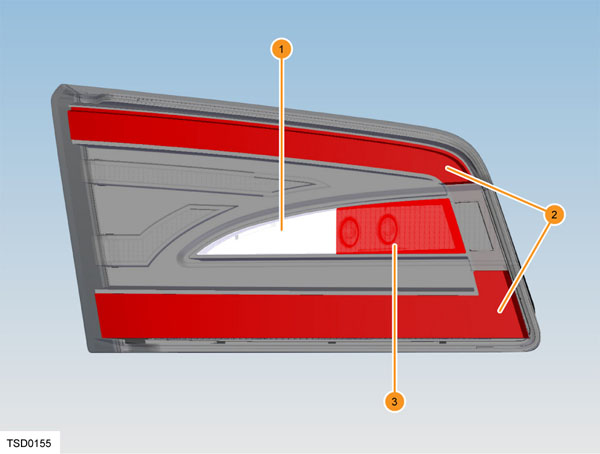 |
|---|
| 1. Reverse Light 2. Tail light 3. Fog light (Europe only, LHD/RHD specific) |
SAE - Lamp Appearance
| Lamp Function | Tail | Reverse |
|---|---|---|
| Off | Off | Off |
| Tail | On | Off |
| Stop/Turn | Off | Off |
| Stop/Turn w/ Tail | On | Off |
| Backup | Off | On |
| Backup w/ Tail | On | On |
| Backup w/ Stop/Turn & Tail | On | On |
ECE - Lamp Appearance
| Lamp Function | Tail | Reverse |
|---|---|---|
| Off | Off | Off |
| Tail | On | Off |
| Stop/Turn | Off | Off |
| Stop/Turn w/ Tail | On | Off |
| Fog | Off | On |
| Backup | Off | On |
| Backup w/ Tail | On | On |
| Backup w/ Stop/Turn & Tail | On | On |
Body Side Tail Light Configuration:link
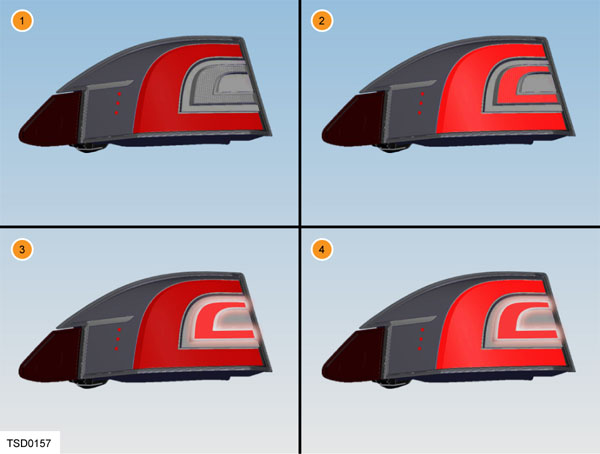 |
|---|
| 1. Lights off 2. Lights on 3. Lights off + indicator on 4. Lights on + indicator on |
SAE - Lamp Appearance
| Lamp Function | Outer "C" Stop/Tail/Turn | Inner "C" Stop/Turn |
|---|---|---|
| Off | Off | Off |
| Tail | Dim (8% PWM) | Off |
| Stop | On | On |
| Stop w/ Tail | On | On |
| Turn | Off | On |
| Turn w/ Tail | On | On |
ECE - Lamp Appearance
| Lamp Function | Outer "C" Stop/Tail/Turn | Inner "C" Stop/Turn |
|---|---|---|
| Off | Off | Off |
| Tail | Dim (8% PWM) | Off |
| Stop | On | Off |
| Stop w/ Tail | On | Off |
| Turn | Off | On |
| Turn w/ Tail | Dim (8% PWM) | On |
| Turn w/ Stop & Tail | On | On |
Operationlink
Light Outage Detection and Warninglink
If a turn indicator is out, the body control module increases the flasher speed on that side, mimicking the behavior of a conventional incandescent bulb with an electromechanical flasher setup. The turn indicator telltale on the Integrated Circuit (IC) also flashes faster, the audio signal does not change frequency.
Adaptive Front Lighting System (Refresh)link
Adaptive front lighting is available on post-Refresh Model S vehicles. This system automatically adjusts the beam of the headlights to improve the driving view. There are several inputs that are needed for this system:
- The driving speed is sent to the Body Control Module via CAN from the Bosch brakes and stability module.
- The steering angle is sent to the Body Control Module via CAN from the steering column control module.
- The yaw angle (rotation of the vehicle around the vertical axis) is sent to the Body Control Module via CAN from the Bosch brakes and stability module (ESP).
The Body Control Module takes into account these inputs, and from them adjusts the brightness of the curve lighting lamp to illuminate specific parts of the road.
For example, to improve visibility while driving on winding roads at night, the adaptive front lighting casts the beam in the direction of the curve. When low beam headlights are turned on and when driving at lower speeds, adaptive front lighting improves lateral illumination to increase the visibility of pedestrians and curbs, and to improve visibility when turning at a dark intersection, into a driveway, or when making a U-turn.
The adaptive front lighting system operates whenever headlights are on. If the Model S is not moving or is moving in reverse, the adaptive headlights do not activate. This prevents the lights from inadvertently blinding other drivers. To turn the adaptive front lighting system off, touch Controls > Settings > Vehicle > Adaptive Headlights > OFF. If the adaptive front lighting fails, the instrument panel displays an alert, "Contact Tesla Service."
See You Home Lighting Functionlink
The lamps controlled by the body controller that turn on with the See You Home function are: headlamps, tail lamps, marker lamps, and license plate lamps.
See You Home lighting is controlled via body CAN signal. The See You Home function turns on, if enabled, when the vehicle exits Drive mode. The lights are only active when the rain/light sensor (see RLS section for details) detects light to be below the daylight threshold (If the rain/light sensor is not available, See You Home function defaults to "operate").
See You Home function shall turn off after a defined time.
If enabled and on, the See You Home lighting function turns off when an external lock is requested via Remote Keyless Entry (RKE) button.
Approach Lightinglink
The lamps controlled by the body controller that turn on with the approach lighting function are: map lights, tail lamps, marker lamps, and license plate lamps. Approach lighting is controlled via body CAN signal. Approach lighting turns on, if enabled, when the vehicle is RKE or PE (passive entry) unlocked. It also turns on, if enabled, when the passive entry system first detects a key fob in range of the vehicle. The approach lighting function turns off when any of the following conditions are true:
- Any door or trunk is opened
- When there is any lock request
- When the vehicle exits Park
- After a defined time.
Headlamp automatic levelinglink
Model S with air suspension: The headlamp level is not actively controlled since the air suspension keeps the vehicle pitch leveled for changing loads.
Model S with coil spring suspension: There are two variants of the system, vehicles built before 2016 (Pre-Refresh) and vehicles built since October 2016 (Refresh).
Pre-Refresh headlamp leveling for vehicles with coil suspensionlink
The headlamp leveling is controlled by the Gateway and utilizes a headlight leveling UI switch for EU vehicles equipped with coil springs. With Model S pre-Refresh body controls (supplier part) the Gateway reads the CAN signal and transmits a command over LIN to the Headlamp Leveling ECU which drives the headlight motors accordingly. The leveling is manually controllable from the UI and is not automatically controlled using the vehicle pitch angle like on the Model S Refresh.
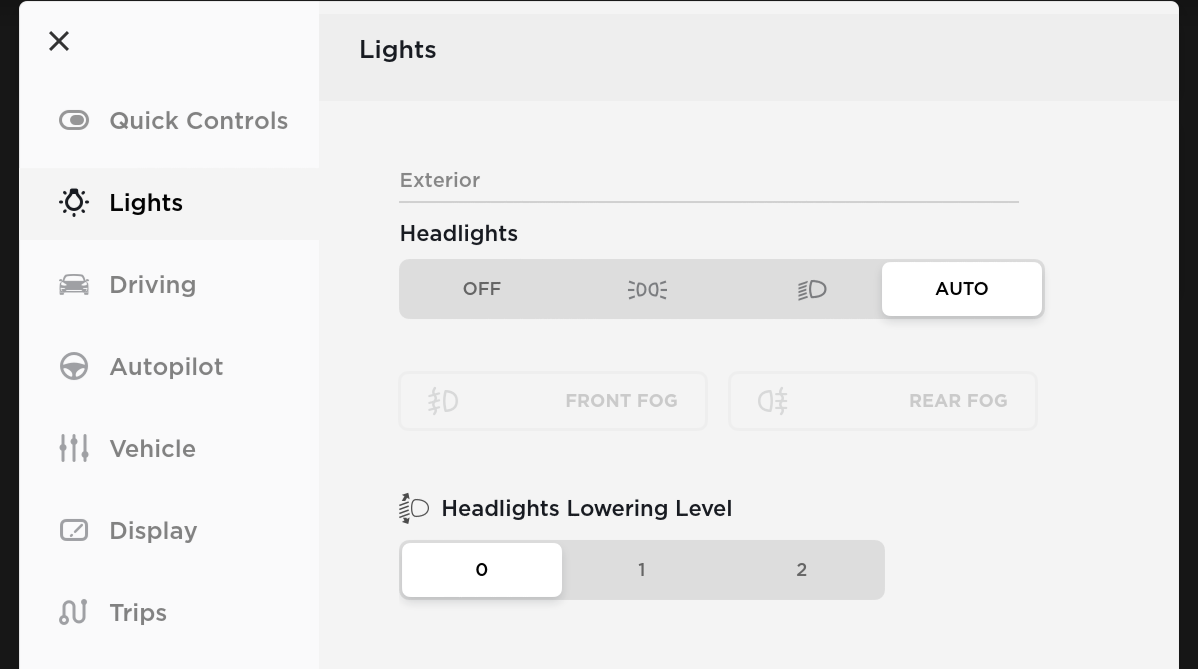 |
|---|
| UI controls for headlights level |
Headlamp auto leveling for refresh cars with coil suspension (since 10/2016)link
With Model S pre-Refresh body controls (supplier part), the BCM calculates the vehicle pitch and adjusts the headlights automatically. For the Model S Refresh, since the headlamps are LED, automatic headlight leveling is required in countries following ECE regulations. This is in contrast to the manual leveling existing on Model S pre-Refresh. The BCM hardware was changed to add an input for the ride height sensor data. The BCM communicate to the headlight leveling ECU and commands the appropriate level based on the ride height sensor data. The GTW recognizes when the BCM (MS) should control the headlight leveling ECU based on the configuration value and disables its own control as well as any fault reporting for this function.
Option codeslink
| Option code | Description | Option group | Status | Note |
|---|---|---|---|---|
| X005 | CHROME/foglamps | EXT LIGHTS | Obsolete | 31/8/2013: Removed X005 & X006 as valid FOGLAMP options |
| X006 | BLACK/No foglamps | EXT LIGHTS | Obsolete | 31/8/2013: Removed X005 & X006 as valid FOGLAMP options |
| X007 | HID with signature DRL function | LIGHTING | Production | Replaced with FG** codes |
| X008 | HID only (not available with TP03-TECHPKG) | LIGHTING | Obsolete | Replaced with FG** codes |
| FG00 | DRL only | EXT LIGHTS | Obsolete | |
| FG01 | Cornering lamps | EXT LIGHTS | Obsolete | 17/10/2014: Removed FG01 as valid FOGLAMP option |
| FG02 | Cornering lamps and Fog lamps (requires X007-HEADLMP, only available as part of TP03-TECHPKG) | EXT LIGHTS | Production | |
| LP00 | Standard interior lighting | LIGHTING PKG | Obsolete | 10/23/2017: Deleted LP00 as valid LIGHTING PKG Option Code |
| LP01 | Premium interior lighting | LIGHTING PKG | Production | 10/17/2014: Added LP02 as a valid future LITEPKG option, to replace LP01 |
| LP02 | Premium interior lighting, including lighted sills | LIGHTING PKG | Never implemented | |
| TP00 | Tech Pack NO (includes X008-HEADLMP, FG00-FOGLAMP, X026-HANDLE, X010-MIRRORS, X002-LIFTGATE, ME03-SEATMEM) | TECHPKG | Production | |
| TP01 | Tech Package (includes 003-NAV, X007-HEADLMP, FG01-FOGLAMP, X031-PASSIVE, X027-HANDLE, X037-MIRRORS, X001-LIFTGATE, ME01/02-SEATMEM) | TECHPKG | Obsolete | 10/17/2014: Added TP02 as a valid Tech Package option, replacing TP01 |
| TP02 | Tech Package (includes X007-HEADLMP, FG02-FOGLAMP, X027-HANDLE, X037-MIRRORS, X001-LIFTGATE) | TECHPKG | Obsolete | 10/17/2014: Added TP02 as a valid Tech Package option, replacing TP01 |
| TP03 | Tech Package (includes X007-HEADLMP, FG02-FOGLAMP, X027-HANDLE, X037-MIRRORS, X001-LIFTGATE) | TECHPKG | Production | 4/6/2015: Replaced TP02 with TP03 |