Alarm Systemlink
Last updated: October 20, 2023
Summarylink
The 2024+ Model 3 is equipped with an alarm system, which monitors for any unwanted entry into the vehicle and alerts the user if any such instance is detected. This system is activated 60 seconds after the vehicle is locked, and checks the status of the door and front/rear trunk latches. If any latch is detected to be open, the alarm system is activated, causing the horn to sound once every second and turn signals to flash.
Specificationslink
General Alarm Functionalitylink
The alarm functionality can be disabled by the user by going to Settings > Safety > Security Alarm.
The alarm is partially armed when the vehicle is parked and locked using the key card, key fob, phone key, or Walk Away Lock. The alarm will then transition to fully armed after one minute if no unlocking request is received.
The alarm is disarmed when the vehicle is unlocked (with key card, key fob, or phone key) or when the vehicle enters Drive Mode.
If armed, the alarm is triggered when any door or trunk is opened.
Note
The alarm is not triggered if the front or rear trunk get opened by an authorized entry (e.g from Tesla phone application). See Trunk Theory of Operation for more information.
If the alarm is triggered, the horn will sound once every second and the turn signals will flash.
If triggered, the alarm can be disabled by unlocking the vehicle via an authenticated device. If none are detected, the alarm will be disabled after being activated for 30 seconds and will re-activate after 1 minute, for a maximum of 10 activation cycles.
Component Descriptionslink
Component Locationslink
Vehicle Security Controller (VCSEC) that is located in Vehicle Control Left (VCLEFT) makes up the Alarm system.
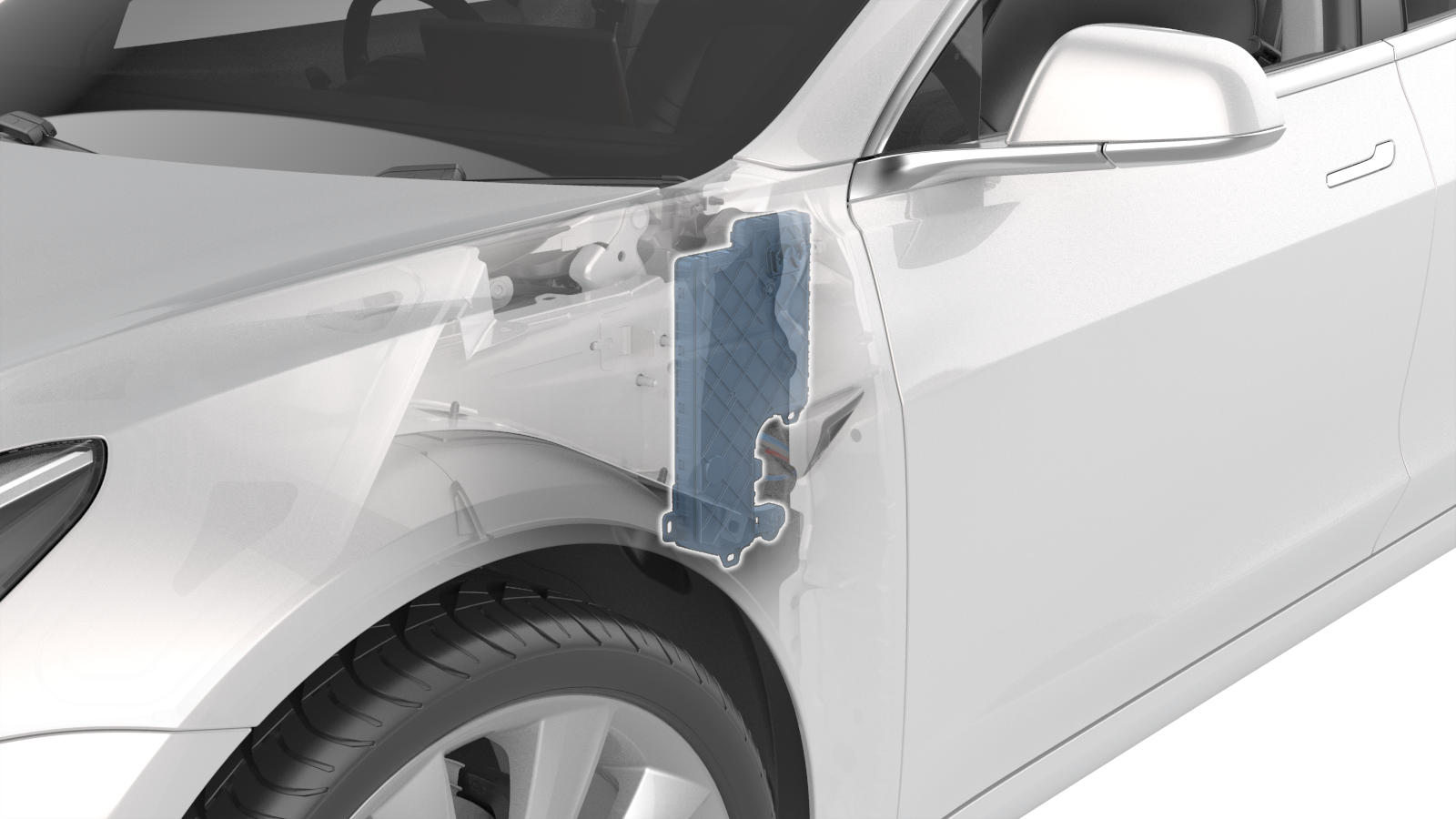 |
|---|
| Vehicle Control Left (VCLEFT) Location |
Alarm Operationlink
The Security Vehicle Controller (VCSEC) continuously monitors the status of all latches (front/rear doors and front/rear trunks). When any of the latches are opened while the vehicle is supposed to be locked, the alarm is triggered. While activated, the horn sounds once every second and the turn signals will flash.
APAC and EMEA vehicleslink
2024+ Model 3 is equipped with Superhorn, integrating the functionalities of a trumpet horn, a pedestrian warning speaker (PWS), and a security alarm into one single component that saves weight and reduces the complexity of assembly.
For more information about, see the Pedestrian Warning System section of the Safety and Restraints Theory of Operation.
Wiring and Communicationlink
Alarm systemlink
VCSEC is the master control unit of the alarm, it requests door and front/rear trunk statuses (via latch position) from VCLEFT (left side doors and rear trunk), VCRIGHT (right side doors) and VCFRONT (front trunk). If any latch signals report that a closure is open while the alarm is armed, VCSEC sends an alarm message to VCFRONT to sound the horn and flash the turn signals.
Behaviorslink
Alarm Stateslink
The alarm state can be determined from the signal
VCSEC_alarmStatus routed on the Vehicle Controller Area Network (VEH CAN) bus. The signal value is determined by VCSEC according to the table below:
| Signal value | Description |
|---|---|
15 ALARM_STATUS_SNA |
When VEH Can bus is asleep. |
7 ALARM_STATUS_DEFAULT |
|
6 ALARM_STATUS_IMMINENT |
If the alarm is armed and triggered, it will wait 1 second in this status to receive an authentication request. If none is received within the time window, the alarm status will change to ALARM_STATUS_TRIGGERED_FLASH_ACTIVE. |
5 ALARM_STATUS_TRIGGERED_FLASH_INACTIVE |
The alarm will wait 60 seconds in this state before entering ALARM_TRIGGERED_FLASH_ACTIVE again. If an unlock request is received while in this state, the alarm goes to ALARM_STATUS_DISARMEDEvery time the alarm enters this state due to an Ultrasonic or Tilt trigger, the alarm trigger count is increased. If it reaches 10, the alarm will stays in this state until an authentication is received by the vehicle. This counter is reset when the vehicle is unlocked. |
4 ALARM_STATUS_ERROR |
|
3 ALARM_STATUS_TRIGGERED_FLASH_ACTIVE |
The alarm is active, horn (depending on the market region) sounding and turn signals flashing. If the alarm remains active for 30 seconds, its status will change to ALARM_TRIGGERED_FLASH_INACTIVE. |
2 ALARM_STATUS_PARTIAL_ARMED |
The vehicle is locked and the alarm initializes. After 1 minute the alarm status will change to ALARM_STATUS_ARMED. |
1 ALARM_STATUS_ARMED |
The alarm is enabled and monitoring the vehicle environment. |
0 ALARM_STATUS_DISARMED |
The alarm is disabled. Either the vehicle is unlocked or the alarm functionality is disabled by the user. |
Trunk Openinglink
With the vehicle locked and the alarm armed, opening the rear trunk using the mobile app or by double-clicking the rear of the key fob temporarily disarms the alarm and causes the vehicle locking status to transition to selective unlock.
After the trunk is closed, the vehicle locks again and the alarm changes to partially-armed before entering the armed status after 60 seconds (refer to the Alarm States section above for state details).
Opening the front trunk via the mobile app or the key fob does not change the alarm status nor the vehicle locking status. The reason for this is that the front trunk is not part of the vehicle cabin.
Diagnosticslink
Alarm systemlink
There are different signals used by VCSEC to control the alarm behavior. The following tables list the signals received by VCSEC from the different ECUs involved in the alarm system. They can be used to determine alarm trigger reason and status.
VCSEClink
The following table lists signals for the current state of the vehicle alarm and lock status.
| Signal | Description | Values |
|---|---|---|
VCSEC_alarmStatus |
Status of the alarm system | 15 ALARM_STATUS_SNA 7 ALARM_STATUS_DEFAULT 6 ALARM_STATUS_IMMINENT 5 ALARM_STATUS_TRIGGERED_FLASH_INACTIVE 4 ALARM_STATUS_ERROR 3 ALARM_STATUS_TRIGGERED_FLASH_ACTIVE 2 ALARM_STATUS_PARTIAL_ARMED 1 ALARM_STATUS_ARMED 0 ALARM_STATUS_DISARMED |
VCSEC_vehicleLockStatus |
Lock status of the vehicle | 15 LOCK_STATUS_PASSIVE_INTERNAL_LOCKED14 LOCK_STATUS_PASSIVE_INTERNAL_UNLOCKED13 LOCK_STATUS_CRASH_UNLOCKED 12 LOCK_STATUS_ACTIVE_REMOTE_LOCKED11 LOCK_STATUS_ACTIVE_REMOTE_UNLOCKED 10 LOCK_STATUS_ACTIVE_UI_LOCKED 9 LOCK_STATUS_ACTIVE_UI_UNLOCKED 8 LOCK_STATUS_ACTIVE_BLE_LOCKED 7 LOCK_STATUS_ACTIVE_BLE_UNLOCKED 6 LOCK_STATUS_ACTIVE_SELECTIVE_UNLOCKED 5 LOCK_STATUS_PASSIVE_BLE_LOCKED4 LOCK_STATUS_PASSIVE_BLE_UNLOCKED 3 LOCK_STATUS_PASSIVE_SELECTIVE_UNLOCKED2 LOCK_STATUS_ACTIVE_NFC_LOCKED 1 LOCK_STATUS_ACTIVE_NFC_UNLOCKED0 LOCK_STATUS_SNA |
VCLEFTlink
The following table lists signals with statuses of left side door handles, interior release buttons, and latches.
| Signal | Description | Values |
|---|---|---|
VCLEFT_frontLatchStatus |
Status of the front door latch | 8 LATCH_FAULT 7 LATCH_DEFAULT 6 LATCH_TIMEOUT 5 LATCH_AJAR 4 LATCH_OPENING 3 LATCH_CLOSING 2 LATCH_CLOSED 1 LATCH_OPENED 0 LATCH_SNA |
VCLEFT_rearLatchStatus |
Status of the rear left door latch | 8 LATCH_FAULT 7 LATCH_DEFAULT 6 LATCH_TIMEOUT 5 LATCH_AJAR 4 LATCH_OPENING 3 LATCH_CLOSING 2 LATCH_CLOSED 1 LATCH_OPENED 0 LATCH_SNA |
VCLEFT_frontHandlePulled |
Status of the front left door handle | 1 = pulled 0 = not pulled |
VCLEFT_frontIntSwitchPressed |
Status of the front left interior door switch | 1 = pressed 0 = not pressed |
VCLEFT_rearHandlePulled |
Status of the rear left door handle | 1 = pulled 0 = not pulled |
VCLEFT_rearIntSwitchPressed |
Status of the rear left interior door switch | 1 = pressed 0 = not pressed |
VCRIGHTlink
The following table lists signals similar to that of VCLEFT but is for the right side doors and two additional signals for the rear trunk:
| Signal | Description | Values |
|---|---|---|
VCRIGHT_trunkExtReleasePressed |
Status of the exterior trunk release button | 1 = pressed 0 = not pressed |
VCRIGHT_trunkLatchStatus |
Status of the rear trunk latch | 8 LATCH_FAULT 7 LATCH_DEFAULT 6 LATCH_TIMEOUT 5 LATCH_AJAR 4 LATCH_OPENING 3 LATCH_CLOSING 2 LATCH_CLOSED 1 LATCH_OPENED 0 LATCH_SNA |
VCRIGHT_frontLatchStatus |
Status of the front right door latch | 8 LATCH_FAULT 7 LATCH_DEFAULT 6 LATCH_TIMEOUT 5 LATCH_AJAR 4 LATCH_OPENING 3 LATCH_CLOSING 2 LATCH_CLOSED 1 LATCH_OPENED 0 LATCH_SNA |
VCRIGHT_rearLatchStatus |
Status of the rear right door latch | 8 LATCH_FAULT 7 LATCH_DEFAULT 6 LATCH_TIMEOUT 5 LATCH_AJAR 4 LATCH_OPENING 3 LATCH_CLOSING 2 LATCH_CLOSED 1 LATCH_OPENED 0 LATCH_SNA |
VRIGHT_frontHandlePulled |
Status of the front right door handle | 1 = pulled 0 = not pulled |
VRIGHT_rearHandlePulled |
Status of the rear right door handle | 1 = pulled 0 = not pulled |
VCRIGHT_frontIntSwitchPressed |
Status of the front right interior door switch | 1 = pressed 0 = not pressed |
VCRIGHT_rearIntSwitchPressed |
Status of the rear right interior door switch | 1 = pressed 0 = not pressed |
VCFRONTlink
The following signals report status of the front trunk (frunk).
| Signal | Description | Values |
|---|---|---|
VCFRONT_frunkLatchStatus |
Status of the front trunk latch | 8 LATCH_FAULT 7 LATCH_DEFAULT 6 LATCH_TIMEOUT 5 LATCH_AJAR 4 LATCH_OPENING 3 LATCH_CLOSING 2 LATCH_CLOSED 1 LATCH_OPENED 0 LATCH_SNA |
Alertlink
Whenever an alarm is triggered, the alert VCSEC_a133_alarmTriggered is set with payload signals for the alarm trigger reason.
The different trigger reasons are:
| Alarm trigger reason | Description |
|---|---|
FRONT_DRIVER_DOOR |
Front driver door was unlatched |
FRONT_PASSENGER_DOOR |
Front passenger door was unlatched |
REAR_DRIVER_DOOR |
Rear driver door was unlatched |
REAR_PASSENGER_DOOR |
Rear passenger door was unlatched |
FRONT_TRUNK |
Front trunk was unlatched |
REAR_TRUNK |
Rear trunk was unlatched |