Keyslink
Last updated: October 20, 2023
The Model S key fob is an active and passive communication device designed to interact with the vehicle security controller. The customer can use it to lock or unlock their vehicle, open the front trunk, and open / close the powered liftgate.
Key Foblink
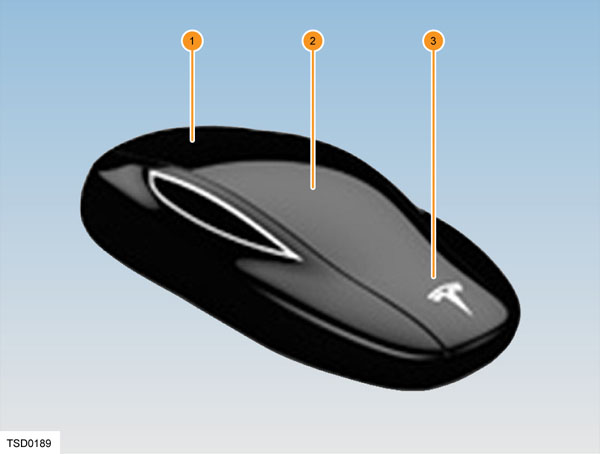
To interact with the vehicle, the customer can press one of three buttons that correspond to a different area of the key fob which is designed to replicate the body of a Model S, indicated on the picture below:
 |
|---|
Key Fob Buttonslink
The buttons on the key transmit a coded radio signal to the vehicle. It is not necessary to point the key at Model S, but it must be within operating range (detailed in dedicated sections below). The operating range varies according to the condition of the key battery and other factors.
The key has 3 buttons:
- Trunk area of the key
- Press twice quickly to open or close the liftgate.
- Press once to stop a moving liftgate.
- Roof area of the key
- Press once to lock all doors and the trunk. The hazard warning lights flash once.
- Press twice quickly to unlock the driver’s door. The hazard warning lights flash twice.
- Front area of the key
- Press twice quickly to open the front trunk.
Warning
Protect the key from impact, water damage, and high temperatures. Avoid contact with solvents, waxes, and abrasive cleaners. Do not expose the key to direct sunlight.
Key Fob Antennaelink
Low Frequency Passive Entry Coilslink
 |
|---|
| # | Location | Shape | Range | Purpose |
|---|---|---|---|---|
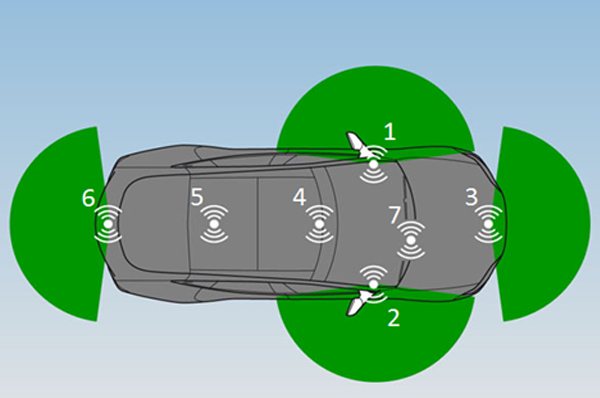
| 1 | End of the dash panel – driver side | Rectangular | ~ 3 feet (1meter) | Detect presence and location of the key |
| 2 | End of the dash panel – passenger side | Rectangular | ~ 3 feet (1meter) | Detect presence and location of the key |
| 3 | Front bumper | Circular | ~ 3 feet (1meter) | Detect presence and location of the key |
| 4 | Center console | Circular | ~ 3 feet (1meter) ~ 3 / 8 in (1cm) |
Detect presence and location of the key Dead key fob detection for drive |
| 5 | Heel board of the 2nd row seats | Circular | ~ 3 feet (1meter) | Detect presence and location of the key |
| 6 | Rear bumper | Rectangular | ~ 3 feet (1meter) | Detect presence and location of the key |
| 7 | Under lower part of front windshield. Note that on early-production cars, a dead-key-fob antenna for unlock (7) is located behind the right front fender, near the side repeater light. | Circular | ~ 3 / 8 in (1cm) | Dead key fob detection for unlock |
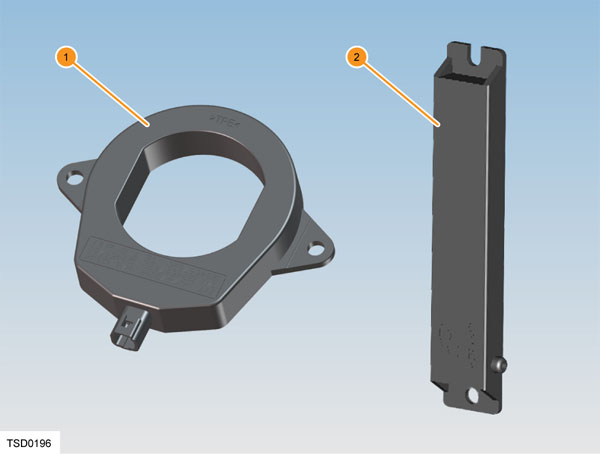
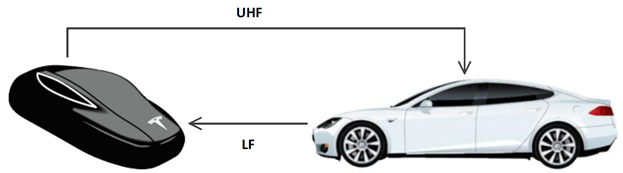
The Model S has seven Low Frequency Passive Entry coils (four circular and three rectangular) that recognize the presence of a key outside or inside the vehicle. The coils have a frequency of ~125 kHz, and are connected to the BCM via shielded twisted wires. With a recognized key within range, the key fob acknowledges its presence via UHF as soon as it receives an LF signal from any of the LF antennae, and transmits a signal to the BCM. The BCM then passes the signal to the door modules. Pressing the exterior door handles causes the handles to extend to allow the door to be opened.
Note
The key might not be detected if a cell phone, personal computer, wireless communication device, coins, metal wallet, CDs, or DVDs are close to it and blocking its signal.
 |
|---|
| 1. Keyless entry circular antenna (x4) 2. Keyless entry rectangular antenna (x3) |
When a button on the key is pressed, a signal transmits to the vehicle. When a key is not authenticated the vehicle searches for a key. The vehicles LF antennae transmit an LF signal to create an ‘LF bubble’ of approximately 1 meter around the vehicle. When a paired key fob comes close enough to the vehicle to receive the LF signal transmitted by the vehicle, it will respond with an UHF signal.
Ultra-High Frequency Antennalink
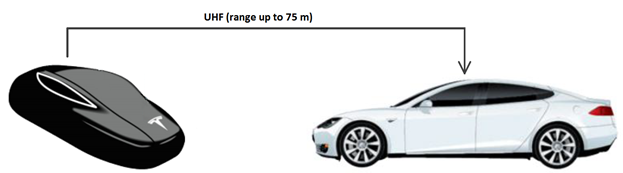
The Ultra-High Frequency (UHF) antenna is located in the rear glass. It connects to the BCM via a coaxial cable, and has a range of up to 250 feet (75 meters). The Tesla charge cable also uses the UHF antenna to open the charge port from 6 feet (2 meters). Depending on the region, the frequency is either 433.92 MHz (Europe, China, Hong Kong) or 315 MHz (North America, Japan).
 |
|---|
| Remote Keyless Entry (RKE) a.k.a. Button Press |
 |
|---|
| Passive Entry (PE) |
Operation and Featureslink
Passive Entrylink
Passive entry allows customers to unlock and start the Model S by simply carrying the key. If Passive Entry is off, the key must be manually pressed to unlock Model S.
Approaching the vehicle with the key will, if the MCU setting for ‘Auto Present Handles’ is set to ON, unlock the vehicle automatically and present door handles. If the MCU setting for ‘Auto Present Handles’ is set to OFF, pushing any of the front door handles unlocks the vehicle. To open the rear trunk, press the switch located under the trunk’s exterior handle.
Note
In case ‘Door Unlock Mode’ is set to ‘DRIVER’, only the driver front door handle will auto-present.
Note
For vehicles equipped with firmware 2018.20 or later, Passive Entry is always ON when the vehicle is in Factory Mode or Transport Mode.
Unlocking the vehicle with Passive Entry (Keyless Entry)link
As mentioned above, there are two ways the vehicle can be unlocked via passive entry:
- Passive Entry ON and Auto Present handles ON
Passive Entry ON and Auto Present handles ON:link
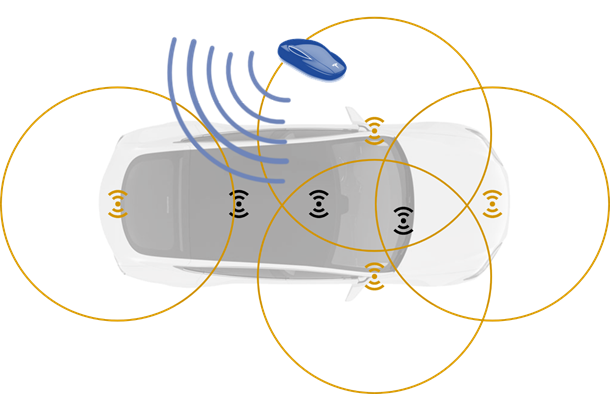
When a paired key comes close to the vehicle, it receives LF signal (yellow) from the vehicle. The key responds by transmitting an UHF signal (blue) back to the vehicle. This signal is picked up by the UHF antenna (labeled as RKE in circuit diagram) in the vehicle’s rear windscreen and sent to the BCM via a coaxial cable. Upon reception, the BCM unlocks the vehicle .
 |
|---|
| Passive Entry ON and Auto Present handles ON |
Passive Entry ON and Auto Present handles OFF:link
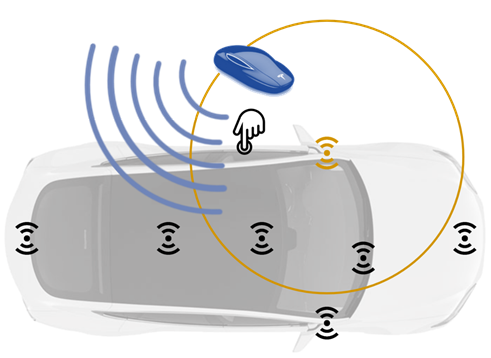
In this case the LF antennas are off. This means that there is no ‘LF bubble’ around the vehicle. Approaching the vehicle with a key fob doesn’t unlock the vehicle. Once any of the front door handles is pressed, the corresponding LF antenna starts to emit an LF signal (yellow). So pushing the driver front door handle activates the driver side rectangular LF antenna at the end of the dash pane, pushing the passenger side front door handle activates the passenger side rectangular LF antenna at the end of the dash panel. The key fob receives the LF signal and again sends back an UHF signal to the vehicle (blue). This signal is picked up by the UHF antenna (labeled as RKE in circuit diagram) in the vehicle’s rear windscreen and sent to the BCM via a coaxial cable. Upon reception the BCM unlocks the vehicle .
From the key’s perspective, this is no different from Passive Entry and Auto present handles ON. The key just receives an LF signal and responds by sending a UHF signal back to the vehicle.
The only difference with Passive Entry and Auto present handles ON is the activation of the LF antennae which is triggered by the user by pushing a door handle.
Opening the liftgate works in the same way. Pressing the liftgate button activates the rear bumper LF antenna. Only when the key fob is in LFrange, the liftgate will open.
 |
|---|
| Passive Entry ON and Auto present handles OFF |
Starting Model S with Passive Entrylink
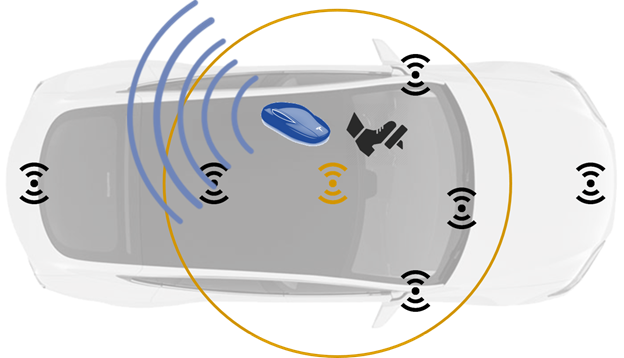
When passive entry is enabled, the Model S can be started without touching the key fob. Simply carrying the key fob is enough to start the vehicle.
This works on the exact same principle as pushing a door handle to unlock the vehicle.
Press the brake > center console LF antenna starts to transmit an LF signal > key fob receives LF signal > key fob transmits UHF signal > BCM receives UHF via antenna in rear windscreen through coaxial cable > BCM turns on drive rail.
 |
|---|
| Starting Model S |
Auto Present Handleslink
The Auto Present Handles feature can be used in combination with passive entry. With Auto Present Handles set to ON and Passive Entry enabled, the selected door handles (see the Door Unlock Mode section) will automatically present when the vehicle is unlocked. With Auto Present Handles set to OFF, the handles will only present on push.
To preserve battery life, the Model S is designed to temporarily disable the Auto Present Handles feature when:
- The key has been out of range for more than 48 hours.
- The key remains within range for five minutes after all doors have been closed.
In these cases, extend door handles by touching one of them, or by pressing the unlock button on the key. There is no need to reset the setting. The next time the customer approaches their Model S, provided the above conditions do not apply, handles will automatically extend.
Door Unlock Modelink
The customer can choose whether they want all doors, or just the driver's door, to unlock when they approach their Model S while carrying the key.
To do so, touch Controls > Settings > Doors & Locks > DOOR UNLOCK MODE, and choose DRIVER or ALL.
Dead Key Foblink
If the Model S does not unlock when a customer walks up to it, or when the unlock button on the key is pressed, then key battery may be dead. If this is the case, the Model S is still able to be unlocked and driven.
To drive the Model S, place the key against the center console immediately below the 12V power outlet. Press and hold the brake pedal to turn the Model S on.
The dead key fob function works on the principle of Radio Frequency Identification (RFID), the same technology that is used in access cards. The range of RFID is typically very short, usually a distance of a few centimeters.
Note
Unlocking the Model S through this method disables Walk Away locking. Walk Away locking must be manually re-enabled after replacing the key battery. Lock the vehicle from the touch screen or with the mobile app.
Early Production Model Slink
In the earliest versions of the Model S, the back of key fob should be placed against the passenger side front fender, somewhat below and to the right of the emblem. When the key fob is recognized, the door handles will extend as they do normally.
Note
It may take several seconds for the vehicle to recognize the fob.
Newer Production Model Slink
The concept is the same in the newer Model S, but the location has changed on the passenger side. Place the key fob near the base of the passenger side windshield wiper, then press the driver’s door handle. The handles extend if the key is recognized. If the handles do not present, try repositioning the fob.
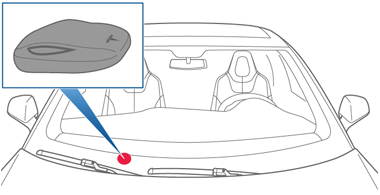 |
|---|
| Placement - LHD |
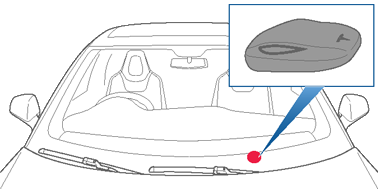 |
|---|
| Placement - RHD |
Walk Away Lockinglink
Doors and trunks can automatically lock whenever the driver walks away carrying the key. To turn this feature on or off, touch Controls > Settings > Doors & Locks > WALK-AWAY DOOR LOCK .
Walk Away Door Locking works on the same principle as Passive Entry. Walk Away Door Locking occurs 10 seconds after the key is no longer within the LF range of the vehicle.
Note
When approaching the vehicle, Passive Entry keeps the vehicle unlocked for 60 seconds regardless of the key being present.
Note
Depending on date of manufacture and options selected at time of purchase, some Model S vehicles are not equipped with the Walk Away Door Lock feature
Note
If all doors are closed and the key is used to unlock the Model S, Walk Away locking is temporarily suspended for one minute. If a door is opened within this minute, it does not re-lock until after all the doors are closed and the key is not detected near the vehicle.
Drive Away Lockinglink
When the Model S exceeds 5 mph (8 km/h), the doors and trunk automatically lock. By stopping the vehicle and selecting Park, the doors and the trunk unlock.
Use the touchscreen to enable or disable drive away locking.
Key Fob Learninglink
The procedure to program a key fob for a Model S can be found in the Service Manual, under section "17 Electrical" > "1745 Keyless Entry and security" > "Key Fob Program".